• You've discovered RedGuides, an EverQuest multi-boxing and scripting community πŸ§™β€β™€οΈβš™οΈ. We want you to play several EQ characters at once, come join us and say hello! πŸ‘‹

  • A TLP without truebox has thawed (Very Vanilla ready)
    Frostreaver

Question - command to hit create

Autumn

Well-known member
Joined
Dec 1, 2019
RedCents
69Β’
im after a macro command ( to write my own macro)
the macro in short will
open the inventory
and start creating coins from the currency tab to put into the inventory to trade and be able to pull a set ammount of stacks out
sorta just after the right resources to look up and follow

any help
please and thank you
 

You can look at many of the macros for examples of opening the inventory and keystrokes to do what you want.

See attached for one that does some of what you want. Opening currency may take some noodling about to figure out the window names. I spent a bunch of time figuring this stuff out. My examples include quite a bit of overview inside.
 

Attachments

/notify MainWindowName ChildWindowElement leftmouseup

Few ways to achieve this result.

If you use MQ2Hud.
INI:
[Dev]
    LastMouseOverText=7,30,0,255,0,255        ,${If[${EverQuest.LastMouseOver.Open},Name: ${EverQuest.LastMouseOver.Name},]}
    LastMouse1bg=7,30,0,0,0,0            ,${If[${EverQuest.LastMouseOver.Open},β–ˆβ–ˆβ–ˆβ–ˆβ–ˆβ–ˆβ–ˆβ–ˆβ–ˆβ–ˆβ–ˆβ–ˆβ–ˆβ–ˆβ–ˆβ–ˆβ–ˆβ–ˆβ–ˆβ–ˆβ–ˆβ–ˆβ–ˆβ–ˆβ–ˆ,]}
    LastMouseOverType=7,30,12,255,0,255        ,${If[${EverQuest.LastMouseOver.Open},Type: ${EverQuest.LastMouseOver.Type},]}
    LastMouse2bg=7,30,12,0,0,0            ,${If[${EverQuest.LastMouseOver.Open},β–ˆβ–ˆβ–ˆβ–ˆβ–ˆβ–ˆβ–ˆβ–ˆβ–ˆβ–ˆβ–ˆβ–ˆβ–ˆβ–ˆβ–ˆβ–ˆβ–ˆβ–ˆβ–ˆβ–ˆβ–ˆβ–ˆβ–ˆβ–ˆβ–ˆ,]}
    LastMouseOverSize=7,30,24,255,0,255        ,${If[${EverQuest.LastMouseOver.Open} && ${Select[${EverQuest.LastMouseOver.Type},ListBox,ComboBox]},Item Count:${EverQuest.LastMouseOver.Items},]}
    LastMouse3bg=7,30,24,0,0,0            ,${If[${EverQuest.LastMouseOver.Open} && ${Select[${EverQuest.LastMouseOver.Type},ListBox,ComboBox]},β–ˆβ–ˆβ–ˆβ–ˆβ–ˆβ–ˆβ–ˆβ–ˆβ–ˆβ–ˆβ–ˆβ–ˆβ–ˆβ–ˆβ–ˆβ–ˆβ–ˆβ–ˆβ–ˆβ–ˆβ–ˆβ–ˆβ–ˆβ–ˆβ–ˆ,]}
    LastMouseOverParent=7,30,36,255,0,255        ,${If[${EverQuest.LastMouseOver.Open},Parent: ${EverQuest.LastMouseOver.Parent},]} ${If[${EverQuest.LastMouseOver.Height}, Width: ${EverQuest.LastMouseOver.Width} Height: ${EverQuest.LastMouseOver.Height},]}
    LastMouse4bg=7,30,36,0,0,0            ,${If[${EverQuest.LastMouseOver.Open},β–ˆβ–ˆβ–ˆβ–ˆβ–ˆβ–ˆβ–ˆβ–ˆβ–ˆβ–ˆβ–ˆβ–ˆβ–ˆβ–ˆβ–ˆβ–ˆβ–ˆβ–ˆβ–ˆβ–ˆβ–ˆβ–ˆβ–ˆβ–ˆβ–ˆ,]}

Add this to your MQ2Hud.ini, then in game type /loadhud dev to load it.
You can unload this hud with /unloadhud dev NOTE: /unload hud is not the same as /unloadhud
Then when you mouseover window elements you'll get an output for what you're mousing over.

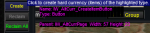
1623975522933.png

It's not perfect, but gets the job done.

From the display there you can see Name: IW_AltCurr_CreateItemButton

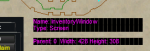
1623975616319.png
If you mouseover the top edge of the window you can get the name of the main window InventoryWindow

So you should be able to /notify InventoryWindow IW_AltCurr_CreateItemButton leftmouseup

You can add stuff like shift (to get a stack) and ctrl (to get a single)

/nomodkey /shiftkey /notify InventoryWindow IW_AltCurr_CreateItemButton leftmouseup
/nomodkey /ctrlkey /notify InventoryWindow IW_AltCurr_CreateItemButton leftmouseup
 
/notify MainWindowName ChildWindowElement leftmouseup

Few ways to achieve this result.

If you use MQ2Hud.
INI:
[Dev]
    LastMouseOverText=7,30,0,255,0,255        ,${If[${EverQuest.LastMouseOver.Open},Name: ${EverQuest.LastMouseOver.Name},]}
    LastMouse1bg=7,30,0,0,0,0            ,${If[${EverQuest.LastMouseOver.Open},β–ˆβ–ˆβ–ˆβ–ˆβ–ˆβ–ˆβ–ˆβ–ˆβ–ˆβ–ˆβ–ˆβ–ˆβ–ˆβ–ˆβ–ˆβ–ˆβ–ˆβ–ˆβ–ˆβ–ˆβ–ˆβ–ˆβ–ˆβ–ˆβ–ˆ,]}
    LastMouseOverType=7,30,12,255,0,255        ,${If[${EverQuest.LastMouseOver.Open},Type: ${EverQuest.LastMouseOver.Type},]}
    LastMouse2bg=7,30,12,0,0,0            ,${If[${EverQuest.LastMouseOver.Open},β–ˆβ–ˆβ–ˆβ–ˆβ–ˆβ–ˆβ–ˆβ–ˆβ–ˆβ–ˆβ–ˆβ–ˆβ–ˆβ–ˆβ–ˆβ–ˆβ–ˆβ–ˆβ–ˆβ–ˆβ–ˆβ–ˆβ–ˆβ–ˆβ–ˆ,]}
    LastMouseOverSize=7,30,24,255,0,255        ,${If[${EverQuest.LastMouseOver.Open} && ${Select[${EverQuest.LastMouseOver.Type},ListBox,ComboBox]},Item Count:${EverQuest.LastMouseOver.Items},]}
    LastMouse3bg=7,30,24,0,0,0            ,${If[${EverQuest.LastMouseOver.Open} && ${Select[${EverQuest.LastMouseOver.Type},ListBox,ComboBox]},β–ˆβ–ˆβ–ˆβ–ˆβ–ˆβ–ˆβ–ˆβ–ˆβ–ˆβ–ˆβ–ˆβ–ˆβ–ˆβ–ˆβ–ˆβ–ˆβ–ˆβ–ˆβ–ˆβ–ˆβ–ˆβ–ˆβ–ˆβ–ˆβ–ˆ,]}
    LastMouseOverParent=7,30,36,255,0,255        ,${If[${EverQuest.LastMouseOver.Open},Parent: ${EverQuest.LastMouseOver.Parent},]} ${If[${EverQuest.LastMouseOver.Height}, Width: ${EverQuest.LastMouseOver.Width} Height: ${EverQuest.LastMouseOver.Height},]}
    LastMouse4bg=7,30,36,0,0,0            ,${If[${EverQuest.LastMouseOver.Open},β–ˆβ–ˆβ–ˆβ–ˆβ–ˆβ–ˆβ–ˆβ–ˆβ–ˆβ–ˆβ–ˆβ–ˆβ–ˆβ–ˆβ–ˆβ–ˆβ–ˆβ–ˆβ–ˆβ–ˆβ–ˆβ–ˆβ–ˆβ–ˆβ–ˆ,]}

Add this to your MQ2Hud.ini, then in game type /loadhud dev to load it.
You can unload this hud with /unloadhud dev NOTE: /unload hud is not the same as /unloadhud
Then when you mouseover window elements you'll get an output for what you're mousing over.

View attachment 30764

It's not perfect, but gets the job done.

From the display there you can see Name: IW_AltCurr_CreateItemButton

View attachment 30765
If you mouseover the top edge of the window you can get the name of the main window InventoryWindow

So you should be able to /notify InventoryWindow IW_AltCurr_CreateItemButton leftmouseup

You can add stuff like shift (to get a stack) and ctrl (to get a single)

/nomodkey /shiftkey /notify InventoryWindow IW_AltCurr_CreateItemButton leftmouseup
/nomodkey /ctrlkey /notify InventoryWindow IW_AltCurr_CreateItemButton leftmouseup

Ty TY
ill try it and mess around with it as well
 
Question - command to hit create

Users who are viewing this thread

Back
Top
Cart