Fearbringer
Active member
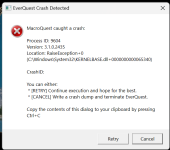
Maybe this is part of the ongoing issue with the client that needs patching, but I keep getting this error?



/ooc, /shout or other public channels. This has been an unwritten rule that's kept casino scripts off the site for decades, but we're now compelled to make it clear: keep automated communication private./target over impossible distances when /nav spawn would passively accomplish the same thing, a spawn search that fires 20+ times per second, and other pointless actions that are likely annoying GMs./lua run
absolutely impossible to say, a kernelbase crash could be all sorts of stuff - even unrelated to mq/eq (likely eq), and without a crashID, no one can check out the crash to see if there is any indication where it might be getting triggered at.Maybe this is part of the ongoing issue with the client that needs patching, but I keep getting this error?
View attachment 59982
plz don't paste dumps - i'll give to brainiac if he wants it. but plz don't past dumps.This is what was in the crash folder i think
need one of those boxing glove on the extention popout thingsI swear… I put the instructions to ctrl+c the text and people still don’t do it
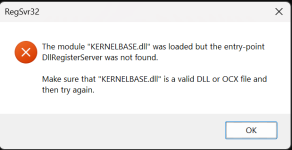
i don't know what this is but it has nothing to do with macroquestHere's another error I found. I'm running a /cmd restorehealth to see if I can find the error in there.
View attachment 59985
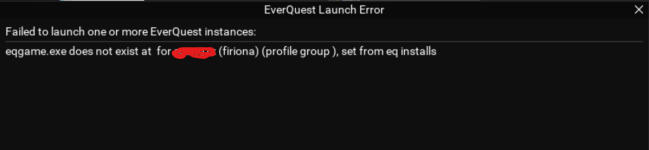
Very odd, it's not finding the .exe file at all. If i manually enter it to the exact location of the .exe, it still says its invalid eq path. Would OneDrive have anything to do with this?
Maybe. What is in OneDrive?Would OneDrive have anything to do with this?
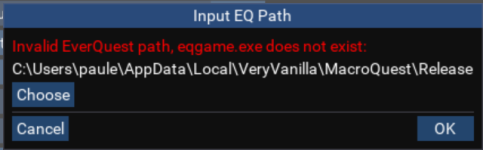
That is not your EverQuest path.Here is what I see. When i type in eqgames.exe, this shows up. There is no eqgames.exe specifically?
View attachment 59992
You need your EVERQUEST path. A.k.a. Where the game is installedAgreed, I look in all files, and there is no locating that .exe file anywhere?
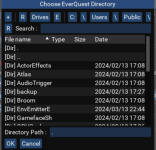
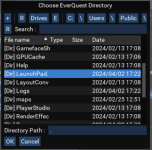
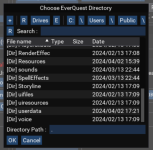
The last pic looks like the correct directory. Just hitting ok on that should work. That said..a few days back I am unsure what happened, but I looked in File Explorer (Windows11) and my Everquest directory did NOT show at all.. was public/daybreak/installed games/ and there was nothing in there, but EQ would start through launcher shortcut. However MQ shortcut told me error. After playing for a bit to search an answer, I just rebooted and of coure all was well after that. /Shrug.I have a default download location: user/public/daybreak/eq .... there's no eqgames.exe
This is everything i see inside that folder for EQView attachment 59995View attachment 59996View attachment 59997

You probably moved it. You can right click the shortcut and do open file location to see where it actually isThe last pic looks like the correct directory. Just hitting ok on that should work. That said..a few days back I am unsure what happened, but I looked in File Explorer (Windows11) and my Everquest directory did NOT show at all.. was public/daybreak/installed games/ and there was nothing in there, but EQ would start through launcher shortcut. However MQ shortcut told me error. After playing for a bit to search an answer, I just rebooted and of coure all was well after that. /Shrug.
Could be, I did what you mentioned because was odd the folder did not show but that Lauchner and EQ ran. Glitch of some type. But after I rebooted it was there and showed properly as it should. Ty though Brain !You probably moved it. You can right click the shortcut and do open file location to see where it actually is

Ok, the FOLDER and not the FILE location solved the autologon problem. Now, that KERNELBASE error, what a mess. EQ client had a missing file > missing file somehow made its way into the windows portion of the file > then it triggered my anit-virus > anti virus isolated redguides & eq > then anti virus locked me out of files and I couldn't recover them. Thus, if you have a issue as noted above, the KERNELBASE is solved through your anti virus settings.
I changed the name of this thread so now if someone has the same issue it is searchable. Thank you all for your excellent assistance !!!


