• You've discovered RedGuides, an EverQuest multi-boxing and scripting community 🧙‍♀️⚙️. We want you to play several EQ characters at once, come join us and say hello! 👋

  • A TLP without truebox has thawed (Very Vanilla ready)
    Frostreaver
Button Master

Release Button Master 05/09/2026

No permission to download
Any idea why on load it would have a way longer cooldown like 12 hours when the hotkey is set to 900 seconds? It’s like I’ve used the Hotkey already but this is after a fresh login and loading button master and haven’t used any hotkeys yet , thanks
 
Derple updated Button Master with a new update entry:

04/25/2026

〰️Commits​


- NEW FEATURE
- ButtonMaster can now persist global state.

What This means :

Buttons can have toggle capabilities that persist through play sessions.

The lua env for any button/label/etc will now all contain an _State table which can be be used by any button or label or lua icon setter.

Example:

Lua Label: return _State.Chase and "Chase Off" or "Chase On"
Lua Icon: return _State.Chase and 197 or 196
Button Command:
--lua
if _State.Chase then...

Read the rest of this update entry...
 
Does anyone have already made keys for Dannet? I have always used Sic's hotkeys on one toon. I would love the ability to have them on all toons now since I will play one or 2 toons during raids. I downloaded one from this thread but they are not useable with Dannet and I would really like to skip editing all of the keys since i still type with 2 fingers after all these years.

Thanks in advance if this is possible.

So I was reading through the pages and discovered that you can drag and drop the already made buttons I had which is extremely helpful.

Would still love it if someone had any other useful already made keys.
 
Last edited:
Pretty sure Sic's Hotkeys have both eqbc and Dannet versions listed for each of them in the thread, but some things I find useful:

Door Button
Code:
cmV0dXJuIHsKIFsiVHlwZSJdID0gIkJ1dHRvbiIsCiBbIkJ1dHRvbiJdID0gewogIFsiQ29vbGRvd24iXSA9IDAsCiAgWyJDYWNoZWRDb29sRG93blRpbWVyIl0gPSAwLAogIFsiQ2FjaGVkVG9nZ2xlTG9ja2VkIl0gPSBmYWxzZSwKICBbIkNhY2hlZENvdW50RG93biJdID0gMCwKICBbIkxhYmVsIl0gPSAiRG9vciIsCiAgWyJDbWQiXSA9ICIvZGdnYSAvZG9vcnRhcmdldFwKL3RpbWVkIDIwIC9kZ2dhIC9jbGljayBsZWZ0IGRvb3IiLAogIFsiQ2FjaGVkTGFzdFJhbiJdID0gMTIxNTA0Ni41OTQsCiAgWyJDYWNoZWRMYWJlbCJdID0gIkRvb3IiLAogIFsiU2hvd0xhYmVsIl0gPSB0cnVlLAogIFsiVGltZXJUeXBlIl0gPSAiU2Vjb25kcyBUaW1lciIsCiAgWyJsYWJlbE1pZFkiXSA9IDEzLAogIFsibGFiZWxNaWRYIl0gPSA4LAogfSwKfQ==

Remove Levitation
Code:
cmV0dXJuIHsKIFsiVHlwZSJdID0gIkJ1dHRvbiIsCiBbIkJ1dHRvbiJdID0gewogIFsiQ29vbGRvd24iXSA9IDAsCiAgWyJDYWNoZWRDb29sRG93blRpbWVyIl0gPSAwLAogIFsiQ2FjaGVkVG9nZ2xlTG9ja2VkIl0gPSBmYWxzZSwKICBbIkNhY2hlZENvdW50RG93biJdID0gMCwKICBbIkxhYmVsIl0gPSAiRG9vciIsCiAgWyJDbWQiXSA9ICIvZGdnYSAvZG9vcnRhcmdldFwKL3RpbWVkIDIwIC9kZ2dhIC9jbGljayBsZWZ0IGRvb3IiLAogIFsiQ2FjaGVkTGFzdFJhbiJdID0gMTIxNTA0Ni41OTQsCiAgWyJDYWNoZWRMYWJlbCJdID0gIkRvb3IiLAogIFsiU2hvd0xhYmVsIl0gPSB0cnVlLAogIFsiVGltZXJUeXBlIl0gPSAiU2Vjb25kcyBUaW1lciIsCiAgWyJsYWJlbE1pZFkiXSA9IDEzLAogIFsibGFiZWxNaWRYIl0gPSA4LAogfSwKfQ==

Close Adventure window (LDON) - to close DZ window, change [AdventureRequestWnd] to [DynamicZoneWnd]
Code:
cmV0dXJuIHsKIFsiVHlwZSJdID0gIkJ1dHRvbiIsCiBbIkJ1dHRvbiJdID0gewogIFsiQ29vbGRvd24iXSA9IDAsCiAgWyJDYWNoZWRDb29sRG93blRpbWVyIl0gPSAwLAogIFsiQ2FjaGVkVG9nZ2xlTG9ja2VkIl0gPSBmYWxzZSwKICBbIkNhY2hlZENvdW50RG93biJdID0gMCwKICBbIkxhYmVsIl0gPSAiRG9vciIsCiAgWyJDbWQiXSA9ICIvZGdnYSAvZG9vcnRhcmdldFwKL3RpbWVkIDIwIC9kZ2dhIC9jbGljayBsZWZ0IGRvb3IiLAogIFsiQ2FjaGVkTGFzdFJhbiJdID0gMTIxNTA0Ni41OTQsCiAgWyJDYWNoZWRMYWJlbCJdID0gIkRvb3IiLAogIFsiU2hvd0xhYmVsIl0gPSB0cnVlLAogIFsiVGltZXJUeXBlIl0gPSAiU2Vjb25kcyBUaW1lciIsCiAgWyJsYWJlbE1pZFkiXSA9IDEzLAogIFsibGFiZWxNaWRYIl0gPSA4LAogfSwKfQ==

Autoaccept button - adds everyone in group to autoaccept
Code:
cmV0dXJuIHsKIFsiVHlwZSJdID0gIkJ1dHRvbiIsCiBbIkJ1dHRvbiJdID0gewogIFsiQ29vbGRvd24iXSA9IDAsCiAgWyJDYWNoZWRDb29sRG93blRpbWVyIl0gPSAwLAogIFsiQ2FjaGVkVG9nZ2xlTG9ja2VkIl0gPSBmYWxzZSwKICBbIkNhY2hlZENvdW50RG93biJdID0gMCwKICBbIkxhYmVsIl0gPSAiRG9vciIsCiAgWyJDbWQiXSA9ICIvZGdnYSAvZG9vcnRhcmdldFwKL3RpbWVkIDIwIC9kZ2dhIC9jbGljayBsZWZ0IGRvb3IiLAogIFsiQ2FjaGVkTGFzdFJhbiJdID0gMTIxNTA0Ni41OTQsCiAgWyJDYWNoZWRMYWJlbCJdID0gIkRvb3IiLAogIFsiU2hvd0xhYmVsIl0gPSB0cnVlLAogIFsiVGltZXJUeXBlIl0gPSAiU2Vjb25kcyBUaW1lciIsCiAgWyJsYWJlbE1pZFkiXSA9IDEzLAogIFsibGFiZWxNaWRYIl0gPSA4LAogfSwKfQ==

Group Alt Activate - Set for origin, change the number to the alt act code listed in aa window for the one you want.
Code:
cmV0dXJuIHsKIFsiVHlwZSJdID0gIkJ1dHRvbiIsCiBbIkJ1dHRvbiJdID0gewogIFsiQ29vbGRvd24iXSA9IDAsCiAgWyJDYWNoZWRDb29sRG93blRpbWVyIl0gPSAwLAogIFsiQ2FjaGVkVG9nZ2xlTG9ja2VkIl0gPSBmYWxzZSwKICBbIkNhY2hlZENvdW50RG93biJdID0gMCwKICBbIkxhYmVsIl0gPSAiRG9vciIsCiAgWyJDbWQiXSA9ICIvZGdnYSAvZG9vcnRhcmdldFwKL3RpbWVkIDIwIC9kZ2dhIC9jbGljayBsZWZ0IGRvb3IiLAogIFsiQ2FjaGVkTGFzdFJhbiJdID0gMTIxNTA0Ni41OTQsCiAgWyJDYWNoZWRMYWJlbCJdID0gIkRvb3IiLAogIFsiU2hvd0xhYmVsIl0gPSB0cnVlLAogIFsiVGltZXJUeXBlIl0gPSAiU2Vjb25kcyBUaW1lciIsCiAgWyJsYWJlbE1pZFkiXSA9IDEzLAogIFsibGFiZWxNaWRYIl0gPSA4LAogfSwKfQ==
 
Okay Derple lets see how your button master holds up under My messing around with it. Gona try it on a few characters and see if I can mess with the buttons. HAAHAHAHAHHA


Zeb
 
Wrong forum
I run on Laz emu and my primary tools are Buttonmaster, RGMercs, Lem, Boxhud and the plugins that support those programs, as well as a couple of nice to haves.

Today something has changed with Buttonmaster evaluating the toggle buttons I use to control RGMercs.

I have not changed the button, and buttonmaster has not been updated for a week(?), but the change in behaviour is new today.
In in need of some direction as to help identify what the cause is and hopefully something that I can fix, or if its a do date undiscovered error with buttonmaster provide appropriate information for the devs that maintain that program.

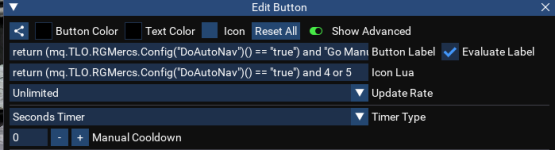
Heres a button that Derple provided (which I edited to remove a single setting when I set it up a few weeks ago).

1778996887770.png
Button Label
Lua:
return (mq.TLO.RGMercs.Config("DoAutoNav")() == "true") and "Go Manual" or "Go Auto"
Button Icon/s
Lua:
return (mq.TLO.RGMercs.Config("DoAutoNav")() == "true") and 4 or 5
Button Content
Code:
--lua

local settings = { 'DoAutoNav', 'DoAutoStick', 'HandleCantSeeTarget', 'HandleTooClose', 'HandleTooFar' }
 --  'FaceTarget'

local cmd = "/rgl set "
local state = "true"

if mq.TLO.RGMercs.Config("DoAutoNav")() == "true" then
    state = "false"
end

for _, setting in ipairs(settings) do
    mq.cmdf("%s %s %s", cmd, setting, state)
    printf("\awExec: \ay%s %s %s", cmd, setting, state)
end

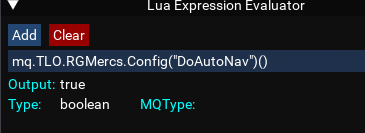
Now, when I manually evaluate the condition mq.TLO.RGMercs.Config("DoAutoNav")() it resolves correctly:
1778996797458.png
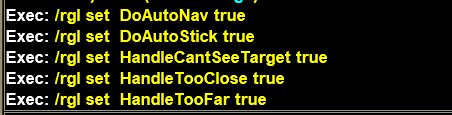
But the icon in buttonmaster doesnt change, and when clicked, it runs the script as if mq.TLO.RGMercs.Config("DoAutoNav")() had returned false.

Script runs correctly
1778997093179.png

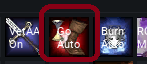
Button does not update
1778996946672.png

And anytime the button is clicked, it set the properties to true believing that they are false.

All I can guess so far is that for some reason, buttonmaster is not evaluating the label nor the icons correctly.
This is happening to all my toggle buttons. All my toggle buttons are for RGMercs.

Any help would be greatly appreciated.
 
I merged this into button master discussion thread since your post was titled and about buttonmaster (tho reading your issue it sounds like it might have been better moved to mercs section)
 
I merged this into button master discussion thread since your post was titled and about buttonmaster (tho reading your issue it sounds like it might have been better moved to mercs section)
Thanks Sic.
I was unsure as the rgmercs TLO is available and returning the correct value.
Also, I have been using buttonmaster for several sessions sinc the last update before this behavior appeared.
So, I'm not confident it is either of them, but identifying why buttonmaster does not resolve the label or icons correctly is a likely placd to start.
 
I run on Laz emu and my primary tools are Buttonmaster, RGMercs, Lem, Boxhud and the plugins that support those programs, as well as a couple of nice to haves.

Today something has changed with Buttonmaster evaluating the toggle buttons I use to control RGMercs.

I have not changed the button, and buttonmaster has not been updated for a week(?), but the change in behaviour is new today.
In in need of some direction as to help identify what the cause is and hopefully something that I can fix, or if its a do date undiscovered error with buttonmaster provide appropriate information for the devs that maintain that program.

Heres a button that Derple provided (which I edited to remove a single setting when I set it up a few weeks ago).

View attachment 77118
Button Label
Lua:
return (mq.TLO.RGMercs.Config("DoAutoNav")() == "true") and "Go Manual" or "Go Auto"
Button Icon/s
Lua:
return (mq.TLO.RGMercs.Config("DoAutoNav")() == "true") and 4 or 5
Button Content
Code:
--lua

local settings = { 'DoAutoNav', 'DoAutoStick', 'HandleCantSeeTarget', 'HandleTooClose', 'HandleTooFar' }
 --  'FaceTarget'

local cmd = "/rgl set "
local state = "true"

if mq.TLO.RGMercs.Config("DoAutoNav")() == "true" then
    state = "false"
end

for _, setting in ipairs(settings) do
    mq.cmdf("%s %s %s", cmd, setting, state)
    printf("\awExec: \ay%s %s %s", cmd, setting, state)
end

Now, when I manually evaluate the condition mq.TLO.RGMercs.Config("DoAutoNav")() it resolves correctly:
View attachment 77117
But the icon in buttonmaster doesnt change, and when clicked, it runs the script as if mq.TLO.RGMercs.Config("DoAutoNav")() had returned false.

Script runs correctly
View attachment 77120

Button does not update
View attachment 77119

And anytime the button is clicked, it set the properties to true believing that they are false.

All I can guess so far is that for some reason, buttonmaster is not evaluating the label nor the icons correctly.
This is happening to all my toggle buttons. All my toggle buttons are for RGMercs.

Any help would be greatly appreciated.

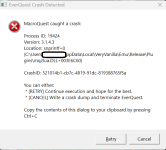
Also getting this more often than not

1779009509873.png
Tried something else.

Renamed my mq emu directory, cleared the cache in redfetch and had it download a fresh copy sans any corruption / configuration errors.
Ran RGMercs and button master, imported a known good toggle button ... same unwanted behavior, toggles no longer working, RGMercs TLO still accessible and returning correct results.

I've put my original directory back now.
 
Also getting this more often than not

View attachment 77123
Tried something else.

Renamed my mq emu directory, cleared the cache in redfetch and had it download a fresh copy sans any corruption / configuration errors.
Ran RGMercs and button master, imported a known good toggle button ... same unwanted behavior, toggles no longer working, RGMercs TLO still accessible and returning correct results.

I've put my original directory back now.
This looks like an mq crash that brain fixed, RG will likely be pushing a build this evening
 
if mq.TLO.RGMercs.Config("DoAutoNav")() == "true" then

thats a string not a bool. I think derple fixed mercs reporting bools as strings, which may have broken your button. Drop the quotes. @Derple can probably confirm.
 
if mq.TLO.RGMercs.Config("DoAutoNav")() == "true" then

thats a string not a bool. I think derple fixed mercs reporting bools as strings, which may have broken your button. Drop the quotes. @Derple can probably confirm.
Yes, that was it.
Incorrect variable type.
All buttons fixed up now.
 
Release Button Master

Users who are viewing this thread

Back
Top
Cart