
If you want to send me your config I can take a look at it.No I have a weird circle in the middle and 5 rows of buttons missing. Only in the main tab

-
 Hail, we're RedGuides. We want you to play six (yes, 6!) EverQuest characters at once. We have scripts and a friendly community to help, please join our playstyle and say hello! 👋
You are using an out of date browser. It may not display this or other websites correctly.
You should upgrade or use an alternative browser.
You should upgrade or use an alternative browser.

Release Button Master 2026-10-03
- Thread starter SpecialEd
- Start date
Im not sure what a new group is, but I tested making a new Set and a new Hotbar and both worked for me - if you want to send me the config that is broken i can take a look at it.I would guess so, think it was when I created a new group. Had to manually go in and remove his entry from the ini.
Are you sure you are on the latest code? bmHotbarClass.Lua:281 for me is a blank line and there is no ipairs until line 290.

No I have a weird circle in the middle and 5 rows of buttons missing. Only in the main tab
I've had an issue with a corrupt button before. Getting rid of that button fixed the issue iirc. It will be the last one that displays messed up.Try to load one of your backup configs, i guess? I have no idea what your buttons should look like so I have no way to diagnose what is going on here.
It has something to do with the icon i think? sorry i dont remember details.
Try to load one of your backup configs, i guess? I have no idea what your buttons should look like so I have no way to diagnose what is going on here.
This is what it looks like now after the patch. This usually has 36 buttons. Now I can only see those and there is a weird red circle around the last one (visible on the pic). The other tabs are fine)I've had an issue with a corrupt button before. Getting rid of that button fixed the issue iirc. It will be the last one that displays messed up.
It has something to do with the icon i think? sorry i dont remember details.
Attachments
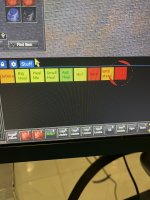
Did you read what I said and check/remove that last button?This is what it looks like now after the patch. This usually has 36 buttons. Now I can only see those and there is a weird red circle around the last one (visible on the pic). The other tabs are fine)
I will try that now. Although I have 2 PCs and I am getting the same issue on both (different characters) after the patch. I will try to unassign the last button and see if that fixes itDid you read what I said and check/remove that last button?
Hurray!! Thank you, working nowI will try that now. Although I have 2 PCs and I am getting the same issue on both (different characters) after the patch. I will try to unassign the last button and see if that fixes it

Discovered an interesting issue when executing an alias. I have an alias called /newrod, which deletes a current mod rod then casts a new mod rod. I was not able to combine /timed 10 and the /newrod alias on the same line of my hotkey, but separating them solved the issue.
Does Not Work:
Line 1: /target ${Me.Name}
Line 2: /timed 10 /newrod
Works:
Line 1: /target ${Me.Name}
Line 2: /timed 10
Line 3: /newrod
Does Not Work:
Line 1: /target ${Me.Name}
Line 2: /timed 10 /newrod
Works:
Line 1: /target ${Me.Name}
Line 2: /timed 10
Line 3: /newrod

Did you try it with an increase of time?Discovered an interesting issue when executing an alias. I have an alias called /newrod, which deletes a current mod rod then casts a new mod rod. I was not able to combine /timed 10 and the /newrod alias on the same line of my hotkey, but separating them solved the issue.
Does Not Work:
Line 1: /target ${Me.Name}
Line 2: /timed 10 /newrod
Works:
Line 1: /target ${Me.Name}
Line 2: /timed 10
Line 3: /newrod
ex: /timed 15 /newrod
Good suggestion and I did try more.Did you try it with an increase of time?
ex: /timed 15 /newrod
I went up to /timed 30 with no luck.
Placing the /timed ## and my /newrod alias on a subsequent line solved the problem for me, so I thought I would pass it along.
I'm really confused how that works though. Maybe I'm misunderstanding something. I thought
This should do the same thing
/timeddoes nothing by itself, but only delays the command argument you add to it after the ##.This should do the same thing
Code:
/target ${Me.Name}
/newrodYou are probably correct, it's been so long since I worked with /timed.I'm really confused how that works though. Maybe I'm misunderstanding something. I thought/timeddoes nothing by itself, but only delays the command argument you add to it after the ##.
This should do the same thing
Code:/target ${Me.Name} /newrod
But the main issue is that for whatever reason, I can't combine /timed ## and my alias on the same line.
Thank you to Kaen01 for sharing this, which gives some color to using /timed ## in front of an alias.

 github.com
Calling an alias from a /timed command breaks any /timed commands in the alias · Issue #434 · macroquest/macroquest
In GitLab by @kaen01 on Dec 13, 2021, 12:55 create this alias: /alias /timertest /multiline ; /echo alias running, starting timers; /timed 30 /echo 3sec; /timed 10 /echo 1sec; /timed 20 /echo 2sec;...
github.com
Interesting, I'm not sure what the alias is so it's hard to troubleshoot it.
And by not working, is the mage not casting the spell? or is he casting but the target isn't set?
If the hotkey is targeting yourself always, might just want to try and add the command to the alias. Make it a
Something like
To help troubleshoot whatever you decide to go with, change the
And by not working, is the mage not casting the spell? or is he casting but the target isn't set?
If the hotkey is targeting yourself always, might just want to try and add the command to the alias. Make it a
/multiline alias.Something like
Code:
/multiline ; /stop ; /timed 5 /target ${Me.Name} ; /timed 15 /cast "<spellname>"To help troubleshoot whatever you decide to go with, change the
/cast to /echoand then have it echo your current target or something to make sure something isn't changing your target or you are waiting enough time to get the target before casting.That's really good too know, thanks for sharing! Glad it's figured out then.Thank you to Kaen01 for sharing this, which gives some color to using /timed ## in front of an alias.
Calling an alias from a /timed command breaks any /timed commands in the alias · Issue #434 · macroquest/macroquest
In GitLab by @kaen01 on Dec 13, 2021, 12:55 create this alias: /alias /timertest /multiline ; /echo alias running, starting timers; /timed 30 /echo 3sec; /timed 10 /echo 1sec; /timed 20 /echo 2sec;...
Indeed.That's really good too know, thanks for sharing! Glad it's figured out then.
I modified my alias to includes the two lines of the BM hotkey, with an inserted delay, so now I just have one line in my BM hotkey that calls the alias.
Derple updated Button Master with a new update entry:
09/18/2025
Read the rest of this update entry...
09/18/2025
 Commits
Read the rest of this update entry...

I just started using BM (love it) and did not notice Hotkey deletion is from the main (gear icon) options. So, a right click option on the Hotkey itself would be quick/handy.Derple, can we get a Delete Hotkey option when you right-click on a button in addition to unassign?
I have close to 500 buttons. It’s hard to see to delete them because they go off of the screen.I just started using BM (love it) and did not notice Hotkey deletion is from the main (gear icon) options. So, a right click option on the Hotkey itself would be quick/handy.
Added.Derple, can we get a Delete Hotkey option when you right-click on a button in addition to unassign?
Derple updated Button Master with a new update entry:
09/19/2025
Read the rest of this update entry...
09/19/2025
Read the rest of this update entry...
Thanks, Derple!Derple updated Button Master with a new update entry:
09/19/2025
Read the rest of this update entry...
I am struggling here, please help.
I closed the buttonmaster plugin window by accident, and I just cant make it reappear. I do /Lua run buttonmaster and it says it is it already running. I stop it and restart it, but the window does not display onscreen, even though it loads up in the MQ2 chat. I it as if it is "minimized" or outside the screen or something.
I closed the buttonmaster plugin window by accident, and I just cant make it reappear. I do /Lua run buttonmaster and it says it is it already running. I stop it and restart it, but the window does not display onscreen, even though it loads up in the MQ2 chat. I it as if it is "minimized" or outside the screen or something.

Usually if you do /btn 1 it will show the buttonmaster window. I have done that before.
I would think you need a Lua for that.Is there a way to code a button to instruct another member of my group (via /dex I guess) to cast his spellgem #1 but, if spellgem #1 is not available, cast his spellgem #2 instead?
I answered you where you asked elsewhere.Is there a way to code a button to instruct another member of my group (via /dex I guess) to cast his spellgem #1 but, if spellgem #1 is not available, cast his spellgem #2 instead?
I would think you need a LUA for that.
It would be best, but it is (hypothetically) possible. BM accepts Lua code in numerous places. Note I am not suggesting it and not being able to use delay in BM code makes it problematic.
Hey folks, question - using the Button Master Lua...is there like a practical limit of how many commands you can put on a button. In my case, I am wanting to make a "Go to Spot" button for my 12 man raid. This raid is the Pelzia's Plot one with the Red and Yellow Wasps then Rains that will DT you if you get both colors on you.
So I can get to the last bee, but i need people to be spaced out a bit so I went around the play area and mapped out loc's...
Button has something like this:
/cwtna mode 0
/nav locyx Y X (driver toon)
/dex toon2 /nav locyx Y X
/dex toon3 /nav locyx Y X
/dex toon4 /nav locyx Y X
/dex toon5 /nav locyx Y X
/dex toon6 /nav locyx Y X
/dex toon7 /nav locyx Y X
/dex toon8 /nav locyx Y X
/dex toon9 /nav locxy Y X
/dex toon10 /nav locyx Y X
/dex toon11 /nav locyx Y X
/dex toon12 /nav locyx Y X
It worked perfectly with the first 3-4 lines. Once I put all 12 toons lines in now I just get random results - sometimes one toon doesn't move, other times other ones don't move...just seemingly random.
Note: All 12 locations are unique so toons are spaced out.
Per Sic - have to have a /timed after the cwtn
You need to delay the nav after going mode 0. All of those lines fire at the same time, so mode 0 is likely cancelling nav (as intended)
So I can get to the last bee, but i need people to be spaced out a bit so I went around the play area and mapped out loc's...
Button has something like this:
/cwtna mode 0
/nav locyx Y X (driver toon)
/dex toon2 /nav locyx Y X
/dex toon3 /nav locyx Y X
/dex toon4 /nav locyx Y X
/dex toon5 /nav locyx Y X
/dex toon6 /nav locyx Y X
/dex toon7 /nav locyx Y X
/dex toon8 /nav locyx Y X
/dex toon9 /nav locxy Y X
/dex toon10 /nav locyx Y X
/dex toon11 /nav locyx Y X
/dex toon12 /nav locyx Y X
It worked perfectly with the first 3-4 lines. Once I put all 12 toons lines in now I just get random results - sometimes one toon doesn't move, other times other ones don't move...just seemingly random.
Note: All 12 locations are unique so toons are spaced out.
Per Sic - have to have a /timed after the cwtn
You need to delay the nav after going mode 0. All of those lines fire at the same time, so mode 0 is likely cancelling nav (as intended)

Lua:
-- lua

local charData = {

['charname1'] = { x = val, y = val, z = val},
['charname2'] = { x = val, y = val, z = val},
['charname3'] = { x = val, y = val, z = val}
}

local delay = 10

mq.cmd("/cwtn mode 0")

for name,loc in pairs(charData or {}) do

   if k ~= nil then
      mq.cmdf("/timed %s /dex %s /nav locyx %s %s", delay, name, loc.y, loc.x, loc.z)
  end

end
fixed the missing Z axis and made it easier to read
fixed phone autocorrect capitalizations
Last edited:

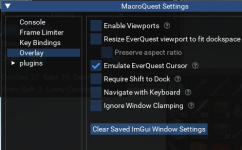
no view ports and i cant see it anywhere on the screen. is there a way to reset the position to center screen?You probably moved it off the screen somewhere. Do you have viewports enabled? did you check the corners of your screen?
The only way I know to do it is to 'Clear Saved ImGui Window Settings', which resets all windows. This is on the EQ -> Macroquest button
Users who are viewing this thread
Total: 1 (members: 0, guests: 1)
Share: