
setting the overlay.ini to read only is a bad idea. all imgui windows store their positioning there with a very few exceptions that store the data in their own configs.Ah, thanks! I did that, but the changes didn't save. Because of some UI weirdness I've experienced, I've set the MacroQuest_Overlay.ini to read-only. Any idea if the tab placement settings saved there? I feel like I've tried clearing the read-only option and trying to rearrange the tabs before, only to have it not save, but I could try it again.

-
 Hail, we're RedGuides. We want you to play six (yes, 6!) EverQuest characters at once. We have scripts and a friendly community to help, please join our playstyle and say hello! 👋
You are using an out of date browser. It may not display this or other websites correctly.
You should upgrade or use an alternative browser.
You should upgrade or use an alternative browser.

Release Button Master 2026-10-03
- Thread starter SpecialEd
- Start date

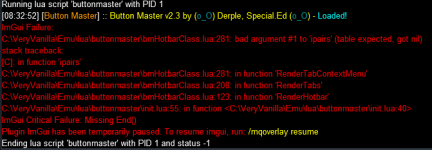
Fixed this with the latest push.Thanks that helped with that part. I am getting this when I try to rename a tab
View attachment 69252
Derple updated Button Master with a new update entry:
04/23/2025
Read the rest of this update entry...
04/23/2025
 Commits
Read the rest of this update entry...
Hmm so I made the Overlay.ini properly readable, rearranged the tab to where I wanted, but the position doesn't save for some reason. I'll keep messing with it though.
Edit: I found the .Lua for my local buttonmaster config and made the edit there, and got the positions of the tabs to save!
Edit: I found the .Lua for my local buttonmaster config and made the edit there, and got the positions of the tabs to save!

BlueBug
Seasoned veteran member
I just started using BM yesterday and finished reading through the posts just now. Seems REALLY cool. As usual for me when I try to learn a new resource I get confused.
Have a couple of questions if anyone can advise me please-
I saw screen shots that have a "Themes" option, I don't see that anywhere on what I'm using (RG updated using the Watch feature). Is this something I have to add separately?
I also saw that there's a Beta version that is newer (?). Does it matter which version of the Lua I use?
Thanks all,
BB~
Have a couple of questions if anyone can advise me please-
I saw screen shots that have a "Themes" option, I don't see that anywhere on what I'm using (RG updated using the Watch feature). Is this something I have to add separately?
I also saw that there's a Beta version that is newer (?). Does it matter which version of the Lua I use?
Thanks all,
BB~

Beta isn’t used much anymore and I think is behind.I just started using BM yesterday and finished reading through the posts just now. Seems REALLY cool. As usual for me when I try to learn a new resource I get confused.
Have a couple of questions if anyone can advise me please-
I saw screen shots that have a "Themes" option, I don't see that anywhere on what I'm using (RG updated using the Watch feature). Is this something I have to add separately?
I also saw that there's a Beta version that is newer (?). Does it matter which version of the Lua I use?
Thanks all,
BB~
It was put in place because Derple was super fast on the updates and was scaring people.
When you right click on the settings gear, look down the menu about halfway, should be 'Set Theme'I just started using BM yesterday and finished reading through the posts just now. Seems REALLY cool. As usual for me when I try to learn a new resource I get confused.
Have a couple of questions if anyone can advise me please-
I saw screen shots that have a "Themes" option, I don't see that anywhere on what I'm using (RG updated using the Watch feature). Is this something I have to add separately?
I also saw that there's a Beta version that is newer (?). Does it matter which version of the Lua I use?
Thanks all,
BB~
BlueBug
Seasoned veteran member
OMFG. I've been putting off going to the optometrist for too long. I looked at that thing over and over and couldn't see that. Thanks @nitramneb and also thanks @burdsjm !!When you right click on the settings gear, look down the menu about halfway, should be 'Set Theme'
Making an eye appointment first thing in the morning.
BB~

In a world of regular games..... Eq looks out for your health by making you WANT to go to the Doctor and get better.... so you can game better!OMFG. I've been putting off going to the optometrist for too long. I looked at that thing over and over and couldn't see that. Thanks @nitramneb and also thanks @burdsjm !!
Making an eye appointment first thing in the morning.
BB~
I went from this:


I want all characters to sit if standing. I use /bcaa //if (${Me.Standing}) /sit
It doesn't seem to take the condition for all. Only for the one where isuse the command. I am not sure what the correct synthax is for making is apply to all. "Any" instead of "Me" doesn't seem to work. Anyone can help?
It doesn't seem to take the condition for all. Only for the one where isuse the command. I am not sure what the correct synthax is for making is apply to all. "Any" instead of "Me" doesn't seem to work. Anyone can help?
wow that worked. Thank you! Can you please explain what noparse does?Try /noparse /bcaa //if (${Me.Standing}) /sit
So, if i understand correctly, if i want any condition to be executed at the individual level once for all connected it's noparse. if i want a condition on the character that i am controlling to affect all the others it is without noparse. would that be more or less correct?noparse prevents you from parsing the (${Me.Standing}) when you send the code and instead will be interpreted by the receiving side of the message in this case all characters.

If I do this on my Warrior to my groupSo, if i understand correctly, if i want any condition to be executed at the individual level once for all connected it's noparse. if i want a condition on the character that i am controlling to affect all the others it is without noparse. would that be more or less correct?
/dgga /gsay My class is ${Me.Class}
The result would be
My class is Warrior
My class is Warrior
My class is Warrior
My class is Warrior
My class is Warrior
My class is Warrior
/noparse /dgga /gsay My class is ${Me.Class}
My class is Warrior
My class is Enchanter
My class is Magician
My class is Beastlord
My class is Wizard
My class is Cleric

what exactly are you trying to do?How do you add a pause into a button? It doesn't work the same as a hotkey (/pause 20) and I have seen /timed used on here but that doesn't seem to work either for what I am trying to accomplish.

For this to work correctly, you would have to do a /timed on the last line also, but insert a delay. /timed is not cumulative, so everything starts it's countdown from when you press the button. You control the sequencing by setting different delays into the command sequences. 1 second = /timed 10 whatever, so /timed 20 will wait 2 seconds, etc. So basically the system is executing all 3 lines at within a microsecond, and lines 2 and 3 are telling it to wait that deayed time to actually execute the part to the right.
/warp t = will warp to target
/timed 20 /tar cleric = delay 2 seconds, then target the cleric
/timed 40 /warp t = delay 4 seconds, then warp to the target at this time
/warp t = will warp to target
/timed 20 /tar cleric = delay 2 seconds, then target the cleric
/timed 40 /warp t = delay 4 seconds, then warp to the target at this time
Here is my TL to Guild hall buttonmaster
/docommand ${If[${Raid.Members}, /dgra /alt act 839, /dgga /alt act 839]}
/dgza /alt act 839
/docommand ${If[${Raid.Members}, /dgra /timed 250 /yes, /dgga /timed 250 /yes]}
/dgza /timed 250 /yes
/alt act 839
/timed 260 /yes
/docommand ${If[${Raid.Members}, /dgra /alt act 839, /dgga /alt act 839]}
/dgza /alt act 839
/docommand ${If[${Raid.Members}, /dgra /timed 250 /yes, /dgga /timed 250 /yes]}
/dgza /timed 250 /yes
/alt act 839
/timed 260 /yes
converted to luaHere is my TL to Guild hall buttonmaster
/docommand ${If[${Raid.Members}, /dgra /alt act 839, /dgga /alt act 839]}
/dgza /alt act 839
/docommand ${If[${Raid.Members}, /dgra /timed 250 /yes, /dgga /timed 250 /yes]}
/dgza /timed 250 /yes
/alt act 839
/timed 260 /yes
Lua:
-- lua
local isRaid = mq.TLO.Raid.Members() > 0
local isGroup = mq.TLO.Me.GroupSize() > 0
local cmdRaid = '/dgra'
local cmdGroup = '/dgga'
local cmdZone = '/dgza'
local cmdIssue = "/alt act 839"

if isRaid then
    cmdIssue = string.format("%s /multiline ;  %s", cmdRaid, cmdIssue)
elseif isGroup then
    cmdIssue = string.format("%s /multiline ; %s", cmdGroup, cmdIssue)
else
    cmdIssue = string.format("%s /multiline ; %s", cmdZone, cmdIssue)
end

cmdIssue = string.format("; %s /timed 250 /yes", cmdIssue)

mq.cmdf("%s", cmdIssue)converted to lua
Lua:-- lua local isRaid = mq.TLO.Raid.Members() > 0 local isGroup = mq.TLO.Me.GroupSize() > 0 local cmdRaid = '/dgra' local cmdGroup = '/dgga' local cmdZone = '/dgza' local cmdIssue = "/alt act 839" if isRaid then cmdIssue = string.format("%s /multiline ; %s", cmdRaid, cmdIssue) elseif isGroup then cmdIssue = string.format("%s /multiline ; %s", cmdGroup, cmdIssue) else cmdIssue = string.format("%s /multiline ; %s", cmdZone, cmdIssue) end cmdIssue = string.format("; %s /timed 250 /yes", cmdIssue) mq.cmdf("%s", cmdIssue)
Great! It cleaned up a bunch of my logic, plus showed me how to do some other things also.
this one is my load rgmercs button, if its a raid it will assign the tanks to Outside Assist in order you wish them to tank as a fallover when one dies.Great! It cleaned up a bunch of my logic, plus showed me how to do some other things also.
click will stop if its running or start for all staggered by some time each.
the label changes if script is running or not.
btn label
Code:
return (mq.TLO.Lua.Script('rgmercs').Status.Equal('RUNNING')() and 2835 or 3485), 'Item'load rgmercs
Code:
-- lua
local ChatCmd = '/dex'  -- default is /dex for dannet
local ChatChan = '/dgt' -- chat channel to use default is /dgt for dannet
local ScriptName = 'rgmercs'

local command = string.format("/lua parse return mq.TLO.Lua.Script('%s').Status.Equal('RUNNING')() == false and", ScriptName)
command = string.format("%s mq.cmd('/multiline ; /lua run %s')", command, ScriptName)

local raidSize = mq.TLO.Raid.Members() or 0
local raidTabk = mq.TLO.Me.Name()
local IsRunning = mq.TLO.Lua.Script(ScriptName).Status() == 'RUNNING'

if raidSize == 0 then
    if IsRunning then
        mq.cmdf('/dgr /lstop %s', ScriptName)
        mq.cmdf('/lstop %s', ScriptName)
    else
        for i = 1, mq.TLO.Me.GroupSize() - 1 do
            mq.cmdf('/timed %s /dex %s /lrun %s mini', (i * 10), mq.TLO.Group.Member(i).DisplayName(), ScriptName)
        end
        mq.cmdf('/lrun %s mini', ScriptName)
    end
else
    if IsRunning then
        mq.cmdf('/dgr /lstop %s', ScriptName)
        mq.cmdf('/lstop %s', ScriptName)
    else
        for i = 1, raidSize do
            if mq.TLO.Raid.Member(i).CleanName() ~= mq.TLO.Me.CleanName() then
                mq.cmdf('/timed %s /dex %s /lrun %s mini', (i * 10), mq.TLO.Raid.Member(i).CleanName(), ScriptName)
            else
                -- if it's me then just run the script immediately
                mq.cmdf('/lrun %s mini', ScriptName)
            end
        end
        -- local dly = raidSize * 15
        --
        -- mq.cmdf("/timed %s /dgr /multiline ; /rgl setma %s; /timed %s /rgl chaseoff; /timed %s /rgl chaseon", dly, raidTabk, 10, 15)
        -- mq.cmdf("/timed %s /rgl clearoa", dly + 10)
        -- RAID SETUP
        local myName = mq.TLO.Me.CleanName():lower()
        local delay = raidSize * 15

        -- enter tanks in order you wish them to be in first slot will always default to the caller of the script (lowercase names as thats what RGMercs uses)
        local tankList = {
            [1] = { Name = 'maintank', Enabled = true, },
            [2] = { Name = '2ndtank', Enabled = true, },
            [3] = { Name = '3rdtank', Enabled = true, },
        }

        local cmd = string.format("/timed %s /dgr /multiline ; /rgl clearoa; /timed %s /rgl setma %s", delay, delay + 5, myName)
        delay = delay + 10 -- set to at least 5 more than the last delay before the table iterations
        cmd = string.format("%s; /timed %s /rgl chaseoff; /timed %s /rgl chaseon; /timed %s /rgl addoa %s", cmd, delay, delay + 3, delay + 5, myName)
        delay = delay + 10 -- set to at least 5 more than the last delay before the table iterations
        for _, data in ipairs(tankList or {}) do
            if data.Enabled then
                cmd = string.format("%s; /timed %d /rgl addoa %s", cmd, delay, data.Name)
                delay = delay + 5
            end
        end
        mq.cmd(cmd)
    end
endThe code had a few bugs This has now been tested and is workingconverted to lua
Lua:-- lua local isRaid = mq.TLO.Raid.Members() > 0 local isGroup = mq.TLO.Me.GroupSize() > 0 local cmdRaid = '/dgra' local cmdGroup = '/dgga' local cmdZone = '/dgza' local cmdIssue = "/alt act 839" if isRaid then cmdIssue = string.format("%s /multiline ; %s", cmdRaid, cmdIssue) elseif isGroup then cmdIssue = string.format("%s /multiline ; %s", cmdGroup, cmdIssue) else cmdIssue = string.format("%s /multiline ; %s", cmdZone, cmdIssue) end cmdIssue = string.format("; %s /timed 250 /yes", cmdIssue) mq.cmdf("%s", cmdIssue)
Fixed version
Lua:
-- lua
local isRaid = mq.TLO.Raid.Members() > 0
local isGroup = mq.TLO.Me.GroupSize() > 0
local cmdRaid = '/dgra'
local cmdGroup = '/dgga'
local cmdZone = '/dgza'
local cmdIssue = "/alt act 839"

if isRaid then
    cmdIssue = string.format("%s /multiline ;  %s", cmdRaid, cmdIssue)
elseif isGroup then
    cmdIssue = string.format("%s /multiline ; %s", cmdGroup, cmdIssue)
else
    cmdIssue = string.format("%s /multiline ; %s", cmdZone, cmdIssue)
end

cmdIssue = string.format("%s ; /timed 250 /yes", cmdIssue)

mq.cmdf("%s", cmdIssue)Oops, went to remove a button set, but accidentally deleted it instead.
Upon the deletion, it removed two other button sets that were displayed.
I am now not able to add any button sets to the display at all.
Not sure how to fix this or where to look.
Any help appreciated
Upon the deletion, it removed two other button sets that were displayed.
I am now not able to add any button sets to the display at all.
Not sure how to fix this or where to look.
Any help appreciated
Ok, never mind.Oops, went to remove a button set, but accidentally deleted it instead.
Upon the deletion, it removed two other button sets that were displayed.
I am now not able to add any button sets to the display at all.
Not sure how to fix this or where to look.
Any help appreciated
Found it. The deletion of the set caused the list of sets for that character to start at [2].
Weird.
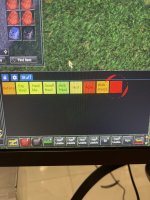
you absolutely don't need your very own buttonmaster thread.
believe it or not, it has an active discussion thread.
Each resource on RG has an Overview / Discussion Thread and either a link to their wiki or tabs with FAQ, Commands, Etc.
Please make sure to post in the respective discussion thread, and check the FAQ/Commands/Wiki for information before posting.
believe it or not, it has an active discussion thread.
Each resource on RG has an Overview / Discussion Thread and either a link to their wiki or tabs with FAQ, Commands, Etc.
Please make sure to post in the respective discussion thread, and check the FAQ/Commands/Wiki for information before posting.
Apologies. I was desperate to get some help and acted too quicklyyou absolutely don't need your very own buttonmaster thread.
believe it or not, it has an active discussion thread.
Each resource on RG has an Overview / Discussion Thread and either a link to their wiki or tabs with FAQ, Commands, Etc.
Please make sure to post in the respective discussion thread, and check the FAQ/Commands/Wiki for information before posting.
Are you still getting this?
Are you talking about the clock curtain not clipping correctly?Apologies. I was desperate to get some help and acted too quickly
No I am not. Also, the other tabs when i click on them are ok. Only the main one does that. Its on two separate PCs so I know its not something related to my PCAre you still getting this?
I would guess so, think it was when I created a new group. Had to manually go in and remove his entry from the ini.Are you still getting this?
I am getting thisNo I am not. Also, the other tabs when i click on them are ok. Only the main one does that. Its on two separate PCs so I know its not something related to my PC
Ending running Lua script 'buttonmaster' with PID 2
Ending Lua script 'buttonmaster' with PID 2 and status -1
Running Lua script 'buttonmaster' with PID 4
[09:32:05] <init.Lua::unknown_func():197 > [Button Master] :: Button Master v2.3 by (o_O) Derple, Special.Ed (o_O) - Loaded!
No I have a weird circle in the middle and 5 rows of buttons missing. Only in the main tabAre you talking about the clock curtain not clipping correctly?
None of these are errors.I am getting this
Ending running lua script 'buttonmaster' with PID 2
Ending lua script 'buttonmaster' with PID 2 and status -1
Running lua script 'buttonmaster' with PID 4
[09:32:05] <init.lua::unknown_func():197 > [Button Master] :: Button Master v2.3 by (o_O) Derple, Special.Ed (o_O) - Loaded!
Try to load one of your backup configs, i guess? I have no idea what your buttons should look like so I have no way to diagnose what is going on here.No I have a weird circle in the middle and 5 rows of buttons missing. Only in the main tab
Users who are viewing this thread
Total: 1 (members: 0, guests: 1)
Share: