Derple updated Button Master with a new update entry:
03/29/2024
Read the rest of this update entry...
03/29/2024
 erpleMQ2/buttonmaster
Read the rest of this update entry...



Please explain this one:Derple updated Button Master with a new update entry:
03/29/2024
Read the rest of this update entry...


Sorry yes, so far I've only seen it happening to a single button at a time, although it's a random button each time I restart the game and such. Thanks for taking a look at this! Figured I'd reply to this message, rather than the one below where you said you found the issue. Very much appreciate all the work that goes into this stuff!Are you saying that just a single button has the wrong countdown timer?

You can take the local configuration of any character (hotbars/buttons/position/etc) and apply it to any other character.Please explain this one:
- added ability to copy a local config from another char.
View attachment 59704
Yah the bug was basically that we use os.clock() which is related to how long the client has been running to calculate the button cooldown, but we store this technically ephemeral value with the new caching code so now your config contains a countdown timer based on os.clock which if you used that button after 6 hours of playing will be some huge number then you restart your client and now os.clock is reset to 0 and you have to catch that huge number before it resets. So instead we will use os.time() which is actual epoch time not reset until the heat death of the universe or the year 2038, whichever comes first.Sorry yes, so far I've only seen it happening to a single button at a time, although it's a random button each time I restart the game and such. Thanks for taking a look at this! Figured I'd reply to this message, rather than the one below where you said you found the issue. Very much appreciate all the work that goes into this stuff!
yeah i prefer this method as well unless you need a more fine grained value than seconds.So instead we will use os.time()
This is a "feature" imgui. If the windows go off the screen it resets their position and when isb changes the resolution the position invalidates and moves the window. I have this compiled out of my customer build for this exact reason.Anybody who uses innerspace have issues with the button master window changing its location everytime you switch to a different toon, I have the lock "locked" and its still keeps moving? I had it locked at the bottom of my screen, then I switch to a toon using innerspace hotkey, and when I switch back the button master window is now in the middle of my screen instead of where I had it?

SpellName = "Feign Death"
/multiline ; /timed 1 /dgae /cast SpellName; /timed 1 /dgae /mq.cmd('/g Casting ', SpellName)FEATURE REQUEST
- Bind to a hotkey, ex: ctrl+alt+4 triggers a hotbutton just like you can bind hotkeys on an EQ hotbar
If hotkeys cant be done with the mq Lua integration...
- Integrate with MQ2CustomBinds ?
- Automagically register every button as Lua mq.bind() , then could use MQ2Custombinds or make an EQ button that basically calls the Button Master button
- /LBM1234
EQ doesnt support this. If you wanted to do this you would have to make a Lua button.How can I set a variable at the top of the button's Command box that I could use later in a multiline? I am using the following code but I am getting a error:
Code:SpellName = "Feign Death" /multiline ; /timed 1 /dgae /cast SpellName; /timed 1 /dgae /mq.cmd('/g Casting ', SpellName)
--lua
local spellName = "Feign Death"
mq.cmdf("/multiline ; /timed 1 /dgae /cast %s; /timed 1 /dgae /echo Casting %s", spellName, spellName)I dont use custombinds so i have no idea how it works but I would be open to that solution until imgui button detection is fixed if someone wanted to PR it or explain to me how it works.FEATURE REQUEST
- Bind to a hotkey, ex: ctrl+alt+4 triggers a hotbutton just like you can bind hotkeys on an EQ hotbar
If hotkeys cant be done with the mq Lua integration...
- Integrate with MQ2CustomBinds ?
- Automagically register every button as Lua mq.bind() , then could use MQ2Custombinds or make an EQ button that basically calls the Button Master button
- /LBM1234
EQ doesnt support this. If you wanted to do this you would have to make a lua button.
Code:--lua local spellName = "Feign Death" mq.cmdf("/multiline ; /timed 1 /dgae /cast %s; /timed 1 /dgae /echo Casting %s", spellName, spellName)
Commits
(2e7233d) ~derplePR # [9](https://github.com/DerpleMQ2/buttonmaster/pull/9): an update rate configurable per button
Add an update rate configurable per button, this is found in the advanced settings of each button.
unlimited is default (your FPS rate), tho for *most* buttons your dealing with things that don't need quite that high of rate...
--lua
local spellName = "Necrotic Pustules"
local PetName = mq.TLO.Me.Pet.CleanName()
mq.cmdf("/multiline ; /timed 1 /dgae /stand; /timed 2 /dgae /target PetName; /timed 3 /dgae /cast %s; /timed 3 /dgae /g Casting -> %s", spellName, spellName)Sorry, I am still having troubles inserting codes into LUA buttons. A hand please?
I got the following code into a button:
Code:--lua local spellName = "Necrotic Pustules" local PetName = mq.TLO.Me.Pet.CleanName() mq.cmdf("/multiline ; /timed 1 /dgae /stand; /timed 2 /dgae /target PetName; /timed 3 /dgae /cast %s; /timed 3 /dgae /g Casting -> %s", spellName, spellName)
The idea is that each group member casts the spell spellName to their respective pets. However, I get the error: "There are no spawns matching (0 200) any whose name contains PetName". Where is my code wrong?
Thanks!
mq.cmdf("/multiline ; /timed 1 /dgae /stand; /timed 2 /dgae /target %s; /timed 3 /dgae /cast %s; /timed 3 /dgae /g Casting -> %s", PetName, spellName, spellName)You've got PetName in your command string instead of using %s to format it as a variable.
Code:mq.cmdf("/multiline ; /timed 1 /dgae /stand; /timed 2 /dgae /target %s; /timed 3 /dgae /cast %s; /timed 3 /dgae /g Casting -> %s", PetName, spellName, spellName)
you want to use `/target id $\{Pet.ID}` if you are sending it through dannet to that should make them target their own pets. But really you should use mq2cast that lets you put a target into the command without needing to target them first.Thank you, I appreciate it. However, there is a problem: that line of code has all members of the group target the group leader's pet instead of their own. I would need each member of the group target their own respective pets. Any suggestion please?
(0b76a04) ~DerpleMQ2- theme now accepts a config/button_master_theme.lua which can be built using ThemeZ etc.
Buttonmaster just got more sexy, if that was even possible!! A few of the possible themes by selecting from a pull down menu. Sample Themes Lua file (By Deth24) attached.Derple updated Button Master with a new update entry:
04/02/2024
Read the rest of this update entry...
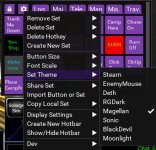
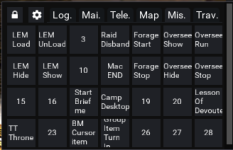
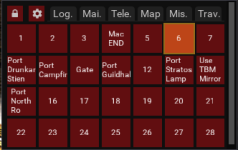
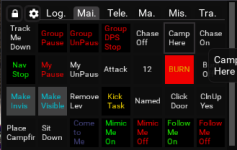
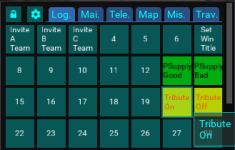

I thnk your character config doesnt have a valid list of sets. I pushed a speculative fix for this this morning if it doesn't work please send me your config/buttonmaster.Lua ina PM and I will debug it.Hi, have been running this great LUA for some time, however I have run this yesterday and today and i get the following : View attachment 59963
I then removed buttonmaster and reinstalled it and the same thing happens

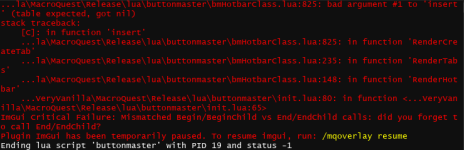
Doing this would likely require we start breaking out bm configs on a per char basis. I've already been considering this, but I hesitate to make such a change as it has a lot of implications (like buttons not auto updating across toons etc).Out of curiosity, is it possible to save the buttonmaster hotbar locations on a per character basis?
Ok Try the next build, since I don't have your config I fixed this issue but I am not sure if you will run into more down the line.Hi again, previous fix did work, i was trying to create a new Set, allowed me to name the set, but when io click on save I get :
View attachment 60016
I can then restart buttonmaster and it comes back with the original configuration
A temporary work around -
Make alias -
/alias /bcgnbrd /noparse /bcga //if (${Me.Class.ShortName.Equal[BRD]})
Update hotkey -
/bcgnbrd /mac kissassist assist tanky