• Hail, we're RedGuides. We want you to play six (yes, 6!) EverQuest characters at once. We have scripts and a friendly community to help, please join our playstyle and say hello! 👋
  • We've added LLM sections to our Terms & Rules and Resource Rules, for everyone's sanity & in-game safety.
    Read more
    a. Do not replace your voice with an LLM. This goes for your posts and your scripts. Drafting and editing with a tool is fine, but don't take you out of what you share.
    b. Do not replace your EQ character's voice with an LLM. We don't want scripts that speak over /ooc, /shout or other public channels. This has been an unwritten rule that's kept casino scripts off the site for decades, but we're now compelled to make it clear: keep automated communication private.

    Why Does RG Review Scripts?
    Nearly every LLM-written Lua script we see is making your character do impossible things, and rarely in a way that's beneficial to you. We've seen heavy server hammering, /target over impossible distances when /nav spawn would passively accomplish the same thing, a spawn search that fires 20+ times per second, and other pointless actions that are likely annoying GMs.

    You are welcome to use LLMs as a tool to structure, draft, and edit your work, but please read critically before hitting /lua run

Question - Bug in windows mode

Baz

Member
Hi All,
I was having an issue where on my second PC my group members in the background would sometimes stop.

I narrowed it down to when an item was on the cursor it would get stuck but when I switched to that window it would drop the item into inventory as expect. I didn't have this issue on my other PC. I was able to resolve the issue by resizing my resolution to EQ's windows screen resolution down a few ticks so everything was clearly visible with part of the desktop around the whole window.

I suspect that part of the window (even if, so very little) was outside the visible display of the monitor or more likely behind the taskbar and that would cause the windows in the background to not auto inventory items on cursor.

Is this a known issue? I spent quite a bit of time searching my symptoms with little results.
 
Solution
Hi All,
I was having an issue where on my second PC my group members in the background would sometimes stop.

I narrowed it down to when an item was on the cursor it would get stuck but when I switched to that window it would drop the item into inventory as expect. I didn't have this issue on my other PC. I was able to resolve the issue by resizing my resolution to EQ's windows screen resolution down a few ticks so everything was clearly visible with part of the desktop around the whole window.

I suspect that part of the window (even if, so very little) was outside the visible display of the monitor or more likely behind the taskbar and that would cause the windows in the background to not auto inventory items on cursor.

Is this...
Hi All,
I was having an issue where on my second PC my group members in the background would sometimes stop.

I narrowed it down to when an item was on the cursor it would get stuck but when I switched to that window it would drop the item into inventory as expect. I didn't have this issue on my other PC. I was able to resolve the issue by resizing my resolution to EQ's windows screen resolution down a few ticks so everything was clearly visible with part of the desktop around the whole window.

I suspect that part of the window (even if, so very little) was outside the visible display of the monitor or more likely behind the taskbar and that would cause the windows in the background to not auto inventory items on cursor.

Is this a known issue? I spent quite a bit of time searching my symptoms with little results.
i would

a: make sure you have > framelimiter setup <
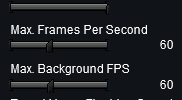
b: check that your alt-o options for max FPS is not set to "min" for background
1662589961112.png
 
Solution
Sorry I Never got around to retesting it, but changing the resolution and making sure they were all in the visible screen (no part of the window below the taskbar) everything started working as expected.
 
Question - Bug in windows mode

Users who are viewing this thread

Back
Top
Cart