Brand new to multi-boxing, I always have true-boxed on 2 machines/4accounts. I have all 120 toons, mage pet tank, shaman, ranger, and druid or enchanter. any tips to get me started, please? I have got the basic /dgae commands. I have experimented with kissassist without much success so far. I understand ini. but have not found one to work for my needs is muleassist or rg mercs better for my casual play? Please Help

Install the app
How to install the app on iOS
Follow along with the video below to see how to install our site as a web app on your home screen.
Note: This feature may not be available in some browsers.
-
 You've discovered RedGuides, an EverQuest multi-boxing and scripting community 🧙♀️⚙️. We want you to play several EQ characters at once, come join us and say hello! 👋
You are using an out of date browser. It may not display this or other websites correctly.
You should upgrade or use an alternative browser.
You should upgrade or use an alternative browser.
Question - Brand New 4 boxer. Please help
- Thread starter Eitac
- Start date
Silverspaceman
Seasoned veteran member
- Joined
- Jul 9, 2018
- RedCents
- 808¢
Sic & Redbot have put a lot of time into making it user friendly to get started. Try the resources linked here.Brand new to multi-boxing, I always have true-boxed on 2 machines/4accounts. I have all 120 toons, mage pet tank, shaman, ranger, and druid or enchanter. any tips to get me started, please? I have got the basic /dgae commands. I have experimented with kissassist without much success so far. I understand ini. but have not found one to work for my needs is muleassist or rg mercs better for my casual play? Please Help
There are also libraries full of INI files to use either for playing or for reference on how to get set up with KA (or MA).

Good post Silver, Sic has a great set of links to help Eitac. Have you watched the videos yet Eitac? Kiss will give you more control, but maybe you would like RGMercs, its very easy to just 'go' with almost no setup. if you want to try the CWTN MQ2Mage/Shaman/Enchanter line, you can try for free on test server before you buy on Live server use. Ranger and Druid not yet available. This said, learning the KISS ini files is a massively great way to learn how to make MQ work the way YOU want. The tools here are amazing. and always ask away here.
jessesarah19
Member
- Joined
- Sep 3, 2019
- RedCents
- 40¢
Hello and sorry to hear about the problems but not sure what your really trying to ask. that being said the ini's for druids are not good IMHO not sure if you know how to make em but i would make my own on druid the only other problem with the ini I had was being connected to the right command center being /Dgae or having the /EQBC running in the ini line is where i found most problems cause alot of the ini's are older . As for the Mule and RG heard good things but never tried em what you are saying you just want to get on and go i would recommend CWTN Plugins very easy to use and set up fast and not a lot of set up time. They have almost all your class plugins except ranger and druid but with ranger you just set and shootBrand new to multi-boxing, I always have true-boxed on 2 machines/4accounts. I have all 120 toons, mage pet tank, shaman, ranger, and druid or enchanter. any tips to get me started, please? I have got the basic /dgae commands. I have experimented with kissassist without much success so far. I understand ini. but have not found one to work for my needs is muleassist or rg mercs better for my casual play? Please Help


One Cool Trick
Seasoned veteran member
- Joined
- Oct 12, 2015
- RedCents
- 693¢
Brand new to multi-boxing, I always have true-boxed on 2 machines/4accounts. I have all 120 toons, mage pet tank, shaman, ranger, and druid or enchanter. any tips to get me started, please? I have got the basic /dgae commands. I have experimented with kissassist without much success so far. I understand ini. but have not found one to work for my needs is muleassist or rg mercs better for my casual play? Please Help

I had taken a long break, came back and EQ alone had a lot of changes, the walk throughs are nice, not everything is answered, but it's enough to be dangerous LOL... that said, I might have as well have been new to EQ.
Discovering MQ2 was a gamechanger and I definitely found that learning and refining the INI taught me the most; experiment here, ask a question here, apply it there, seemed to teach me the most about it... I really enjoyed the older INI websites that walked me through (though I believe some are out of date or whatnot... they still were a really great place to learn a basic knowledge)
KISSASSIST
Still one of my favorites for learning and quick reference, if there's better, I am unaware... another one I liked for / macro commands was
MQ2MOVEUTILS
Just a couple nuggets that help me sort it out... and then again, asking questions of the community here @ RG has been HUGE!
Good Luck and Welcome!
Just my two red
 ents.
ents.[HINT:
 You too can help prevent forum fires by also "redenting" (click the icon to the right ---->)



Welcome to RG!
Watch the vids in Sic's signature and then mess around with Kissassist, RGmercs, and especially cwtn plugins. Lots of info and videos on them here and a super helpful community when you get stuck.
I suggest taking the toons somewhere safe and lower level at first to get your feet wet and explore the automation options. You can also /testcopy and use the cwtn plugins there for free.
Check out the macros and lua's available as well like buttonmaster, mq2autogroup, mq2autoaccept, mq2status, GuildClicky, and more.
This community makes the game great again so don't hesitate to ask questions!
All of the CWTN class plugins uses the shortname for their "/" command example: /shd for SK, /clr for cleric, /bst for beastlord etc
so loading the window is "/shd show", "/clr show", "/bst show", "/ber show", etc.
Q. The UI Window Doesn't save my settings?
A. This is intentional.
The UI acts as a "hot swap" allowing you to adjust on the fly.
If you want to "save" your settings, adjust it with the slash command.
Explained here > UI Video @ 9:10 <
Q. My UI window isn't saving the location
A. > CWTN UI Vid < follow these steps:
1. move it to where you want it
2. close the window
3. /ber show to reshow it - eq will now have the window saved
Q. The Window isn't loading?!?
A. This is demonstrated in the vid.
If you don't want to watch it, make sure you reloaded your UI if you are loading it for the first time
/reloadui
or
/loadskin default
the plugin actually tells you to do that in your mq window.
then it is just your plugin class command and "show" example: /shd show
So i bought the Mage cwtn , and watched the video 20 x at least. Still getting the "plugin mq2mage could not be loaded: unknown error. I will be honest. This is more than frustrating. I don't get much play time and have wasted most of the weekend on one plugin.
You probably want to post this to the MQ2Mage discussion thread but Sic will probably move it anyways.So i bought the Mage cwtn , and watched the video 20 x at least. Still getting the "plugin mq2mage could not be loaded: unknown error. I will be honest. This is more than frustrating. I don't get much play time and have wasted most of the weekend on one plugin.
Are you on live? test? emu? You installed the newly purchase plugin using the RG launcher (the correct way) and not by clicking download on the resource (the wrong way)?
Here is anexample:I bought one of CWTN's plugins and can not get the UI after watching the videos several times. Please advise.
Code:
/rog showChat (CWTN) has all the commands on the individual plugin pages in the Plugins tab above.
Edit: Just to make sure, you do have the plugin loaded?
Once purchased, you can update it in the Launcher Window before you load up MQ. There is ways to learn to load it after MQ is loaded, but lets make sure you have it loaded up..
Suggestion.. exit EQ, close out the little MQ button in taskbar, and in your Launcher window hit refresh in the Plugins tab so you see it there with green letters in the update area..see mine:
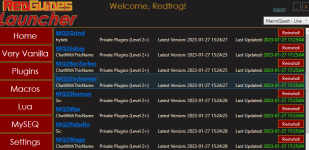 Now.....at least you know it should be loading up. if its not there... say something. If it all good, load up MQ and see what happens when you start your character
Last edited:
Yes, I am using /mag show. It says "DoCommand- Couldn't parse '/mag show' "Here is anexample:
Use the right command for the plugin you bought.../shd /enc /clr etc..Code:/rog show
Chat (CWTN) has all the commands on the individual plugin pages in the Plugins tab above.

Dallas41
Well-known member
- Joined
- Oct 7, 2014
- RedCents
- 132¢
You have to load the plugin. /plugin mq2mage loadYes, I am using /mag show. It says "DoCommand- Couldn't parse '/mag show' "
Thank you so much! I am not at PC atm but I shut everything off when I left. So I will definitely try the refresh. I will let you know!Here is anexample:
Use the right command for the plugin you bought.../shd /enc /clr etc..Code:/rog show
Chat (CWTN) has all the commands on the individual plugin pages in the Plugins tab above.
Edit: Just to make sure, you do have the plugin loaded?
Once purchased, you can update it in the Launcher Window before you load up MQ. There is ways to learn to load it after MQ is loaded, but lets make sure you have it loaded up..
Suggestion.. exit EQ, close out the little MQ button in taskbar, and in your Launcher window hit refresh in the Plugins tab so you see it there with green letters in the update area..see mine:
View attachment 45629Now.....at least you know it should be loading up. if its not there... say something. If it all good, load up MQ and see what happens when you start your character
Yes getting unknown error when trying to do \plugin mq2mage load.You have to load the plugin. /plugin mq2mage load

Shadow
Ultimate seasoned veteran member
- Joined
- Feb 15, 2022
- RedCents
- 1,887¢
/plugin mq2mage load, not \Yes getting unknown error when trying to do \plugin mq2mage load.

- Joined
- Dec 29, 2017
- RedCents
- 24,680¢
Hi Eitac, I got your private message about your issue as well.
The CWTN Plugins are loaded like any other plugin in the game, @Shadow was correct, that you appear to be using the wrong slash.
Could not parse /mag show is a result of the plugin not being loaded yet, and the other error is from the incorrect slash.
You'll definitely want to check out the getting started guide after that. It'll guide you through a lot of the thing you'll want to know about the plugins as a first time user.
Please see >>> Getting Started with CWTN plugins! (Movement, UI Window, Clickies, Pulling, ETC) Check Here First! <<<
The CWTN Plugins are loaded like any other plugin in the game, @Shadow was correct, that you appear to be using the wrong slash.
Could not parse /mag show is a result of the plugin not being loaded yet, and the other error is from the incorrect slash.
You'll definitely want to check out the getting started guide after that. It'll guide you through a lot of the thing you'll want to know about the plugins as a first time user.
Please see >>> Getting Started with CWTN plugins! (Movement, UI Window, Clickies, Pulling, ETC) Check Here First! <<<
- Joined
- Dec 29, 2017
- RedCents
- 24,680¢
Thanks for your reply,Live server, and I downloaded it from here.
This conversation is currently ongoing in three locations. Reference this link for your responses to your question in regards to this. Also, as opposed to responding directly to your PM I've opted to just respond at the above link as well.
Please refrain from multi-posting and PMing authors. You should pick one spot and stick to it. The best place will always be the discussion thread for the resource in question.
Silverspaceman
Seasoned veteran member
- Joined
- Jul 9, 2018
- RedCents
- 808¢
Sometimes you'll need to run /reloadui before some of these windows will show up. Issues with EQ UI.I bought one of CWTN's plugins and can not get the UI after watching the videos several times. Please advise.

Please see >>> Getting Started with CWTN plugins! (Movement, UI Window, Clickies, Pulling, ETC) Check Here First! <<<Sometimes you'll need to run /reloadui before some of these windows will show up. Issues with EQ UI.
check out the sticky plz, all stuff is explained there (and in the several other places that reposting has happened)
UPDATE: After realizing I had to update the launcher, I am thrilled with Mq2 and the Mq2mage, and after seeing how great the mage was, I bought Mq2shaman. WOW !! I am thrilled. What a game-changing experience. Thank you all that helped
That's awesome, congrats. It takes some patience, but it's worth it.
Users who are viewing this thread
Total: 1 (members: 0, guests: 1)
Share: