
-
 Hail, we're RedGuides. We want you to play six (yes, 6!) EverQuest characters at once. We have scripts and a friendly community to help, please join our playstyle and say hello! 👋
You are using an out of date browser. It may not display this or other websites correctly.
You should upgrade or use an alternative browser.
You should upgrade or use an alternative browser.

Release Boxhud 04/06/2024
- Thread starter aquietone
- Start date

aquietone updated Boxhud with a new update entry:
Switch to init.lua folder structure
Read the rest of this update entry...
Switch to init.lua folder structure
Move boxhud.lua to boxhud/init.lua
Read the rest of this update entry...
I was also wondering this. The window resets to it's default position each load.Did I miss how to save the Boxhud window position and column width adjustments?
imgui windows already save their positions by default. i'm not sure at what point it actually persists that info to the file, if its when the window is created, destroyed, randomly, when its dragged, etc. maybe try just start/stop the script.When a toon zones they don't show up in red, they come off the list.
Also would like to fix the position and size of the box when started.
The toons that are displayed depends on what the window is configured to display. Configuration > Windows > Default > Edit. Set the peer group to the one you want (group, zone, all)
So after I edited how I wanted it, now it doesn't have accurate information. Doesn't show the correct hitpoints, experience, mana. No idea why it stopped working for me.
I even deleted the ini files and unwatched, refreshed the Redguilde launcher then watched and refreshed and reinstalled. It just doesn't work.
I even deleted the ini files and unwatched, refreshed the Redguilde launcher then watched and refreshed and reinstalled. It just doesn't work.

RedMan updated Boxhud with a new update entry:
20230104
Read the rest of this update entry...
20230104
2.5.5
- Fix reset observers for peer off by 1
Read the rest of this update entry...

that does seems to do the trick, thanks!not a big brain, but doesnt turn off tethering? View attachment 45030

i had boxhud showing me days left on subscription somehow i lost it , anyone got any ideas?
["subdays"] = {
["Prettify"] = false;
["InZone"] = false;
["OwnColor"] = false;
["Ascending"] = true;
["Type"] = "property";
["Name"] = "subdays";
["Percentage"] = false;
["Properties"] = {
["all"] = "Me.SubscriptionDays";
but it isnt showing up now
["subdays"] = {
["Prettify"] = false;
["InZone"] = false;
["OwnColor"] = false;
["Ascending"] = true;
["Type"] = "property";
["Name"] = "subdays";
["Percentage"] = false;
["Properties"] = {
["all"] = "Me.SubscriptionDays";
but it isnt showing up now
Last edited:
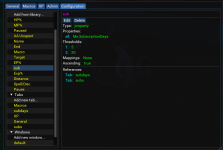
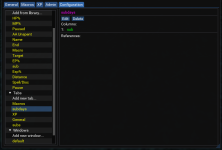
add the tab to the default window.
window has a list of tabs, because it supports more than 1 window, each having different tabs.
RedMan updated Boxhud with a new update entry:
20230116
Read the rest of this update entry...
20230116
2.6.0
- Removes some delays that may or may not have been necessary on observer setup
- Mark sorting dirty when switching between tabs
Read the rest of this update entry...
RedMan updated Boxhud with a new update entry:
20230117
Read the rest of this update entry...
20230117
2.6.1
- fix flickering distance numbers
Read the rest of this update entry...
There's a bug with group peer group. It should be using your group leader's peer group instead of
Either that or have everyone join each others that's in your group
group_${server}_${me.name} The tricky part is handling when you aren't in a group and when you are in a group.Either that or have everyone join each others that's in your group
Last edited:
i think i don't see this because i don't run boxhud on anyone but my driver. will look into it i suppose!There's a bug with group peer group. It should be using your group leader's peer group instead ofgroup_${server}_${me.name}The tricky part is handling when you aren't in a group and when you are in a group.
Either that or have everyone join each others that's in your group
RedMan updated Boxhud with a new update entry:
20230119
Read the rest of this update entry...
20230119
2.6.2
- Use group leader name when constructing dannet group name for eq group
Read the rest of this update entry...
RedMan updated Boxhud with a new update entry:
20230120
Read the rest of this update entry...
20230120
2.6.3
- Add slight delay back on add observer loop
Read the rest of this update entry...
RedMan updated Boxhud with a new update entry:
20230120
Read the rest of this update entry...
20230120
2.6.4
- Just put back waiting for ObserveSet true
Read the rest of this update entry...
RedMan updated Boxhud with a new update entry:
20230125
Read the rest of this update entry...
20230125
2.6.5
- fix error in sort
- fix error in add new tab
Read the rest of this update entry...
Lately the level appending to character name on the macros tab is crashing out with this:
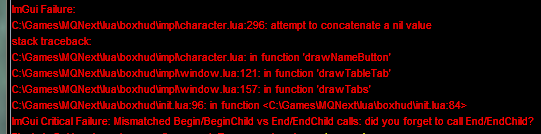
Which I can temporarily get past by changing the concat value to a flat string value, which at least finishes the load process so it executes, and allows me to make changes to the display. I've had this issue for the last two iterations I've used.
Which I can temporarily get past by changing the concat value to a flat string value, which at least finishes the load process so it executes, and allows me to make changes to the display. I've had this issue for the last two iterations I've used.
RedMan updated Boxhud with a new update entry:
20230130
Read the rest of this update entry...
20230130
2.6.6
- nil check on level when appending to name button
Read the rest of this update entry...
I loaded this Lua and suddenly my character went haywire and ran all super choppy. My MQ window has been full of DanNet spam for 10 minutes now after i shut it off. What settings need to be updated to calm this badboy down? I havent got a chance to use it in the field yet. Just in the guildhall.
did you enable dannet debug or something? if you did, maybe try disabling that.I loaded this LUA and suddenly my character went haywire and ran all super choppy. My MQ window has been full of DanNet spam for 10 minutes now after i shut it off. What settings need to be updated to calm this badboy down? I havent got a chance to use it in the field yet. Just in the guildhall.
its not normally on. but it certainly started spamming me when i turned boxhud on rofldid you enable dannet debug or something? if you did, maybe try disabling that.
BOXHUD is awesome, thanks for the resource!
Question...
I run raids with 12 or 18 often.. Can you setup to see if a toon has CWTN plugin paused or unpaused from driver toon running boxhud? Also same for a KISS macro? I can see what mode they are in and have setup a column/tab to pause or unpause but when starting a raid fight, i still tab thru all windows to check if i missed someone being paused or something. thanks
Question...
I run raids with 12 or 18 often.. Can you setup to see if a toon has CWTN plugin paused or unpaused from driver toon running boxhud? Also same for a KISS macro? I can see what mode they are in and have setup a column/tab to pause or unpause but when starting a raid fight, i still tab thru all windows to check if i missed someone being paused or something. thanks


manydills
Well-known member
I just wanted to chime in here and say that the realization that Boxhud can be set as a tab in the MQ Console window is a total game-changer. I really like Boxhud but found it hard to find screen real-estate for it. Attaching it to the console solves all these problems. This is fast becoming one of my favorite luas.
This happened to me after the current Test patch. I found these instructions on the MQ2Dannet resource page. I switched to the other listed interface, reloaded Dannet, and the hud began working again.It was working perfectly. I havent changed any settings but now it will only show the current toon. It wont show anyone else now at all and the peergroup is still set to ALL. Any idea what might have happened?
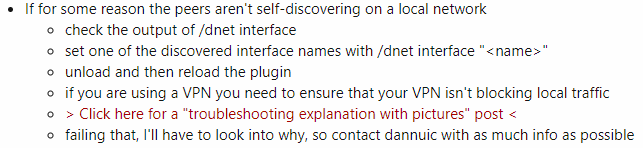
It was working perfectly. I havent changed any settings but now it will only show the current toon. It wont show anyone else now at all and the peergroup is still set to ALL. Any idea what might have happened?
I have the same issue, it was working fine and now it's only showing one toon. I did the command /dnet interface, but i have no idea what to do with this information. Help much appreciated.
Attachments

My issue basically self resloved after I rebooted my computer so I didn't actually "do" anything to fix it.I have the same issue, it was working fine and now it's only showing one toon. I did the command /dnet interface, but i have no idea what to do with this information. Help much appreciated.
shollyd3169
Member
First, let me just say I love this utility!
I have a question though, I wanted to add a column to monitor pet health. My efforts worked perfectly. My problem is (and this is a problem before now), when I log off the toon, while it does keep the pet health column in the window, it does not save the reordered columns. It doesn't save the window size, the column sizes, or even the window location. How do I save those values?
I have a question though, I wanted to add a column to monitor pet health. My efforts worked perfectly. My problem is (and this is a problem before now), when I log off the toon, while it does keep the pet health column in the window, it does not save the reordered columns. It doesn't save the window size, the column sizes, or even the window location. How do I save those values?

you can reorder the columns from the config tab if you go to the tab configuration. the reordering directly in the table using built in imgui controls isn't being persisted as i disable saving imgui table settings due to some old crashes which probably don't occur anymore anyways.First, let me just say I love this utility!
I have a question though, I wanted to add a column to monitor pet health. My efforts worked perfectly. My problem is (and this is a problem before now), when I log off the toon, while it does keep the pet health column in the window, it does not save the reordered columns. It doesn't save the window size, the column sizes, or even the window location. How do I save those values?
For the window position, make sure to do a /Lua stop boxhud after moving the window, rather than just /exit without ending the script.
shollyd3169
Member
Thank you! I was able to reorder the columns and now they stick using the config tab. I can resize and move the window and it saves if I do /Lua stop boxhud (although occasionally the position doesn't save correctly oddly enough)you can reorder the columns from the config tab if you go to the tab configuration. the reordering directly in the table using built in imgui controls isn't being persisted as i disable saving imgui table settings due to some old crashes which probably don't occur anymore anyways.
For the window position, make sure to do a /lua stop boxhud after moving the window, rather than just /exit without ending the script.
You didn't mention, but is there a way to save column widths? If not, it isn't a big deal. Just want to make sure I wasn't missing that too. The columns are currently different sizes, so I feel like there is a setting somewhere (if it also isn't saved by resizing using imgui)
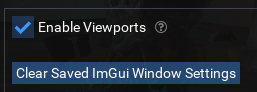
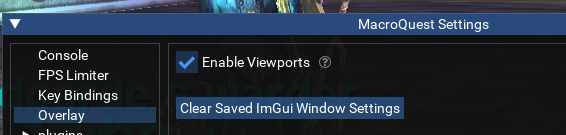
Hey there. Love Boxhud, and have been using it with ISXBoxer, but I've been forced to have to use the "Enable Viewports" setting in MacroQuest Settings as for some reason something with ISXBoxer resets the Boxhud window. I've tried moving the boxhud window on all 6 clients then doing a "/Lua stop boxhud" and "/Lua start boxhud" and while it starts up in the right place, as soon as I click to another client and back it moves the window. I have a feeling it's something related to how ISXBoxer manages the game windows and forces resolution uniformity, but can't quite figure it out. Any ideas?

Boring
Well-known member
Good evening. From someone who knows nothing about coding at all, I considered myself fortunate to not only get it running but also add a new tab called Invis Status and I added a new Property Me.Invis and it works! I have a few questions please:
Where do you have a repository of known command strings like Me.Invis that I can look up,
Why is it 'flickering' (regardless if toons are invis or not, the TRUE/FALSE lettering flickers (the other results like CWTN Paused doesn't flicker) and
What is the command for IVU ?
Sorry to bother you folks! It took hours of reading this all carefully to learn how it works and attempt to make my own properties to play.
Where do you have a repository of known command strings like Me.Invis that I can look up,
Why is it 'flickering' (regardless if toons are invis or not, the TRUE/FALSE lettering flickers (the other results like CWTN Paused doesn't flicker) and
What is the command for IVU ?
Sorry to bother you folks! It took hours of reading this all carefully to learn how it works and attempt to make my own properties to play.
Users who are viewing this thread
Total: 1 (members: 0, guests: 1)
Share: