• You've discovered RedGuides, an EverQuest multi-boxing and scripting community 🧙‍♀️⚙️. We want you to play several EQ characters at once, come join us and say hello! 👋

  • A TLP without truebox has thawed (Very Vanilla ready)
    Frostreaver
Boxhud

Release Boxhud 04/06/2024

No permission to download
As a delayed comment on sorting by group, I created a property for Group.Leader.Name and a column in my xp tab so I can sort by group.

As a side request: could we get an "All" option in the admin->reset observers option, or a button to have it loop through everyone and reset the observers? When running for long periods with boxhud loaded early on, then unloaded later, and loaded again, the observers don't refresh very cleanly or promptly, so I can have extremely stale data displayed. with 24 toons to reset, it's a bit tedious to do it one at a time.
 
lol, was trying to push to see how far I can see what I can make this do =P Me.Inventory[mainhand].ItemLink[CLICKABLE] Almost works lol. gives the big long string of the click and the item name heh
 
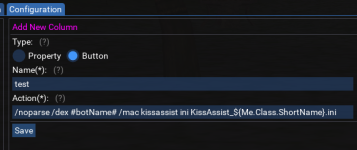
trying to get a button going to make certain toons load their ${Me.Class.ShortName} .ini files from my driver toon. My button looks like this:
/noparse /dex #botName# /mac kissassist ini KissAssist_${Me.Class.ShortName}.ini

My driver toon is a SHD, and every toon i click that button on tries to load the SHD.ini - halp!

PS. Love love love this Lua!
 
trying to get a button going to make certain toons load their ${Me.Class.ShortName} .ini files from my driver toon. My button looks like this:
/noparse /dex #botName# /mac kissassist ini KissAssist_${Me.Class.ShortName}.ini

My driver toon is a SHD, and every toon i click that button on tries to load the SHD.ini - halp!

PS. Love love love this Lua!
this worked ok for me.
1640390465619.png

[BOXHUD] Run command: /noparse /dex toonname /mac kissassist ini KissAssist_${Me.Class.ShortName}.ini

Receiving toon, of a different class, used their own ${Me.Class.ShortName}
 
What are the treshold boxes for under "Add new column" ?
PS! Sorry for silly question.
 
What are the treshold boxes for under "Add new column" ?
PS! Sorry for silly question.
If the column displays a number and you want to show different colors for numbers above or below certain thresholds, enter numbers there. Like hp pct uses 35 and 70, so below 35 is red, in-between is yellow, above 70 is green.

Ascending can reverse that. If ascending isn't checked, then the "above threshold" or "good" values would be 0-35 so those would be green, and 70-100 would be red. The distance column works that way where 0-100 is green, 100-200 is yellow and > 200 is red.

The percentage checkbox just adds a percent sign to the number in the display. Prettify will put commas in numbers like 1000 vs 1,000
 
Would this be able to display if the char's MGB and other AA are ready or not? Like Clerics MGB is ready and Celestial Regen is ready or currently down?
 
Would this be able to display if the char's MGB and other AA are ready or not? Like Clerics MGB is ready and Celestial Regen is ready or currently down?

You could try something like these:

Name=Me.AltAbilityReady[Mass Group Buff]
DependsOnName=Me.Class.ShortName
DependsOnValue=clr

Name=Me.AltAbilityReady[Celestial Regeneration]
DependsOnName=Me.Class.ShortName
DependsOnValue=clr
 
If the column displays a number and you want to show different colors for numbers above or below certain thresholds, enter numbers there. Like hp pct uses 35 and 70, so below 35 is red, in-between is yellow, above 70 is green.

Ascending can reverse that. If ascending isn't checked, then the "above threshold" or "good" values would be 0-35 so those would be green, and 70-100 would be red. The distance column works that way where 0-100 is green, 100-200 is yellow and > 200 is red.

The percentage checkbox just adds a percent sign to the number in the display. Prettify will put commas in numbers like 1000 vs 1,000
Thanks <3
 
Seems that boxhud is now displaying % twice in column like hp, mp or EP
 
Is there a possibility to scale down / up the window ? Or any possibility of adding that in the future ?


PS! Love that plugin!
 
Is there a possibility to scale down / up the window ? Or any possibility of adding that in the future ?


PS! Love that plugin!
You can grab and adjust it when in *viewport*/*overlay* mode.

And not home to check atm, but isnt there a option in the MQ in game menu to adjust viewports/overlay size and color?
 
Having an issue with inivis even though I set different colors for the different types of invis I'm just getting the light blue color in parenthesis for every invis I can't tell if double invis worked.
I'm using Perfected AA's they are alt 1210 and alt 1212.
 
Having an issue with inivis even though I set different colors for the different types of invis I'm just getting the light blue color in parenthesis for every invis I can't tell if double invis worked.
I'm using Perfected AA's they are alt 1210 and alt 1212.
You need to observe the different invis types if you want it to differentiate between different invis. Me.Invis[1] and Me.Invis[2] or something.
 
Hi All, is it possible to display Mercenary %Exp and unspent Merc AAs?
 
I can't get this to start up for my team, I run 24 characters but I get a timeout every time before it finishes loading. I had similar issues with dobservers in my macro also, not sure why my DanNet is slow like this, maybe just too many chars?

1644352099390.png

Ok Edit to my own post here, turns out /dnet interface returned that I was using an old Hyper-V virtual switch (was interface 2 in dnet). I changed it to use the loopback adapter (interface 1 @ localhost/127.0.0.1) and reloaded dnet, and now I have it working again. Leaving the stuff above incase someone else has similar problems. Finger's crossed that solves all my DNet issues!
 
Last edited:
Ok so my "fix" was a false positive. I think just reloading DanNet was what made it load so well because after running for a few hours I went to reload it again and got the same "Timed out waiting for observer to be added" errors again. After trying 5 times it would time out on different toons everytime. All 24 toons are run locally on the same PC, all dnets are connected via the loopback adapter in /dnet interfaces. I am running EQBC/NetBots at the same time.
 
maybe I am blind but is there away to add cwtn mode and if it is paused or not to the gen tab?
From the configuration tab:
  1. Expand properties and Add new property
    1. property name == CWTN.Mode
    2. DependsOnProperty == Me.Class.ShortName
    3. DependsOnValue == war,shd,shm,clr,mnk,mag,enc,rog,ber
      1. DependsOnValue should be whatever class short names you use CWTN plugins for. Otherwise, it will cause macros on non-CWTN toons to get errors about undefined variable CWTN.
  2. Expand columns and Add new column
    1. select your new CWTN.Mode property, fill out other stuff as you see fit. more details of the column settings on overview.
  3. Expand tabs and select General tab (or whichever tab you want to add it to, or create a new tab)
    1. Add the new CWTN Mode column to the tab
  4. If you added the column to an existing tab, should be done then. If you made a new tab, then also add that tab to the window.

Under properties and columns there is also an "Add from library" option that comes with some stuff pre-filled, but then you still need to add the column to a tab.

Most important part is setting the DependsOn stuff in the property so you don't break non-CWTN toons.
 
I have continued to work with this over the last 2 weeks. What I found is that if you have EvasiveRefresh enabled boxhud almost never completes loading and gives the "time out waiting for observer" error. With EvasiveRefresh disabled it loads fine for me (with 24 toons).

So if your having a similar issue I had above make sure you check your EvasiveRefresh setting in DanNet (/dnet EvasiveRefresh). I had enabled it long ago trouble shooting another issue with dannuic, disabling it improved performance across the board (even with other obs I use in my own macros).
 
Not sure if I'm not understanding this correctly, but I cannot get BoxHUD to show my group. It only shows myself. I have dnet installed and enabled on all toons, same with NetBot, and still only my group leader shows himself. Each toon actually only shows themselves. I dug through the comments, and the guides to see if there was something I needed to do, but I didn't see anything.
 
The default configuration is set to zone iirc. If you go to the Admin tab, it should show the dannet peer group that it is listing toons from. If you go to the configuration tab and expand windows, select default, you can edit that to change the peer group to something else, like all or group.
If you switch the window to group, it will expect the toon running boxhud to be the group leader.

If its not anything related to what group you're watching, use /dnet info and /dnet interface to make sure your characters are all seeing each other.
 
Not sure if I'm not understanding this correctly, but I cannot get BoxHUD to show my group. It only shows myself. I have dnet installed and enabled on all toons, same with NetBot, and still only my group leader shows himself. Each toon actually only shows themselves. I dug through the comments, and the guides to see if there was something I needed to do, but I didn't see anything.
Try verifying if your DanNet is connecting across the peers first I think.

/echo peer count=${DanNet.PeerCount} connected peer names= ${DanNet.Peers}

You should see the correct # of toons you are running and all of their names in that echo, if not the dnet isnt connecting somehow. If it's not connecting make sure all of your toons are using the same interface by doing a /dnet interface on each toon.
 
The default configuration is set to zone iirc. If you go to the Admin tab, it should show the dannet peer group that it is listing toons from. If you go to the configuration tab and expand windows, select default, you can edit that to change the peer group to something else, like all or group.
If you switch the window to group, it will expect the toon running boxhud to be the group leader.

If its not anything related to what group you're watching, use /dnet info and /dnet interface to make sure your characters are all seeing each other.
Try verifying if your DanNet is connecting across the peers first I think.

/echo peer count=${DanNet.PeerCount} connected peer names= ${DanNet.Peers}

You should see the correct # of toons you are running and all of their names in that echo, if not the dnet isnt connecting somehow. If it's not connecting make sure all of your toons are using the same interface by doing a /dnet interface on each toon.
Thank you both. Ended up needing to restart MQ entirely, and looked in my MQDnet ini to find a weird setting in there that had invalid chars in there. Removed that special char and it's all working.
 
hi there, i use boxhud its really nice for tracking exp/aa/mana/hp ect i like the fact that i can stop my boxes from doing things but im unable to resume them from the same window and have to switch to to them is there a way you could add a resume macro button as well?
thanks for the consideration! :)
 
hi there, i use boxhud its really nice for tracking exp/aa/mana/hp ect i like the fact that i can stop my boxes from doing things but im unable to resume them from the same window and have to switch to to them is there a way you could add a resume macro button as well?
thanks for the consideration! :)
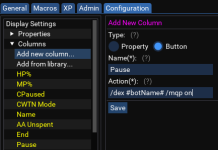
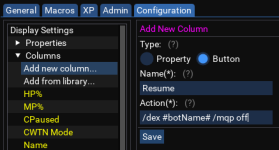
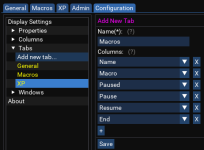
The default pause button that is included is just the command /mqp so it should toggle macros paused/unpaused. For individual buttons, you would want to use /mqp on and /mqp off.

The columns are all configurable, so you can actually add/change these in your settings:

For example:
1. Edit the current Pause button column to be /mqp on:
1645236869531.png

2. Add a new Resume button to /mqp off:
1645236911112.png

3. Add the resume button to the Macro tab:
1645237008507.png
 
aquietone updated Boxhud with a new update entry:

Property input validation

Clicking Save when adding a new property will now attempt some basic validation. Validation output will appear below the Save button.
The Save button will change to Confirm, which will then actually persist the change when clicked.

- Validation failing does not prevent saving.
- Validation will only be performed against TLOs on the character running boxhud.
- If you add cWtN.Pause, it will complain about cWtN (should be CWTN)
- If you add CWTN.Pause, it will complain about Pause (should be...

Read the rest of this update entry...
 
aquietone updated Boxhud with a new update entry:

Import Configuration

Add ability to import properties and columns from other boxhud settings files.
1. Go to Configuration tab
2. Select Import Configuration on the left hand side
3. Click Choose and select a file like boxhud-settings-myothertoon.lua from your MQ Config folder
4. Select each property and column you would like to import
5. Click Import

Properties and Columns with the same name as existing Properties and Columns will be rejected. Columns which depend on Properties that don't exist will be...

Read the rest of this update entry...
 
this worked ok for me.
View attachment 36194

[BOXHUD] Run command: /noparse /dex toonname /mac kissassist ini KissAssist_${Me.Class.ShortName}.ini

Receiving toon, of a different class, used their own ${Me.Class.ShortName}
What about when the receiving toon is yourself? First you fixed the Lua's ability to handle /noparse, then you fixed /dex #botName# when botName is yourself, but now it seems it won't parse anything when /noparse /dex #botName# is yourself.
 
Release Boxhud

Users who are viewing this thread

Back
Top
Cart