• You've discovered RedGuides, an EverQuest multi-boxing and scripting community 🧙‍♀️⚙️. We want you to play several EQ characters at once, come join us and say hello! 👋

  • A TLP without truebox has thawed (Very Vanilla ready)
    Frostreaver
Boxhud

Release Boxhud 04/06/2024

No permission to download
I saw it mentioned on pg 2 of the comments, if I want to add a column (in this case "class"), I have to go into the settings file and and add the observer property?
 
I saw it mentioned on pg 2 of the comments, if I want to add a column (in this case "class"), I have to go into the settings file and and add the observer property?

Me.Class.ShortName should be in there by default already so you probably don't have much need for Me.Class. The overview page has some screenshots of how to add things, but to summarize:
1. Add a property which you want to observe. This would be a TLO member like Me.Class. Don't include the ${ }.
2. Add a column which references the property. The column define things like thresholds for coloring the text if its a number, whether the values ascending/descending like if you want 0 to be red and 100 to be green, etc.
3. Add the column to an existing tab or create a new tab. A column can be added to one or more tabs, in case you wanted it to always be visible on all tabs or something.
 
Me.Class.ShortName should be in there by default already so you probably don't have much need for Me.Class. The overview page has some screenshots of how to add things, but to summarize:
1. Add a property which you want to observe. This would be a TLO member like Me.Class. Don't include the ${ }.
2. Add a column which references the property. The column define things like thresholds for coloring the text if its a number, whether the values ascending/descending like if you want 0 to be red and 100 to be green, etc.
3. Add the column to an existing tab or create a new tab. A column can be added to one or more tabs, in case you wanted it to always be visible on all tabs or something.

yup, got it, I was to busy jumping steps, ty for getting me back on track.
 
is there way to bring up boxhud when you launch ....instead of having to manually launch it on every toon
thanks
 
I wonder if there would be a way to incorporate a dps meter

You're probably better off sticking to MQ2DPSAdv or an external parser like gamparse/eqlogparser.
Sure, if you were running MQ2DPSAdv on every toon, you could observe all of their DPS like DPSAdv.MyDPS, but I think that would be a very strange thing to do.
 
You're probably better off sticking to MQ2DPSAdv or an external parser like gamparse/eqlogparser.
Sure, if you were running MQ2DPSAdv on every toon, you could observe all of their DPS like DPSAdv.MyDPS, but I think that would be a very strange thing to do.
Run eqlogparser with overlay.. at least shows total and top.. 4?. tuck it next to boxhud on 3rd or 4th monitor.. perfect...
 
i noticed my health and manna percentages are not jiving with my actual health and manna
the only reason that i noticed is i couldn't figure out why my tank would not go hunt, when all the variables were showing 100
 
i noticed my health and manna percentages are not jiving with my actual health and manna
the only reason that i noticed is i couldn't figure out why my tank would not go hunt, when all the variables were showing 100

Sounds like something has probably gone stale. have the toons that aren't updating logged out/back in, gone LD, anything that might screw up the observers on the toon running the HUD?
You can try going to the admin tab and resetting the observers for a toon that isn't updating properly, or reload the dannet plugin on the toon running the HUD so that the observers are all recreated.
 
This used to overlay when the running screen was focused (ie driver active window, have this overlayed on another monitor with EQ). It hasnt since i patched last night.. am i missing a setting, or update?
 
How about the sorting aspect of it? I see there was an update for it. Updated viewport in overlay settings, but not sure what to change to add sorting back in. Thank you!
 
Duh, re-download the badboy proactively. My how I've gotten lazy with the launcher. Thank you!
 
Is that possible to show specific disc or spell is ready or not??
It'd probably look a little strange unless you've got something interesting to watch from every toon / want to watch something which every toon has, like a glyph or something that is common across all classes.
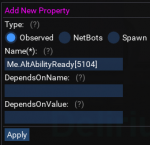
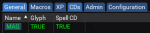
For example, you could define a property to watch for glyph of dragon scales to be ready:
1634127541064.png
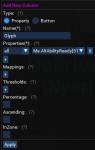
And then use in a column:
1634127592228.png


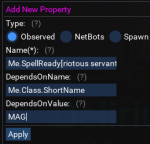
Alternatively, you could use different properties for different classes if you wanted to watch different discs or spells:
1634127781934.png
its cut off but i used Me.SpellReady[riotous servant rk. ii]
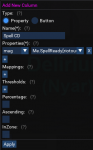
And then use each in a column:
1634127871809.png

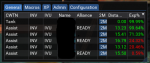
Then add the columns to a tab or create a new one and end up with something like:
1634127959794.png

Just note that if you do use spells, I'm pretty sure you can't nest ${ } inside of dannet observed properties, so you can't do something like Me.SpellReady[${Spell[riotous servant].RankName}]}, which is why i included the full spell name including rank there.
 
Thank you so much, this is what I need.

One more thing, can I click on the TRUE to run some command? I tried to make a button, but it can't show the status.
Nope, nothing like that. Columns displaying info and columns including buttons are independent of each other. Interesting idea though..
 
Nope, nothing like that. Columns displaying info and columns including buttons are independent of each other. Interesting idea though..
My idea is to put a disc button here from the other character. But I think that's ButtonMaster's job... :P
 
Last edited:
What about tribute and trophy status? Is there any reference page for this??
You can find all the TLO / members here https://docs.macroquest.org/macroquest/data-types-and-top-level-objects/top-level-objects
For example, stuff under Me like Me.PctHPs is here https://docs.macroquest.org/macroquest/data-types-and-top-level-objects/top-level-objects/tlo-me

I'd recommend not going overboard with what you add. Also probably recommend sticking to information that is useful in real time, and not things that change infrequently.
Keep in mind that for a lot of things that you don't need to see as often, can use things like /status from MQ2Status plugin to query on demand.
 
You can find all the TLO / members here https://docs.macroquest.org/macroquest/data-types-and-top-level-objects/top-level-objects
For example, stuff under Me like Me.PctHPs is here https://docs.macroquest.org/macroquest/data-types-and-top-level-objects/top-level-objects/tlo-me

I'd recommend not going overboard with what you add. Also probably recommend sticking to information that is useful in real time, and not things that change infrequently.
Keep in mind that for a lot of things that you don't need to see as often, can use things like /status from MQ2Status plugin to query on demand.
Thanks!
 
Release Boxhud

Users who are viewing this thread

Back
Top
Cart