
-
 Hail, we're RedGuides. We want you to play six (yes, 6!) EverQuest characters at once. We have scripts and a friendly community to help, please join our playstyle and say hello! 👋
You are using an out of date browser. It may not display this or other websites correctly.
You should upgrade or use an alternative browser.
You should upgrade or use an alternative browser.

Release Boxhud 04/06/2024
- Thread starter aquietone
- Start date
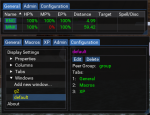

yes pls! i currently sort by class.. if your saying sort by group or fellowship or raid, that would be amazing..


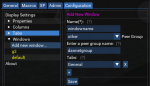
Unofficial release to maybe get some feedback, since I'm not sure everyone would need the added layer of configuring a window like mentioned above. It changes a few things:
1. Adds the "window" configurations mentioned above, including the ability to select the peer group the window will use.
2. Adds some more actions to the admin tab for checking or dropping dannet observers.
3. Adds `group` keyword as an option for a windows peer group. This will set the peer group to
4. I re-arranged the code a whole lot for something to do.. i think it all still works.
1. Adds the "window" configurations mentioned above, including the ability to select the peer group the window will use.
2. Adds some more actions to the admin tab for checking or dropping dannet observers.
3. Adds `group` keyword as an option for a windows peer group. This will set the peer group to
group_povar_charactername, and expects that you are the group leader.4. I re-arranged the code a whole lot for something to do.. i think it all still works.
It doesn't let you sort the window by fellowship, group, etc, but adds the ability to create entirely separate windows for different dannet peer groups. Not sure how that will play out for screen real estate. They can of course be docked together but still separate windows may just be too much.yes pls! i currently sort by class.. if your saying sort by group or fellowship or raid, that would be amazing..
Attachments
This is is very useful to me as i run 3 separate groups in the same zone now i can just see whos in my Particular group. ( I think) rather than all 18 at once. on each of the leaders.Unofficial release to maybe get some feedback, since I'm not sure everyone would need the added layer of configuring a window like mentioned above. It changes a few things:
1. Adds the "window" configurations mentioned above, including the ability to select the peer group the window will use.
2. Adds some more actions to the admin tab for checking or dropping dannet observers.
3. Adds `group` keyword as an option for a windows peer group. This will set the peer group togroup_povar_charactername, and expects that you are the group leader.
4. I re-arranged the code a whole lot for something to do.. i think it all still works.
It doesn't let you sort the window by fellowship, group, etc, but adds the ability to create entirely separate windows for different dannet peer groups. Not sure how that will play out for screen real estate. They can of course be docked together but still separate windows may just be too much.
aquietone updated Boxhud with a new update entry:
Window configs + some fixes
Read the rest of this update entry...
Window configs + some fixes
- Fix window position resetting and generating new window ID while dead and hovering
- Update name button to /foreground immediately instead of from main loop
- Add multiple window support
-- In addition to configuring properties, columns and tabs, you can now configure windows.
-- Windows represent a whole boxhud UI window, and allow configuring the DanNet peer group and tabs that will be displayed in each window.
-- A default window will be configured with all existing tabs
-- If creating...
Read the rest of this update entry...
cool feature (intended or not), it will monitor across different picks.. It doesnt give range, but everything else (i have displayed) works 
I have an issue when I first log in. I get the the below image. If I just /Lua run boxhud again it launches fine. Can you advised what I missed?
Last edited:
how soon after login are you starting it? are you using a config file to start it immediately or you just started it manually after loading? Also, looks like the screenshot has a name, probably want to delete it.I have an issue when I first log in. I get the the below image. If I just /lua run boxhud again it launches fine. Can you advised what I missed?

gpag
Active member
Updated to latest build and trying to figure out how to keep all my toons showing even if in another zone. Before I upgraded their name would show as red and i could still click on the name to switch to them to see what's up in their other zone. I thought it was this:
["Name"] = {
["InZone"] = false;
["Type"] = "property";
["Percentage"] = false;
["Name"] = "Name";
};
Which did have inzone set to true and showed up as:
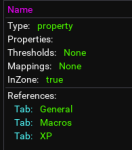
when moved to false, it looks like this:
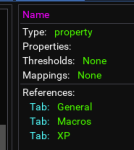
Am I looking in the wrong place? Thank you!
["Name"] = {
["InZone"] = false;
["Type"] = "property";
["Percentage"] = false;
["Name"] = "Name";
};
Which did have inzone set to true and showed up as:
when moved to false, it looks like this:
Am I looking in the wrong place? Thank you!
On the configuration tab, windows > default > edit, set the peer group to all.Updated to latest build and trying to figure out how to keep all my toons showing even if in another zone. Before I upgraded their name would show as red and i could still click on the name to switch to them to see what's up in their other zone. I thought it was this:
["Name"] = {
["InZone"] = false;
["Type"] = "property";
["Percentage"] = false;
["Name"] = "Name";
};
Which did have inzone set to true and showed up as:
View attachment 34917
when moved to false, it looks like this:
View attachment 34918
Am I looking in the wrong place? Thank you!
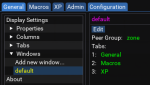
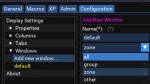
When upgrading, you shouldn't have lost your previous config.. did you? How did you update, delete the old folder and add the new one, or copy the new one over the old?
how soon after login are you starting it? are you using a config file to start it immediately or you just started it manually after loading? Also, looks like the screenshot has a name, probably want to delete it.
I am using the cfg file to launch it using the (i believe) recommended line of /timed 100 /Lua run boxhud
aquietone updated Boxhud with a new update entry:
Fix column buttons
Read the rest of this update entry...
Fix column buttons
- Fix column buttons not actually doing anything. Apparently the last release broke column buttons.. guess they must not be used much.
- Also includes a fix or two for netbots properties in case some crazy person happens to use those..
Read the rest of this update entry...
gpag
Active member
Sorry for yet another newb question... When I am applying this update. I'm only moving over the boxhud.Lua is that correct?

Or do I need to move anything over in the boxhud folder? Best practice just to save out the chars settings, add everything, then plop the char settings back in? Thank you for all your help!
Or do I need to move anything over in the boxhud folder? Best practice just to save out the chars settings, add everything, then plop the char settings back in? Thank you for all your help!
You should be able to copy in the boxhud.Lua + boxhud folder into your Lua folder on top of what's already there. It shouldn't remove your settings files and just overwrite the other stuff.Sorry for yet another newb question... When I am applying this update. I'm only moving over the boxhud.lua is that correct?
View attachment 34986
Or do I need to move anything over in the boxhud folder? Best practice just to save out the chars settings, add everything, then plop the char settings back in? Thank you for all your help!
Buy you can always backup your settings files just in case

I’d love to be able to group them based on group. I often box 18+.
I’d love to be able to group them based on group. I often box 18+.
If you've got the screen space for it, try something like this:
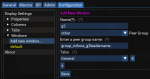
then you could dock the separate windows together, put them side by side or stack them or whatever.
Last edited:
aquietone updated Boxhud with a new update entry:
Move config, strip brackets on properties
Read the rest of this update entry...
Move config, strip brackets on properties
- Adding properties will now automatically strip leading and trailing ${ } from the property name to help avoid bad configuration
- A big red warning has been added to also remind about TLO members being case sensitive. If you're unsure, check the docs: https://docs.macroquest.org/macroquest/data-types-and-top-level-objects/top-level-objects
- Boxhud will now read boxhud-settings-charactername.lua from the MQ config directory. It should copy your existing settings file over there...
Read the rest of this update entry...

You should be able to add those, anything which can be queried or observed with dannet technically can be, though a lot of things i wouldn't recommend.Could ${Me.CurrentFavor}, ${Me.TributeActive}, and ${Me.TributeTimer} be added as Column Properties options?
Just add the appropriate property and column for each, and add them to a tab, using the configuration tab. Instructions are on the main page of the resource or instructions tab.
Just keep in mind, TLO members are case sensitive, and should be added without the ${ }. So, adding the properties, the names would be Me.CurrentFavor, Me.TributeActive and Me.TributeTimer.
aquietone updated Boxhud with a new update entry:
Added a library thing
Read the rest of this update entry...
Added a library thing
- Configuration tab now has "Add from library" option for properties and columns. These are pretty empty atm, but provides a few pre-configured things that are basically just disabled by default / excluded from the main property or column lists.
- Made some changes to how observers are managed. May be better, may be worse.
- Fixed save settings to write to the correct place since the last update moved character settings to the config folder.
Read the rest of this update entry...
You should be able to add those, anything which can be queried or observed with dannet technically can be, though a lot of things i wouldn't recommend.
Just add the appropriate property and column for each, and add them to a tab, using the configuration tab. Instructions are on the main page of the resource or instructions tab.
Just keep in mind, TLO members are case sensitive, and should be added without the ${ }. So, adding the properties, the names would be Me.CurrentFavor, Me.TributeActive and Me.TributeTimer.
The available TLO members appear to be hard-coded?
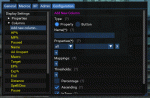
I'm pretty new to Lua, so this is probably ignorance on my part, but hunting around I haven't found a way to add additional TLO members to that dropdown, which seems like the place where they would go?
On the left, under Properties, you add the properties you're interested in.The available TLO members appear to be hard-coded?
I'm pretty new to LUA, so this is probably ignorance on my part, but hunting around I haven't found a way to add additional TLO members to that dropdown, which seems like the place where they would go?
Once you've added the properties, then you can reference them from a column.
1. Add new property, such as Me.CurrentFavor
2. Add new column to display the Me.CurrentFavor property
3. Add the new column to an existing tab or create a new tab
4. If you added a new tab, add the new tab to the window.
Columns can display different properties for different classes and such, which is why properties and columns are separate configuration items.
On the left, under Properties, you add the properties you're interested in.
Once you've added the properties, then you can reference them from a column.
1. Add new property, such as Me.CurrentFavor
2. Add new column to display the Me.CurrentFavor property
3. Add the new column to an existing tab or create a new tab
4. If you added a new tab, add the new tab to the window.
Columns can display different properties for different classes and such, which is why properties and columns are separate configuration items.
Got it - thanks!

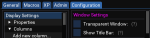
Check the show title bar box hereI'm liking this.
How about minimize/close buttons a la MAUI?
I'm trying to add some properties to my boxhud that I was previously using in MQ2HUD through netbots observation. The properties are Cursed, Poisoned, Diseased, and Pet HP. As soon as I added a property for NetBots.Cursed, boxhud crashed and crashes again when I try to reload it. See below screenshot. Stack 17 was a character name. What did I do wrong?
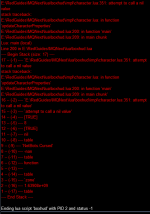
If you want boxhud to observe something likeI'm trying to add some properties to my boxhud that I was previously using in MQ2HUD through netbots observation. The properties are Cursed, Poisoned, Diseased, and Pet HP. As soon as I added a property for NetBots.Cursed, boxhud crashed and crashes again when I try to reload it. See below screenshot. Stack 17 was a character name. What did I do wrong?
Me.Cursed then just add an observed property for Me.Cursed. Forget that whole netbots thing.If you want to add NetBots properties then leave off the
NetBots. part. Just use Cursed.You'll have to remove the bad property from your boxhud-settings-charactername.Lua file I guess since boxhud fails to start. It will be under properties somewhere. Or if you don't have much custom stuff added it may be easier to just delete your settings file and start from the default again.
Thanks for the help. I think I'm figuring it out. I decided to use Me.CountersCurse instead to save space.If you want boxhud to observe something likeMe.Cursedthen just add an observed property forMe.Cursed. Forget that whole netbots thing.
If you want to add NetBots properties then leave off theNetBots.part. Just useCursed.
You'll have to remove the bad property from your boxhud-settings-charactername.lua file I guess since boxhud fails to start. It will be under properties somewhere. Or if you don't have much custom stuff added it may be easier to just delete your settings file and start from the default again.
aquietone updated Boxhud with a new update entry:
Misc updates
Read the rest of this update entry...
Misc updates
View attachment 35697View attachment 35698
- Add setting under Display Settings to include levels in name column, like Myname (120).
- Add column specific color settings which will override global color settings.
View attachment 35699
Read the rest of this update entry...

rocketman8181
Active member
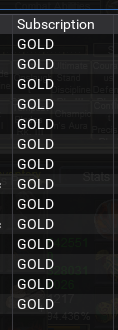
Would there be any way to have a check if account is gold/silver? when you box a lot of toons that would come in handy
Kingfisher
Member
question regarding Lua box hud: the information doesnt seem to refresh, i tried reset the observer buttong, zoning, but it stays the same, also cvlosed and reopened the box hud didnt help..any ideas?
You could addWould there be any way to have a check if account is gold/silver? when you box a lot of toons that would come in handy
Me.Subscription if you wanted to see that. https://docs.macroquest.org/macroqu...p-level-objects/data-types/datatype-characterThe whole thing isn't refreshing or just certain characters or columns?question regarding lua box hud: the information doesnt seem to refresh, i tried reset the observer buttong, zoning, but it stays the same, also cvlosed and reopened the box hud didnt help..any ideas?
If the whole thing seems broke, and you're on the latest version, try the big scary reload dannet and boxhud button on the admin tab. If you're not on the latest, stop boxhud, and do a /dga /multiline ; /plugin dannet unload ; /timed 10 /plugin dannet load ;
If you reload dannet, and are running any other macros that depend on dannet, you may want to restart them too after.
rocketman8181
Active member
Nice!! Thank you very much!

Robban
Ultimate seasoned veteran member
Thats a good idea! But I think I will put in ${Me.SubscriptionDays} instead. Nice to see the days left
rocketman8181
Active member
Yea I was just looking at that... Love this thing!
Kingfisher
Member
some data is stuck, e.g. my zerker stays on a certain exp% and aa unspent while my driving toon is updated correctlyYou could addMe.Subscriptionif you wanted to see that. https://docs.macroquest.org/macroqu...p-level-objects/data-types/datatype-character
The whole thing isn't refreshing or just certain characters or columns?
If the whole thing seems broke, and you're on the latest version, try the big scary reload dannet and boxhud button on the admin tab. If you're not on the latest, stop boxhud, and do a /dga /multiline ; /plugin dannet unload ; /timed 10 /plugin dannet load ;
If you reload dannet, and are running any other macros that depend on dannet, you may want to restart them too after.
Users who are viewing this thread
Total: 1 (members: 0, guests: 1)
Share: