• You've discovered RedGuides, an EverQuest multi-boxing and scripting community 🧙‍♀️⚙️. We want you to play several EQ characters at once, come join us and say hello! 👋

  • A TLP without truebox has thawed (Very Vanilla ready)
    Frostreaver
Bazaar.mac

Release Bazaar.mac 2023.8.20.1

No permission to download
People have noticed MQ for a long time.
Pricing items at 2m is a good way to keep from selling them when you don't actually want to sell them.
Staying competitive in the vegetable and water business is vital to the survival of my boxes.
 
lol, i think i need to avoid your green grocers but i do appreciate the fact that mq2 is well known, but at the same time should we be highlighting it quite so stupidly, ive only bought this up due to a large increase in chatter concerning these random 2 mill items, theres already a lack of confidence in the economy due to recent issues its in our own interests to keep it healthy. As for not really wanting to sell an item there are many other storage options.
 
if you dont want to sell something dont add it to the baz trader list .. ive had a trader and if i didnt want to sell something i just dont add it .. even if its in a trader satchel no one can buy it cause there is no price and its not even viewable by a buyer ..
 
if you dont want to sell something dont add it to the baz trader list .. ive had a trader and if i didnt want to sell something i just dont add it .. even if its in a trader satchel no one can buy it cause there is no price and its not even viewable by a buyer ..
If I don't list them, then how can I profit from someones misclicks!
 
Want to say sorry to everyone for ghosting on this. Without going into too much; Life Happens.
It's truly great the Doc James was able to pick up and fix an issue that came up.

This script grew from something relatively simple, to something complex and I am not the greatest coder. I improved the original to fit my needs and then requests started coming in. Tried to accommodate what I could. I'm glad it's still going and working well for many. I looked over the last couple of pages and did not see any big showstopper issues. I'm glad those who use it enjoy it.
 
Wrong forum
Hey I was just wondering if a couple things existed.

1. Is there a way to stop the baz mac from INCREASING prices? As in some idiot throws a semi trash item up for 500k that I have listed for 20k. Don't increase.

2. Is there any similar macro to just "drop all prices 20%" or something similar? some way to lower prices on things that aren't selling quickly.
 
Hey I was just wondering if a couple things existed.

1. Is there a way to stop the baz mac from INCREASING prices? As in some idiot throws a semi trash item up for 500k that I have listed for 20k. Don't increase.

2. Is there any similar macro to just "drop all prices 20%" or something similar? some way to lower prices on things that aren't selling quickly.

For #2, I am not aware of any that do what you're asking. Not a completely simple feature once you boil it down to "How/when exactly should it act"

#1 supported in a more specific way than you're requesting; adding a maximum price. This is per-item setting in the config file.

bazaar.ini
[Water Flask]
SellPriceMin=10000
SellPriceMax=20000

You can also set a global maximum for new items when they are created, but this is probably less useful for your ask

bazaarSettings.ini
[Defaults]
SellPriceMin=200
SellPriceMax=1000000
 
Hey I was just wondering if a couple things existed.

1. Is there a way to stop the baz mac from INCREASING prices? As in some idiot throws a semi trash item up for 500k that I have listed for 20k. Don't increase.

2. Is there any similar macro to just "drop all prices 20%" or something similar? some way to lower prices on things that aren't selling quickly.

1) Not directly. You could use the custom_script_trader_price_controls to possibly handle it. This feature gives you more control of how it adjusts the prices, but it should be considered an advanced feature, and what you're looking it would be a very advanced feature.
2) Not that I know of.

As to question 1. The macro was intended to maximize profits. If someone is asking 500k then you will want to undercut them or sell it at your SellPriceMax. Out of the box this macro works well. Every couple of months I would go through and adjust my Max and Min prices. I've been gone for a while and recently came back; the market is completely different than when I left.
 
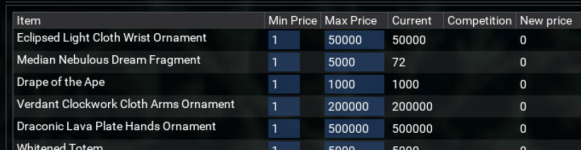
Looking for a couple of people to test my new Settings GUI
1705209025325.png

It does not replace the macro, but provides a graphical interface to all the settings of the macro.
I was using something similar for myself to manage the max and mins of the bazaar.ini. This is an attempt to clean up and maybe offer it up to others.

Features:
enable/disable columns.
edit just items on your trader/buyer or your entire INI file.
can display current market values.
tweak the bazaarSetting.

Important Notes:
Looking for about 2 or 3 persons (Send me a DM)
Requires macro version: 2024.1.13.1 (Soon to be released)
It works for me but does not mean it works for everyone.
You must provide feedback. (Even if it's you are awesome JerkChicken works great)
Be willing to send a screenshot of any error messages (please sanitize anything which may identify your character)
It may or may not get officially released. (depends at how bad I sucked at it)
 
Looking for a couple of people to test my new Settings GUI
not sure how you edit your settings, but something I did in mine that I'm really liking.
1705237066171.png

I made the fields editable when it scans like what you see in the screen shot, you can then very quickly scan through and adjust the prices which then updates the Bazaar.ini file when you leave the cell.
 
Some additional information.

Fields become editable when you click the edit button.
I hate having to keep counting zeros, so I wanted a way to format with comma's

It loads your current offers when in bazaar, needs to be able to open the /trader and /buyer windows.
It has a column for "Market Value" which shows the current high and low selling prices. This part works outside of the bazaar zone.

The bazaar button will search /bazaar for the item and Barter searches /barter

I did not want to clutter the discussion with a bunch of screenshots and I tried to use some dummy data.

Here is what editing can look like
1705246489292.png

The box under Diamond is for your custom notes, cause notes boxes are awesome. The notes are displays when hovering over the (?) next to the item name.

So far, I have only tested it with 1600 items in the bazaar.ini
 
First time using this today, and basically just using it so i dont have to price items... then i pause it after, but what exactly do i do when there's a item it can't search in bazaar... for example say i have a emerald, and it searches but finds no results it just says null... and leaves it at 0 is there a generic way in .ini or typed command i can do to make it default ANY item thats not found to 20k or something? --

Thank you!
 
1/3 of the way down the main pages tells you how to set default min prices.. :shrug: option 2 is to have JC fly ro your house and set prices.. botb work, one is highly prefered over the other :f5:
 
First time using this today, and basically just using it so i dont have to price items... then i pause it after, but what exactly do i do when there's a item it can't search in bazaar... for example say i have a emerald, and it searches but finds no results it just says null... and leaves it at 0 is there a generic way in .ini or typed command i can do to make it default ANY item thats not found to 20k or something? --

Thank you!

In the bazaar.ini file you will find a section for every item it detects on your trader. Under those you will find keys for SellPriceMin and SellPriceMax

If SellPriceMax is set to 1 (often the default) it means no max or min, update as needed when needed. When it does not find any items to compare it just leaves it as it was.
If SellPriceMax is set to -1 (negative one) it won't ever check the item or adject its prices. It's the "I want to do this item manually" setting.
If SellPriceMax is set to 20000: If no one else is selling that item will set it to 20000. If you're the only one selling it, let's maximize your profit.

SellPriceMin is the least amount you are willing to sell it. Helps prevent pricing errors as it double checks to make nothing got priced under that amount.

In the bazaarSettings.ini there are Default Max/Min. Any new item will be set to these amounts.
There is also the "InitialPrice" in the bazaarSettings.ini. This is the price it will set when it first discovers a new item.

The macro runs well out of the box, but to really make it work you have to manage the bazaar.ini file. There are a lot of ways to customize things to make it your own and make it not look so automated. The Lua Ui I posted is still in development, it is intended to make managing and understanding all the settings easier. There is no release time frame yet.
 
When using aggressive seller and undercutting by 5000, is there a way to make it so it is always a round number? Like round to the nearest 1000 or something? I feel like it looks very botty when someone prices something at 119499 and then i update to 114499... Tried searching for this answer but didnt have luck.
 
I wanted to make my bazaar prices less "bot-like" and more human appearing. So I changed a bit of code in order to round prices downward...

Here is the default block of code in bazaar2.mac:
[CODE lang="ini" title="Beginning at Line 179 of bazaar2.mac"] /if (${newPrice} == ${OpponentPrice} && ${OpponentPrice}) {
/varcalc newPrice ${newPrice}-${Math.Calc[${newPrice}*0.${UndercutPct}]}
/if (${Debugging}) /bazecho \arA new price ${UndercutPct}% lower than all other vendors is ${newPrice}
}
[/CODE]

I replaced that block with the following lines which uses the Modulo function to chop off the least significant bits of the price. It's somewhat arbitrary how many digits I decided weren't significant! I'm sure there is a more elegant way to do this using a Switch function but my coding skills are very rough.

[CODE lang="ini" title="Round down code"]
/if ((${newPrice} == ${OpponentPrice}) && (${OpponentPrice}) && (${newPrice} > 1000000)) {
/varcalc newPrice ${newPrice}-${Math.Calc[${newPrice}*0.${UndercutPct}]}
/varcalc newPrice ${newPrice}-${Math.Calc[${newPrice}%100000]}
/if (${Debugging}) /bazecho \arA new price ${UndercutPct}% lower than all other vendors is ${newPrice}
}

/if ((${newPrice} == ${OpponentPrice}) && (${OpponentPrice}) && (${newPrice} > 100000) && (${newPrice} < 999999)) {
/varcalc newPrice ${newPrice}-${Math.Calc[${newPrice}*0.${UndercutPct}]}
/varcalc newPrice ${newPrice}-${Math.Calc[${newPrice}%10000]}
/if (${Debugging}) /bazecho \arA new price ${UndercutPct}% lower than all other vendors is ${newPrice}
}

/if ((${newPrice} == ${OpponentPrice}) && (${OpponentPrice}) && (${newPrice} > 10000) && (${newPrice} < 99999)) {
/varcalc newPrice ${newPrice}-${Math.Calc[${newPrice}*0.${UndercutPct}]}
/varcalc newPrice ${newPrice}-${Math.Calc[${newPrice}%1000]}
/if (${Debugging}) /bazecho \arA new price ${UndercutPct}% lower than all other vendors is ${newPrice}
}

/if ((${newPrice} == ${OpponentPrice}) && (${OpponentPrice}) && (${newPrice} > 1000) && (${newPrice} < 9999)) {
/varcalc newPrice ${newPrice}-${Math.Calc[${newPrice}*0.${UndercutPct}]}
/varcalc newPrice ${newPrice}-${Math.Calc[${newPrice}%100]}
/if (${Debugging}) /bazecho \arA new price ${UndercutPct}% lower than all other vendors is ${newPrice}
}

/if ((${newPrice} == ${OpponentPrice}) && (${OpponentPrice}) && (${newPrice} > 100) && (${newPrice} < 999)) {
/varcalc newPrice ${newPrice}-${Math.Calc[${newPrice}*0.${UndercutPct}]}
/varcalc newPrice ${newPrice}-${Math.Calc[${newPrice}%10]}
/if (${Debugging}) /bazecho \arA new price ${UndercutPct}% lower than all other vendors is ${newPrice}
}

/if ((${newPrice} == ${OpponentPrice}) && (${OpponentPrice}) && (${newPrice} > 1) && (${newPrice} < 99)) {
/varcalc newPrice ${newPrice}-${Math.Calc[${newPrice}*0.${UndercutPct}]}
/varcalc newPrice ${newPrice}-${Math.Calc[${newPrice}%5]}
/if (${Debugging}) /bazecho \arA new price ${UndercutPct}% lower than all other vendors is ${newPrice}
}
[/CODE]
Is this something I can still just replace in the macro?
 
Ahhh. Ok, that solves it. Swithcing back to aggressiveseller false.

AggressiveSeller uses a fixed amount to undercut. In case you wanted to also undercut by 1 plat.

If you are comfortable with macroScript you can write your own pricing/rounding. The "script_trader_price_controls" option is an advanced option which you send the current lowest price to your custom code and you return back what you want to set it to.

The bazaar_custom-sample.inc (in the macro folder) file contains an example using BigDaddy rounding. It is an advance setup, but it's intended to give you more control.
 
AggressiveSeller uses a fixed amount to undercut. In case you wanted to also undercut by 1 plat.

If you are comfortable with macroScript you can write your own pricing/rounding. The "script_trader_price_controls" option is an advanced option which you send the current lowest price to your custom code and you return back what you want to set it to.

The bazaar_custom-sample.inc (in the macro folder) file contains an example using BigDaddy rounding. It is an advance setup, but it's intended to give you more control.
Thank you. I’m not great at coding but I will give it a shot.
 
Looking for a couple of people to test my new Settings GUI
View attachment 55957

It does not replace the macro, but provides a graphical interface to all the settings of the macro.
I was using something similar for myself to manage the max and mins of the bazaar.ini. This is an attempt to clean up and maybe offer it up to others.

Features:
enable/disable columns.
edit just items on your trader/buyer or your entire INI file.
can display current market values.
tweak the bazaarSetting.

Important Notes:
Looking for about 2 or 3 persons (Send me a DM)
Requires macro version: 2024.1.13.1 (Soon to be released)
It works for me but does not mean it works for everyone.
You must provide feedback. (Even if it's you are awesome JerkChicken works great)
Be willing to send a screenshot of any error messages (please sanitize anything which may identify your character)
It may or may not get officially released. (depends at how bad I sucked at it)

I know this is way after the fact, but I'd love to check that out if the offer is still available. Seems like a nice addition.
 
Does anyone know where the output file is written when you go into off-line mode, I don't always have time to run the macro and it would be handy to have this file and just update the trader manually occasionally, but nothing seems to be saved where i can find it?
 
Does anyone know where the output file is written when you go into off-line mode, I don't always have time to run the macro and it would be handy to have this file and just update the trader manually occasionally, but nothing seems to be saved where i can find it?
This sounds like a general Everquest question moreso than a bazaar.mac question.
 
This sounds like a general Everquest question moreso than a bazaar.mac question.
I'll try and rephrase as it's probably not very well explained.
Is it possible to get the output of the bazaar.mac pricing at point of entering offline mode to write to a file, that can then be used to populate the EQ trader file, or is the output available anywhere that could possibly be used to update the eq bazaar file with the values obtained at the point of the macro running?
Basically it's to save me having to manually chaeck and update all of the items on my traders when i am unable to use the mac, if i have a starting point, hope that makes sense.

Ty
 
I'll try and rephrase as it's probably not very well explained.
Is it possible to get the output of the bazaar.mac pricing at point of entering offline mode to write to a file, that can then be used to populate the EQ trader file, or is the output available anywhere that could possibly be used to update the eq bazaar file with the values obtained at the point of the macro running?
Basically it's to save me having to manually chaeck and update all of the items on my traders when i am unable to use the mac, if i have a starting point, hope that makes sense.

Ty
My point above is still valid 1768490215647.png and open it 1768490242714.png
 
I think durango's notes are what you are looking for, I think I know what you're looking to do, but I don't think there is an easy way. I only run offline, So I get where you are coming from.

Here is a list of different logs

The EQClient logs:
\EverQuest\Logs\eqlog_{Player}_{Server}.txt
-- This is the normal chat log. Since the client will list everything that was sold while offline when you first login, you can capture that here. It does need to be enabled. Good for traders but can fill fast for normal toons. enable: "/log on"

\EverQuest\Logs\bzrlog_{Server}_{Player}.txt
-- Logs everything in the /trader window. This would include any items updated. Logs nothing while offline.

\EverQuest\Logs\btrlog_{Server}_{Player}.txt
-- Logs everything in the /buyer window. Logs nothing while offline

Other files:
\EverQuest\BZR_{Player}-{Server}.ini
-- Keeps your current set prices for items you're selling. Not very useful unless you have a way to cross reference ID with name

\EverQuest\userdata\BART_{Server}_{Player}.ini
-- Keeps the list of items you are buying in barter. There was a tool online (found it on EQ Official Forums) that can help sort this.

MQ2 Logs

\{InstalPath}\Logs\{Server}_{Player}.log
-- Keeps the MQ2 chat window. Enabled with /mqlog

{InstalPath}\Logs\bazaar3_{Server}_Shopping_List.cvs.log
-- Creates a CVS file of items the bazaar mac has processed. Enabled in the bazaarSettings.ini file "CreateShoppingList=TRUE"
More details are in the Bazzar.mac Overview tab. The macro does not create a header row for the file, that can be found in the Overview tab. It was intended to give a structured dataset to work from when settings your prices. You may have to remove the ".log" from the end to open it in Excel. MQ2 auto appended the .log
 
I am returning after a 10 year break and relearning everything. I am Redguides Level 2, running on a Silver Account, and ran /mac bazaar . Received You don't have a Gold Subscription! Ending Macro. Do I have to have a paid Daybreak Account to run a trader? I have multiple paid accounts, I am using this one for storage.


What am I doing wrong?

Update: DOH!!!! Yes, I have to use a paid account. Overload! The macro says Gold Account where the new term is All Access.
 
Last edited:
I am returning after a 10 year break and relearning everything. I am Redguides Level 2, running on a Silver Account, and ran /mac bazaar . Received You don't have a Gold Subscription! Ending Macro. Do I have to have a paid Daybreak Account to run a trader?

What am I doing wrong?
You need to have an everquest subscription to be a trader. It is not available to F2P accounts.
 
Release Bazaar.mac

Users who are viewing this thread

Back
Top
Cart