• You've discovered RedGuides, an EverQuest multi-boxing and scripting community 🧙‍♀️⚙️. We want you to play several EQ characters at once, come join us and say hello! 👋

  • A TLP without truebox has thawed (Very Vanilla ready)
    Frostreaver
Bazaar.mac

Release Bazaar.mac 2023.8.20.1

No permission to download
Joined
Sep 5, 2020
RedCents
2,722¢
@ChatWithThisName you should just start a new thread with this as Bazaar mac 4.0 with all the changes you have made.
I will just mark this one as retired and link you your new thread

As per Maskoi, I've gone ahead and created a new thread for Bazaar.mac

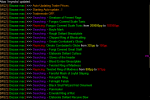
Below is a photo of what it looks like with the searching spam on.
bazaarmac.png

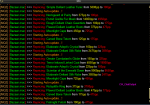
Below is a photo of it with search spam off. Allows you to see all updates to prices after long periods AFK.
bazaarmac.png
 
Last edited by a moderator:
Re: Bazaar.mac Maintained by ~Chat

Below is a photo of what it looks like with the searching spam on.
View attachment 13510

Below is a photo of it with search spam off. Allows you to see all updates to prices after long periods AFK.
View attachment 13511

I am liking the colour's you went with, I did mien vary similar but your looks better.


I've been thinking when I come back from long AFK I find myself checking my barlog_toon_server.ini looking at what sold and how much for, and then trying to keep track of the info manually.

Diamonds sold while AFK

07 @ 1000
05 @ 850
03 @ 250
10 @ 1550
02 @ 730
867 was my average, I would now set that as my new "SellPriceMin"


I've been thinking about how to implement price tracking or something, being that MQ cant see inside the Bazaar window to see what something fold for, how about tracking the selling price's seen and then average um

my logic
when searching for item name set [itemname]
selling_at_1 through selling_at_9 too defaults of 0
count and record the exact matches found
record all the price's found
add up price's divide by count
save that result as average value
next slot

What the ini might look like
Rich (BB code):
[Diamond]
SellPriceMin=250
SellPriceMax=1
BuyPriceMin=1
BuyPriceMax=1
VenderValue=200
selling_at_1=1050
selling_at_2=850
selling_at_3=260
selling_at_4=1250
selling_at_5=700
selling_at_6=0
selling_at_7=0
selling_at_8=0
selling_at_9=0
item_count=5
averageval=822

probable want to cap it at 9, maybe I think

so, when reprising reed ini's price's tracked and the # of matches tracked ~ since last run

add it up prices then divide by the count, Then give us the suggested value or even just set SellPriceMin to averageval
or just output
suggested
a price range even, of Min tracked to max tracked, I don't know witch would be better.

potential problem with tracking selling prices Vs
tracking
sold prices is inevitably there's someone with some stupid low or high price

I think that this could be good, however I also think it could make the bazaar.ini get to be huge so theirs that
I don't know just a though, anyone ?
 
Re: Bazaar.mac Maintained by ~Chat

That would require a lot more code but it can be done. It would require that in addition to setting the price to a set amount that it also stored it in an array with the name of the item, quantity of the item, and the value currently set on the item. Then on every update of prices it iterates through all the items and stores them into an array in the same order that it would previously stored in an array, then it compares the two arrays to see if they are the same. If they aren't the same then the item that is missing from the second array that is present in the first array is an item that has been sold (or removed manually) and the price assigned to it in the array is going to be the sell price. Which can be stored in an INI as the the sell price. The problem comes when you want to limit that ini to a certain number of stored sells. IE: only 9 sells stored at a time. You can add to an INI and you can overwrite a slot in the INI but you can't delete an INI entry. Once you reach the 9th entry then how do you know what to replace on the 10th sell to keep the average current. Then how are you expecting to implement the pricing information?

I'm thinking that keeping this as a method of selling items based on making it the lowest price without going under the minimum price is the most viable option. Expanding on it might require a bit more effort than you expect and solving the issues presented above isn't immediately obvious to me. So the INI could store the sell values of an item, but it would be a continuous lifetime average adding to a never ending SoldAtPrice# list. Then an entry that searches the ItemName section for a SoldAt# and adds them all together and divides them by the count to get the lifetime average and updates the INI entry for the average at that point. Even then the data would be useful per server. But even then it doesn't account for things such as surge in product availability due to the zone that drops the item being a hotzone, or a lack thereof due to it being infrequently traveled following it being a hotzone. Then of course the macro would be competing with other people running the same macro would would assist in keeping the price at a set rate range, but then at what point does the market become flooded with average priced items do you elect to convert the price from a "fair market value" to an I need to sell this item because I'm tired of looking at it value.

Lots of factors. I believe for now the intended objective for the trader side of this has macro has been reached, expanding on its functionality at this point would change the objective of the macro entirely. Which is not something I'm looking forward to attempting. If it was something someone did then I would recommend it be made as an entirely different macro as it would have an entirely different objective.

Perhaps I would consider working on the code to store the sold items to a list somewhere and the amount they costed at the time of sell. But It's unlikely I'll have time for it anytime soon as my classes have started and there is no lack of classwork to be sure.
 
Re: Bazaar.mac Maintained by ~Chat

it was just a thought, its not needed thing by any means

with regards to

The problem comes when you want to limit that ini to a certain number of stored sells.

I was saying to have it set all "selling_at_#=" cells for an item to zero before comparing price to minSellPrice that way they get reset every time it runs so's you get the current average.

like I said it was just a thought, and I do see your point of "intended objective for the trader side of this has macro has been reached" and your right its probably a lot more effort than I thought it would be, but I am still going to try to figure it out, doing so will be a learning experience, though I expect to have a lot of failures along the way, and don't know when I will succeed, or if I will for that matter.

PS. you work on this (& other mac)'s is appreciated by not just me but the masses here
 
Does anyone use this for buyer mode that could provide input on anything that is broken/spamming/moving too slow/needs color added etc? I should be able to squeeze in changes for buyer mode in spare time while doing classwork.
 
Re: Bazaar.mac Maintained by ~Chat

it was just a thought, its not needed thing by any means

with regards to


I was saying to have it set all "selling_at_#=" cells for an item to zero before comparing price to minSellPrice that way they get reset every time it runs so's you get the current average.

like I said it was just a thought, and I do see your point of "intended objective for the trader side of this has macro has been reached" and your right its probably a lot more effort than I thought it would be, but I am still going to try to figure it out, doing so will be a learning experience, though I expect to have a lot of failures along the way, and don't know when I will succeed, or if I will for that matter.

PS. you work on this (& other mac)'s is appreciated by not just me but the masses here

Basically you would have to declare an array that is 100x3, That's 100 entries with 3 entries per slot. Then make it a string. /declare StartingItems[100,3] string outer -1
Then in a for loop that cycles through the items in the trader window you would need to use varset's to set each component to the desired value.

/varset StartingItem[${i},1] ${Window[BazaarWnd].Child[BZR_BazaarSlot${slot}].Tooltip}
/varset StartingItem[${i},2] ${FindItemCount[=${Window[BazaarWnd].Child[BZR_BazaarSlot${slot}].Tooltip}]}
/varset StartingItem[${i},3] ${Window[BazaarWnd].Child[BZW_Money0].Text}

Where the first item is the name, the second one is the quantity, and the third is the price assigned to it per item.

Then on every update you would need to create ANOTHER array /declare CurrentItem[100,3] string outer -1

then populate it with the new existing values for all the items.

Then you would have to compare the two arrays to each other.

/if (${StartingItem[${i},1].NotEqual[${CurrentItem[${j},1]}]}) {
/echo ${StartingItem[${i},1]} Sold!
/varcalc platThisSession ${platThisSession} + ${StartingItem[${i},3]}
/echo I've now made ${platThisSession} so far.
} else /if (${StartingItem[${i},2].NotEqual[${CurrentItem[${j},2]}]}) {
/echo The quantity of ${StartingItem[${i},1]} has changed. I had ${StartingItem[${i},2]}, but now I have ${CurrentItem[${j},2]}
/varcalc platThisSession ${platThisSession} + ${Math.Calc[${Math.Calc[${Int[${StartingItem[${i},2]}]}-${Int[${CurrentItem[${j},2]}]}]}*${Int[CurrentItem[${i},3]}]}
}

I'm not even sure that's all accurate, but that's basically the gist of what would need to happen. Obviously you'd have to declare platThisSession.
That also doesn't cover all conditions, IE: If the item is missing you would have to varcalc j ${j}+1, the comparison would have to be in a goto loop as opposed to a for loop. that way i and j could iterate at the same time, and then iterate j up one if there is an item missing. after calculating the differences and adding platThisSession you would then need to overwrite the both arrays -1 to cancel out any existing entries, then repopulate the StartingItem array to ready it for the next update comparison.

Also for items that stack I didn't try and calculate the value if all items were missing so that currentitem array had the quantity multiplied etc.

It's going to be quite a bit of work and testing.

To populate the arrays I recommend a sub where you pass the array name as a parameter
the same to clear the arrays.

Sub ClearArray(Array)
/declare i int local 0
/for i 0 to 100
/varset Array[${i},1] -1
/varset Array[${i},2] -1
/varset Array[${i},3] -1
/next i
/return

/call ClearArray ${StartingItem}

Then of course once you see that you've sold something you would have to make the ini entry.

/ini "Bazaar.ini" "${StartingItem[${i},1]}" "selling_at_#" "${StartingItem[${i},3]}"

Calculating the # to use prior to the INI entry elsewhere in the program and use that in place of # in the INI string...calculating that number per item would require reading the INI.

/for k 0 to 100
/if (!${Ini[Bazaar.ini,
${StartingItem[${i},1]},selling_at_${k}].Length}) {
/ini "Bazaar.ini" "${StartingItem[${i},1]}" "selling_at_${k}" "${StartingItem[${i},3]}"
/break
}
/next k

Which would create a new entry at ${k} and then exit the loop

Then another to calculate the average

/for l 0 to 100
/if (${Ini[Bazaar.ini,${StartingItem[${i},1]},selling_at${l}].Length}) {
/varCalc thisTotal ${thisTotal}+
${Ini[Bazaar.ini,${StartingItem[${i},1]},selling_at${l}]}
} else {
/varcalc Average ${Math.Calc[${thisTotal}/${l}]}
/ini "Bazaar.ini" "${StartingItem[${i},1]}" "Average" "${Average}
}
/next l

Keep in mind at this point we've nested i, j, k, and l loops. Which is like saying

/for i 0 to 100
/for j 0 to 100
/for k 0 to 100
/for l 0 to 100
/next l
/next k
/next j
/next i

The i and j loops are comparing 3 different entries, up to 100 each, that's up to 600 comparisons.
k is doing another 100 comparisons, and l another 100 comparisons.

Potentially up to 800 comparisons.
If every loop ran all 100 iterations nested inside of one another that would be 100 million iterations.

While it is true that programmatically these will calculate faster than any of us could do on paper. It's also going to use resources that could potentially cause significant delays in response.

So that's basically the theoretical application of such a thing. It's quite in depth and not even all the code that would be required.
 
Last edited:
Re: Bazaar.mac Maintained by ~Chat

Converted all settings in the code to settings in an INI called BazaarMacSettings_${Me.Name}
It generates all the settings in the INI to default values and changes no functionality except that it now draws the information from the INI. This keeps you from having to reproduce your settings on every update.
It won't over write your existing settings in the INI unless the key is completely blank. It's done silently and automatically the first time you run it after downloading the new copy.

Added all my patch notes from my commits to git to the bottom of the macro for those that are interested in such things.
Updated to 4.2 with today's date.
 
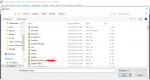
q8reflex None that I'm seeing in the code. The ini is defined as
/declare iniName string outer BazaarMacSettings_${Me.Name}.ini

So opening the macros folder and going to BazaarMacSettings alphabetically should immediately follow the bazaar.mac file.

bazaarmacsettings.png
 
Nada, i even created a "Release/Macros" sub-folder (which i don't use in my MQ2 folder structure) but still nothing.
 
Last edited:

While it is true that programmatically these will calculate faster than any of us could do on paper. It's also going to use resources that could potentially cause significant delays in response.

So that's basically the theoretical application of such a thing. It's quite in depth and not even all the code that would be required.


thank you for explaining, that is a good reason to not look further in to it.

- - - Updated - - -

Does anyone use this for buyer mode that could provide input on anything that is broken/spamming/moving too slow/needs color added etc? I should be able to squeeze in changes for buyer mode in spare time while doing classwork.

I don't use buyer, but ran over to that side to give it a test,


mac opens both Barter window & barter buyer windows and then I get a eq crash, vary soon after starting

Rich (BB code):
[2018/01/23 13:25:51] # Welcome to MQ2EQBC, ToonName: Use /bccmd help to see help.
[2018/01/23 13:26:17] Your integrity has been preserved.
[2018/01/23 13:27:02] Alias '/myecho' updated.
[2018/01/23 13:27:02] [MQ2] [Bazaar.mac] >>>  Auto-Updating Buyer Prices.
[2018/01/23 13:27:02] [MQ2] [Bazaar.mac] >>>  Starting Auto-update...!
[2018/01/23 13:27:02] [MQ2] [Bazaar.mac] >>>  Opening Buy Window.
[2018/01/23 13:27:02] [MQ2] [Bazaar.mac] >>>  Opening Barter Window.
[2018/01/23 13:27:02] [MQ2] [Bazaar.mac] >>>  Checking all items in list for Bazaar.ini entries
[2018/01/23 13:33:55] # Welcome to MQ2EQBC, ToonName: Use /bccmd help to see help.
[2018/01/23 13:34:55] Your integrity has been preserved.
[2018/01/23 13:35:27] [MQ2] me running to other side to run /mac bazaar trader
[2018/01/23 13:36:59] [MQ2] i am sure i could run it over on the blue side, but trying to rual out resions why i am seeing a crash
[2018/01/23 13:37:03] Alias '/myecho' updated.
[2018/01/23 13:37:03] [MQ2] [Bazaar.mac] >>>  Auto-Updating Trader Prices.
[2018/01/23 13:37:03] [MQ2] [Bazaar.mac] >>>  Starting Auto-update...!
[2018/01/23 13:37:06] [MQ2] [Bazaar.mac] >>>  Tradermode OFF.
[2018/01/23 13:37:15] [MQ2] [Bazaar.mac] >>>  Searching  - High Quality Steel Gear
[2018/01/23 13:37:19] [MQ2] [Bazaar.mac] >>>  Searching  - Raw Amber Nihilite
[2018/01/23 13:37:19] [MQ2] [Bazaar.mac] >>>  Repricing: Raw Amber Nihilite from 1975pp to 1500pp.
[2018/01/23 13:37:22] [MQ2] [Bazaar.mac] >>>  Searching  - Bloodstone
[2018/01/23 13:37:26] [MQ2] [Bazaar.mac] >>>  Searching  - Feran Blood
[2018/01/23 13:37:30] [MQ2] [Bazaar.mac] >>>  Searching  - Star Ruby
[2018/01/23 13:37:33] [MQ2] [Bazaar.mac] >>>  Searching  - Amber
[2018/01/23 13:37:37] [MQ2] [Bazaar.mac] >>>  Searching  - Ruby
[2018/01/23 13:37:41] [MQ2] [Bazaar.mac] >>>  Searching  - Black Pearl
[2018/01/23 13:37:44] [MQ2] [Bazaar.mac] >>>  Searching  - Uncut Black Sapphire
[2018/01/23 13:37:48] [MQ2] [Bazaar.mac] >>>  Searching  - Muramite Dragorn Slaver Whip
[2018/01/23 13:37:52] [MQ2] [Bazaar.mac] >>>  Searching  - Uncut Morganite
[2018/01/23 13:37:54] [MQ2] ending now, as it is running fine
[2018/01/23 13:38:01] The current macro has ended.
[2018/01/23 13:38:20] [MQ2] running to blue side
[2018/01/23 13:39:40] [MQ2] on blue side, running /mac bazaar buyer
[2018/01/23 13:39:50] Alias '/myecho' updated.
[2018/01/23 13:39:50] [MQ2] [Bazaar.mac] >>>  Auto-Updating Buyer Prices.
[2018/01/23 13:39:50] [MQ2] [Bazaar.mac] >>>  Starting Auto-update...!
[2018/01/23 13:39:50] [MQ2] [Bazaar.mac] >>>  Opening Buy Window.
[2018/01/23 13:39:50] [MQ2] [Bazaar.mac] >>>  Opening Barter Window.
[2018/01/23 13:39:50] [MQ2] [Bazaar.mac] >>>  Checking all items in list for Bazaar.ini entries
[2018/01/23 13:44:44] # Welcome to MQ2EQBC, ToonName: Use /bccmd help to see help.
[2018/01/23 13:45:03] Your integrity has been preserved.
[2018/01/23 13:45:13] Alias '/myecho' updated.
[2018/01/23 13:45:13] [MQ2] [Bazaar.mac] >>>  Auto-Updating Buyer Prices.
[2018/01/23 13:45:13] [MQ2] [Bazaar.mac] >>>  Starting Auto-update...!
[2018/01/23 13:45:13] [MQ2] [Bazaar.mac] >>>  Opening Buy Window.
[2018/01/23 13:45:13] [MQ2] [Bazaar.mac] >>>  Opening Barter Window.
[2018/01/23 13:45:13] [MQ2] [Bazaar.mac] >>>  Checking all items in list for Bazaar.ini entries
Edited out my toon name & while I was in game echoed what I was doing as I was doing it.

tried a few times just to be sure
 
thenameless might be something on your end.

Rich (BB code):
[2018/01/23 16:57:14] [MQ2] [Bazaar.mac] >>>  Repricing: Lesser Nebulous Dream Fragment from 25pp to 100pp.[2018/01/23 18:28:51] [MQ2] [Bazaar.mac] >>>  Starting Auto-update...!
[2018/01/23 18:29:11] [MQ2] [Bazaar.mac] >>>  Repricing: Ornate Combatant's Globe from 325pp to 375pp.
[2018/01/23 18:29:37] [MQ2] [Bazaar.mac] >>>  Repricing: Rotspittle Ring from 375pp to 475pp.
[2018/01/23 18:31:35] [MQ2] [Bazaar.mac] >>>  Repricing: Terror Infused Linked Coat from 4850pp to 19800pp.
[2018/01/23 18:33:30] [MQ2] [Bazaar.mac] >>>  Repricing: Steamwork Compound Bow from 1225pp to 100pp.
[2018/01/23 18:33:37] [MQ2] [Bazaar.mac] >>>  Repricing: Elaborate Defiant Silk Robe from 5000pp to 2475pp.
[2018/01/23 18:40:41] The current macro has ended.
[2018/01/23 18:41:28] Alias '/bazecho' updated.
[2018/01/23 18:41:28] [MQ2] [Bazaar.mac] >>>  Auto-Updating Buyer Prices.
[2018/01/23 18:41:28] [MQ2] [Bazaar.mac] >>>  Starting Auto-update...!
[2018/01/23 18:41:28] [MQ2] [Bazaar.mac] >>>  Opening Buy Window.
[2018/01/23 18:41:28] [MQ2] [Bazaar.mac] >>>  Opening Barter Window.
[2018/01/23 18:41:28] [MQ2] [Bazaar.mac] >>>  Checking all items in list for Bazaar.ini entries
[2018/01/23 18:41:29] [MQ2] [Bazaar.mac] >>>  Creating bazaaar.ini entry for Flawed Defiant Silk Cap.
[2018/01/23 18:41:29] [MQ2] [Bazaar.mac] >>>  Creating bazaaar.ini entry for Flawed Defiant Silk Gloves.
[2018/01/23 18:41:29] [MQ2] [Bazaar.mac] >>>  Creating bazaaar.ini entry for Flawed Defiant Silk Pantaloons.
[2018/01/23 18:41:30] [MQ2] [Bazaar.mac] >>>  Creating bazaaar.ini entry for Flawed Defiant Silk Robe.
[2018/01/23 18:41:35] [MQ2] [Bazaar.mac] >>>  Setting price of Flawed Defiant Breastplate to 0.
[2018/01/23 18:41:41] [MQ2] [Bazaar.mac] >>>  Setting price of Flawed Defiant Chain Boots to 0.
[2018/01/23 18:41:47] [MQ2] [Bazaar.mac] >>>  Setting price of Flawed Defiant Chain Bracer to 0.
[2018/01/23 18:41:48] The current macro has ended.
[2018/01/23 18:41:56] [MQ2] ended manually.
[2018/01/23 18:42:37] [MQ2] It seems to work for me. I likely don't have minimum buy prices set to a default value greater than 0 when creating INI entries. Also it shouldn't ever try to set to 0, so I'll have to sort that out.

Not sure what the disconnect is.
 
ChatWithThisName Bazaar.mac used to have a feature to ignore items. Is this something that is not in the new mac or is it simply not working in the current version?

[Excludes]
ExcludeList=Sebilisian Prudence,Sebilisian Celerity,Sebilisian Efficacy,Sebilisian Harmony,Sebilisian Intensity,Sebilisian Resilience,Sebilisian Brilliance,Sebilisian Proficiency
 
LOL, that would explain why it never worked for me ... not how it was intended.

The only reason I wish to ignore items is because I run two bazaar mules pretty much 24/7 and items like the Sebilisian Gems ... I don't want the two mules undercutting each other every time bazaar.mac redoes the prices.
 
LOL, that would explain why it never worked for me ... not how it was intended.

The only reason I wish to ignore items is because I run two bazaar mules pretty much 24/7 and items like the Sebilisian Gems ... I don't want the two mules undercutting each other every time bazaar.mac redoes the prices.

Put their names in the exclude list and it will not consider their prices. Problem solved.
 
Yeah, by default the exclude list automatically excludes yourself so that your price won't be considered. However it will also include anyone that you add to the exclude list. At least, that is the way it is supposed to work. There is not currently an option to exclude specific items.

So if my Exclude list in the INI (Top of Bazaar.ini) shows

Rich (BB code):
[Excludes]
ExcludeList=name1,name2,name3,name4

Then when it checks prices it will check that the price doesn't belong to trader name1, name2, name3, or name4. If it belongs to any of those players the price won't be adjusted based on their price. However, if the price belongs to another person, then all the traders will consider the price for the person -not- in the exclude list. Likely making them all set the item to same price.
 
I'm having trouble with the macro repeatedly searching for items if it is not listed in the bazaar. Is there a way to have it skip if it cannot find a price?
 
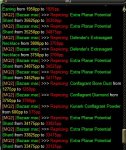
I've just started using /mac bazaar trader and it starts working fine to start with, but after an hour or two, when it re-checks the price, it starts reducing the price of items against my own price.

For example, 1 have "item a" 3 times and it doesn't stack. Current price is 30,000, when it goes to re-price it will come to the first item and drop the price to 29,500, then it will come to the second and drop it to 29,000, then it will come to the third and drop it to 28,500. Nobody else has the item for cheaper than me, it is just competing against my price. Please see example below - Extra Planar Potential Shard

Any ideas how to stop this?

Capture.JPG
 
I've just started using /mac bazaar trader and it starts working fine to start with, but after an hour or two, when it re-checks the price, it starts reducing the price of items against my own price.

For example, 1 have "item a" 3 times and it doesn't stack. Current price is 30,000, when it goes to re-price it will come to the first item and drop the price to 29,500, then it will come to the second and drop it to 29,000, then it will come to the third and drop it to 28,500. Nobody else has the item for cheaper than me, it is just competing against my price. Please see example below - Extra Planar Potential Shard

Any ideas how to stop this?

View attachment 13757

This is kind of a stupid workaround, but you can add yourself to the .ini that removes a trader from competition with you.

Open up your bazaar.ini and find this section (mine is at the top):

[Excludes]
ExcludeList=name1,name2,name3,name4

Add your own trader's name to the list and see if that works.
 
Rich (BB code):
/declare Excludelist         string      outer   ${Me.Name},${Ini[bazaar.ini,Excludes,ExcludeList,NOT_FOUND]}

So above we see the declaration of the exclude list. It begins with ${Me.Name} followed by anything in the exclude list found in the INI. If the exlude list is not present in the INI then it puts "NOT_FOUND". Even if the INI Entry wasn't present it would still make the variable Excludelist "${Me.Name},NOT_FOUND"

Rich (BB code):
/if (${Bazaar.Item[${result}].Name.Equal[${itemname}]} && ${Spawn[${Bazaar.Item[${result}].Trader}].Name.NotEqual[${Me}]} && !${Excludelist.Find[${Spawn[${Bazaar.Item[${result}].Trader}].Name}]}>=1) {

Above we will find the line of code that checks to see if a trader is being ignored. In this case we are checking for the Excludelist string to NOT find the trader name displayed in the bazaar window. This is of course using TLO's from the Bazaar Search plugin. So unless something is wrong with the plugin then it should be reporting correctly the name, comparing it to your own name, and opting to skip you because you are by default in the exclude list. The above line actually checks for your name TWICE when it does
Rich (BB code):
${Spawn[${Bazaar.Item[${result}].Trader}].Name.NotEqual[${Me}]}
followed by
Rich (BB code):
!${Excludelist.Find[${Spawn[${Bazaar.Item[${result}].Trader}].Name}]}>=1

While I do feel the second line overly complicated and should instead be
Rich (BB code):
${Excludelist.Find[${Spawn[${Bazaar.Item[${result}].Trader}].Name}]} != 0

Alternately, if you are using "/caption anon on" then ${Me.Name} will not report your name correctly and cause the macro to not see the correct name and thus report incorrectly that you are not on the exclude list.

The plugin required to retrieve information actually is only required because of the way this macro was coded. MQ2bzsrch provides TLO's that would otherwise be inaccessible without directly reading from the UI Windows (Which honestly isn't all that hard to do). So if it is in fact faulty somehow I can look into it and perhaps program direct reading of the UI File as opposed to usage of the plugin.
 
I don't have anon on, so that shouldn't cause any issues.

I added my trader's name to the exclude list and that seems to have done the trick, many thanks.
 
I don't have anon on, so that shouldn't cause any issues.

I added my trader's name to the exclude list and that seems to have done the trick, many thanks.

So, I noticed I'm seeing the same bug as you. I'm not anon, and I had my own name in the exclusion list.

What I think *might* be messing it up is older bazaar.mac versions would turn trader off when it was updating prices and then turn trader back on again. I noticed this version does not do that, so you're still trading when the macro goes to update prices.

Not sure if that's significant, but maybe ChatWithThisName can comment?? Thanks!
 
So, I noticed I'm seeing the same bug as you. I'm not anon, and I had my own name in the exclusion list.

What I think *might* be messing it up is older bazaar.mac versions would turn trader off when it was updating prices and then turn trader back on again. I noticed this version does not do that, so you're still trading when the macro goes to update prices.

Not sure if that's significant, but maybe @ChatWithThisName can comment?? Thanks!

You're exactly right, seems I spoke too soon, the problem is still occurring and yes, trader is not turning off before pricing starts updating and then back on when finished.
 
As I said previously, it could be something to do with bzrsrch plugin as my only guess as to what could be causing it. Prior to this recent update this was not occuring. I've got a macro to make for someone today. Soon as I've done that I'll work on converting this over to directly reading from the UI windows like my barter.mac does.

If anyone would like to run this with line 237 uncommented to see if it outputs that it is/should be excluding it would be helpful.

Rich (BB code):
	|/if (${Excludelist.Find[${Spawn[${Bazaar.Item[${result}].Trader}].Name}]}>=1) /myecho ... Exclude List - ${Spawn[${Bazaar.Item[${result}].Trader}].Name} ignoring their price.

That is in the line in question. Removing the | at the start of the line and then running the macro should generate the desired effect of reporting that the trader in question is being ignored. This would apply if your name is actually on the exclude list. As you have said you've added your own name to the list that should generate the desired resulting exclusion announcement.
 
Okay. So I've un-commented the echo that reports someone is being ignored due to ExcludeList presence. I have not exclusively named myself on the exclude list and it is ignoring me anyway. It reports everytime my name is present (for every item while trader mode is on while the updates to price is being processed). So there is no bug on my end to fix. I cannot address the problem without also showing the problem present.
 
So behind the scenes, I've been working on a spawn of this macro (Coded it all today lol). While not really an improvement per-say, it has been coded from the ground up so that I understand every bit of code in it because I've either coded it personally or I've used snippets from the bazaar.mac that I felt was just fine the way it was. This is not an update to the existing macro at this point as it lacks all functionality of the entire barter side of things as well as it lacks testing beyond the coding I've done on it. This method will use a percentage based undercutting of prices instead of the obscured pricing setup that was built into the current bazaar.mac. I welcome some testers and some responses on the matter.

Notes that should be made about this variation of bazaar.mac

  • It uses the existing bazaar.ini for the prices min/max. However, it will now use BazaarSettings.ini for all the user settings.
  • It no longer uses parameters. It will use your current location to determine what to do. (Currently only coded to verify you're in the trader area of map)
  • It will now initprice on every run. If you don't want to sell something, take it out of your trader bag into another container or the bank.
  • Will now generate missing INI entries at the start of every run during the initprice loop
  • If running bazaar2.mac on multiple characters it will automatically append your new toons name to the ExcludeList
  • ExcludeList is no longer saved as a variable. It's read per item per trader directly from the INI allowing updating of the ExcludeList in real time.
  • Doesn't use MQ2bzsrch plugin.
  • uses Saar's input code to type into bazaar Search box eliminating the need to fix strings greater than 30 (this is probably more for me than you lol)
  • Output changes to prices are now color coded. Red means the price went down. Green means the price went up.


Could use some input on this variation.
In the current version of bazaar.mac there is some consideration for items with comma's in the name. I feel like this might have to do with INI entries as the parameters of INI calls are separated by comma's. That consideration is not made here. I don't have any items with a comma in their name to test anything at this point.

If you intend to end this macro mid update you MUST make a social hotkey /end because of the way the information is input into the box it deletes and types for you and will delete you typing /end
 

Attachments

Last edited:
Could use some input on this variation.
In the current version of bazaar.mac there is some consideration for items with comma's in the name. I feel like this might have to do with INI entries as the parameters of INI calls are separated by comma's. That consideration is not made here. I don't have any items with a comma in their name to test anything at this point.

If you intend to end this macro mid update you MUST make a social hotkey /end because of the way the information is input into the box it deletes and types for you and will delete you typing /end

I like what I am seeing I truly appreciate the colouring of the output really clear, only thing I will probably change the ${thisItem} from (/ap) purple too (/am) magenta, I am coming through the code to see what's what, its slick I like it, just checked with the "Inventory.mac" I don't have anything with a " , " in it either, I've been running it since I down loaded it, all good so fair I don't except any trouble through night,,, will report back.
 
@chats: why dont you just shift control click the item then the name is automatically put into the bazaar window.
 
Updated Bazaar2.mac file for min/max sell price issue. Thanks Kaen for bringing it to my attention.

Changed the color format for price changes. Now if the price goes down the new price is shown in red. If it goes up it is shown in green.
 
vary cool, I was going to bring that up for that next,

ok so I left it running last night, this morning my PC was off. here are the relevant lines of a few logs:

C:\Users\Public\MQ\Release\Macros\Toon_Server.ini
Rich (BB code):
[2018/03/05 04:59:42] Window 'Bazaar Search Window' is now closed.
[2018/03/05 04:59:42] [MQ2] [Bazaar.mac] >>>  Prices will be updated in 0 minutes.
[2018/03/05 04:59:43] [MQ2] [Bazaar.mac] >>>  Setting unpriced items to default price of (5000) pp.
[2018/03/05 05:00:37] [MQ2] [Bazaar.mac] >>>  Updating Black Sapphire's price from 3500 to 1800
[2018/03/05 05:05:24] MQ2Paranoid:: Dethbohm 41 Iksar Necromancer has left the zone.

C:\Users\Public\Daybreak Game Company\Installed Games\EverQuest\Logs\bzrlog_Server_Toon.txt
Rich (BB code):
[Mon Mar 05 04:59:20 2018] Price change updated to your bazaar list.
[Mon Mar 05 04:59:21 2018] Price updated for item Shabby Fine Spell Scroll.
[Mon Mar 05 05:00:37 2018] Item: Black Sapphire price set to (1800p), INI file updated.
[Mon Mar 05 05:00:37 2018] Price change updated to your bazaar list.
[Mon Mar 05 05:00:37 2018] Price updated for item Fire Opal.


C:\Users\Public\Daybreak Game Company\Installed Games\EverQuest\Logs\eqlog_Toon_server.txt
Rich (BB code):
[Mon Mar 05 04:59:42 2018] [MQ2] [Bazaar.mac] >>>  Prices will be updated in 0 minutes.
[Mon Mar 05 04:59:43 2018] [MQ2] [Bazaar.mac] >>>  Setting unpriced items to default price of (5000) pp.
[Mon Mar 05 04:59:44 2018] To begin searching for items, select a search parameter from one of the drop down menus or type in an item name in the edit box and click Find.
[Mon Mar 05 05:00:37 2018] [MQ2] [Bazaar.mac] >>>  Updating Black Sapphire's price from 3500 to 1800
[Mon Mar 05 05:05:24 2018] MQ2Paranoid:: Dethbohm 41 Iksar Necromancer has left the zone.

C:\Users\Public\Daybreak Game Company\Installed Games\EverQuest\Logs\dbg.txt
Rich (BB code):
[Sun Mar 04 17:26:25 2018]00634:DoMainLoop: completed second while(!ReadyEnterWorld).
[Sun Mar 04 17:26:25 2018]00635:Setting up models.
[Sun Mar 04 17:26:25 2018]00636:Starting pre-load
[Sun Mar 04 17:26:36 2018]00637:Setting up character.
[Sun Mar 04 17:26:36 2018]00638:Activating music.
[Sun Mar 04 17:26:36 2018]00639:Initialization complete.
Entering main loop.
[Sun Mar 04 17:26:36 2018]00640:Memory: Load: 48, Total Phys: 8190, Avail Phys: 4191, Total Page: 19454, Avail Page: 13786, Total Virtual: 4095, Avail Virtual: 2884, FreeBlocks: 2031,359,82,60,54,49,42,35,15,13
[Sun Mar 04 17:26:36 2018]00641:MaxTextures: 37413k, CurrentTextures: 36187k, HighQualityTextures: 30494k
[Sun Mar 04 17:30:23 2018]00642:Parsing INI file .\BZR_Jaxxie_bristle.ini
[Sun Mar 04 17:30:23 2018]00643:INI file .\BZR_Jaxxie_bristle.ini loaded.
[Sun Mar 04 19:56:02 2018]00194:Invalid render material type.
[Sun Mar 04 19:56:02 2018]00195:CRender::CreateBatchWithoutColor() failed.
[Sun Mar 04 19:56:02 2018]00196:Invalid render material type.
[Sun Mar 04 19:56:02 2018]00197:CRender::CreateBatchWithoutColor() failed.
[Sun Mar 04 19:56:03 2018]00198:Invalid render material type.
[Sun Mar 04 19:56:03 2018]00199:CRender::CreateBatchWithoutColor() failed.
[Sun Mar 04 23:48:05 2018]00200:D3DXCreateTextureFromFileEx() failed to create texture lightning_l.dds for particle system.
[Sun Mar 04 23:48:05 2018]00201:D3DXCreateTextureFromFileEx() failed to create texture lightning_l.dds for particle system.
[Sun Mar 04 23:48:05 2018]00202:D3DXCreateTextureFromFileEx() failed to create texture torch_grey.dds for particle system.

I don't think the mac was the cause of my crash

is there any other file that could have useful info?
 
Last edited:
Thank you for your insight, I'm glad it was not MQ, I've been running the new bazaar mac exclusively since I got it, not had any problems really. it got stuck constantly updating again & again once, I was not able to reproduce it though
 
Release Bazaar.mac

Users who are viewing this thread

Back
Top
Cart