
Yah so we rely on bzrsrch to do this if that is bugged we would have to file a bug aginst the plugin but I don't think its being maintained :\ I will try to get in there and fix it when I have time.Yes. It doesn't pass /bzsrch which just strips the " from the query. I even tried `, \, ' before the quote, double ', and reverse quoting the query. It just strips it.

-
 Hail, we're RedGuides. We want you to play six (yes, 6!) EverQuest characters at once. We have scripts and a friendly community to help, please join our playstyle and say hello! 👋
You are using an out of date browser. It may not display this or other websites correctly.
You should upgrade or use an alternative browser.
You should upgrade or use an alternative browser.
Resource icon
Release Bazaar / Auction Helper 05/09/2026
- Thread starter Derple
- Start date
Derple updated Bazaar / Auction Helper with a new update entry:
06/07/2024
Read the rest of this update entry...
06/07/2024
Read the rest of this update entry...


So after loading mq2linkdb I pressed the Auction Now! button and it put a message into the proper channel, without any link.
So I then unloaded the lua and restarted it, now I get
View attachment 57568
is there something I need to do with that plugin first?
*****UPDATE********************************
Found on the forums for the plugin, I needed to do aCode:/link /update
did you do a `/link /import` to download the latest definitions?And that still didn't help, it's not producing the link in the WTS message
it uses the /bzsrch plugin which can get stuck sometimes. there are some /bzsrch commands you can issue to unstick it but in generally restarting the Lua should work.I am curious if I am heading for a crash..it stopped doing anything, and as you see in the pic MQ window says
"Waiting for bazaar cmd to finish" as well as the scan shows Next Scan in -1:17:41. It stopped mid scan at 35%.
I did not update yet since your last update and wanted to see if I could capture any info for you next crash. I'll leave it for a bit to see what happens.
View attachment 57581

Sweet - I hadn't looked at this thread in a minute and was just going down the list.I am a little confused, my issues were resolved back in February...
No worries! I had posted a suggestion/request though.... using a "nearest price" instead of lowest, very useful if you sold out of something at a low price and now all those being offered are at a higher price than your previous price. Just a thought. Love the Lua and use it all the time!Sweet - I hadn't looked at this thread in a minute and was just going down the list.
EDIT: ehhhh, might be a little more complicated than the above statement... what I am thinking is having it show "lowest price" if lower than my set price OR "nearest low price" if higher than my set price. That might be a bit more trouble than it's worth.
Last edited:

What about the ability to have the script automaticallly start the trader mode. I have the character.cfg file autoloading the LEM, but could find no method of automatically starting the trader into trader mode. If you don't have time, I will do a pull request once I get it setup if that works for you. I looked at the code, and you are interacting with the Trader window to start trader mode, so I think it should be possible to automatically start the trader.

Would love to see an update to undercut by 5000-25000. I'm on live and prices dont care about 1 or even 1000....
I think it is this part:
I'm guessing i could change the MagDiff =1000.... not sure. I'm sure I will break it.
I think it is this part:
Code:
if curr == 0 or curr >= (best or 0) then
        if shouldUndercut(trader) then
            local ordMagDiff = 10 ^ settings.UnderCutOOM
            -- math.floor(math.abs(math.log((best > 0 and best or 1) / (settings.UnderCutOOM > 0 and 10 ^ settings.UnderCutOOM or 10), 10)))

            local newPrice = math.ceil((best or 0) - (settings.UnderCutPercent / 100 * (best or 0)))

            if ordMagDiff > best then return newPrice end

            newPrice = math.floor(newPrice / ordMagDiff) * ordMagDiff

            return newPrice
        else
            return best
        end
    end
I'm guessing i could change the MagDiff =1000.... not sure. I'm sure I will break it.


Trying to use the auction option item shows in the window, but when it links in general chat, this is all it does.

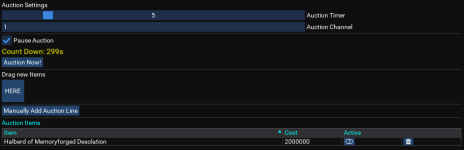
Derple updated Bazaar / Auction Helper with a new update entry:
05/02/2025
Read the rest of this update entry...
05/02/2025
Commits
(65f7c0f) ~DerpleBazaar Helper no longer requires MQ2Bzsrch plugin and should now work on EMU in theory but I didn't test it. If it doesn't work then the UI element names need to be updated which I will do later.
Read the rest of this update entry...

Totally awesome. TY Derple!Derple updated Bazaar / Auction Helper with a new update entry:
05/02/2025
Read the rest of this update entry...
I'm not clear on where you are trying to update things. Manual update in the BH window is always required to set a price.Great Lua!
I'm not sure if I'm doing it wrong, but it will find the price for all my items, but not update my ini. I have to click one by one to update the ini. It freezes at times saying (Spamming) "Waiting for bazaar cmd to finish" and when I restart all my prices are gone.
Are you trying to set prices in the middle of a scan? They will conflict.
I was trying to set all prices after manually adjusting them. If it's one at a time that's what it is. I thought I could manually adjust them all using tabs (which does seem to work) and then click once to send a bulk update.I'm not clear on where you are trying to update things. Manual update in the BH window is always required to set a price.
Are you trying to set prices in the middle of a scan? They will conflict.
A good quality of life feature might be a single button that bulk does all changes to prices that you've put in. It takes ~3 seconds per update click on my pc (very beefy) and if I have ~300 items i'm trying to sell that's a lot of time. I'd much rather set all prices and click something to update my entire INI file with all prices I've put in.
Last edited:
GREAT WORK!!
May I suggest that instead of pressing the set price button one by one. there be a tick. We tick all those that we want the price changed, then when all done we click process button that will automatically adjust all ticks. Having to wait 2-3 seconds for every item is not optimal. thanks
May I suggest that instead of pressing the set price button one by one. there be a tick. We tick all those that we want the price changed, then when all done we click process button that will automatically adjust all ticks. Having to wait 2-3 seconds for every item is not optimal. thanks

tradeskill queen
Well-known member
Still very new and struggling. I was using the bazaar Lua and it was working great. Now since the patch it is not working. I updated mq2 ok, and everything else is working so far. But when I use /Lua run bazaar in game it says it cant be found now, and it worked fine before (I made a hotkey and it worked before the patch). I checked and the files are still in the Lua folder but to be sure I Downloaded it again and replaced them and still get the same msg in game, bazaar cant be found. What am I doing wrong? Any help is greatly appreciated.
To be sure, getting started can be daunting. Don't let it get you down.
If you did things correctly, you should have a folder named 'bazaar' in your Lua folder. This folder should be wherever your MQ installation is. For me, it is D:\MQNext\Lua\bazaar. It could very well be something else for you.
In this folder there should be 3 files:
baz_utils.Lua
bazaar_db.Lua
init.Lua
When you type /Lua run bazaar in game it will look for and run the init.Lua from the folder matching the name you gave (bazaar). So if it is coming up with cannot be found then there is something wrong with what you did. The most common is that there is a mismatch between where you extracted the ZIP file and the actual RedGuides VV installation folder. I would check the Settings tab in the Launcher to confirm where MQ is installed and make sure you are putting your Lua files in the right spot.
BTW - OneDrive is evil. If your MQ installation is there, or it is redirecting you there, you should fix that.
If you did things correctly, you should have a folder named 'bazaar' in your Lua folder. This folder should be wherever your MQ installation is. For me, it is D:\MQNext\Lua\bazaar. It could very well be something else for you.
In this folder there should be 3 files:
baz_utils.Lua
bazaar_db.Lua
init.Lua
When you type /Lua run bazaar in game it will look for and run the init.Lua from the folder matching the name you gave (bazaar). So if it is coming up with cannot be found then there is something wrong with what you did. The most common is that there is a mismatch between where you extracted the ZIP file and the actual RedGuides VV installation folder. I would check the Settings tab in the Launcher to confirm where MQ is installed and make sure you are putting your Lua files in the right spot.
BTW - OneDrive is evil. If your MQ installation is there, or it is redirecting you there, you should fix that.
tradeskill queen
Well-known member
To be sure, getting started can be daunting. Don't let it get you down.
If you did things correctly, you should have a folder named 'bazaar' in your Lua folder. This folder should be wherever your MQ installation is. For me, it is D:\MQNext\lua\bazaar. It could very well be something else for you.
In this folder there should be 3 files:
baz_utils.lua
bazaar_db.lua
init.lua
When you type /lua run bazaar in game it will look for and run the init.lua from the folder matching the name you gave (bazaar). So if it is coming up with cannot be found then there is something wrong with what you did. The most common is that there is a mismatch between where you extracted the ZIP file and the actual RedGuides VV installation folder. I would check the Settings tab in the Launcher to confirm where MQ is installed and make sure you are putting your Lua files in the right spot.
BTW - OneDrive is evil. If your MQ installation is there, or it is redirecting you there, you should fix that.
all the installation was correct and it worked fine until patch. it has only stopped working since the patch.? i have patched eq and mq
Well, by definition it is not correctall the installation was correct and it worked fine until patch. it has only stopped working since the patch.? i have patched eq and mq

Be very specific with the error message you see. If you type /Lua run bazaar and it cannot find the correct file at all it should come up with 'Cannot find Lua script matching 'bazaar'' (red text in your MQ window). Let us know if that is what you see or it is something else.
princevoodoo
New member
testing this out currently on an EMU server.. works amazing but ive noticed all of the items in my trader bags are not showing up in the window.
due to it being an EMU and the trader satchels were upgraded to have 30 slots, is this why it's not picking up all the items?
due to it being an EMU and the trader satchels were upgraded to have 30 slots, is this why it's not picking up all the items?
Hi i am having some issues with the Lua. I have it installed in the right folder along with RedGuides launcher and MQ.
My issue is when I type /Lua run bazaar in the injection screen, it will scan for a few mins and then the injection box, along with the BFO bazaar box, closes.
I have checked and double-checked to make sure everything is updated and installed correctly. Any help? thx
Ah I found out why after testing on other servers. Teek is not supported yet. *Edited* 1/31/26
My issue is when I type /Lua run bazaar in the injection screen, it will scan for a few mins and then the injection box, along with the BFO bazaar box, closes.
I have checked and double-checked to make sure everything is updated and installed correctly. Any help? thx
Ah I found out why after testing on other servers. Teek is not supported yet. *Edited* 1/31/26
Last edited:

Would you consider putting the tribute value in a column?
Derple updated Bazaar / Auction Helper with a new update entry:
05/09/2026
Read the rest of this update entry...
05/09/2026
Read the rest of this update entry...

Just waking up so have not had my coffee yet... is there a way to set price limits as is done with the bazaar.mac? As in upper and lower price limits, so I am not trying to undercut someone selling a water flask for 2B plat, nor am I suddenly trying to sell the queen's jewels for 1 plat?
Notice i am trying to undercut someone selling ornaments for 1.9m plat, whose next piece of the collection is 5p...
Notice i am trying to undercut someone selling ornaments for 1.9m plat, whose next piece of the collection is 5p...

I will see if I can add itJust waking up so have not had my coffee yet... is there a way to set price limits as is done with the bazaar.mac? As in upper and lower price limits, so I am not trying to undercut someone selling a water flask for 2B plat, nor am I suddenly trying to sell the queen's jewels for 1 plat?
Notice i am trying to undercut someone selling ornaments for 1.9m plat, whose next piece of the collection is 5p...
would you want this per item or an overall limits? or both?Just waking up so have not had my coffee yet... is there a way to set price limits as is done with the bazaar.mac? As in upper and lower price limits, so I am not trying to undercut someone selling a water flask for 2B plat, nor am I suddenly trying to sell the queen's jewels for 1 plat?
Notice i am trying to undercut someone selling ornaments for 1.9m plat, whose next piece of the collection is 5p...
per item would be my use, though I could see a general "never go above X or below Y" being useful to someone.would you want this per item or an overall limits? or both?
Not familiar enough with Lua to know if that is feasible (per item data base/ini)
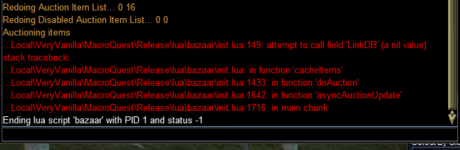
There is usually a stack trace associated with that. Post it? Lines of red text describing the error and the things being called when it happened.It crash the MQUI when I drop a item and add price and hit save.
Starting the mq2linkdb plugin may fix this issue until it is properly addressedSeems to be crashing when i am using it on frostreaver in East Commons
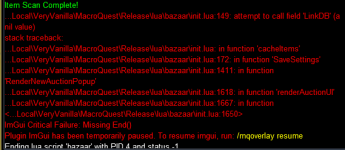
Refer to the post above yours
Starting the mq2linkdb plugin may fix this issue until it is properly addressed
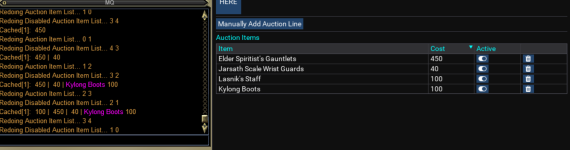
Was able to get it to work by loading the mq2linkdb plugin. However it will not link the items except for a few items.
Users who are viewing this thread
Total: 1 (members: 0, guests: 1)
Share: