• You've discovered RedGuides, an EverQuest multi-boxing and scripting community 🧙‍♀️⚙️. We want you to play several EQ characters at once, come join us and say hello! 👋
AutoLogin (core plugin)

Release AutoLogin (core plugin) (3 Viewers)

Been putting this off as it's not a game breaker, just annoying.

But now I want to get it fixed.

Couple months ago my VV Autologin stopped working.

It gets to password screen on EQ and fails to enter the password, so i get incorrect PW error from EQ and have to enter it manually.

It also will NOT let me add new accounts or characters, I enter the info, and nothing happens, it acts like it accepted it, but nothing shows up.

How do I fix or reinstall this feature?

I tried searching in the RG folder for autologin and nothing is found so I'm puzzled where this even lives?
I'm on the current build on tlp and it's been this way the last 2 builds at least.
I've also reinstalled RG VV over the old one, no change.

Thanks for any advice.
I deleted the 2 db files mentioned by others, and rewrote my account info stuff and now it works again.

Problem solved (for now)
 
I have this on two PCs, one is great, the other one gives wrong password. I think because the PC is so slow it tries to enter the password before it managed to tab to the right field or something. Anyone know a solution to this or a way I can add a delay?
 
Thanks but they don't seem to help. I think launch delay is time between launching other clients, and the other one is character select screen.
 
I have this on two PCs, one is great, the other one gives wrong password. I think because the PC is so slow it tries to enter the password before it managed to tab to the right field or something. Anyone know a solution to this or a way I can add a delay?
Autologin injects into the exe so entering info on the wrong window is almost impossible. One client being at char select wont impact any other eq window since autologin knows what process ID its attached to and what one to interact with.
 
Autologin injects into the exe so entering info on the wrong window is almost impossible. One client being at char select wont impact any other eq window since autologin knows what process ID its attached to and what one to interact with.
Thanks that is good to know. Any idea why it would be getting the password wrong? It is right in the setup.
 
I think it is fixed. I updated, reset master password to the same thing, made a new profile and it worked. I will check the old profile and see if that works.
 
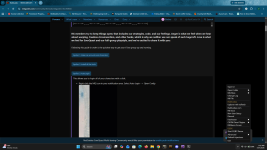
I am not sure what happened, but i can't use the auto login from mq2. Normally I would right click on MQ2 and click my group, but when I got home today to log in the feature wasn't there. I am not sure what could have happened between when I logged on last night and tried to log back in today as i have been at work all day.

1784934411324.png
 
I am not sure what happened, but i can't use the auto login from mq2. Normally I would right click on MQ2 and click my group, but when I got home today to log in the feature wasn't there. I am not sure what could have happened between when I logged on last night and tried to log back in today as i have been at work all day.

View attachment 78220
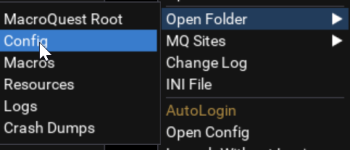
Every time I've heard of this issue it was an issue with login.db, which is found in your mq config folder. Sometimes a lock, sometimes a corruption.

1784934804017.png


* Reboot your PC and try again, just in case this is a transient issue with an old eq process locking this file for some strange reason. It's happened.
If not:
* Shut down MQ.
* Delete any login.db-shm or login.db-wal files that are still there (if it won't let you, you may have a stray EQ task holding them open and causing the issue, reboot and start from scratch checking if login option is there).
* Temporarily remove or rename the login.db file (no -wal or -shm, the actual login.db).
* Start MQ.... if you suddenly see the login menu again, that was the issue, and you have two options:
* * 1) Just redo your logins by logging in manually once on each account or
* * 2) getting a db editor and trying to find what is wrong with the login.db file

Generally #1 is what people end up doing, unless you are losing a large amount of logins.
 
close mq, then go to your config folder and edit the macroquest.ini and make sure the mq2autologin plugin is set to =1
mq2autologin=1
 
Just a thought here but was your group on Mangler. If they were then autologin is looking in the (or wrong) server. Need to point all your toons to the right server in redfetch.

Just a thought.

Zeb
 
Release AutoLogin (core plugin)

Users who are viewing this thread

  • Mandzi3
  • Tansy25
Back
Top
Cart