• Hail, we're RedGuides. We want you to play six (yes, 6!) EverQuest characters at once. We have scripts and a friendly community to help, please join our playstyle and say hello! 👋
  • We've added LLM sections to our Terms & Rules and Resource Rules, for everyone's sanity & in-game safety.
    Read more
    a. Do not replace your voice with an LLM. This goes for your posts and your scripts. Drafting and editing with a tool is fine, but don't take you out of what you share.
    b. Do not replace your EQ character's voice with an LLM. We don't want scripts that speak over /ooc, /shout or other public channels. This has been an unwritten rule that's kept casino scripts off the site for decades, but we're now compelled to make it clear: keep automated communication private.

    Why Does RG Review Scripts?
    Nearly every LLM-written Lua script we see is making your character do impossible things, and rarely in a way that's beneficial to you. We've seen heavy server hammering, /target over impossible distances when /nav spawn would passively accomplish the same thing, a spawn search that fires 20+ times per second, and other pointless actions that are likely annoying GMs.

    You are welcome to use LLMs as a tool to structure, draft, and edit your work, but please read critically before hitting /lua run

Problem - AutoLogin Help

Chanticleer

yells at clouds
Creator
i am trying to use mq2autlogin and ive got my ini set up and ive done everything correctly but i dont understand how to use it with mqnext its not working and before im told to read up and look for my answer i have and im just confused ?
 
i am trying to use mq2autlogin and ive got my ini set up and ive done everything correctly but i dont understand how to use it with mqnext its not working and before im told to read up and look for my answer i have and im just confused ?
howdy chanticleer -

if it has been a while since you used MacroQuest and you need to migrate your mq2 -> mq - you can do that real easily


> This Guide < here will walk you through how to migrate all your stuff including your autologin (happens as part of the migration)

tho based on your downloads - it appears you have been using macroquest since it went to MQ and to 64bit full time.

are you on another computer or something?

What specifically is no longer working?

The second video in this video guide show how autologin works > here < this is using the old autologin but it is, with minimal exception, the same.

Since now autologin uses imgui windows - if you have having conflicting overlay software preventing imgui from working, i could see that as being an issue - the launcher will notify of conflicts with nahimic - but there are potential other overlay conflicts.

Without having more information as to *specifically* what the issue is - i'm just going to end up re-editing and re-adding wild speculation.

If you haven't done so already, a fresh restart of your computer is always a good idea.
 
like i made my ini and i launched my toons , and in the top corner it says autologin is disabled , but i made sure in my macroquest ini it is and i did it ingame to assure they are all using it , but it wont login , just gets to loading first toon and then sits there.
 
like i made my ini and i launched my toons , and in the top corner it says autologin is disabled , but i made sure in my macroquest ini it is and i did it ingame to assure they are all using it , but it wont login , just gets to loading first toon and then sits there.
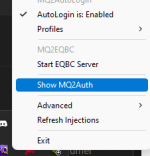
do you have "AutoLogin is: Enabled" when you right click on your mq icon?

1649969716868.png
 
I'm having a really hard time trying to get the launcher and autologin to work. I haven't used RG since May of last year, and when I try to load my group, it says autologin is disabled, and when I manually try to log in the characters, it will automatically go back to server select. I hope there is something I'm missing here, cause it's pretty frustrating.
 
I'm having a really hard time trying to get the launcher and autologin to work. I haven't used RG since May of last year, and when I try to load my group, it says autologin is disabled, and when I manually try to log in the characters, it will automatically go back to server select. I hope there is something I'm missing here, cause it's pretty frustrating.
our > RG New User Guides < will help you get setup
 
Problem - AutoLogin Help

Users who are viewing this thread

Back
Top
Cart