• You've discovered RedGuides, an EverQuest multi-boxing and scripting community 🧙‍♀️⚙️. We want you to play several EQ characters at once, come join us and say hello! 👋

  • A TLP without truebox has thawed (Very Vanilla ready)
    Frostreaver
AutoLogin (core plugin)

Release AutoLogin (core plugin)

I dont know what I am doing wrong, but I am sure it is user error. When I click on the tray icon, and right click the MQ icon, the go to profiles, I do not get the drop down menu to create a profile. So I never get the profile box. I had set this up on a previous computer a few years back, so I know how to do it. It is just not letting me.

I have left clicked the MQ icon and brought of a window where you should be able to add accounts, characters, profiles, etc. I have entered them sever times but it never saves them.

I checked, and MQ2autologin is loaded.

Any ideas???

Are you following the steps in this post?

 
Alright. I feel like a newb here also. Just returning to eq and I am the old school always manually logging in a 6man group. takes too much time these days. I set up my profiles all that seems to be good, but I am having issue pointing it where I need to go. i get the message eqgame.exe does not exist at so n so. I've gone in and pointed it to me EQ folder tried that. gone in pointed it to my launch pad. idk what I am doing wrong. looking for some directions
 
Alright. I feel like a newb here also. Just returning to eq and I am the old school always manually logging in a 6man group. takes too much time these days. I set up my profiles all that seems to be good, but I am having issue pointing it where I need to go. i get the message eqgame.exe does not exist at so n so. I've gone in and pointed it to me EQ folder tried that. gone in pointed it to my launch pad. idk what I am doing wrong. looking for some directions
I replied in the on you sent.

Did you do that or no
 
Alright. I feel like a newb here also. Just returning to eq and I am the old school always manually logging in a 6man group. takes too much time these days. I set up my profiles all that seems to be good, but I am having issue pointing it where I need to go. i get the message eqgame.exe does not exist at so n so. I've gone in and pointed it to me EQ folder tried that. gone in pointed it to my launch pad. idk what I am doing wrong. looking for some directions
What I was doing is I was typing in eqgame.exe into my string, and it was saying it didnt exist. When I just pointed it to the Everquest folder it started working perfectly.

C:\Users\Public\Daybreak Game Company\Installed Games\EverQuest
 
Hi,
Cannot find anywhere for me to export my toons. Just got a new computer and transferred via external HDD, but passwords are all wrong. Anyone point me in right direction with extremely simple directions please? :)
 
So I've had some issues with this I haven't played EQ for a few years so I suspect something has changed in the way MQNext handles AutoLogin now.

I've stumbled across some old threads but nothing concrete as to a potential fix. Maybe it's impossible now.

I'm trying to launch 18 characters with WinEQ, I have the mq2autologin saved with their correct credentials

[Settings]
DefaultEQPath=C:\Program Files (x86)\Sony\EverQuest
UseStationNamesInsteadOfSessions=1
KickActiveCharacter=1
KickActiveTrader=1
Debug=0
UseAuth=0
UseMQ2Login=0
NotifyOnServerUP=0
CharSelectDelay=3

##Char Details here##

If I load via MQNext it works, if I load via eqgame /patchme with login name it works. However launching profile via WinEQ works about 10% of the time, it never pop ups with the AutoLogin box in the top left (even when it does work) saying which char is picking but sometimes it decides goes back to the old ways of just finding the station name in the ini and choosing the right details.

I found an old thread whereby the /login parameter must be passed for it to work but as I mentioned SOMETIMES without that, the WinEQ profile does decide to work. But 10% is rubbish and obviously not ideal when trying to save time to launch chars. I also think it might be because it seems to take so long to launch maybe MQNext tries to stop looking for details as I notice when it loads quite quickly it seems to work more often.

This used to work fine for me maybe 2-3 years ago but don't know why it's decided to not want to do it anymore. Any ideas as to what to try? If I use the eqgame.exe /patchme stuff, alt tabbing around in Windows is bad and makes it harder to use my PC, whereas the WinEQ windows makes it much better which is why its my strong prerference.

If ISBoxer was free I'd try that but keen to get this working in the "Legacy" mode I suppose?
 
So I've had some issues with this I haven't played EQ for a few years so I suspect something has changed in the way MQNext handles AutoLogin now.

I've stumbled across some old threads but nothing concrete as to a potential fix. Maybe it's impossible now.

I'm trying to launch 18 characters with WinEQ, I have the mq2autologin saved with their correct credentials

[Settings]
DefaultEQPath=C:\Program Files (x86)\Sony\EverQuest
UseStationNamesInsteadOfSessions=1
KickActiveCharacter=1
KickActiveTrader=1
Debug=0
UseAuth=0
UseMQ2Login=0
NotifyOnServerUP=0
CharSelectDelay=3

##Char Details here##

If I load via MQNext it works, if I load via eqgame /patchme with login name it works. However launching profile via WinEQ works about 10% of the time, it never pop ups with the AutoLogin box in the top left (even when it does work) saying which char is picking but sometimes it decides goes back to the old ways of just finding the station name in the ini and choosing the right details.

I found an old thread whereby the /login parameter must be passed for it to work but as I mentioned SOMETIMES without that, the WinEQ profile does decide to work. But 10% is rubbish and obviously not ideal when trying to save time to launch chars. I also think it might be because it seems to take so long to launch maybe MQNext tries to stop looking for details as I notice when it loads quite quickly it seems to work more often.

This used to work fine for me maybe 2-3 years ago but don't know why it's decided to not want to do it anymore. Any ideas as to what to try? If I use the eqgame.exe /patchme stuff, alt tabbing around in Windows is bad and makes it harder to use my PC, whereas the WinEQ windows makes it much better which is why its my strong prerference.

If ISBoxer was free I'd try that but keen to get this working in the "Legacy" mode I suppose?
I don't think win eq even works with mq now .. aren't isboxer and wineq on the same lavishsoft subscription?
 
I think ISBoxer is $50/year, I have been using WinEQ2 free for a longtime 2.15 Pro or something? Lol.

I can load them with WinEQ fine and MQ all works its just autologin it struggles with for some reason
 
I think ISBoxer is $50/year, I have been using WinEQ2 free for a longtime 2.15 Pro or something? Lol.

I can load them with WinEQ fine and MQ all works its just autologin it struggles with for some reason
I really don't think wineq is compatible with new mq or autologin. What is your use case for wineq?
 
autologin uses the /login: parameter to know what to load. If you launch using the MQ system tray menu you can check task manager to see what the arguments are. I'm not sure how you're launching and what arguments are being passed, but thats how you get it to work.
 
I really don't think wineq is compatible with new mq or autologin. What is your use case for wineq?
Just handles tabbing around better than lots of eqgame.exe windows I found. With 18 clients open I can click into the Windows taskbar to swap to a Word document for example and nothing happens, with WinEQ this isnt a problem and alt tabbing generally feels snappier.

I downloaded a 7 day trial of ISBoxer and same issue was happening.

I just managed to get a work around I think which seems to get it working how I expected it to..

Close MQ2, load all WinEQ/ISBoxer profiles and wait for them all to be on EULA screen loaded up. Load MQ2, which refreshes all injections and then they seem to all login fine automatically 🤷‍♂️
 
I really don't think wineq is compatible with new mq or autologin. What is your use case for wineq?
Just handles tabbing around better than lots of eqgame.exe windows I found. With 18 clients open I can click into the Windows taskbar to swap to a Word document for example and nothing happens, with WinEQ this isnt a problem and alt tabbing generally feels snappier.

I downloaded a 7 day trial of ISBoxer and same issue was happening.

I just managed to get a work around I think which seems to get it working how I expected it to..

Close MQ2, load all WinEQ/ISBoxer profiles and wait for them all to be on EULA screen loaded up. Load MQ2, which refreshes all injections and then they seem to all login fine automatically 🤷‍♂️
You need to follow the guide posted on the forums for isb and autologin to work.
 
[2025-01-13 17:14:49.757] [MQ] [debug] [NamedPipes.cpp:234] Created PipeConnection: connectionId=10 pid=11908 -- these are the messages I don't see in the debug console if launching one at a time. In bulk I get them all working and connecting once refreshing injections.

It just worked launching that way using WinEQ 18 profiles first with no MQNext loaded, no /login parameter passed to any profiles or eqgame

18 Clients sitting on EULA Screen, and then load MQNext and then it injects into all 18 and logs in fine.

I don't know if it's just a me/my PC problem I may experiment with a second PC later on.
 
What are you using wineq for? As I've said a number of times now I don't believe it works with the new mq/ autologin and I'm like 99% sure wineq is no longer supported for eq even on lavishsofts site after eq went 64bit.

What are you doing with wineq that you can't do with autologin? I know ISB works but it takes a little extra setup and you can find a guide to that on the forums.
 
ditch wineq, it gives you only problems, you don't need to run eq in full screen windowed mode, just run in windowed maximized mode, and use the window title to display information like normal people!
 
Oh I should have mentioned this for emulated which may be where the confusion is as their client is 32bit still.

I'll mess about with what type of windowed mode I have setup. I feel like im the only one with these tabbing around issues lol
 
WinEQ does things that break MQ's ability to inject properly. It's waiting on a event that never comes because WinEQ intercepted it.

edit: nobody's fixed it because WinEQ is deaaaaaaaaad
 
Oh I should have mentioned this for emulated which may be where the confusion is as their client is 32bit still.

I'll mess about with what type of windowed mode I have setup. I feel like im the only one with these tabbing around issues lol
use hotkeys in your autologin setup for the characters.
1736834857049.png
 
Wrong forum
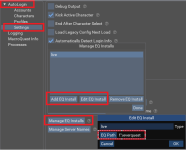
hi, I am trying to set up part of my raid to login from different copies of everquest on my laptop. I am using the autologin program seen here, ultimately the goal is to get them to load EQ from 3 different sources so I can let casters use their horses, and what not. I haven't been able to find a walkthrough on how to use this to do it. I am running this on eqemu, with the RoF2 client
1736965451036.png
 
hi, I am trying to set up part of my raid to login from different copies of everquest on my laptop. I am using the autologin program seen here, ultimately the goal is to get them to load EQ from 3 different sources so I can let casters use their horses, and what not. I haven't been able to find a walkthrough on how to use this to do it. I am running this on eqemu, with the RoF2 client
View attachment 67757

did you follow these steps?
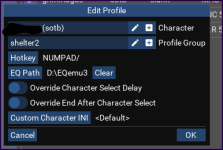
each "group" has 1 eq install directory, so you'll need to have 3 distinct groups

You'd create something like "live-caster" "live-tank" whatnot

1736965858881.png
 
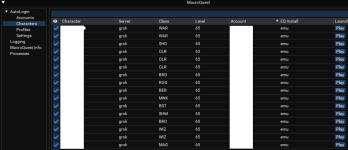
I tried to log on a few days ago and all of my profiles were gone along with all my characters and apparently all the MQ settings for all my characters. I finally get logged in and I can't seem to find any of the plugins that come with Very Vanila.

If anyone could help shed light on what happened that would be much appreciated.

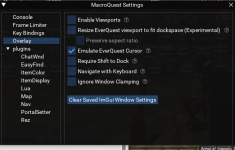
There used to be a whole bunch of plugins in this window i'm like 100% sure.

1737599082808.png

Any help thanks.

Mod edit: your toon names were visible behind your window. Don't do that
 
I tried to log on a few days ago and all of my profiles were gone along with all my characters and apparently all the MQ settings for all my characters. I finally get logged in and I can't seem to find any of the plugins that come with Very Vanila.

If anyone could help shed light on what happened that would be much appreciated.

There used to be a whole bunch of plugins in this window i'm like 100% sure.

View attachment 68034

Any help thanks.

Mod edit: your toon names were visible behind your window. Don't do that
We likely need more details as to what occured when you "tried to log on" (to include your method and app of choice for updating/launching mq) and what changed for you to "finally get logged in". My initial inclination is that you ended up installing MQ somewhere else (or had it installed somewhere else).
 
Yes, i updated RG, then my plugins, Lua's, and macros, then i started MQ from RG launcher even my map meshes were gone. But I always update everquest first. As far as installing it anywhere else I've updated it how I've done it a dozen or so times. The thing that changed to finally log in was I loaded up nopatch EQ and went old school. After doing that, characters started showing up in my MQ characters.
 
Yes, i updated RG, then my plugins, lua's, and macros, then i started MQ from RG launcher even my map meshes were gone. But I always update everquest first. As far as installing it anywhere else I've updated it how I've done it a dozen or so times.
Are you sure the folder didn't somehow change in your settings, leaving you to install mq elsewhere?
 
I am not sure, but i am also not sure how to check.
1. What are you using to update MQ. Redguides Launcher or Redfetch?
A.

2. If you look at the install location - does it match where you expect it to be?
A.

3. If you look at the install location and go to the config folder - do you have a login.db file or an MQ2Autologin.ini file?
A.

4. If 3 is no. Can you search your computer for either of those files in case macroquest is installed in a different location and share the results of the search?
A.
 
1. What are you using to update MQ. Redguides Launcher or Redfetch?
A. Redguides

2. If you look at the install location - does it match where you expect it to be?
A. It does match where i would expect it to be.

3. If you look at the install location and go to the config folder - do you have a login.db file or an MQ2Autologin.ini file?
A. Yes i have alot of login.db files for nearly every class, i cannot find any .ini files, I see autologin.dll

4. If 3 is no. Can you search your computer for either of those files in case macroquest is installed in a different location and share the results of the search?
A. yes
 
1. Redguides wasn't one of the two options provided.

3. You shouldn't have a login.db file for every class. Should just be one file called login.db located in the config folder of your macroquest install. It's a database that stores the information for your autologin. There may also be a login.db-shm and login.db-wal which are not class specific.

5. What method of launching macroquest do you use? Are you using the launcher, a shortcut, or navigating to the folder where MQ is stored and launching from there?
A.
 
1. Redguides wasn't one of the two options provided.
I'm not sure what to make of this cause i use redguides to update for the last 3 years.

3. You shouldn't have a login.db file for every class. Should just be one file called login.db located in the config folder of your macroquest install. It's a database that stores the information for your autologin. There may also be a login.db-shm and login.db-wal which are not class specific.
I have a login.db-shm and a login.db-wal

5. What method of launching macroquest do you use? Are you using the launcher, a shortcut, or navigating to the folder where MQ is stored and launching from there?
A. I launch MQ from the redguides launcher.
1737604592863.png
 
1. Redguides wasn't one of the two options provided.
I'm not sure what to make of this cause i use redguides to update for the last 3 years.

3. You shouldn't have a login.db file for every class. Should just be one file called login.db located in the config folder of your macroquest install. It's a database that stores the information for your autologin. There may also be a login.db-shm and login.db-wal which are not class specific.
I have a login.db-shm and a login.db-wal

5. What method of launching macroquest do you use? Are you using the launcher, a shortcut, or navigating to the folder where MQ is stored and launching from there?
A. I launch MQ from the redguides launcher.
View attachment 68035

1. based on your screenshot and your response to 5 I can see you're using the Redguides launcher.

5. That is the correct way to do it.


I'm not seeing any issues right away with the way it's installed. If you're positive you haven't installed it in a new location unintentionally.

I can only suggest you setup your profiles and logins again.
 
I would check you don't have av locking any files.

Many folks whitelist their RG/MQ/EQ folders from av / scanning /syncing so they don't get quarantined
 
Good Evening all. I'm not very good at figuring things out, I tried to follow the YouTube guide on the Tutorial. And of course the video is an older version of what I just downloaded
and so trying to follow along things are not exactly the same on the setup. I am trying to auto load my characters and so far nothing is working. Is there a more updated video to show this process
with the new patch or can someone walk me through these steps. I think I was able to find the place to add my account login info with password, but being able to add it to a group is not clear to me, nor is finding the correct path to eq.exe showing up
etc... I was hoping I wasnt going to have to experiment in trying to figure this out, I thought the tutorial was going to be step by step for someone like me who has no idea how this works.
Haaaalp please
 
Good Evening all. I'm not very good at figuring things out, I tried to follow the YouTube guide on the Tutorial. And of course the video is an older version of what I just downloaded
and so trying to follow along things are not exactly the same on the setup. I am trying to auto load my characters and so far nothing is working. Is there a more updated video to show this process
with the new patch or can someone walk me through these steps. I think I was able to find the place to add my account login info with password, but being able to add it to a group is not clear to me, nor is finding the correct path to eq.exe showing up
etc... I was hoping I wasnt going to have to experiment in trying to figure this out, I thought the tutorial was going to be step by step for someone like me who has no idea how this works.
Haaaalp please
howdy Fully - there isn't an "official" RG vid for the new(er) autologin quite yet, sorry about that, but there is a vid in the overview for mq2autologin by grimmier

here is a walkthrough with some pictures, as well as the grim vid at the end
https://www.redguides.com/community/threads/mq2autologin.43323/post-633533
 
Does the option to asign a custom character .ini work on Emu? I tried to get it to work but failed. I created an eqclient_driver.ini and pointed MQ to it, but i couldn't get it to load.
 
Release AutoLogin (core plugin)

Users who are viewing this thread

Back
Top
Cart