• Hail, we're RedGuides. We want you to play six (yes, 6!) EverQuest characters at once. We have scripts and a friendly community to help, please join our playstyle and say hello! 👋
  • We've added LLM sections to our Terms & Rules and Resource Rules, for everyone's sanity & in-game safety.
    Read more
    a. Do not replace your voice with an LLM. This goes for your posts and your scripts. Drafting and editing with a tool is fine, but don't take you out of what you share.
    b. Do not replace your EQ character's voice with an LLM. We don't want scripts that speak over /ooc, /shout or other public channels. This has been an unwritten rule that's kept casino scripts off the site for decades, but we're now compelled to make it clear: keep automated communication private.

    Why Does RG Review Scripts?
    Nearly every LLM-written Lua script we see is making your character do impossible things, and rarely in a way that's beneficial to you. We've seen heavy server hammering, /target over impossible distances when /nav spawn would passively accomplish the same thing, a spawn search that fires 20+ times per second, and other pointless actions that are likely annoying GMs.

    You are welcome to use LLMs as a tool to structure, draft, and edit your work, but please read critically before hitting /lua run

Problem - aquietone's Guide to Emu Stability

  • Thread starter Thread starter aquietone
  • Anyone can edit the first post of this thread WikiPost WikiPost
  • Start date Start date
Status
The first post of this thread is a WikiPost and can be edited by anyone with the appropriate permissions. Your edits will be public.
Thank you to aquietone for opening this post as a wiki-post.

  • Make your eqgame.exe Large Address Aware (aka, the "4GB Patch"): This will prevent crashes by allowing the old 32-bit client to use more memory. https://ntcore.com/4gb-patch/
  • Update your drivers: Motherboard, GPU.
  • Some users have found the following helpful if they are still experiencing regular crashes:
  • If on a laptop, EQ should be set to use the discrete graphics card, if there is one.
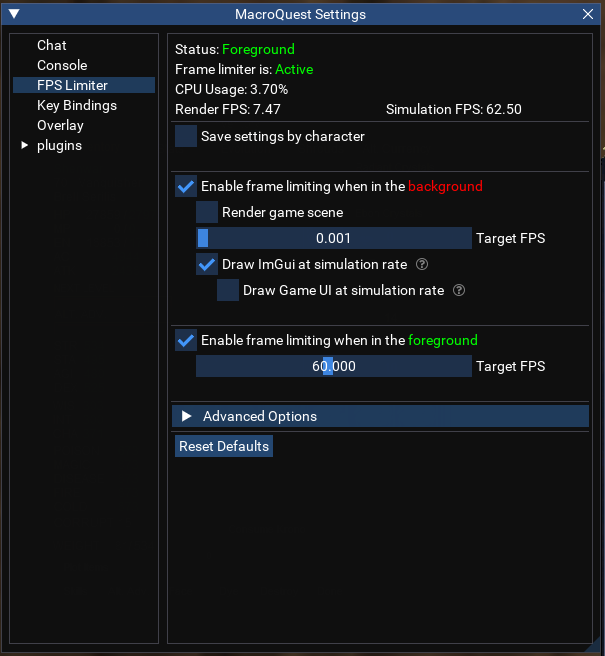
  • Set up the MQ Frame Limiter. It is superior to (and trumps) the built-in frame limiting in EQ (Algar's personal settings below). More info below.
  • Use in-game settings or eqclient.ini tweaks to further adjust performance once the above steps have been taken.
    • Some users have more than one EQ install, so one install can have a client ini with "prettier" settings for their driver.
    • An example eqclient.ini can be found on Rekka's E3Next git wiki, linked elsewhere in this post. I recommend understanding what you are changing by using it.
    • Beware of using performance guides aimed at "Modern EQ" (like Fanra's). Some of the information may not be relevant or correct, as EMU currently uses an older 32-bit client.
  • The fix for everything being stuck in "Turbo Mode" (aka "the AMD bug"): https://github.com/RekkasGit/E3Next/wiki/5)-Common-issues---FAQ#help-everything-is-moving-too-fast
  • Modern-gen Intel processors with P/E cores may require further tuning of core use with something like Process Lasso (this is very rare and non-trivial).
  • Gaming overlays can cause conflicts with MQ (Discord, Nvidia, Overwolf, etc).

Frame limiter:
  • The "community standard" is typically minimum background FPS. I've found 1fps stops ImGui Animations from being stuck on screen for a very long time.
  • Foreground FPS is generally for the user's preference.
  • It is recommended to turn spell particle effects off for background characters when using the frame limiter. (/showspelleffects off, or edit the ini).
More frame limiter info/discussion can be found at: https://www.redguides.com/community/threads/mqnext-framelimiter-demo.78448/
image
 
Last edited:
I didn't have this problem about a year ago. I just recently started playing again and suddenly crash central. How do I get to the limiter? MQ settings?
 
Edit: Merged into wiki post above.

This is the guide that I wrote for EQ Might.
I don't believe old models or global load adjustments to be necessary with the most recent patch. Feel free to do with it as you will. I used links and resources I knew to be available to the public, as this was not aimed at RG-users specifically.
Some of it is brief because I was keeping it under the 2000 character no-nitro discord limit.
 
Last edited:
Problem - aquietone's Guide to Emu Stability

Users who are viewing this thread

Back
Top
Cart