


- Joined
- May 14, 2026
- RedCents
- 1,539¢
I switched to linux in general a few years back when I got my steam deck (was floored by what it could do), and for the most part, I don't have any issues running any games I want to on it, or anything else. EQ1 + MQ has been a bit of a chore (EQ itself being the bigger of the two problematically), and I was hoping to glean some knowledge from those of you who are on linux runningEQ1+MQ as well for some issues I've more or less just dealt with up until now:
Running CachyOS on an AMD 9900X cpu with a 7900xtx GPU as my setup, outputting to a 4k tv since my old ass can see a larger screen much better in general, especially with presbyopia starting to set in.
For any of you that play at 4k, it's no secret that the EQ1 UI doesn't scale well at all. There's a few ways I've found around this, but neither works that great: I can use winecfg to set the DPI scale for the prefix EQ/MQ is using (the default in this case, but I've also created EQ-specific prefixes as well). This works to get things more readable, at the cost of blurriness and loss of graphical fidelity, BUT, if you have DXVK installed in for the prefix, it doesn't work right. The graphics will scale much better, but the text scaling gets broken to the point of being completely illegible. Without DXVK, however, EQ sees my gpu as an old radeon HD 5600 (lol), and the game takes a big performance hit. On top of that, if I try to run with shadows on, the game will crash within an hour of play consistently. Not ideal. The third option, which works pretty well is to use gamescope to force the game to run internally at 1080p and use FSR to upscale to 4k. This works fine with DXVK and looks fantastic. (You can do this in Windows with lossless scaling as well). HOWEVER, MQ does not like being ran through gamescope. At all. Crashes every single time for me. So using this option to fire up MQ and launch the game from there is a no-go. Have any of you found a good solution for this?
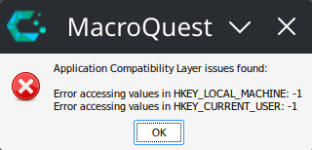
On the MQ itself front: It's been largely problem-free for the most part with running RG mercs and plugins like the Autoforage. There are two things that have been bugging me that I would appreciate any advice/help with, though: When starting up MQ, I always get a compatibility layer error (screenshot below). This only happens on my desktop, not my laptop, which are configured identically. It doesn't seem to affect anything as far as I can tell, but If it's somethign that needs to be corrected, does anyone have any tips on how to do so? Lastly, the DanNet plugin-required buttons (Come to Me, Follow Me, etc...) have never worked for me. I have made sure the plugin is indeed loaded in MQ, but still no joy. Perhaps related to the error I mentioned above? That said it doesnt work on my laptop either, which doesn't throw that error when launching MQ.
Running CachyOS on an AMD 9900X cpu with a 7900xtx GPU as my setup, outputting to a 4k tv since my old ass can see a larger screen much better in general, especially with presbyopia starting to set in.
For any of you that play at 4k, it's no secret that the EQ1 UI doesn't scale well at all. There's a few ways I've found around this, but neither works that great: I can use winecfg to set the DPI scale for the prefix EQ/MQ is using (the default in this case, but I've also created EQ-specific prefixes as well). This works to get things more readable, at the cost of blurriness and loss of graphical fidelity, BUT, if you have DXVK installed in for the prefix, it doesn't work right. The graphics will scale much better, but the text scaling gets broken to the point of being completely illegible. Without DXVK, however, EQ sees my gpu as an old radeon HD 5600 (lol), and the game takes a big performance hit. On top of that, if I try to run with shadows on, the game will crash within an hour of play consistently. Not ideal. The third option, which works pretty well is to use gamescope to force the game to run internally at 1080p and use FSR to upscale to 4k. This works fine with DXVK and looks fantastic. (You can do this in Windows with lossless scaling as well). HOWEVER, MQ does not like being ran through gamescope. At all. Crashes every single time for me. So using this option to fire up MQ and launch the game from there is a no-go. Have any of you found a good solution for this?
On the MQ itself front: It's been largely problem-free for the most part with running RG mercs and plugins like the Autoforage. There are two things that have been bugging me that I would appreciate any advice/help with, though: When starting up MQ, I always get a compatibility layer error (screenshot below). This only happens on my desktop, not my laptop, which are configured identically. It doesn't seem to affect anything as far as I can tell, but If it's somethign that needs to be corrected, does anyone have any tips on how to do so? Lastly, the DanNet plugin-required buttons (Come to Me, Follow Me, etc...) have never worked for me. I have made sure the plugin is indeed loaded in MQ, but still no joy. Perhaps related to the error I mentioned above? That said it doesnt work on my laptop either, which doesn't throw that error when launching MQ.

