
Sorry you guys are having trouble with this. Wish I could help more but I have no experience with IsBoxer. And from what I understand it affects more other Luas as well. Maybe in the future the ImGui window management will improve (the MQ devs are always working on improving the integration).

-
 Hail, we're RedGuides. We want you to play six (yes, 6!) EverQuest characters at once. We have scripts and a friendly community to help, please join our playstyle and say hello! 👋
You are using an out of date browser. It may not display this or other websites correctly.
You should upgrade or use an alternative browser.
You should upgrade or use an alternative browser.

Release AlphaBuff - The Ultimate Buff & Song Windows 3.5.4
- Thread starter raw
- Start date
Raw
I really don't think it is ISB that is causing this phenomenon. If you recall our previous conversations a few months back about this problem I noted that whenever you switched windows and back again it triggered a rewrite of not only the macrooverlay file but also alphabuff.ini file too. You could change the the position alphabuff and both of those files would update and then switch and they both would revert back to the default position. I have found out from experimentation that you can only move them to the left of their original positions (default). That works good, but you can't go to the right. Really weird behavior. But then you added the lock feature and that really helped. It most certainly does lock them both in place and they stay there. Again my only complaint is that the lock works too good lol. When I log out and log back in I find them both AB and AS, to be in that partially open state. You can just barely see the settings icon under the down arrow. To fix this you have to "drag the box open to see all the buffs. But to do the drag part you first have to "unlock" it by clicking on the settings icon (which is only barely visible) and click the unlock and then you can drag it any way you want. Last note, I have found that I can just leave it unlocked and it won't revert positions but that it will stay open for me if and when I log back in. I think you have developed some kind of alien AI software here...it healed itself lol.
Vrak
I really don't think it is ISB that is causing this phenomenon. If you recall our previous conversations a few months back about this problem I noted that whenever you switched windows and back again it triggered a rewrite of not only the macrooverlay file but also alphabuff.ini file too. You could change the the position alphabuff and both of those files would update and then switch and they both would revert back to the default position. I have found out from experimentation that you can only move them to the left of their original positions (default). That works good, but you can't go to the right. Really weird behavior. But then you added the lock feature and that really helped. It most certainly does lock them both in place and they stay there. Again my only complaint is that the lock works too good lol. When I log out and log back in I find them both AB and AS, to be in that partially open state. You can just barely see the settings icon under the down arrow. To fix this you have to "drag the box open to see all the buffs. But to do the drag part you first have to "unlock" it by clicking on the settings icon (which is only barely visible) and click the unlock and then you can drag it any way you want. Last note, I have found that I can just leave it unlocked and it won't revert positions but that it will stay open for me if and when I log back in. I think you have developed some kind of alien AI software here...it healed itself lol.
Vrak
Haha.Raw
I really don't think it is ISB that is causing this phenomenon. If you recall our previous conversations a few months back about this problem I noted that whenever you switched windows and back again it triggered a rewrite of not only the macrooverlay file but also alphabuff.ini file too. You could change the the position alphabuff and both of those files would update and then switch and they both would revert back to the default position. I have found out from experimentation that you can only move them to the left of their original positions (default). That works good, but you can't go to the right. Really weird behavior. But then you added the lock feature and that really helped. It most certainly does lock them both in place and they stay there. Again my only complaint is that the lock works too good lol. When I log out and log back in I find them both AB and AS, to be in that partially open state. You can just barely see the settings icon under the down arrow. To fix this you have to "drag the box open to see all the buffs. But to do the drag part you first have to "unlock" it by clicking on the settings icon (which is only barely visible) and click the unlock and then you can drag it any way you want. Last note, I have found that I can just leave it unlocked and it won't revert positions but that it will stay open for me if and when I log back in. I think you have developed some kind of alien AI software here...it healed itself lol.
Vrak
I also experience the partially open window that needs to be dragged down. But this only happens if I log out and back in while the window is collapsed, and then I go to uncollapse it.
As for the other stuff, I just can't reproduce it. Whether locked or not, all my buff and song windows stay in the correct place on all 7 of my toons. I usually never use the lock option.
So I'm at a bit of a loss as to what's happening for you guys =(


celestialtaco
Member
would it be possible to add an 'unblock spell' context menu option?
thanks for considering!
thanks for considering!

I see you have made some absolute banger Lua scripts
One thing and maybe I'm messing up the config but is there a way to hide favorited buffs that you currently have? Like I just want to see those buffs if they are missing, to help eliminate clutter
One thing and maybe I'm messing up the config but is there a way to hide favorited buffs that you currently have? Like I just want to see those buffs if they are missing, to help eliminate clutter
example
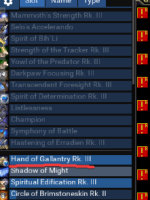
I want to see all those buffs above, what I don't want to see is Gallantry at all if it is in my favorites and i have the buff to help clean up the window to better see debuffs, short term buffs
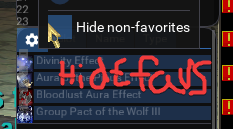
also you have two typos on your check boxes where it reads "Hide non-favoties" instead of hide non-favorites
I want to see all those buffs above, what I don't want to see is Gallantry at all if it is in my favorites and i have the buff to help clean up the window to better see debuffs, short term buffs
also you have two typos on your check boxes where it reads "Hide non-favoties" instead of hide non-favorites
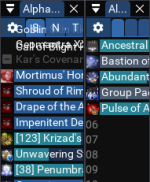
Sometime since yesterdays patch my buff window got scrunched up at the top and I can't get it to stop overlapping buff names.
I've stretched and pulled, closed and reopened. Changed font sizes re-positioned and re-docked the windows. Hid and showed the title bar.
I figured I'd ask for help here before removing my whole favorites list and redoing it in the hopes that that will fix it.
I've stretched and pulled, closed and reopened. Changed font sizes re-positioned and re-docked the windows. Hid and showed the title bar.
I figured I'd ask for help here before removing my whole favorites list and redoing it in the hopes that that will fix it.
Attachments

gpag
Active member
Hit Alt + B to open up your default eq buff window (you can then close it). Does that fix the overlapping for you?Sometime since yesterdays patch my buff window got scrunched up at the top and I can't get it to stop overlapping buff names.
I've stretched and pulled, closed and reopened. Changed font sizes re-positioned and re-docked the windows. Hid and showed the title bar.
I figured I'd ask for help here before removing my whole favorites list and redoing it in the hopes that that will fix it.
Gold Effin Star! Thank you, that did indeed correct the issue!Hit Alt + B to open up your default eq buff window (you can then close it). Does that fix the overlapping for you?
raw updated AlphaBuff with a new update entry:
3.4.0
Read the rest of this update entry...
3.4.0
 Commits
Read the rest of this update entry...

Rare Spawn
Well-known member
Alpha Buff is one of my favorites, I have it setup to show me only the favorite buffs I am missing, and its just knows/defaults to also showing me the dots and debuffs I am afflicted with to. Love this.
On several occasions during combat, with the main buff window sorted by name, and only showing missing favorites, and hiding non-favorites. It has dropped all my buffs when attempting to click or possibly right click on what is displayed as a missing favorite favorite buff... for example, an old rank II that I would like to unfavorite, as I currently had the rank III on, I right clicked the greyed out rank II to see the unfavorite option, but instead all my buffs were removed. Anyone else see that?
On several occasions during combat, with the main buff window sorted by name, and only showing missing favorites, and hiding non-favorites. It has dropped all my buffs when attempting to click or possibly right click on what is displayed as a missing favorite favorite buff... for example, an old rank II that I would like to unfavorite, as I currently had the rank III on, I right clicked the greyed out rank II to see the unfavorite option, but instead all my buffs were removed. Anyone else see that?
Glad you like it. No, I've never had anything like that before.Alpha Buff is one of my favorites, I have it setup to show me only the favorite buffs I am missing, and its just knows/defaults to also showing me the dots and debuffs I am afflicted with to. Love this.
On several occasions during combat, with the main buff window sorted by name, and only showing missing favorites, and hiding non-favorites. It has dropped all my buffs when attempting to click or possibly right click on what is displayed as a missing favorite favorite buff... for example, an old rank II that I would like to unfavorite, as I currently had the rank III on, I right clicked the greyed out rank II to see the unfavorite option, but instead all my buffs were removed. Anyone else see that?
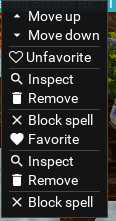
There is an issue where if you try to right-click a buff to get the context menu, but your EQ window is not in focus (i.e., your tabbed into another window), it treats it like a left-click and removes the buff. Could this be what you experienced?
BTW everyone, if you're enjoying AlphaBuff, don't forget to vote for it in the 6th annual EverQuest Software Awards! 
Rare Spawn
Well-known member
That is quite possible, I do have alot of windows open, stacked, and some side by side, so I haven't began to keep track of which window has/had focus when it happens. The offending click did cause either ALL my buffs, or all my favorite buffs to drop with a single click though... I couldn't tell which because I hide everything except the missing favorites.Glad you like it. No, I've never had anything like that before.
There is an issue where if you try to right-click a buff to get the context menu, but your EQ window is not in focus (i.e., your tabbed into another window), it treats it like a left-click and removes the buff. Could this be what you experienced?


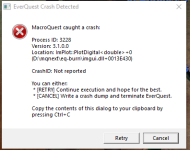
I am not sure what is going on, but I was able to narrow it down by process of elimination that alpha buff is causing the issue. The crash is just random, I could literally just be standing there. I believe I have the latest MQ and Alphabuff, and I am playing on Emu for more info.
Bootwo2000
New member
This Lua is causing crashes all the time. By process of elimination I was able to narrow it down to this Lua. Soon as I took it off all my boxes I get no more crashes. I would not use this Lua til the author gets it fixed.

DEADCiTiES
Well-known member
I was having issues more frequently than normal. I like to crash less. I stopped using AlphaBuff after reading this post by brainiac, even though I really liked using it. I'm not sure if the issue braniac was able to confirm is still the culprit.
yea its been mentioned a few times there are some mismatched push/pop which will eventually cause memory related crashes. afaik that hasn't been fixed

taking a quick look at the code I suspect that the problem is the barcolor function. It has a few problems:
1) it gets called all over the place and actually does a push color that is never popped most of the time.
2) it assigned the value of pushsytlecolor to a variable and returns it but as far as I know pushstylecolor returns void
3) it also ignores the return value.
I think this just needs refactored.
1) it gets called all over the place and actually does a push color that is never popped most of the time.
2) it assigned the value of pushsytlecolor to a variable and returns it but as far as I know pushstylecolor returns void
3) it also ignores the return value.
I think this just needs refactored.
Rare Spawn
Well-known member
I have no idea what you just said, but, I am a huge fan of Buttonmaster and a fan of Alphabuff. Thank you for the collaboration!taking a quick look at the code I suspect that the problem is the barcolor function. It has a few problems:
1) it gets called all over the place and actually does a push color that is never popped most of the time.
2) it assigned the value of pushsytlecolor to a variable and returns it but as far as I know pushstylecolor returns void
3) it also ignores the return value.
I think this just needs refactored.
Alphabuff is super useful for raiding as it allows me to only see what buffs I am missing, and only show me "songs" or short term buffs that are important for my class to respond/react to.

Same. I use it on all toons and don't encounter any issues other than the occasional crash that could be the result of literally anything!. It would be great if this was kept updated as needed (not sure it needs it now) as it's a great resource to see necessary buffs.I have no idea what you just said, but, I am a huge fan of Buttonmaster and a fan of Alphabuff. Thank you for the collaboration!
Alphabuff is super useful for raiding as it allows me to only see what buffs I am missing, and only show me "songs" or short term buffs that are important for my class to respond/react to.

Whatchu talkin' bout Willis? Doesn't everyone do that?left your client running for likely days at a time
raw updated AlphaBuff with a new update entry:
3.4.1
Read the rest of this update entry...
3.4.1
Bug Fixes
- PlotHistoGram bleed
Progress bar styles were bleeding out and refreshing every frame.
I noticed this in style editor where it wouldn't let me revert the PlotHistogram color unless i closed AlphaBuff.
you could even force it to change color by removing buffs.
* Converted the barcolor variable into a table to hold the values.
* Instead of having barColor function return the PushStyleColor, we just return the values. and plug them back into the...
Read the rest of this update entry...
DEADCiTiES
Well-known member
Thank you for the update! I'm back to using it again. There's been an empty spot on all my clients where it used to live for months. Also, posting this reminded me I need to edit my ingame.cfg to have it autoload :-)

The bug in Alphabuff has been corrected.Thanks for the confirmation. I guess I don't have to run it for long periods of time, but it is nice to have. I didn't change any configuration options for it and am running it straight out of the box. I will post something in the forums section for it and see if the author can give me any guidance.
Never experienced this issue. Did it start recently? Curious if anyone can replicate this.Anyone check their ingame FPS before/after using this lua? It seems to be nearly a ~50 FPS loss running Alphabuff with the song/buff window overlays open on a pretty solid PC. I love what it does but that feels like a ton of performance loss for buff overlays

Mochila
Member
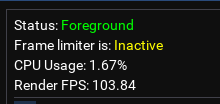
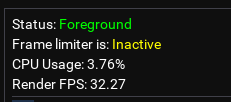 Using AB Song + AB Buff windows staring at a wall. First SS is with it off (Lua loaded, but no windows up) 2nd SS is with both buff windows loaded. Stock MQ2 install. Only a CWTN plugin loaded besides the base stuff.
Maybe someone else can check theirs in a similar way and see if it's just me and I can troubleshoot from there...but normally my stuff runs smoothly and this was a pretty noticeable slowdown without any other variables I could think of.
Last edited:
I'm about an hour or so from being home but when I get there I'll check mine and see.View attachment 60872View attachment 60873Using AB Song + AB Buff windows staring at a wall. First SS is with it off (Lua loaded, but no windows up) 2nd SS is with both buff windows loaded. Stock MQ2 install. Only a CWTN plugin loaded besides the base stuff.
Maybe someone else can check theirs in a similar way and see if it's just me and I can troubleshoot from there...but normally my stuff runs smoothly and this was a pretty noticeable slowdown without any other variables I could think of.
Sorry that took WAY longer than expected.
That said...It's happening to me too.
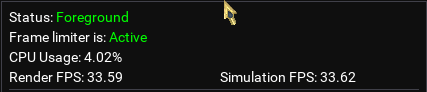
Although mine is going from around 34fps to around 19fps with Alphabuff loaded Buff and Song window.
Before Starting Alphabuff After Starting Alphabuff
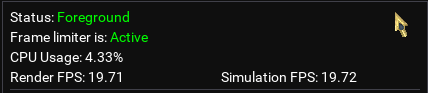
Also I feel like my FPS should be way higher if anyone wants to take a crack at giving me some tips on that lol
lol
Edit: I closed down Boxhud, Buttonmaster and my own homebrewed debuff tracker as well and each one increased FPS.
I jumped up to a whopping 70fps
Editing to say that because I don't think it's an Alphabuff specific issue.
That said...It's happening to me too.
Although mine is going from around 34fps to around 19fps with Alphabuff loaded Buff and Song window.
Before Starting Alphabuff After Starting Alphabuff
Also I feel like my FPS should be way higher if anyone wants to take a crack at giving me some tips on that
lolEdit: I closed down Boxhud, Buttonmaster and my own homebrewed debuff tracker as well and each one increased FPS.
I jumped up to a whopping 70fps
Editing to say that because I don't think it's an Alphabuff specific issue.
Last edited:
I really love this script and have been using it since day 1, and I can also confirm this, it will drop my fps 10-20 though. But I just live with it
P. S. I've been using several other Lua UI scripts, such as Boxhud and myself written ones. I've tested by run/stop them one by one, only alphabuff will bring a significant FPS drop.
P. S. I've been using several other Lua UI scripts, such as Boxhud and myself written ones. I've tested by run/stop them one by one, only alphabuff will bring a significant FPS drop.
Users who are viewing this thread
Total: 1 (members: 0, guests: 1)
Share: