• You've discovered RedGuides, an EverQuest multi-boxing and scripting community 🧙‍♀️⚙️. We want you to play several EQ characters at once, come join us and say hello! 👋

  • A TLP without truebox has thawed (Very Vanilla ready)
    Frostreaver
AlphaBuff - The Ultimate Buff & Song Windows

Release AlphaBuff - The Ultimate Buff & Song Windows 3.5.3

No permission to download
Just tried this out on EMU (Laz) and it works great! Was wondering, could the Auras be added maybe in an upcoming update? Really appreciate this effort! Really like that favorites can be added so that I can figure out if I'm missing a buff at a glance.
 
Love the Lua and your work on it. Is there any solution for using with Isboxer and keeping position? I suspect this is just one of the prices to pay with using Isboxer and is not a limitation of the Lua. But was jsut wondering if there was a way to do that.
 
Love the lua and your work on it. Is there any solution for using with Isboxer and keeping position? I suspect this is just one of the prices to pay with using Isboxer and is not a limitation of the lua. But was jsut wondering if there was a way to do that.
The Lua should remember its window positions for each toon individually. Sorry, I've never used Isboxer and don't know how it works or how it affects window positions.
 
They get reset all of the time. Not sure if it is related to the constant UI changes DBG implemented.
 
They get reset all of the time. Not sure if it is related to the constant UI changes DBG implemented.
That must be annoying.
I have 6 toons that run AB, and they all have their windows in unique positions.
I really can't replicate this.
The only thing I can think of is to open MacroQuest_Overlay.ini in your config forlder, and delete all entries related to alphabuff.
AB has it's own size/position memory that should override MacroQuest_Overlay.ini but maybe for some reason it's not working on your end.
 
I feel like this would be very subjective. Maybe a lua that would be customizable to your needs where you pick what buffs you class as "needed" and would tell you if you have them or not.

Very cool Lua rawmotion! Thank you - cant wait to use this.
that customizable Lua is an awesome idea.
This Lua is a awesome idea as well!
 
That must be annoying.
I have 6 toons that run AB, and they all have their windows in unique positions.
I really can't replicate this.
The only thing I can think of is to open MacroQuest_Overlay.ini in your config forlder, and delete all entries related to alphabuff.
AB has it's own size/position memory that should override MacroQuest_Overlay.ini but maybe for some reason it's not working on your end.
Will give this a go and see if that helps. Thanks!
 
They get reset all of the time. Not sure if it is related to the constant UI changes DBG implemented.
This happens to me sometimes, too. Here's what I do:

1) Get the AB windows on your toons where you want them.
2) Go into your config folder and delete all of the Alphabuff_ToonName.ini files.
3) Grab the AB window on each toon and give it a little wiggle.
4) This forces the Lua to generate a fresh Alphabuff ini with the correct position info.

I don't know why this should be necessary, but I have had great success with it.
 
This happens to me sometimes, too. Here's what I do:

1) Get the AB windows on your toons where you want them.
2) Go into your config folder and delete all of the Alphabuff_ToonName.ini files.
3) Grab the AB window on each toon and give it a little wiggle.
4) This forces the lua to generate a fresh Alphabuff ini with the correct position info.

I don't know why this should be necessary, but I have had great success with it.
Glad this works... Just be aware, it will delete all your favorited buffs and songs, and other settings.
 
This happens to me sometimes, too. Here's what I do:

1) Get the AB windows on your toons where you want them.
2) Go into your config folder and delete all of the Alphabuff_ToonName.ini files.
3) Grab the AB window on each toon and give it a little wiggle.
4) This forces the lua to generate a fresh Alphabuff ini with the correct position info.

I don't know why this should be necessary, but I have had great success with it.
I really appreciate the tip. Are you using isboxer as well? I have a feeling that it is causing the issues.
Going to try with one window tomorrow and see how it goes.
 
I really appreciate the tip. Are you using isboxer as well? I have a feeling that it is causing the issues.
Going to try with one window tomorrow and see how it goes.
Sorry, I have no experience with isboxer.
 
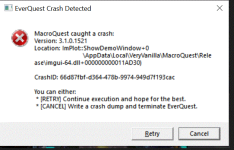
I have been having daily crashes in MQ, specfically in the ImPlot location, referecing the imgui-64.dll. This appears to be happening after MQ has been running for 4-6 hours+. I have attached a screenshot of the error message I receive when this happens, usually on my tank, but sometimes on other chars. I also have a recent crash dump from just a few minutes ago that I can upload, if someone can tell me where I should place it. Thanks in advance..

mq_crash3.GIF.png
 
I have been having daily crashes in MQ, specfically in the ImPlot location, referecing the imgui-64.dll. This appears to be happening after MQ has been running for 4-6 hours+. I have attached a screenshot of the error message I receive when this happens, usually on my tank, but sometimes on other chars. I also have a recent crash dump from just a few minutes ago that I can upload, if someone can tell me where I should place it. Thanks in advance..

View attachment 50230
Crash dumps are automatically submitted to the MQ developers, CWTN, redbot, and myself
 
Crash dumps are automatically submitted to the MQ developers, CWTN, redbot, and myself
Gotcha, thanks for letting me know. If you need any additional information, I will be happy to provide it. I have attached a copy of my tank's .cfg file that shows the Lua's and plugins I'm running, if that's helpful.

/timed 50 /lua run lootly /timed 100 /lua run alphabuff /timed 150 /lua run buttonmaster /timed 200 /plugin mq2autogroup load /timed 250 /autogroup /timed 300 /lua run boxhud
 
Crash dumps are automatically submitted to the MQ developers, CWTN, redbot, and myself

Yes, so we have the dump, but won't look at it unless we have the crash Id. which can be ctrl+c copied out of the dialog, by the way.

One of your Lua scripts is slowly leaking memory by calling ImGui.PushStyleColor and never popping it.
 
Yes, so we have the dump, but won't look at it unless we have the crash Id. which can be ctrl+c copied out of the dialog, by the way.

One of your lua scripts is slowly leaking memory by calling ImGui.PushStyleColor and never popping it.
Thanks Brainic. My crash ID is:

66d87fbf-d364-478b-9974-949d7f193cac

Just let me know if you need anything else.
 
I already explained the problem to you
Sorry, I guess I misunderstood your post. You said you wouldn't look at the dump unless I provided the Crash ID, which I then posted. Is there any way to identify the Lua that is causing the memory leak? I suspect it's either alphabuff or boxhud, but I'm running the latest versions.
 
Sorry, I guess I misunderstood your post. You said you wouldn't look at the dump unless I provided the Crash ID, which I then posted. Is there any way to identify the LUA that is causing the memory leak? I suspect it's either alphabuff or boxhud, but I'm running the latest versions.
i got the id from your crash dialog, i was telling sic because he seemed to imply that we'd look at it regardless, which isn't true.

anyways, probably the best bet is to only load one of the Lua scripts and leave it running for a while, see if it crashes, check its memory usage, etc. one of those scripts wil be causing memory usage to slowly grow over time, you want to narrow down which one it is.

then, report this as a bug to the author of that script.
 
i got the id from your crash dialog, i was telling sic because he seemed to imply that we'd look at it regardless, which isn't true.

anyways, probably the best bet is to only load one of the lua scripts and leave it running for a while, see if it crashes, check its memory usage, etc. one of those scripts wil be causing memory usage to slowly grow over time, you want to narrow down which one it is.

then, report this as a bug to the author of that script.
Got it. Thank you. I will just close both boxhud and alphabuff for now if I plan on running MQGrind for a long period of time. As a general question, to recover from a memory leak in this context, do I just need to stop all MQ and EQ processes and restart them or do I need to reboot my Windows PC as well?
 
i got the id from your crash dialog, i was telling sic because he seemed to imply that we'd look at it regardless, which isn't true.
Nah, was in reference to asking where they should upload the file to
 
Got it. Thank you. I will just close both boxhud and alphabuff for now if I plan on running MQGrind for a long period of time. As a general question, to recover from a memory leak in this context, do I just need to stop all MQ and EQ processes and restart them or do I need to reboot my Windows PC as well?
In this case just unloading and reloading mq would fix it
 
In this case just unloading and reloading mq would fix it
Great. Thanks for the clarification and speedy reply. Based on some previous crashes I have encountered and knowing which Lua's, I'm running on which characters, I suspect this is boxhud, but will see if I can reproduce it later tonight.
 
In this case just unloading and reloading mq would fix it

I find this interesting, as a macro I use tends to cause massive memory leaks. I also keep boxhud up on my driver toon. BUt the clients, if left running under the macro for 3-4 hours will have clients upwards of 2.5 to 3gb each. if left for 7-8 hours it's upwards of 5-7gb per EQ client. To release that memory (Im assuming it's a leak) unloading and reloading MQ doesn't fix it, as it seems absorbed by the eqgame process, which those clients need to be restarted.

If I use another macro, it doesn't happen. Unless I'm misunderstanding your explanation of how the leak and memory release works.

I think my issue is related to plugins the macro uses. Assumption is it's mq2collections causing the problem, but i have no way of determining where that issue is.
 
I find this interesting, as a macro I use tends to cause massive memory leaks. I also keep boxhud up on my driver toon. BUt the clients, if left running under the macro for 3-4 hours will have clients upwards of 2.5 to 3gb each. if left for 7-8 hours it's upwards of 5-7gb per EQ client. To release that memory (Im assuming it's a leak) unloading and reloading MQ doesn't fix it, as it seems absorbed by the eqgame process, which those clients need to be restarted.

If I use another macro, it doesn't happen. Unless I'm misunderstanding your explanation of how the leak and memory release works.

I think my issue is related to plugins the macro uses. Assumption is it's mq2collections causing the problem, but i have no way of determining where that issue is.
It varies case by case but in this case the memory that’s leaking isn’t “lost” — it’s being held by something and can be release simply by unloading mq. That will reset the data structures and free the memory that’s being held.

Basically the script keeps asking for more objects and doesn’t give them back. Doesn’t matter if the script ends. The part that is holding the created objects that were given to the script still thinks they are in use because it has no other way of knowing.

Macros could do it too if they create an unlimited number of variables but that’s a completely different problem.

This specific case keeps adding colors to the style stack and never takes them off. In the crash dump there were several millions colors in the stack and it hit its limit on the size
 
As an update, it definitely appears to be boxhud. I unloaded the Lua and left my clients running last night, with no crashes. I also followed this article and was able to monitor memory and page usage with the Lua loaded vs un-loaded: https://learn.microsoft.com/en-us/w...rs/debugger/determining-whether-a-leak-exists. I guess I just need to reach out to the author of boxhud and see where to go from here. I love the utility of it, but having it chew through that much memory and crash my client is very frustrating.
 
Not seeing any mismatched push/pop colors in boxhud. Also haven't encountered this myself or heard of anyone else having this problem with it. Do you have any customizations, added your own columns or anything? Outside of the configuration tab which you probably don't leave open majority of the time, there are just 2 places where it does push/pop color.
 
You unloaded all luas or just boxhud? Looking at the rest of the luas in your list you had running, i see push style color called many many times in alphabuff but only popped once.
 
My apologies for saying that it must have been boxhud. I thought I had unloaded both boxhud and alphabuff on all of my chars, but due to one of them not being in the same Dannet group, it was still loaded. I ran without both of them running last night and had no issues. I willl try running alphabuff again all day today and see if it happens again. I am surprised that it would be alphabuff, since I'm not doing anything special other than the out of the box config. Maybe it's not meant to be run on all 6 chars and that's when the problem starts occurring? Thanks for the prompt replies and assistance thus far and sorry again for the confusion on my part.
 
I have been having daily crashes in MQ, specfically in the ImPlot location, referecing the imgui-64.dll. This appears to be happening after MQ has been running for 4-6 hours+. I have attached a screenshot of the error message I receive when this happens, usually on my tank, but sometimes on other chars. I also have a recent crash dump from just a few minutes ago that I can upload, if someone can tell me where I should place it. Thanks in advance..

View attachment 50230
was having same issues and stoped using auto forage , hasnt happened since
 
This is 100% alphabuff
Thanks for the confirmation. I guess I don't have to run it for long periods of time, but it is nice to have. I didn't change any configuration options for it and am running it straight out of the box. I will post something in the forums section for it and see if the author can give me any guidance.
 
Thanks for the confirmation. I guess I don't have to run it for long periods of time, but it is nice to have. I didn't change any configuration options for it and am running it straight out of the box. I will post something in the forums section for it and see if the author can give me any guidance.
It isn't anything you're doing, alphabuff just needs an update. Rawmotion said they're on vacay for the next 2 weeks, so might be a lil bit
 
I really appreciate the tip. Are you using isboxer as well? I have a feeling that it is causing the issues.
Going to try with one window tomorrow and see how it goes.
i am using isboxer and everytime i switch to another box and then back it resets the window position unless the window is pinned, however, i dont want it to take up a whole side of my screen if possible. let me know if you find a solution
 
i am using isboxer and everytime i switch to another box and then back it resets the window position unless the window is pinned, however, i dont want it to take up a whBole side of my screen if possible. let me know if you find a solution
I tried everything I could find and even checked with the folks @ ISB and I found no solution. When you switch windows from one monitor to another or change the size, it does resize/move them to keep them on the screen and I'm told the imgui's have no anchoring system unless the author builds it on.

Solution for me - Boxhud and no more isb
 
I tried everything I could find and even checked with the folks @ ISB and I found no solution. When you switch windows from one monitor to another or change the size, it does resize/move them to keep them on the screen and I'm told the imgui's have no anchoring system unless the author builds it on.

Solution for me - Boxhud and no more isb
bummer, ok, thanks for the reply

like i said if you pin alphabuff to the side of the screen it will stay when you switch back and forth, i just hate to waste one full side of my screen that way
 
bummer, ok, thanks for the reply

like i said if you pin alphabuff to the side of the screen it will stay when you switch back and forth, i just hate to waste one full side of my screen that way
Yup. For me, it was the left side because that toon was on the left monitor. When I switched it to the right monitor when switching toons, it would stay fine on the left. It was all the imgui's on the right side that went left LOL
 
I have noted this phenomenon also. I have ISB and when I first started using AlphaBuff I couldn't get it to stay put either. I tried the "turn off the IMGui at the pos I wanted it at and then turn it back on from the Lua settings menu", thing. That didn't work, like others have said previous to this, everytime you switch toons, and then switch back, it would revert to the default position. I spent some time DM'ing with Raw about this, and I think this led to him putting the Lock feature in the UI. Well the "lock" works alright and I adapted. I changed my UI to have AB in the upper left corner with AS to the right of it, and locked them in place. (I used to have my buffs over in the upper right side of the screen). This holds the position and just works. I found that I have the same problem with HunterHud. So I adjusted my UI to fit around the default position. It's not pretty but I live with it for now.

However, I have since found out that, a lot of times I have to "pull down" the AB window, especially at startup. And to "pull down" you have to unlock it first. So almost as much of a PITA as before, almost. Anyways I look at it like this, AB is a definite improvement over the default EQ UI Buff window, I can live with it. <sigh>.

Vrak
 
Release AlphaBuff - The Ultimate Buff & Song Windows

Users who are viewing this thread

Back
Top
Cart