grimmier updated Alert Master with a new update entry:
v2.09
Read the rest of this update entry...
v2.09
Read the rest of this update entry...



[2.10] - 2024-05-12
Bug Fixes
- Add spawn and import
(2a82435) ~grimmier378Fixed some of the add spawn options since they broke adding targeted spawn.
importing from MQ2SpawnMaster.ini should go better.
That is interesting I will dig into that.Heya,
When I go into config and test a sound, it is changing the volume of the instance of EQ I test it on in the windows panel... and keeping it there. Not sure this is intended.
Love the thing anyways, cheers.
Heya,
When I go into config and test a sound, it is changing the volume of the instance of EQ I test it on in the windows panel... and keeping it there. Not sure this is intended.
Love the thing anyways, cheers.
[2.11] - 2024-06-12
Bug Fixes
- Alerts setting volume on eq and not resetting
(f0fdd1e) ~grimmier378Now re record the current volume setting when the script loads.
and after playing an alert we will reset back to that setting. this is set to a 2 second buffer to account for audio durations.
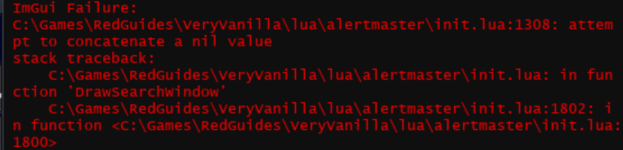
is it only in the guild hall?Back again my dude, seems to be crashing when I go into my tiny crapy guildhall and seems to be reproducable (on live). Lmk if I can do anything to assist!
View attachment 62384
[2.12] - 2024-06-13
Bug Fixes
- Is Zoning check is failing
(03cdb87) ~grimmier378Preventing crash added some nil checks.
Right now that is all I can say for certain.is it only in the guild hall?
[2.13] - 2024-07-30
Bug Fixes
- Zoning() checks replaces with Zone ID Compares
(b2b718f) ~grimmier378
Yeah the alert window i noticed that as well. but as you said there are typically so few mobs in it which was why i never fixed it lol.Hey man, just wanted to bring up that the Alert Window doesn't really respect sorting by distance. It will sort when you click the header, show an arrow, but it seems to go back to a default sorting whenever the list is updated. I can test further and be more precise if needed, and its a minor nuisance at best (usually too few mobs on it to matter).
This has become a foundational part of my experience with EQ and I appreciate the work.
I know how you roll burdsjm so I am making an assumption, do you have more than one character running AM at once?I'm not sure if this is just me, but I have ignored the same toonnames repeatedly, and it seems that every time I log on, it's forgotten.
/exit or /camp. /am ignoreadd saving something after the fact and reverting the addition.[2.15] - 2024-08-10
Bug Fixes
- Importing MQ2SpawnMaster.ini
(8191523) ~grimmier378Should better Import from MQ2SpawnMaster.ini
you may need to manually click Import are visiting a zone you have already been to or edit the am_imports.lua file in your config dir to reset the zones.
Features
- Command /am...
the above update should help.I do, usually have the MT of each group running it.
If I manually add it to them ini it still removes them.
/am reload will reload the config. this way you can resync the other chars after changing something on one.added. =)Any way to add an innocuous sound when the alert fires for a PC entering/leaving zone?
[2.16] - 2024-08-19
Features
- PC announcement audio settings
(b476069) ~grimmier378You can now set audio alerts for PC entered zone or PC left zone.
configurable in the settings window
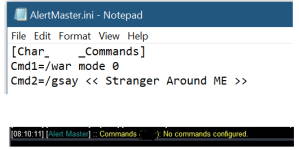
I haven't used this resource for a while, and never had to edit or look at the ini, but your section header ("[Char_ _Commands]") looks seriously whacked. Is there supposed to be a char name in the blank space? Scratching my head....need a little help please.
I do have CMD for the Alert, but when I do /am cmdlist, it is showing me no commands configured.
View attachment 64171

dont you think he just edited it to not show his charnames?I haven't used this resource for a while, and never had to edit or look at the ini, but your section header ("[Char_ _Commands]") looks seriously whacked. Is there supposed to be a char name in the blank space? Scratching my head....
<edit> Yeah, I checked my ini and there definitely are char names in that blank. Try editing to add char name and see if that makes a difference.
I haven't used this resource for a while, and never had to edit or look at the ini, but your section header ("[Char_ _Commands]") looks seriously whacked. Is there supposed to be a char name in the blank space? Scratching my head....
<edit> Yeah, I checked my ini and there definitely are char names in that blank. Try editing to add char name and see if that makes a difference.
Ah of course, obvious to all but me :PI removed char name before posting, so not to show my toon's name, it was [Char_XYZ _Commands]
[2.17] - 2024-08-31
Bug Fixes
- Cmdlist
(760f6b8) ~grimmier378/am cmdlist will now properly list your commands.
/am cmddel will accept cmd# or the command as arguments remember the command should be in quotes
cmd# can be found with /am cmdlist
[2.18] - 2024-09-01
Features
- Config window update
(e490a01) ~grimmier378Add most of the config options to the config window.
good to know. I will think of a different command to use to prevent any issues.Just wanted to toss out that /am is short for /amaze on live, so /am commands will pass to the server if they are sent when alert master isn't running (perhaps through a macro button/etc). Tinfoil, but something to be aware of.
there is actually both /am and /alertmaster that work. just checked the code. I have a fix i never pushed for the pcs settings save issue as well.Just wanted to toss out that /am is short for /amaze on live, so /am commands will pass to the server if they are sent when alert master isn't running (perhaps through a macro button/etc). Tinfoil, but something to be aware of.
Yes, I switched to /alertmaster, thanks!there is actually both /am and /alertmaster that work. just checked the code. I have a fix i never pushed for the pcs settings save issue as well.
[2.19] - 2024-10-01
Bug Fixes
- Importing from spawnmaster, Fix: saving toggle changes
(1f2fff5) ~grimmier378
was already there actuallyYes, I switched to /alertmaster, thanks!
yep, switched to it when i posted the message, was posting because i didn't think sending commands in emotes to the server was intended behavior XDwas already there actually


 Am able to drop multiple plugins and various scripts, and *it just works*, no messing about