• You've discovered RedGuides, an EverQuest multi-boxing and scripting community 🧙‍♀️⚙️. We want you to play several EQ characters at once, come join us and say hello! 👋

  • A TLP without truebox has thawed (Very Vanilla ready)
    Frostreaver
Alert Master

Release Alert Master v2.28

No permission to download
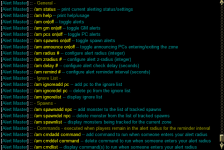
/am help should bring up this
[CODE title="AM Help"][02:37:31] [Alert Master] :: Alert Master Usage:
[02:37:31] [Alert Master] :: - General -
[02:37:31] [Alert Master] :: /am status -- print current alerting status/settings
[02:37:31] [Alert Master] :: /am help -- print help/usage
[02:37:31] [Alert Master] :: /am on|off -- toggle alerts
[02:37:31] [Alert Master] :: /am gm on|off -- toggle GM alerts
[02:37:31] [Alert Master] :: /am pcs on|off -- toggle PC alerts
[02:37:31] [Alert Master] :: /am spawns on|off -- toggle spawn alerts
[02:37:31] [Alert Master] :: /am beep on|off -- toggle Audible Beep alerts
[02:37:31] [Alert Master] :: /am doalert -- toggle Popup alerts
[02:37:31] [Alert Master] :: /am announce on|off -- toggle announcing PCs entering/exiting the zone
[02:37:31] [Alert Master] :: /am radius # -- configure alert radius (integer)
[02:37:31] [Alert Master] :: /am zradius # -- configure alert z-radius (integer)
[02:37:31] [Alert Master] :: /am delay # -- configure alert check delay (seconds)
[02:37:31] [Alert Master] :: /am remind # -- configure Player and GM alert reminder interval (seconds)
[02:37:31] [Alert Master] :: /am remindnpc # -- configure NPC alert reminder interval (Minutes)
[02:37:31] [Alert Master] :: /am popup -- Toggles Display of Alert Window
[02:37:31] [Alert Master] :: /am reload -- Reload the ini file
[02:37:31] [Alert Master] :: /am distmid -- Sets distance the color changes from Green to Orange
[02:37:31] [Alert Master] :: /am distfar -- Sets the distnace the color changes from Orange to Red
[02:37:31] [Alert Master] :: - Ignore List -
[02:37:31] [Alert Master] :: /am ignoreadd pcname -- add pc to the ignore list
[02:37:31] [Alert Master] :: /am ignoredel pcname -- delete pc from the ignore list
[02:37:31] [Alert Master] :: /am ignorelist -- display ignore list
[02:37:31] [Alert Master] :: - Spawns -
[02:37:31] [Alert Master] :: /am spawnadd npc -- add monster to the list of tracked spawns
[02:37:31] [Alert Master] :: /am spawndel npc -- delete monster from the list of tracked spawns
[02:37:31] [Alert Master] :: /am spawnlist -- display monsters being tracked for the current zone
[02:37:31] [Alert Master] :: /am show -- Toggles display of Search Window and Spawns for the current zone
[02:37:31] [Alert Master] :: /am aggro -- Toggles display of Aggro status bars in the search window.
[02:37:31] [Alert Master] :: - Commands - executed when players remain in the alert radius for the reminder interval
[02:37:31] [Alert Master] :: /am cmdadd command -- add command to run when someone enters your alert radius
[02:37:31] [Alert Master] :: /am cmddel command -- delete command to run when someone enters your alert radius
[02:37:31] [Alert Master] :: /am cmdlist -- display command(s) to run when someone enters your alert radius[/CODE]

are you using the Git Hub version?
That is what contains my additions (Audio \ Visual Alerts).
links in the v1.xxx in my posts.
 
/am help should bring up this
[CODE title="AM Help"][02:37:31] [Alert Master] :: Alert Master Usage:
[02:37:31] [Alert Master] :: - General -
[02:37:31] [Alert Master] :: /am status -- print current alerting status/settings
[02:37:31] [Alert Master] :: /am help -- print help/usage
[02:37:31] [Alert Master] :: /am on|off -- toggle alerts
[02:37:31] [Alert Master] :: /am gm on|off -- toggle GM alerts
[02:37:31] [Alert Master] :: /am pcs on|off -- toggle PC alerts
[02:37:31] [Alert Master] :: /am spawns on|off -- toggle spawn alerts
[02:37:31] [Alert Master] :: /am beep on|off -- toggle Audible Beep alerts
[02:37:31] [Alert Master] :: /am doalert -- toggle Popup alerts
[02:37:31] [Alert Master] :: /am announce on|off -- toggle announcing PCs entering/exiting the zone
[02:37:31] [Alert Master] :: /am radius # -- configure alert radius (integer)
[02:37:31] [Alert Master] :: /am zradius # -- configure alert z-radius (integer)
[02:37:31] [Alert Master] :: /am delay # -- configure alert check delay (seconds)
[02:37:31] [Alert Master] :: /am remind # -- configure Player and GM alert reminder interval (seconds)
[02:37:31] [Alert Master] :: /am remindnpc # -- configure NPC alert reminder interval (Minutes)
[02:37:31] [Alert Master] :: /am popup -- Toggles Display of Alert Window
[02:37:31] [Alert Master] :: /am reload -- Reload the ini file
[02:37:31] [Alert Master] :: /am distmid -- Sets distance the color changes from Green to Orange
[02:37:31] [Alert Master] :: /am distfar -- Sets the distnace the color changes from Orange to Red
[02:37:31] [Alert Master] :: - Ignore List -
[02:37:31] [Alert Master] :: /am ignoreadd pcname -- add pc to the ignore list
[02:37:31] [Alert Master] :: /am ignoredel pcname -- delete pc from the ignore list
[02:37:31] [Alert Master] :: /am ignorelist -- display ignore list
[02:37:31] [Alert Master] :: - Spawns -
[02:37:31] [Alert Master] :: /am spawnadd npc -- add monster to the list of tracked spawns
[02:37:31] [Alert Master] :: /am spawndel npc -- delete monster from the list of tracked spawns
[02:37:31] [Alert Master] :: /am spawnlist -- display monsters being tracked for the current zone
[02:37:31] [Alert Master] :: /am show -- Toggles display of Search Window and Spawns for the current zone
[02:37:31] [Alert Master] :: /am aggro -- Toggles display of Aggro status bars in the search window.
[02:37:31] [Alert Master] :: - Commands - executed when players remain in the alert radius for the reminder interval
[02:37:31] [Alert Master] :: /am cmdadd command -- add command to run when someone enters your alert radius
[02:37:31] [Alert Master] :: /am cmddel command -- delete command to run when someone enters your alert radius
[02:37:31] [Alert Master] :: /am cmdlist -- display command(s) to run when someone enters your alert radius[/CODE]

are you using the Git Hub version?
That is what contains my additions (Audio \ Visual Alerts).
links in the v1.xxx in my posts.
I did that and got the display from the overview tab with less options. I had JUST downloaded it. so not sure if I am having a different issue. Feels like I have an old version, but I cant test it until I log back in.
 
/am help should bring up this
[CODE title="AM Help"][02:37:31] [Alert Master] :: Alert Master Usage:
[02:37:31] [Alert Master] :: - General -
[02:37:31] [Alert Master] :: /am status -- print current alerting status/settings
[02:37:31] [Alert Master] :: /am help -- print help/usage
[02:37:31] [Alert Master] :: /am on|off -- toggle alerts
[02:37:31] [Alert Master] :: /am gm on|off -- toggle GM alerts
[02:37:31] [Alert Master] :: /am pcs on|off -- toggle PC alerts
[02:37:31] [Alert Master] :: /am spawns on|off -- toggle spawn alerts
[02:37:31] [Alert Master] :: /am beep on|off -- toggle Audible Beep alerts
[02:37:31] [Alert Master] :: /am doalert -- toggle Popup alerts
[02:37:31] [Alert Master] :: /am announce on|off -- toggle announcing PCs entering/exiting the zone
[02:37:31] [Alert Master] :: /am radius # -- configure alert radius (integer)
[02:37:31] [Alert Master] :: /am zradius # -- configure alert z-radius (integer)
[02:37:31] [Alert Master] :: /am delay # -- configure alert check delay (seconds)
[02:37:31] [Alert Master] :: /am remind # -- configure Player and GM alert reminder interval (seconds)
[02:37:31] [Alert Master] :: /am remindnpc # -- configure NPC alert reminder interval (Minutes)
[02:37:31] [Alert Master] :: /am popup -- Toggles Display of Alert Window
[02:37:31] [Alert Master] :: /am reload -- Reload the ini file
[02:37:31] [Alert Master] :: /am distmid -- Sets distance the color changes from Green to Orange
[02:37:31] [Alert Master] :: /am distfar -- Sets the distnace the color changes from Orange to Red
[02:37:31] [Alert Master] :: - Ignore List -
[02:37:31] [Alert Master] :: /am ignoreadd pcname -- add pc to the ignore list
[02:37:31] [Alert Master] :: /am ignoredel pcname -- delete pc from the ignore list
[02:37:31] [Alert Master] :: /am ignorelist -- display ignore list
[02:37:31] [Alert Master] :: - Spawns -
[02:37:31] [Alert Master] :: /am spawnadd npc -- add monster to the list of tracked spawns
[02:37:31] [Alert Master] :: /am spawndel npc -- delete monster from the list of tracked spawns
[02:37:31] [Alert Master] :: /am spawnlist -- display monsters being tracked for the current zone
[02:37:31] [Alert Master] :: /am show -- Toggles display of Search Window and Spawns for the current zone
[02:37:31] [Alert Master] :: /am aggro -- Toggles display of Aggro status bars in the search window.
[02:37:31] [Alert Master] :: - Commands - executed when players remain in the alert radius for the reminder interval
[02:37:31] [Alert Master] :: /am cmdadd command -- add command to run when someone enters your alert radius
[02:37:31] [Alert Master] :: /am cmddel command -- delete command to run when someone enters your alert radius
[02:37:31] [Alert Master] :: /am cmdlist -- display command(s) to run when someone enters your alert radius[/CODE]

are you using the Git Hub version?
That is what contains my additions (Audio \ Visual Alerts).
links in the v1.xxx in my posts.
yeah, i dont have all of those options. Just updated this morning
1708620204937.png
 
@Myysterio
Ahh yeah, you have the original from the launcher.
I don't own the resource so my changes can't directly be updated through the launcher.
you can download the version off my GitHub and unzip that to your Lua folder.
 
v1.86

* Save state for directional arrows between loads.
* Added btn_red and btn_green colors to colors.Lua and replaced hard coded colors.
* Fixed some Tooltips that wouldn't toggle off. Now only the Tooltip for toggling tooltips is always stays on.
* Ctrl + Right Click will nav group defaults to DanNet '/dgae ' if EQBC is loaded will use '/bcca /'
* Group commands use a random /timed delay between 5 and 30 for each character.
* Right Click Nav self
 

Attachments

I've noticed that the radius PC trigger doesn't always trigger the commands. Does anyone else notice inconsistencies?
 
I see it only triggers on loitering.
curious if its a z radius thing...
try changing line 1422 from
Code:
local tmp = spawn_search_players('pc radius '..radius..' zradius '..zradius..' notid '..Me.ID())
to
Code:
local tmp = spawn_search_players('pc radius '..radius..' notid '..Me.ID())
 
I've noticed that the radius PC trigger doesn't always trigger the commands. Does anyone else notice inconsistencies?
try this test branch.


also now saves radius and zradius settings to config not sure why it wasn't always that way.
 
Last edited:
I've been using this alot lately and one quality-of-life change that could help me out is a /am cmddel * or all or Cmd2. Typing out the exact command seems to take a few every time I set it up and take it down.
 
@grimmier
Any chance you could get your version of this added as a new resource? Or take ownership like derple did for button master?
I've put some messages to Special Ed.
but beyond that its up to him and the powers that be.

I don't really want to duplicate it as a resource just for launcher updates though, even though they would be nice.

I've been using this alot lately and one quality-of-life change that could help me out is a /am cmddel * or all or Cmd2. Typing out the exact command seems to take a few every time I set it up and take it down.

Let me see what I can do Burd.
 
v1.88

some minor cosmetics.
you can use themes created by ThemeZ
currently you have to drop the file into the themes folder and replace the themes.Lua
will fix this later to read the MyThemeZ file from config.
 
I've put some messages to Special Ed.
but beyond that its up to him and the powers that be.

I don't really want to duplicate it as a resource just for launcher updates though, even though they would be nice.


Let me see what I can do Burd.
You might need @Redbot or @Sic here for ownership change. Anyways tagging to help out. 🧙‍♂️
 
I've put some messages to Special Ed.
but beyond that its up to him and the powers that be.

I don't really want to duplicate it as a resource just for launcher updates though, even though they would be nice.


Let me see what I can do Burd.
i'll toss you the resource @SpecialEd hollar
 
Loving all your Lua's! If there a way to add a list of mobs to track? for example I want to add all the mobs of a zone for Hunter... if there an easier way to do that rather than type each name in to be tracked?
 
Loving all your Lua's! If there a way to add a list of mobs to track? for example I want to add all the mobs of a zone for Hunter... if there an easier way to do that rather than type each name in to be tracked?

Why not just use Hunter HUD?

 
Why not just use Hunter HUD?

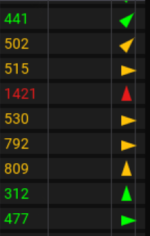
Hunter Hud is almost perfect, it doesn't give notifications when something spawn, I really like how AM pops up or dings when something spawns. It looks like HH is working on something on that since there is a bell looking icon at the bottom, but doesn't appear to have any function. I also like that AM has directional arrows and distance, makes getting to the named easy. I understand HH has some auto nav but it really makes you look like a bot, I'd rather guide myself over.
 
Hunter Hud is almost perfect, it doesn't give notifications when something spawn, I really like how AM pops up or dings when something spawns. It looks like HH is working on something on that since there is a bell looking icon at the bottom, but doesn't appear to have any function. I also like that AM has directional arrows and distance, makes getting to the named easy. I understand HH has some auto nav but it really makes you look like a bot, I'd rather guide myself over.
adding auto importing for the zone from MQ2SpawnMaster.ini
this will happen as you zone around and fill in any missing spawns that exist in SpawnMaster.ini and not AlertMaster.ini.

I believe most of the hunter spawns have been added to MQ2SpawnMaster.ini you may need to search for the latest version.

this change is coming in next update the forums pulls.
 
grimmier updated Alert Master with a new update entry:

v2.0

Customizable sound alerts.

you can drop in your own wav files into the "lua/alertmaster/sounds" folder.

name them what you wish and adjust the names in the ini file. (these save per char) the defaults will overwrite on updates otherwise.

changing the volume will play a preview for at that volume.

Commands
Code:
[Alert Master] :: - Sounds -
[Alert Master] ::     /am dosound pc -- toggle PC custom sound alerts
[Alert Master] ::     /am dosound npc -- toggle NPC custom sound alerts
[Alert...

Read the rest of this update entry...
 
adding auto importing for the zone from MQ2SpawnMaster.ini
this will happen as you zone around and fill in any missing spawns that exist in SpawnMaster.ini and not AlertMaster.ini.

I believe most of the hunter spawns have been added to MQ2SpawnMaster.ini you may need to search for the latest version.

this change is coming in next update the forums pulls.
You are a legend! Thank you
 
Release Alert Master

Users who are viewing this thread

Back
Top
Cart