• You've discovered RedGuides, an EverQuest multi-boxing and scripting community 🧙‍♀️⚙️. We want you to play several EQ characters at once, come join us and say hello! 👋

  • A TLP without truebox has thawed (Very Vanilla ready)
    Frostreaver
Alert Master

Release Alert Master v2.28

No permission to download
v1.4.6
  • Added color changes to spawn distance.
  • /am distmid 200 would set the range 200 to change from green to orange
  • /am distfar 1000 would set the range 1000 to change from orange to red.
  • you can also change them directly in the ini.
  • Cleaned up the UI layout a little.
  • Alert window doesn't close when a spawn dies anymore. Unless it is empty.
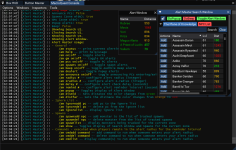
    Screenshot 2024-02-03 020855.png
edit: had wrong image
 
v1.4.7
  • Removed the tab color change if alerts up. this was breaking other windows. Will have to look into a new way to do this.
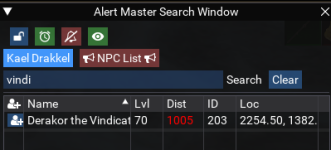
  • Changed the buttons to be nice icons. saves a lot of window space.
  • Removed the tab's and replaced with buttons. Tab coloring breaks things, and I wanted to make it stand out if spawns were up.
  • if you lock the search window it will auto open on load.

    1706994893036.png
 
v1.4.8

Last update for today.
  • Fixed a bug that wasn't letting you add a spawn by typing it in anymore.
  • Now with Rounded Corners! welcome to the softer side of life.
1707004174964.png
 
v1.4.9

New Day=New Update!
  • Added a button to Add ${Target} to spawn list. this is a #Dirty_Name000 but is handy for some named you can't find with a Clean Name.
  • Added a buttone to add ${Target.CleanName} this is the name you see in game.
  • Added a Heartbeat button to toggle all alerts on and off. same as /am on|off
  • Added a ? help icon to top right corner. this displays some tool-tip help
  • You can now toggle tool-tips on and off by right clicking the title bar.

What's Changed​

Full Changelog: v1.4.7...v1.4.9

image
image
 
v1.5

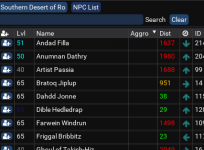
  • Added Con Color to the Level Text.
  • Fixed the swapped alert window toggle and show tooltips
  • You can now search for # to find any named that use that symbol in their #DirtyName. =)
 
Thank you for the updating, though one minor issue on the UI, when /am status, it should shows "remind #min" instead of "remind #s" since /am remind # is set the time interval by second not minute
 
Thank you for the updating, though one minor issue on the UI, when /am status, it should shows "remind #min" instead of "remind #s" since /am remind # is set the time interval by second not minute
I should probably add a new variable.

AlertMaster really only used the remind value to recheck for GM and Player's, and that still is in Seconds.

I convert that value to minutes to use for the alertpopup, and audio beeps if enabled.
 
v1.5.1

  • Added a remindNPC variable. for duration between popup/beep alerts for npc spawns. default is 5min
  • /am remindnpc # will change the value and save to ini.

This allows you to keep pc/gm alert reminders separate from spawn alerts. one in seconds and the other in minutes.
 
v1.5.1

  • Added a remindNPC variable. for duration between popup/beep alerts for npc spawns. default is 5min
  • /am remindnpc # will change the value and save to ini.

This allows you to keep pc/gm alert reminders separate from spawn alerts. one in seconds and the other in minutes.
the remindnpc command could be very useful, somehow it's not working atm.. I tested /am remindnpc #, it showed results in mq console but it was not actually working. there was no repeat reminders for npc spawns
 
the remindnpc command could be very useful, somehow it's not working atm.. I tested /am remindnpc #, it showed results in mq console but it was not actually working. there was no repeat reminders for npc spawns
and to that I say!
v1.7.5
v1.7.6
  • Added the text reminders for Spawns into the RemindNPC routine. This was originally not a thing as remind only did reminders for players and GM's.
  • remindNPC can also take fractions if you wanted a 2.5 min reminder or even something like a 0.5 min (30 second) reminder. You can do that.
  • quick update to 1.7.6 had the text alerts spamming, forgot to reset the alert timer when they went off.
if the alert window is already open we suppress the beeps if enabled, on reminders.
 
Last edited:
v1.7.7

  • Changed remind Npc logic again.
    • Now we always remind in text.
    • Check if beeps are enabled and remind with a beep if so.
    • Check if popups are enabled and remind with a popup if it is closed.
  • Fixed the issue where it would keep reminding you with beeps even when there was nothing to remind you about.
  • Added a toggle for Show Aggro.
    • /am aggro will toggle on or off.
    • there is a toggle button on the search window as well.
 
View attachment 57380

Do we want more refined directional arrows? ie. on the 45 degree angles.
Or is 4 directions good enough?
If you want fun arrows check out the spawninfo Lua in the mq repo, it might only be in a branch somewhere.. was the example script for Lua plu[BGCOLOR=initial]gins I think?[/BGCOLOR]

 
v1.8

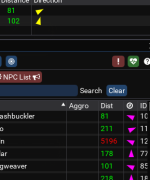
* Added Directional arrows to point towards the mobs. Thanks @Derple for the Arrow code.
I went with the 16 points returned by Spwn.HeadingTo() because we store this data and call it back from a table., so its already a little stale, but less work on the Gui to keep drawing fresh data for hundreds of spawns up in the zone.

* Changed Me.CleanName() calls to Me.DisplayName() to prevent any errors corpse. Thanks again @Derple for that heads up.
 
a handy trick to find your named to add to the list.
On the search window since you can search for parts of Spawn.Name() and Spawn.CleanName().
searching for # will return only spawns with #Name for a Spawn.Name()
searching for 000 will return only the spawns ending in 000 which will give you a greatly refined list removing duplicates.
 
I'm having trouble getting ignored PC from staying consistent. Every time I load the Lua, I have to start over.

Does anyone know of a way I can keep it constant?
 
1708058908064.png

I think it has to do with /dg the commands out. /dg /am ignoreadd name. Only the last PC that hits the file gets put into the ini as the Char settings.
 
sounds like maybe the file corrupted? try manually editing them into the INI. and loading AM again. after you close AM does it corrupt the ini?
 
Anytime I do a dannet command to edit the settings, it corrupts it, even if it looked good at the start of the Lua.
 
sounds like maybe the file corrupted? try manually editing them into the INI. and loading AM again. after you close AM does it corrupt the ini?
shouldn't have to /dg the command, the list is global. unless you are running boxes on other pc's
 
Only one Toon has a config and command. Even if I run it on 54 toons.

[Char_NameofToon_Commands]
[Char_NameofToon_Config]
aggro=false
announce=false
beep=false
delay=1
distfar=1200
distmid=600
gms=true
ignoreguild=true
locked=false
pcs=true
popup=false
remind=30
remindNPC=5
spawns=true
 
if multiple clients run a save at the same time files get corrupted.this is a thing and shouldn't be done. There really isn't a great way to solve this either other than "don't do that" but @dannuic doesn't believe me that this is a valid use case so lets all yell at him! :)
 
if you are running them all on the same machine then it will happen due to timing of all of them trying to write to the same file.
 
Ok I'll adjust it. I had this in my ingame.cfg

/timed 2000 /noparse /dg /dg /am ignoreadd ${Me.Name}
 
yeah i would add each one either manually into the ini or one at a time.
Then you shouldn't have to add them again unless you delete the name from the ignore list.

also if in the same guild they should be ignored with guildignore on.
 
I noticed that Alert Master brought a significant FPS drop on my client, from 60fps (framelimiter on) to 15fps.

And after I commented out
Code:
mq.imgui.init('DrawSearchWindow', DrawSearchGUI)
then the fps lag gone but also the lovely GUI gone too
 
has anyone else seen this performance hit?
I noticed that Alert Master brought a significant FPS drop on my client, from 60fps (framelimiter on) to 15fps.

And after I commented out
Code:
mq.imgui.init('DrawSearchWindow', DrawSearchGUI)
then the fps lag gone but also the lovely GUI gone too
I haven't seen anything that drastic. on either the onboard or dedicated cards on my machine.
Thats with rgmercs Lua, arlertmaster, boxhux, 2 buttonmaster windows, alpha buff, mqconsole, and playertarg all displaying gui's
 
v1.8.1

  • Added a Toggle to enable and disable the directional arrows. (may help with framerates if you are in a heavily populated zone.)
  • Tooltip on the Zone Button, displays NPC count in zone.
  • Cleaned up some of the code some.
 
Follow up to my previous issue.
Alertmaster-beta is running. I do a /am ignoreadd NameofToon. Other Toons will still see the Toon ignored as an alert. Name is in Alertmaster.ini file. Do I need to reload the Lua after the change or is there something else I need to do?
 
Follow up to my previous issue.
Alertmaster-beta is running. I do a /am ignoreadd NameofToon. Other Toons will still see the Toon ignored as an alert. Name is in Alertmaster.ini file. Do I need to reload the lua after the change or is there something else I need to do?
v1.8.2

  • Added Command to reload the settings file. /am reload
  • this is useful if you run the script on more than one character, this way you can reload and get the latest changes made by other characters.
 
has anyone else seen this performance hit?

I haven't seen anything that drastic. on either the onboard or dedicated cards on my machine.
Thats with rgmercs lua, arlertmaster, boxhux, 2 buttonmaster windows, alpha buff, mqconsole, and playertarg all displaying gui's

You're calling RefreshZone every frame, even if the ui isn't visible. Thats going to bleed your framerate dry
 
I see UIs and Beeping controls for alerts on your previous posts. where are the controls for them? I dont see a list of commands that display them in the description and they do not work in game.
 
Release Alert Master

Users who are viewing this thread

Back
Top
Cart