
-
 Hail, we're RedGuides. We want you to play six (yes, 6!) EverQuest characters at once. We have scripts and a friendly community to help, please join our playstyle and say hello! 👋
You are using an out of date browser. It may not display this or other websites correctly.
You should upgrade or use an alternative browser.
You should upgrade or use an alternative browser.

Release Alert Master v2.28
- Thread starter SpecialEd
- Start date

Is there a beep sound to alert the name spawn??
not for spawns, no

not for spawns, no
Would be a nice addition for sure

EDIT: Actually I'm getting the big block of red text when I try to start the script now too, unfortunately.
This is probably a massive ask, but if this could have a UI element similar to HunterHUD, that would be amazing.

 www.redguides.com
This is probably a massive ask, but if this could have a UI element similar to HunterHUD, that would be amazing.
Work in Progress - HunterHUD
2022 ESA Winner OPTIMIZE YOUR HUNTER ACHIEVEMENTS! WITH THE AMAZING HUNTERHUD Presenting the amazing HunterHud or HH for short, its simple and keeps tracks of your hunts in your current zone. It lists your total doneness in a nice looking...
www.redguides.com
Last edited:
I don't see an error message, how would you like me to help?EDIT: Actually I'm getting the big block of red text when I try to start the script now too, unfortunately.
This is probably a massive ask, but if this could have a UI element similar to HunterHUD, that would be amazing.
Work in Progress - HunterHUD
2022 ESA Winner OPTIMIZE YOUR HUNTER ACHIEVEMENTS! WITH THE AMAZING HUNTERHUD Presenting the amazing HunterHud or HH for short, its simple and keeps tracks of your hunts in your current zone. It lists your total doneness in a nice looking...
No plans to implement a hud.

- Commits
- 2
If I set up safezones and die to a safezone the script ends? I get summoned back to camp and restart the script?
Is this a question or a bug?If I set up safezones and die to a safezone the script ends? I get summoned back to camp and restart the script?
- Commits
- 2
Still trying to figure out the script. If a pc comes into the radius, does this end the script or just activate the commands? If so, I assume that when you die it would activate the commands or pause the script when you are in the guild lobby if you didn't have the safezones listed.Is this a question or a bug?

SpecialEd updated Alert Master with a new update entry:
Bug fixes
Read the rest of this update entry...
Bug fixes
- Added version to startup output
- Updated /am spawnlist output
- Fixed double timestamp
- Moved to using lib/LIP, lib/ed/utils (if you don't have these, just copy them to your lua/lib folder)
Read the rest of this update entry...
bishopofyorkpa
Member
ok, im late to this Lua and lostI was looking for that TLO stuff, I am just bright enough to kinda know I should look for something and sometimes land on the right idea but most of the time I ask the smart people.
Yeah I don't need a popup, BONK I'll just do the /beep cmd. Simple solution! thank you.
where does the beep command go; see the audio files for other commands but no idea what the command line is or where it goes into this Lua script?

- Commits
- 2
add the command /beep where you want it to beep.ok, im late to this lua and lost
where does the beep command go; see the audio files for other commands but no idea what the command line is or where it goes into this lua script?

SpecialEd updated Alert Master with a new update entry:
update
Read the rest of this update entry...
update
update There's a bug on line 442 as it ignores the pcs setting. It should be:
Read the rest of this update entry...
- Commits
- 2
Nice, Iove the folder structure. Love the script.SpecialEd updated Alert Master with a new update entry:
update
Read the rest of this update entry...

- Commits
- 2
You are going to be limited to what is in the script or what configurations are available in the ini file.Does this or in fact any LUA's have the capability for TLO's? I leverage spawnmaster for a lot of conditions/ifs. Does Alert Master support this?
I think what's being asked is if a Lua script could create an external TLO. I've pondered the question myself a fair bit, but haven't completely investigated what it takes to make a TLO in the first place. If so, it'll be done through the ffi integration of LuaJIT.You are going to be limited to what is in the script or what configurations are available in the ini file.
Feature Request: Have the ability to ignore whole Zones. This would be great for EMU that setup hub spots.
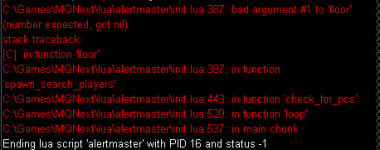
change that line to math.floor(pc.Distance() or 0)Still getting this error, anyone else?
bitbreaker
Member
I've added
However, it doesn't seem to make any sound.
What is everyone using as a way to get your attention, since the chat alerts are brief and sometimes drowned out by other spam from macroquest/other game chatter.
/cmdadd /beep to ping me when someone's inside the alert radius.However, it doesn't seem to make any sound.
What is everyone using as a way to get your attention, since the chat alerts are brief and sometimes drowned out by other spam from macroquest/other game chatter.
Last edited:

In case anyone is interested.
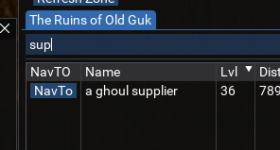
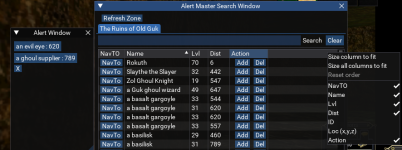
I combined a side project I was working on for making a Lua tracking window with some features, I was thinking GUI version of SpawnMaster. I was able to get the GUI loading and refreshing, navTo working but hadn't tackled the backend for storing and retrieving the spawns list. I thought about trying to tie the UI directly with SpawnMaster, then I found AlertMaster.
So mostly for personal use I integrated the UI into AlertMaster, Originally I made them work hand in hand, but wanted to combine them.
Alas we have this:
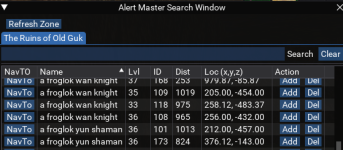
** AlertMaster ** with a GUI,
** Key Features Added **
* Add and Delete spawns in the Spawn List.
* Get Alert PopUp's when Mobs Spawn.
* NavTo abilities for any mob in zone.
* Spawn list is now Case Sensitive, Saber will not find saber and vice versa.
** Added Commands **

 github.com
I combined a side project I was working on for making a Lua tracking window with some features, I was thinking GUI version of SpawnMaster. I was able to get the GUI loading and refreshing, navTo working but hadn't tackled the backend for storing and retrieving the spawns list. I thought about trying to tie the UI directly with SpawnMaster, then I found AlertMaster.
So mostly for personal use I integrated the UI into AlertMaster, Originally I made them work hand in hand, but wanted to combine them.
Alas we have this:
** AlertMaster ** with a GUI,
** Key Features Added **
* Add and Delete spawns in the Spawn List.
* Get Alert PopUp's when Mobs Spawn.
* NavTo abilities for any mob in zone.
* Spawn list is now Case Sensitive, Saber will not find saber and vice versa.
** Added Commands **
- /am show will toggle the search window.
- /am popup will toggle the alert popup window.
- You can search with the search box
- Sort by columns (Shift-Clicking Columns will MultiSort based on the order you click.)
- Click the Add button, and the spawn will be added to spawn list
- Click the Del button, and the spawn will be deleted from the spawn list.
- You can NavTo any spawn in the search window by clicking the button.
- Right-Clicking the name will target the spawn.
- Columns can be toggled on and off as well as re-arranged in the table.
- The Alert Popup Window lists the spawns that you are tracking and are alive. Shown as "Name : Distance"
- Clicking the button on the Alert Window will NavTo the spawn.
- Closing the Alert Popup will keep it closed until something changes or your remind timer is up.
- If you have remind set in your ini or via /am remind #seconds:
- The alert window will re-popup if there is something on it after that many seconds since last appearance.
GitHub - grimmier378/AlertMaster
Contribute to grimmier378/AlertMaster development by creating an account on GitHub.
github.com
instead of /cmdadd /beepI've added/cmdadd /beepto ping me when someone's inside the alert radius.
However, it doesn't seem to make any sound.
What is everyone using as a way to get your attention, since the chat alerts are brief and sometimes drowned out by other spam from macroquest/other game chatter.
put this line.
mq.cmd('/beep')
* Added beep setting to the ini. the default is false.
* /am beep will toggle setting on\off and write setting to ini.
* The beep is only set to work on NPC spawns
* Beeps will only fire off when the alert popup opens, or something changes on it, Mob spawns or dies. No one wants to hear 10 beeps when they zone in and everything is up. one is enough the window will show the 10 spawns.
* Added a setting to enable or disable popup alerts. popup=true|false default is false.
* Added command switch "/am doalert" toggle popup on\off and write to settings.
* If popup is off and beeps are on you will still get the beep notification.
* If popup is off you can still open the popup with /am popup
files on github link above.
- download code as a zip
- rename folder (folder name is what you call with /Lua run) and plop it into your Lua folder.
* /am beep will toggle setting on\off and write setting to ini.
* The beep is only set to work on NPC spawns
* Beeps will only fire off when the alert popup opens, or something changes on it, Mob spawns or dies. No one wants to hear 10 beeps when they zone in and everything is up. one is enough the window will show the 10 spawns.
* Added a setting to enable or disable popup alerts. popup=true|false default is false.
* Added command switch "/am doalert" toggle popup on\off and write to settings.
* If popup is off and beeps are on you will still get the beep notification.
* If popup is off you can still open the popup with /am popup
files on github link above.
- download code as a zip
- rename folder (folder name is what you call with /Lua run) and plop it into your Lua folder.
Last edited:
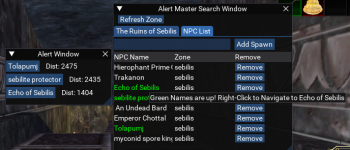
v1.3
* added a tab to display and edit the spawnlist for the current zone.
* names will highlight green if the spawn is up in the zone.
* you can directly add spawns with the text box and button. *Case Sensitive*
* Right clicking on a green name will nav to.
github.com
* added a tab to display and edit the spawnlist for the current zone.
* names will highlight green if the spawn is up in the zone.
* you can directly add spawns with the text box and button. *Case Sensitive*
* Right clicking on a green name will nav to.
GitHub - grimmier378/AlertMaster
Contribute to grimmier378/AlertMaster development by creating an account on GitHub.
github.com
another quickie.
- changed alert window to be a table. for a cleaner look.
- you can now search for Spawn.Name and Spawn.CleanName we check for both to be safe.
- this is helpful for some pesky spawns. ex. An Undead Bard in Sebilis returns nothing even when he is up.
- You can now search by its spawn name An_Undead_Bard000 and it will appear in the alert.
Release v1.4.02_beta · grimmier378/AlertMaster
Spawns saved with _ values aka Spawn.Name instead of CleanName will display Clean Names. You can add target to the list by entering ${Target.Name} or ${Target.CleanName} in the add textbox. Now the...
github.com
Noted will change that.I notice in every place where you do a /nav id <some spawn id> you also do a /target id <some spawn id>.
You might be all the way across the zone from something you click to nav to, so you shouldn't target the thing, that isn't generally recommended.
Updated to remove /target and some new buttons
Added toggle buttons for both popup and beeps, settings save to ini.
buttons change color based on current state.
Release v1.4 · grimmier378/AlertMaster
*Spawns saved with _ values aka Spawn.Name instead of CleanName will display Clean Names. *You can add target to the list by entering ${Target.Name} or ${Target.CleanName} in the add textbox. *Now ...
github.com
Last edited:
Update and Fixes.
* Crash Fix: protected some GUI draw calls that were causing crashes after a while. Now it doesn't try to draw a new window when it already exists.
* Removed the refresh zone button. since this is handled with the delay setting anyway. Only valid use case is to refresh between delay if you set the delay to many minutes.
* Added a window lock button to the Search GUI. although I should probably call this the Main GUI at this point.
* Removed the nav button on the zone list. replaced with a right click to nav event.
* Added more tooltips for elements on hover.
* Fixed some formatting issues that were affecting other windows.
* removed the calls for a beep and or popup when a spawn dies. we really only care if it spawns. when its up we already know and can monitor anyway,
* Fixed column size defaults on the search GUI table. it shouldn't collapse to nothing on new zones.
* Turned the alert window buttons into just text. you can right click to nav.
* a little bit of code clean up here and there.
 github.com
* Crash Fix: protected some GUI draw calls that were causing crashes after a while. Now it doesn't try to draw a new window when it already exists.
* Removed the refresh zone button. since this is handled with the delay setting anyway. Only valid use case is to refresh between delay if you set the delay to many minutes.
* Added a window lock button to the Search GUI. although I should probably call this the Main GUI at this point.
* Removed the nav button on the zone list. replaced with a right click to nav event.
* Added more tooltips for elements on hover.
* Fixed some formatting issues that were affecting other windows.
* removed the calls for a beep and or popup when a spawn dies. we really only care if it spawns. when its up we already know and can monitor anyway,
* Fixed column size defaults on the search GUI table. it shouldn't collapse to nothing on new zones.
* Turned the alert window buttons into just text. you can right click to nav.
* a little bit of code clean up here and there.
Release v1.4.5 · grimmier378/AlertMaster
Removed the refresh zone button. since this is handled with the delay setting anyway. Only valid use case is to refresh between delay if you set the delay to many minutes. Added a window lock butto...
github.com
Users who are viewing this thread
Total: 1 (members: 0, guests: 1)
Share: