• Hail, we're RedGuides. We want you to play six (yes, 6!) EverQuest characters at once. We have scripts and a friendly community to help, please join our playstyle and say hello! 👋
  • We've added LLM sections to our Terms & Rules and Resource Rules, for everyone's sanity & in-game safety.
    Read more
    a. Do not replace your voice with an LLM. This goes for your posts and your scripts. Drafting and editing with a tool is fine, but don't take you out of what you share.
    b. Do not replace your EQ character's voice with an LLM. We don't want scripts that speak over /ooc, /shout or other public channels. This has been an unwritten rule that's kept casino scripts off the site for decades, but we're now compelled to make it clear: keep automated communication private.

    Why Does RG Review Scripts?
    Nearly every LLM-written Lua script we see is making your character do impossible things, and rarely in a way that's beneficial to you. We've seen heavy server hammering, /target over impossible distances when /nav spawn would passively accomplish the same thing, a spawn search that fires 20+ times per second, and other pointless actions that are likely annoying GMs.

    You are welcome to use LLMs as a tool to structure, draft, and edit your work, but please read critically before hitting /lua run

Screenshot "Safe" Macroquest2.ini

TeachersPet

Well-known member
If you want to use MQ2 and not have to worry about getting caught in screenshots, this is for you. The only way now you will be caught with anything in a screenshot is the rare chance the underscore in someone's last name shows up, and occaisionally corpses will appear with green names.

Go into MacroQuest2.ini, and search for "[Captions]" after finding it, replace that block and the next block below it with what is in the code box below.

Rich (BB code):
[Captions]
Update=35
Player1=${If[${NamingSpawn.Mark},${NamingSpawn.Mark} - ,]}${If[${NamingSpawn.Trader},Trader ,]}${If[${NamingSpawn.Invis},(${NamingSpawn.DisplayName}),${NamingSpawn.DisplayName}]}${If[${NamingSpawn.AFK}, AFK,]}${If[${NamingSpawn.Linkdead}, LD,]}${If[${NamingSpawn.LFG}, LFG,]}}
Player2=${If[${NamingSpawn.Mark},${NamingSpawn.Mark} - ,]}${If[${NamingSpawn.Trader},Trader ,]}${If[${NamingSpawn.Invis},(${NamingSpawn.DisplayName}),${NamingSpawn.DisplayName}]}${If[${NamingSpawn.Surname.Length}, ${NamingSpawn.Surname},]}${If[${NamingSpawn.AFK}, AFK,]}${If[${NamingSpawn.Linkdead}, LD,]}${If[${NamingSpawn.LFG}, LFG,]}}
Player3=${If[${NamingSpawn.Mark},${NamingSpawn.Mark} - ,]}${If[${NamingSpawn.Trader},Trader ,]}${If[${NamingSpawn.Invis},(${NamingSpawn.DisplayName}),${NamingSpawn.DisplayName}]}${If[${NamingSpawn.Surname.Length}, ${NamingSpawn.Surname},]}${If[${NamingSpawn.AFK}, AFK,]}${If[${NamingSpawn.Linkdead}, LD,]}${If[${NamingSpawn.LFG}, LFG,]}${If[${NamingSpawn.Guild.Length},\n${NamingSpawn.Guild}>,]}
Player4=${If[${NamingSpawn.Mark},${NamingSpawn.Mark} - ,]}${If[${NamingSpawn.Trader},Trader ,]}${If[${NamingSpawn.AARank},${NamingSpawn.AATitle} ,]}${If[${NamingSpawn.Invis},(${NamingSpawn.DisplayName}),${NamingSpawn.DisplayName}]}${If[${NamingSpawn.Surname.Length}, ${NamingSpawn.Surname},]}${If[${NamingSpawn.Suffix.Length}, ${NamingSpawn.Suffix},]}${If[${NamingSpawn.AFK}, AFK,]}${If[${NamingSpawn.Linkdead}, LD,]}${If[${NamingSpawn.LFG}, LFG,]}${If[${NamingSpawn.Guild.Length},\n<${NamingSpawn.Guild}>,]}
NPC=${If[${NamingSpawn.Mark},${NamingSpawn.Mark} - ,]}${If[${NamingSpawn.Assist},>> ,]}${NamingSpawn.DisplayName}${If[${NamingSpawn.Assist}, - ${NamingSpawn.PctHPs}%<<,]}${If[${NamingSpawn.Surname.Length},\n(${NamingSpawn.Surname}),]}
Corpse=${NamingSpawn.DisplayName}'s corpse
Pet=${If[${NamingSpawn.Mark},${NamingSpawn.Mark} - ,]}${If[${NamingSpawn.Assist},>> ,]}${NamingSpawn.DisplayName}${If[${NamingSpawn.Assist}, - ${NamingSpawn.PctHPs}%<<,]}

[Caption Colors]
PC=OFF
PC-Color=ff00ff
PCCon=OFF
PCPVPTeam=OFF
PCRaid=OFF
PCRaid-Color=ff7f
PCClass=OFF
PCGroup=OFF
PCGroup-Color=ffff00
PCTrader=OFF
PCTrader-Color=ff7f00
NPC=OFF
NPC-Color=ff0000
NPCCon=OFF
NPCClass=OFF
NPCMerchant=OFF
NPCMerchant-Color=ff7f00
NPCBanker=OFF
NPCBanker-Color=c800ff
NPCAssist=OFF
NPCAssist-Color=ffff00
NPCMark=OFF
NPCMark-Color=ffff00
PetNPC=OFF
PetNPC-Color=ff0000
PetPC=OFF
PetPC-Color=ffff00
PetClass=OFF
PetClass-Color=ff0000
Corpse=OFF
Corpse-Color=ff0000
CorpseClass=OFF
CorpseClass-Color=ff0000

Now move your MQ2 window behind a collapseable chat window (I suggest one that you filter guild chat to) and when you need to read your MQ2 window just collapse said window and read it. Also, don't make use of any of those retarded "Hud" UI things. If anything the XML will get you caught and banned for 3rd party programs because it's pretty easy for SoE to detect, but they're a dead giveaway you're using MQ2 in a screenshot
 
Usually F10 , screenshot, then whatever.....Since I don't like having all my chat windows,and char info showing anyways, still nice though...I really like the new speedhack ;)
 
Mochila said:
Usually F10 , screenshot, then whatever.....Since I don't like having all my chat windows,and char info showing anyways, still nice though...I really like the new speedhack ;)
F10 won't hid pet owner names if there are pets in the shot... also have con color probs too!
 
getting spamed with "No Such 'spawn' member 'Sur name'

i fucked it up somehow

Okay i have cut and pasted this twice i get that message up above when ever i target anything and i get

} after pc's names and (Null) on merchants below their names.

Just goes to show you even I can screw up cut and paste.

Nothings impossible just look at me.
 
Last edited:
Thanks ..... hey think you can swing by my house and press enter for me to?

Sorry to have to have you spoon feed me this crap :(
 
F10 won't hid pet owner names if there are pets in the shot... also have con color probs too!

This come from MQ2 really, I thougth it was like this for everyone, guess I should remove a couple of screenshot from now...
 
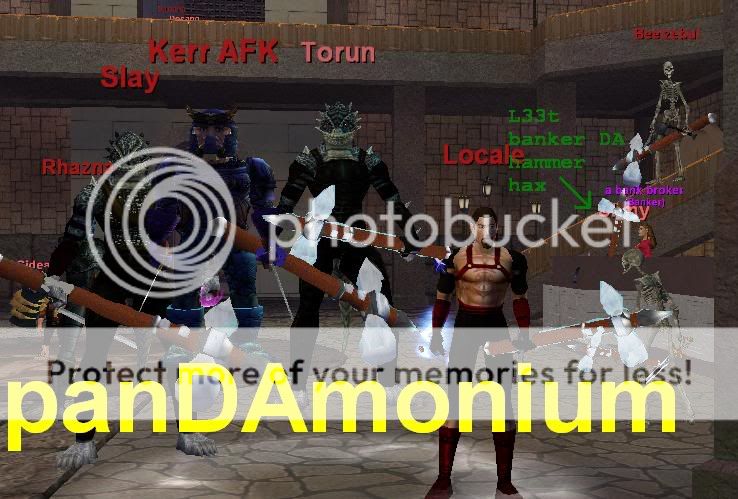
Heh, you must be in Pandemonium.

gg shortysticker
update_pic_04.jpg
 
TeachersPet said:
The only way now you will be caught with anything in a screenshot is the rare chance the underscore in someone's last name shows up,
So, is the only way you see someone with an underscore for their surname is if mq2 is running? Like, if someone posted their name is Soandso _ and they got the underscore from their surname being taken away by a gm, is that for sure that they use mq2?
 
Ok.. duh. That wasn't really my question. Can one see the underscore if mq2 is not running? Like I said, if someone posts that their name is Soandso _, is that a flag that they use mq2? Can one see the underscore without mq2 running? I don't want to falsely accuse someone for being stupidly blatant.
 
As long as I don't do any screen shots I don't need to worry right? Or do I need to do this anyway?
 
if you see Timmy_the_Champion in a screenshot, he's using mq2.

If you see a screenshot and you see someone JUST named Tim _, or tim (insertboxthingyhere,) it's possible to get certain special characters in a last name without mq. easiest way to tell - does their last name look like that to YOU when YOU arent using mq? if so, its not blatant stupidity, it's ini editing.
 
grog, you are either confused or just lack reading comprehension.

You can't get the name Timmy_the_Champion in the first place. If you see a screenshot and see someone named Tim _, that means that the person who took the screenshot is using MQ2.
 
You can't get the name Timmy_the_Champion in the first place.

If you win a GM event and they give you a special surname. Example "Timmy the super newb" it will show up as "Timmy_the_super_newb" for me sometimes. Usually just on the /who list.
 
Oh, crud. I've been using MQ too long. I didn't realize that (Playername's Pet) was an MQ thing.

oops.

Guess I should stop posting screen shots with that in it.

~Busted~
 
I almost posted a screenshot once and it had the LDR of my group in it...and he was an officer too so it said officer of such and such guild lol. Both only show up in MQ2
 
Screenshot "Safe" Macroquest2.ini

Users who are viewing this thread

Back
Top
Cart