



- Source Repository
- https://github.com/Razzrr/EQBZ_Multiboxer
EQBZ Multiboxer. Launch it, arrange it, log it in, dress it up, then play.
I built this because I got tired of the two hour setup every time I wanted to play my crew. One window that launches all of my sessions, lays them out, swaps between them instantly, logs every character in through MacroQuest, keeps my accounts and raids straight, and puts a matching UI on every single toon. No injection, no admin rights, and it doesn't care what server you're on because it manages windows and files, not the game. I run 72 with it.


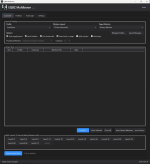
Launch and arrange the whole crew
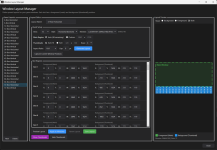
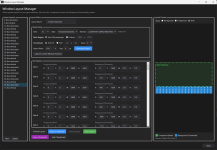
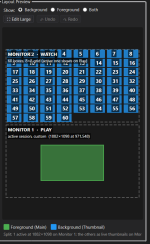
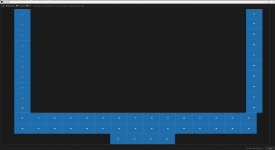
One click launches 1 to 72 sessions, spaced out so your machine doesn't choke, and once they've all loaded the grid snaps into place on its own. Layouts come in horizontal, vertical, grid, stacked, or split across two monitors, from 6 to 72 slots, and you can drag any box in the preview to make it exactly what you want (Edit Large gives you the full window to do it in). Every game window stays full size and keeps its title bar. The app only ever moves windows, never resizes them, and that's the whole reason your mouse is dead accurate in every session.


Swap instantly
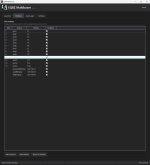
F1 to F12 and End bring a slot to the front, Ctrl+Alt+Z and X cycle, everything is rebindable. A swap is a change of order, not a resize, so it's instant. Background sessions show as live previews in a strip over your active window (or tiled across a second monitor). Click one to go there. Swapping to a session that's still loading works too, focus lands on its own when the client is ready, and a client that pops its own window up when it finishes zoning doesn't steal focus from the one you're playing anymore.

AutoLogin through MacroQuest
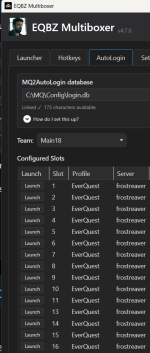
Link your MQ2AutoLogin login.db, drag characters onto slots, done. Every session logs in its own character. The app only reads character names, your passwords never leave MacroQuest. Window titles show the character name so you can tell 18 sessions apart at a glance.

Team tab and Raid Planner
This one I wanted for years. A roster of all your accounts and toons (active or not, last checked, notes, class, level), imported straight from MacroQuest. Tag toons to raids, see the composition by class, get warned when two toons on the same account are in the same raid, and send a raid to AutoLogin as a ready to launch team, healers first.


EQBZ UI: 28 themed in-game interfaces, built in
New in 5.8 and honestly my favorite part. Twelve styles and one theme per class ship inside the installer. Pick a look once (every toon wears its class theme, or one theme for everyone, for a team, a server, or every character in your EverQuest folder) and every launch comes up styled. Give any toon its own theme with two clicks. Spell gem count per server (8 gems on the TLP, 13 on Live, at the same time), names on gems, buffs as a list, UI scale up to 225%, chat color schemes, import any third party UI, and a Copy Layout wizard that takes one character's window arrangement, chat windows and all, and puts it on any others. Your window positions are never touched unless you ask.


Built for big fleets
The two Windows limits that stop everyone are one click each: the desktop heap (that 0xc0000142 error around 30 sessions) and hardware GPU scheduling (the wall around 40). Background memory trimming so more clients fit in RAM, a texture memory budget that survives game patches, frame caps, CPU affinity. If you want to run 36 or more, do the "optimize for many sessions" step in the installer. It'll save you a lot of headaches.


Stuff I care about that you might too
Requirements
Windows 10 (1607+) or Windows 11, 64-bit. EverQuest. MacroQuest with MQ2AutoLogin only if you want AutoLogin. .NET is bundled, nothing else to install.
Quick setup
Example of 72 Loaded with Mem0 Trimmed sessions.

I built this because I got tired of the two hour setup every time I wanted to play my crew. One window that launches all of my sessions, lays them out, swaps between them instantly, logs every character in through MacroQuest, keeps my accounts and raids straight, and puts a matching UI on every single toon. No injection, no admin rights, and it doesn't care what server you're on because it manages windows and files, not the game. I run 72 with it.
Launch and arrange the whole crew
One click launches 1 to 72 sessions, spaced out so your machine doesn't choke, and once they've all loaded the grid snaps into place on its own. Layouts come in horizontal, vertical, grid, stacked, or split across two monitors, from 6 to 72 slots, and you can drag any box in the preview to make it exactly what you want (Edit Large gives you the full window to do it in). Every game window stays full size and keeps its title bar. The app only ever moves windows, never resizes them, and that's the whole reason your mouse is dead accurate in every session.
Swap instantly
F1 to F12 and End bring a slot to the front, Ctrl+Alt+Z and X cycle, everything is rebindable. A swap is a change of order, not a resize, so it's instant. Background sessions show as live previews in a strip over your active window (or tiled across a second monitor). Click one to go there. Swapping to a session that's still loading works too, focus lands on its own when the client is ready, and a client that pops its own window up when it finishes zoning doesn't steal focus from the one you're playing anymore.
AutoLogin through MacroQuest
Link your MQ2AutoLogin login.db, drag characters onto slots, done. Every session logs in its own character. The app only reads character names, your passwords never leave MacroQuest. Window titles show the character name so you can tell 18 sessions apart at a glance.
Team tab and Raid Planner
This one I wanted for years. A roster of all your accounts and toons (active or not, last checked, notes, class, level), imported straight from MacroQuest. Tag toons to raids, see the composition by class, get warned when two toons on the same account are in the same raid, and send a raid to AutoLogin as a ready to launch team, healers first.
EQBZ UI: 28 themed in-game interfaces, built in
New in 5.8 and honestly my favorite part. Twelve styles and one theme per class ship inside the installer. Pick a look once (every toon wears its class theme, or one theme for everyone, for a team, a server, or every character in your EverQuest folder) and every launch comes up styled. Give any toon its own theme with two clicks. Spell gem count per server (8 gems on the TLP, 13 on Live, at the same time), names on gems, buffs as a list, UI scale up to 225%, chat color schemes, import any third party UI, and a Copy Layout wizard that takes one character's window arrangement, chat windows and all, and puts it on any others. Your window positions are never touched unless you ask.
Built for big fleets
The two Windows limits that stop everyone are one click each: the desktop heap (that 0xc0000142 error around 30 sessions) and hardware GPU scheduling (the wall around 40). Background memory trimming so more clients fit in RAM, a texture memory budget that survives game patches, frame caps, CPU affinity. If you want to run 36 or more, do the "optimize for many sessions" step in the installer. It'll save you a lot of headaches.
Stuff I care about that you might too
- No injection into EverQuest, no elevation, no license server. Your RedGuides access is the license.
- Everything you configure lives in your own AppData folder. If a file ever goes bad the app backs it up instead of overwriting it.
- Only one copy of the app runs at a time, so two versions can never fight over your settings.
- If it ever hangs, there's a debug log that records exactly what it was waiting on and which session did it. Turn it on in Settings, send me the log, and I can actually fix it.
Requirements
Windows 10 (1607+) or Windows 11, 64-bit. EverQuest. MacroQuest with MQ2AutoLogin only if you want AutoLogin. .NET is bundled, nothing else to install.
Quick setup
- Run the installer (leave the "optimize for many sessions" step on if you run 30+, it needs one reboot).
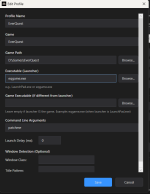
- Launcher tab, Manage Profiles, point it at your EverQuest folder.
- Pick a layout and Launch.
- Optional: AutoLogin tab, link your login.db and drag characters onto slots.
- Optional: UI tab, click Set Up, pick a look, and every toon comes up themed from then on.
Example of 72 Loaded with Mem0 Trimmed sessions.
-
 Window_Layout_Manager.png
 -
 Hotkeys.png
 -
 Launcher.png
 -
 ProfileSetup.png
 -
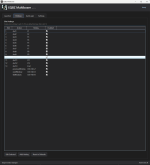 Hotkeys.png
 -
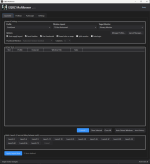 Launcher.png
 -
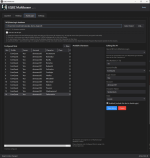 AutoLogin.png
 -
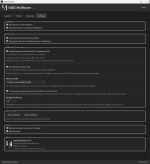 SettingsPage.png
 -
 Window_Layout_Manager.png
 -
 Launch_Buttons_Autologin_Page.png
 -
 Split_Screen_Edit_large_Foreground_Feature.png
 -
 Custom_Edit_large_Example.png
 -
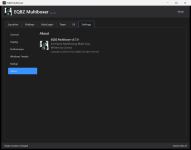 settings-about.png
 -
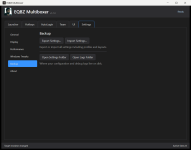 settings-backup.png
 -
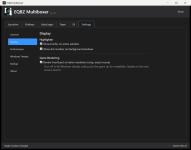 settings-display.png
 -
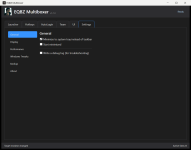 settings-general.png

