- Software Requirements
- Windows 10/11 (64-bit). EverQuest. Optional: MacroQuest + MQ2AutoLogin (only for AutoLogin). .NET is bundled.
- Source Repository
- https://github.com/Razzrr/EQBZ_Multiboxer
EQBZ Multiboxer - EQ multiboxing made easy.
An external window manager that launches, arranges, and instantly swaps between dozens of EverQuest sessions, with configurable hot-swap keys and MacroQuest AutoLogin support.
What it does
No injection. No admin.
EQBZ Multiboxer is a fully external utility. It does not inject into or modify EverQuest and runs at normal integrity (no administrator prompt). It only manages windows.
Requirements
Works on: Live, Emu, TLP, and Test (it manages windows, so it is server-agnostic).
Quick setup
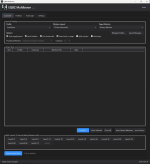
Launch and arrange your whole crew from one window.

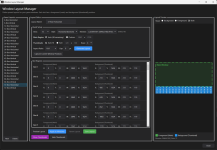
Build any layout - horizontal, vertical, grid, or stacked.

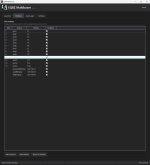
Fully rebindable hot-swap keys (F1-F12 + End by default).

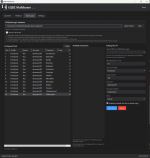
Assign characters to slots; sessions log in via MacroQuest AutoLogin.

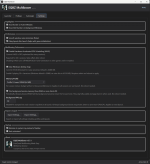
Performance options for running many sessions at once.

Point it at your EverQuest folder and go.

Example of 72 Loaded with Mem0 Trimmed sessions.

An external window manager that launches, arranges, and instantly swaps between dozens of EverQuest sessions, with configurable hot-swap keys and MacroQuest AutoLogin support.
What it does
- Launch your whole crew: one click launches 1, 3, 6, 9, 12, or 72+ sessions.
- Automatic window layouts: horizontal, vertical, grid, or stacked. It positions and strips borders for you, then re-arranges once every session finishes loading.
- Instant hot-swap: F1-F12 + End focus your slots (fully rebindable). The focused window snaps to the main spot.
- Live thumbnails: watch background sessions without resizing them, on a second monitor if you like.
- MacroQuest AutoLogin support: links to your existing MQ2AutoLogin login.db and logs each slot into its assigned character. Requires MacroQuest; the app never stores your passwords.
- Built for high session counts: Desktop-heap and Disable-HAGS helpers to push past common ceilings.
- Themed base background color. If you have a dark theme for your desktop the software will match. If you have light theme it will match etc.
- Split Monitor is a WIP (Work in progress)
No injection. No admin.
EQBZ Multiboxer is a fully external utility. It does not inject into or modify EverQuest and runs at normal integrity (no administrator prompt). It only manages windows.
Requirements
- Windows 10 (1607+) or Windows 11, 64-bit
- EverQuest
- Optional: MacroQuest with MQ2AutoLogin (only for AutoLogin)
Works on: Live, Emu, TLP, and Test (it manages windows, so it is server-agnostic).
Quick setup
- Run the installer. Optionally enable the "optimize for many sessions" step (one reboot).
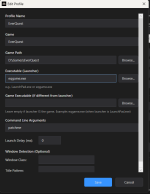
- Launcher tab, Manage Profiles: point it at your EverQuest folder.
- Pick a layout, then Launch.
- Optional: AutoLogin tab, link your MacroQuest login.db and drag characters onto slots.
Launch and arrange your whole crew from one window.
Build any layout - horizontal, vertical, grid, or stacked.
Fully rebindable hot-swap keys (F1-F12 + End by default).
Assign characters to slots; sessions log in via MacroQuest AutoLogin.
Performance options for running many sessions at once.
Point it at your EverQuest folder and go.
Example of 72 Loaded with Mem0 Trimmed sessions.
- License Name
- Proprietary (Commercial EULA)