



- Other Authors
- Source Repository
- https://github.com/macroquest/mq-definitions
Macroquest Lua Definitions Library
Overview
The definitive set of Lua code definitions for Macroquest, ImGui Lua Bindings w/custom features, and Macroquest core Lua helpers. This library is designed to help you write Lua scripts for Macroquest with greater speed and fewer runtime errors, thanks to LuaLS dynamic type checking, syntax checking, and diagnostic tools.Prerequisites
To get started you'll need the following.- Microsoft VS Code
- The LuaLS Extenstion
- This library installed to a known location on your computer
Installation
Microsoft Visual Studio Code
- Install the latest version of Visual Studio Code from the here
LuaLS (Lua Language Server Extension)
- Install LuaLS either from here VSCode Marketplace - Lua Language Server Extension
- Or the extension can be installed directly from within VSCode. Search Extensions for "Lua Language Server" as seen here, and install the one by "sumneko"
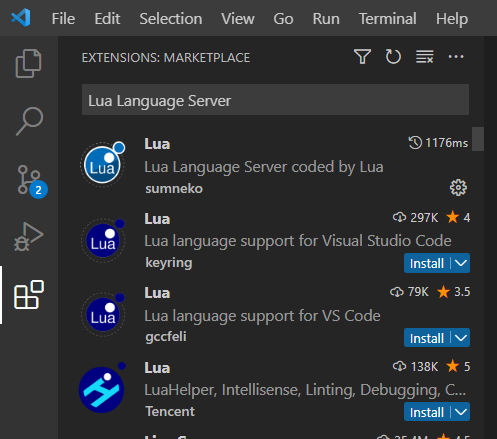
Install these files on your computer
- RedGuides Users can simply "Watch" the resource here and the files will automatically be placed in a directory called "mq-defintions" under your Lua directory when you run the RedGuides launcher.
- If you are not a RedGuides user, or wish to install the files yourself, you can clone the repository from GitHub, or download the zip file from GitHub.
- Unless you need the definitions in a separate location, e.g you're writing scripts for different versions EQ Live and EQ Emu, it is highly recommended that you put the definitions under your Lua directory (i.e. a subdirectory called mq-definitions under the Lua directory). This installation will require no additional configurations and you'll be up and running right away.
- Download the zip from Gihub by following this link, or you can use the web interface.
- Clone the repository
- If you do not have Git for Windows installed, you can get it at gitforwindows.org
git clone https://github.com/macroquest/mq-definitions.git
Getting Started
At this point, you should have:- VS Code Installed and Working
- with the LuaLS Extension installed
- and the files downloaded to a known directory on your computer
- If you put your mq-defintions in a folder location other than under the lua directory, then you will need to complete the next step, to define where the LuaLS extension can locate the definition files and the Macroquest Lua directory.
- Create or modify settings file for VS Code with these settings:
JSON:
{
  "Lua.runtime.version": "LuaJIT",
  "Lua.workspace.library": [
    "path/to/mq-definitions",
    "path/to/macroquest/lua",
  ],
}
How to Use
When requiring the Macroquest, ImGui, or other supported libaries in your Lua script, autocompletion will be provided for fields, methods and enum types.- Definitions support the following requires. Note: This is case sensitive.
Lua:
local mq = require('mq')
local imgui = require('ImGui')
local actors = require('actors')
local icons = require('mq/icons')
local utils = require('mq/utils')
local packageman = require('mq/packageman')
. . .


