• You've discovered RedGuides, an EverQuest multi-boxing and scripting community 🧙‍♀️⚙️. We want you to play several EQ characters at once, come join us and say hello! 👋

  • A TLP without truebox has thawed (Very Vanilla ready)
    Frostreaver

Problem - Where can we disable spamming of Origin?

manydills

Well-known member
Joined
Apr 14, 2020
RedCents
845¢
I have a ranger that I run in KA manual mode with /buffson. Sometimes I will try to cast a spell using the keybinding (Alt+5, in this case) and it'll cast the spell in gem 5, but it'll also try to activate my Origin AA? I usually am able to interrupt it, but why would that be happening? The button that I've got Origin on isn't bound to any key.

This may not even be an MQ2 problem or a KA problem but I found it really strange. Any one else experience this?
 
Perhaps it thinks your gems are stuck and is trying to unstick them? I see origin casting sometimes but it never actually finishes the cast.
 
I don't think it's ever finished a cast on mine either. How odd. Glad to know I'm not the only one.
 
I looked into this a bit further; it seems like it's part of the Stuck Gems routine - it doesn't quite wait long enough after cast before deciding the gems are stuck, and then tries to cast Origin for a split second to unstick them.

This is only really a problem when I'm casting an invis spell - invis gets cast, I'm invisible. Origin starts being cast, I'm visible again. I have to pause the macro before invising.
 
Recently I have had problems with this, and they do actually manage to get it off a lot of times causing a few wipes! The only cure I have found so far is to re-install MQ2 every day or so, that seems to have fixed it ....for now?
 
yea I saw this once too. EQ has been having lag spikes at times, it may be related to that?
 
Yeah, I think it is related to the bad lag lately. I've had origin successfully cast a few times in the past few days when it normally would interrupt itself, and each time was when the server was lagging really badly.
 
I have also randomly had this happen, but only on my cleric
 
Just started seeing this happen on my crew today.

I just updated to ka12 last night so maybe an issue with that?
 
Last edited:
It happens if you try to manually cast a spell while kiss is running or if there is server lag. kiss tries to cast origin to clear a locked out gem.
 
It's to clear out stuck spell gems. If you're running KA, for example, and you manually cast a spell KA will think the spell gem is stuck so it'll cast origin to reset the gem.
 
This happens to my cleric sometimes. Is there any way to use a different spell?
 
are you using kissassist? kiss uses origin for stuck gem detection.
Yes I am.... What do you mean by stuck gem detection....... forgive me I'm new........... also............. i really want to know the command to stop................ I hit find ............ tune starts running............... and /mac end does not work
 
/nav stop, or manually move.

MQ2EasyFind has auto-navigation when you click things.

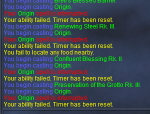
when Kissassist thinks your gems are stuck (greyed out), it will autocast then interrupt Origin, to refresh the spell gems
 
1612215391061.png

This is becoming a big problem, one guy said he actually gated to his home city because of KissAssist.

I don't have stuck spellgems, why are we spamming this over and over? It seems every time I try to manually buff myself the macro wants to cast origin. Can we option this usage off in the .ini by adding a line in there somewhere? SpamOriginIfWeThinkSpellGemsAreStuck=0
 
Yeah, this is a problem for me too... I've actually had chars origin to their respective home city during raid encounters...
 
I don't use KA on raids, but I looked at the kissassist.mac file out of curiosity after reading this thread and saw the following code pertaining to it:

Lines 342 through 343:
INI:
        /if (${ChainPull}!=2) {
            /if (!${IAmABard} && ${Me.Casting.ID}) /call CheckStuckGems

And then Line 1886 (checks for either gems stuck or there is a spell in book but it's not memmed)
INI:
/call CheckStuckGems

Then lastly the sub/function that starts on line 13743

INI:
| SUB: Check and Fix Stuck Gems

| ----------------------------------------------------------------------------

    Sub CheckStuckGems

        /if (${Window[CastingWindow].Open} || ${Me.Invis}) /return

        /if (${Me.AltAbilityReady[origin]}) {

            /alt act ${Me.AltAbility[origin].ID}

            /delay 50 ${Window[CastingWindow].Open}

            /stopcast

            /delay 10

        } else {

            /echo Origin AA not ready.

            /delay 20

        }

    /return

Pretty sure this is why. Looking at this piece of code, KA will try to detect stuck gems in two places via /call CheckStuckGems. It's then trying to use use an AA ability (origin in this case since it's a universal AA applied to all classes) if it thinks you have stuck gems.. However, it seems like the /stopcast portion is not working for some people and/or maybe it's not really registering if people's gems are all entirely greyed out. That part I am unsure as to how it's affecting you. However, based on my experience just actually raiding (and not running KA), it may get laggy where your gems are greyed out for about a second or two. KA might be confusing this with gems just being perma-stuck which although is a similar matter/issue, it's still a separate one.

But with that being said, there should really be a fix to disable it if one is not available. I can see this causing a world of problems especially if someone is running KA with unsuspecting players in an instanced raid and then they all of a sudden see you casting origin over and over. If there isn't a way to turn off /call CheckStuckGems which is used in various parts of the KA file, then a temporary workaround may be to just comment out line 343 and line 1886. Or replace the reference to the origin ability with something else if you still want to try and use an ability (the latter I don't recommend since if you're running multiple toons and one doesn't have the specific AA, then it will probably cause an error).

Edit: I also just thought about something. If some people are claiming that they still ended up gating to the home-city, then maybe there is a conflict if castinginterrupt is set off in the individual player ini. Not sure, but just spitting ideas out loud. This is worthy of you cross-posting so the devs maintaining KA can have a look, if you care to look into this further: https://www.redguides.com/community/threads/kissassist.61791/

 
Last edited:
I ask my machine to do A LOT with what little it has, this just seems to add to the confusion and delay as well as
if someone is running KA with unsuspecting players in an instanced raid and then they all of a sudden see you casting origin over and over.
Highly Embarassing
 
Unfortunately this is something new which started with the February patch, perhaps the tolerance check to execute the stuckgems code was edited and it is now checking for a stuck gem with too tight a tolerance.
Supposedly the Lag issues are being generated by the procs that are being executed and DP is looking to ease that a bit, but no amount of spamming Origin is ever going to fix it.
 
Sounds like something to fully disable until it’s implemented better.
 
Until this gets resolved I edited my kissassist.mac file to a different filename to disable it, and fully expect to have to re-edit as updates occur.
When I am running bot group I /kissassist, and when running other toons /kissassistx

INI:
| ----------------------------------------------------------------------------
| SUB: Check and Fix Stuck Gems
| ----------------------------------------------------------------------------
    Sub CheckStuckGems
    /return
        /if (${Window[CastingWindow].Open} || ${Me.Invis}) /return
        /if (${Me.AltAbilityReady[origin]}) {
            /alt act ${Me.AltAbility[origin].ID}
            /delay 50 ${Window[CastingWindow].Open}
            /stopcast
            /delay 10
        } else {
            /echo Origin AA not ready.
            /delay 20
        }
    /return
 
I guess do as the above suggested. Rename (copy it and rename the copied file) your KissAssist.mac file, find the areas where it calls to Origin based on stuck gems, and comment (pipe) them out. When you run KA, use that renamed macro file instead. It seems like a lot of steps to prevent this new "feature" but it's what we gotta go with, if this is problematic for anyone.
 
I guess do as the above suggested. Rename (copy it and rename the copied file) your KissAssist.mac file, find the areas where it calls to Origin based on stuck gems, and comment (pipe) them out. When you run KA, use that renamed macro file instead. It seems like a lot of steps to prevent this new "feature" but it's what we gotta go with, if this is problematic for anyone.

I found it to cause errors when I tried to comment out the whole section so I changed it to this

INI:
| ----------------------------------------------------------------------------
| SUB: Check and Fix Stuck Gems
| ----------------------------------------------------------------------------
    Sub CheckStuckGems
    /return
        /if (${Window[CastingWindow].Open} || ${Me.Invis}) /return
        /if (!${Me.AltAbilityReady[origin]}) {
            /alt act ${Me.AltAbility[origin].ID}
            /delay 50 ${Window[CastingWindow].Open}
            /stopcast
            /delay 10
        } else {
            /echo Origin AA not ready.
            /delay 20
        }
    /return

Since I never really use origin, I changed it to !${Me.AltAbilityReady[origin]} so it will only try cast origin when origin is not ready, which is never.
 
How to stop the KA Origin stuck Gem check? Can someone tell me what line to delete in the KA file to stop this from spamming at inappropriate times.

Does this even need to be around anymore? I feel like since the last update they may have finally resolved bard from sticking our gems.
 
How to stop the KA Origin stuck Gem check? Can someone tell me what line to delete in the KA file to stop this from spamming at inappropriate times.

Does this even need to be around anymore? I feel like since the last update they may have finally resolved bard from sticking our gems.
you will need to find the "Sub CheckStuckGems" and add a /return afterwards

Code:
Sub CheckStuckGems
    /return
 
I observed that it triggers when you have an ini block enabled and there are null spells within the activated list. E.g.

[CODE title="Example ini that triggers origin"][Buffs]
BuffsOn=1
BuffsSize=3
Buffs1=Pack Spirit
Buffs2=NULL
Buffs3=NULL
[/CODE]

The fix was to change BuffsSize=1

Also, the behavior of the settings routine adds null entries if the size is > list. E.g.

[CODE title="INI before"][Buffs]
BuffsOn=1
BuffsSize=3
Buffs1=Pack Spirit
[/CODE]

will then become

[CODE title="INI after"][Buffs]
BuffsOn=1
BuffsSize=3
Buffs1=Pack Spirit
Buffs2=NULL
Buffs3=NULL
[/CODE]
 
90% of the time, this is triggered by Lag. The check for stuck Gems is if Me.Casting.ID has a value and There is NO casting window open, then something is wrong. I will see if I can add someway to turn this functionality off, but it will be on by default. For now just use @Sic suggestion.
 
Is there a way force a stuck cast gem? If there was, then different resolutions could be tested.
 
That's the purpose of casting Origin. When the Gems get into a stuck state, casting any AA and then aborting the cast will clear the Stuck Gem state. Well that is how it use to work.
 
I found another way to trigger the behavior. Click an AA which has some casting duration, like Call of the Hero, and it will try to halt it. If you put an /echo in the sub, you'll see it really hammers it like several times a second...
 
The stuck gem state has been fixed in game now - so this routine is kinda redundant.

Any reason not to disable it completely?
 
The stuck gem state has been fixed in game now - so this routine is kinda redundant.

Any reason not to disable it completely?

Could you give a clear proof that the long-time stuck gem bug has been really really fixed this time please? Since DPG screwed this too many times...
 
Problem - Where can we disable spamming of Origin?

Users who are viewing this thread

Back
Top
Cart