
Install the app
How to install the app on iOS
Follow along with the video below to see how to install our site as a web app on your home screen.
Note: This feature may not be available in some browsers.
-
 You've discovered RedGuides, an EverQuest multi-boxing and scripting community 🧙♀️⚙️. We want you to play several EQ characters at once, come join us and say hello! 👋
You are using an out of date browser. It may not display this or other websites correctly.
You should upgrade or use an alternative browser.
You should upgrade or use an alternative browser.
Question - What will ISBoxer give me?
- Thread starter Ordell
- Start date


I still use it out of habit for launching different group setups, I stopped using any tiling or window management (other than borderless windows), and I stopped using cpu management due to mq2eqwire.Honest question. I six box, controlling the warrior while KissAssist runs the other 5. My machine has 32GB of memory so no performance issues. Would I gain anything by springing for ISBoxer?
TIA.
I still use the ctrl-alt-1, ctrl-alt-2 etc for swapping toons and I still love the virtualization of eqclient.ini so some toons I can have on stuff, and other toons i have stickfigures and everything turned to gummybear mode

- Joined
- Jul 22, 2018
- RedCents
- 1,312¢
I like it for keystroke and mouse click broadcasting. For example, I have a social button for connecting to eqbc and it's in the exact same place on my UI for all characters. So I just have to flip on mouse broadcast, click the social on one char and all of them get the click and connect simultaneously. EQwire breaks this functionality, however, because it prevents the background members from rendering.
The virtualization of the ini files is nice too. That allows for each character to have it's own eqclient.ini which is where all your eq settings are stored (such as graphics settings, chat channel colors, etc.).
The virtualization of the ini files is nice too. That allows for each character to have it's own eqclient.ini which is where all your eq settings are stored (such as graphics settings, chat channel colors, etc.).
I use it for these reasons...
1. Making group profiles: in ISBoxer there is a menu command for Wizards. You go into the Quick Setup Wizard and it steps you through the process of creating a group from a series of popup boxes. It gives you all kinds of options and let's you layout the load order of the characters and everything. And very importantly it let's you make a:
2. Windows Layout: this is a really cool part. You can select different window layout options based on your group. In other words, if you have a group of 6 then it will automatically adjust to show a layout of 6 windows. Same as if you had 4 or 3 or just 2. Not only that but it takes into account how many monitors you have. And the windows layouts let you keep the same aspect ratio for all the different windows no matter what size they are. For example, I have 2 monitors and on 1 I have my main screen (full screen) and on the other monitor I have 5 separate windows for the other 5 characters in my group, and I can change the size and placement of those windows. Also I can switch (they call it swapping) between any of the windows by either clicking on the window or as said by Sic, just cntl alt 1 or 3 or 5, and it swaps that window with your full screen one. Honestly best part of ISBoxer as far as I am concerned.
3. Logging in: Like I said in #1, it will create a profile of your group. You can use that profile to log all your characters into EQ. In your notification area is a Innerspace icon. Right click on that and it pops up a menu and you select which group profile or even just one character from that group (great for when you have one client crash) that you want to log in. It then goes through the process of starting all 6 of your clients with the proper characters and all you have to do is type in your password. And if you do it right you can type in your password on all 6 clients at the same time (love this feature).
4. It creates a Virtual eqclient.ini for each character that you can edit, like Sic said, to make different configurations for that character. Think Wiz casting fire or cold nukes, something like that.
5. You can set this up in just a veritable butt ton of different ways. I freely admit I have no idea how most of it is used. But watch this video and I think you will see why I wanted to use it. This is what made me get a sub. Multi-boxing Everquest with ISBoxer: VideoFX and Click Bar setup. The guy who wrote this software started it all with EQ1 and was (I think, but I don't want to overstep here) once part of the team that made MQ2. You have probably read some of the forum posts about multi boxing and seen where the Dev's have said that one button for each action even on multiple toons is legal? WinEQ (from ISBoxer) is where that saying came from. And this is exactly what ISBoxer was made for. Press A key on muliple toons at the same time. I always imagine an octopus sitting in front of 6 keyboards.
6. This is different from using KA, it is more like MQ2 and a bunch of macro's. But much more sophisticated. It costs $15 for a 3 month sub. So go here ISBoxer to check it out. There are pretty complete video tutorials and active forums and Discord for questions and answers. Use this link to register an account, Referral gives me some freebies lol.
Hope this helps explain some of it for you.
1. Making group profiles: in ISBoxer there is a menu command for Wizards. You go into the Quick Setup Wizard and it steps you through the process of creating a group from a series of popup boxes. It gives you all kinds of options and let's you layout the load order of the characters and everything. And very importantly it let's you make a:
2. Windows Layout: this is a really cool part. You can select different window layout options based on your group. In other words, if you have a group of 6 then it will automatically adjust to show a layout of 6 windows. Same as if you had 4 or 3 or just 2. Not only that but it takes into account how many monitors you have. And the windows layouts let you keep the same aspect ratio for all the different windows no matter what size they are. For example, I have 2 monitors and on 1 I have my main screen (full screen) and on the other monitor I have 5 separate windows for the other 5 characters in my group, and I can change the size and placement of those windows. Also I can switch (they call it swapping) between any of the windows by either clicking on the window or as said by Sic, just cntl alt 1 or 3 or 5, and it swaps that window with your full screen one. Honestly best part of ISBoxer as far as I am concerned.
3. Logging in: Like I said in #1, it will create a profile of your group. You can use that profile to log all your characters into EQ. In your notification area is a Innerspace icon. Right click on that and it pops up a menu and you select which group profile or even just one character from that group (great for when you have one client crash) that you want to log in. It then goes through the process of starting all 6 of your clients with the proper characters and all you have to do is type in your password. And if you do it right you can type in your password on all 6 clients at the same time (love this feature).
4. It creates a Virtual eqclient.ini for each character that you can edit, like Sic said, to make different configurations for that character. Think Wiz casting fire or cold nukes, something like that.
5. You can set this up in just a veritable butt ton of different ways. I freely admit I have no idea how most of it is used. But watch this video and I think you will see why I wanted to use it. This is what made me get a sub. Multi-boxing Everquest with ISBoxer: VideoFX and Click Bar setup. The guy who wrote this software started it all with EQ1 and was (I think, but I don't want to overstep here) once part of the team that made MQ2. You have probably read some of the forum posts about multi boxing and seen where the Dev's have said that one button for each action even on multiple toons is legal? WinEQ (from ISBoxer) is where that saying came from. And this is exactly what ISBoxer was made for. Press A key on muliple toons at the same time. I always imagine an octopus sitting in front of 6 keyboards.
6. This is different from using KA, it is more like MQ2 and a bunch of macro's. But much more sophisticated. It costs $15 for a 3 month sub. So go here ISBoxer to check it out. There are pretty complete video tutorials and active forums and Discord for questions and answers. Use this link to register an account, Referral gives me some freebies lol.
Hope this helps explain some of it for you.
SA_krycek
Really? I didn't know you couldn't use it with EQWire. That's a bummer. I was going to look into using EQWire to take care of some of my lag problems.
But Sic said:
Sic you mind giving me some help here? Can you just disable cpu management in ISB and still use EQWire?
Really? I didn't know you couldn't use it with EQWire. That's a bummer. I was going to look into using EQWire to take care of some of my lag problems.
But Sic said:
and I stopped using cpu management due to mq2eqwire.
Sic you mind giving me some help here? Can you just disable cpu management in ISB and still use EQWire?
I don't use broadcasting with isboxer since i have mq2 with mimicme and suchSA_krycek
Really? I didn't know you couldn't use it with EQWire. That's a bummer. I was going to look into using EQWire to take care of some of my lag problems.
but I do 100% use mq2eqwire with isboxer (turned off cpu management in isboxer and just set eqclient.ini all to -1 for every entry)
- Joined
- Jul 22, 2018
- RedCents
- 1,312¢
EQwire only breaks the broadcasting of keys and mouse clicks, not the entire isboxer program.
yes 100%SA_krycek
Really? I didn't know you couldn't use it with EQWire. That's a bummer. I was going to look into using EQWire to take care of some of my lag problems.
But Sic said:
Sic you mind giving me some help here? Can you just disable cpu management in ISB and still use EQWire?
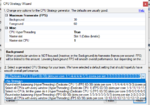
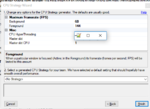
when you get to the cpu stragegy portion of quick setup wizard, just use no strategy

then I made sure to have CPUAffinity set to -1
Code:
stickfigures=1
UseWASDDefault=1
GraphicsMemoryModeSwitch=1
APVOptimizations=TRUE
DisableWestBugFix=0
Sound=FALSE
CPUAffinity0=-1
CPUAffinity1=-1
CPUAffinity2=-1
CPUAffinity3=-1
CPUAffinity4=-1
CPUAffinity5=-1
these settings combined with eqwire has been awesome.
also since isboxer can use different ini files per toon, I have most of my background toons with stickfigures=1 and everything turned off --- and the toons i might be driving without that entry, and maybe new char models and such
Attachments
Very cool. I was on the fence about trying out ISBoxer before since I wasn't sure how much it would add that MQ2 didn't have mostly covered, but you guys have convinced me to try it out.
The window tiling does sound really handy and I'll see their videos as well for some more features.
Thanks for taking the time to explain your setups!
The window tiling does sound really handy and I'll see their videos as well for some more features.
Thanks for taking the time to explain your setups!
G
gSe7eN
Shameless self promotion, but that's only coincidence. InnerSpace launches a group boringly slow. I posted about how to speed up the process quite considerably. Check out the Powershell Post that is the exact copy and paste of the script I use to launch my profiles.
You'll need to change a few things to get this to work if you decide to use it. You'll need to define $MQ2 to your MQ2.exe path (I have mine defined in system PATH, hence the environmental variable). Likewise path to your InnerSpace.exe file. Then, you'll need to change WorkHorses to whatever the name of your profile you want to launch. Next, change 1..32 to whatever slots you want to launch (this will likely be 1..6, one through six. Finally, the last Start-Sleep -s 1 may need changed up to 3 rather than one, it just depends on how beefy your system is to handle launching them 1 second apart. Three of my machines require the 3 second pause, but my main can do 1.
What this does is checks to see if InnerSpace is running. If it isn't, run it. Then MQ2. It takes a short pause to allow InnerSpace to open. Then, it launches the slots of the profile you specified at (in this case) 1 second intervals. What takes InnerSpace several minutes to do, this does in this case in about 10 seconds, nice and simple. I do most of my work in Powershell ISE, which is included in Windows 10 (search for it in Start menu).
Code:
$IS = "$env:InnerSpace\InnerSpace.exe"
$MQ2 = "$env:MQ2\MacroQuest2.exe"
$Run1 = Get-Process -Name InnerSpace -ErrorAction SilentlyContinue
$Run2 = Get-Process -Name MacroQuest2 -ErrorAction SilentlyContinue

if($Run1 -eq $null) {Start-Process -FilePath $IS -WindowStyle Minimized}
if($Run2 -eq $null) {Start-Process -FilePath $MQ2 -verb RunAs -WorkingDirectory $env:MQ2}
Start-Sleep -s 3

ForEach ($n in 1..32) {
    Start-Process -FilePath $IS -Verb RunAs -ArgumentList "run isboxer -launchslot `"WorkHorses`" $n"
    Start-Sleep -s 1
}
You'll need to change a few things to get this to work if you decide to use it. You'll need to define $MQ2 to your MQ2.exe path (I have mine defined in system PATH, hence the environmental variable). Likewise path to your InnerSpace.exe file. Then, you'll need to change WorkHorses to whatever the name of your profile you want to launch. Next, change 1..32 to whatever slots you want to launch (this will likely be 1..6, one through six. Finally, the last Start-Sleep -s 1 may need changed up to 3 rather than one, it just depends on how beefy your system is to handle launching them 1 second apart. Three of my machines require the 3 second pause, but my main can do 1.
What this does is checks to see if InnerSpace is running. If it isn't, run it. Then MQ2. It takes a short pause to allow InnerSpace to open. Then, it launches the slots of the profile you specified at (in this case) 1 second intervals. What takes InnerSpace several minutes to do, this does in this case in about 10 seconds, nice and simple. I do most of my work in Powershell ISE, which is included in Windows 10 (search for it in Start menu).
Thanks SA...kinda backs up how I feel about it. And Sic? thanks for the detail. That is pretty much how I have things setup right now without the EQWire. I was going to check into EQWire because I have started to notice some lag when I have more than 6 characters logged in. Especially in PoK.
gSe7eN
I run Windows 7 still, and I know nothing about Windows PS. I am not even sure whether I have it installed or not lol. Will this work with W7? Because your right, lack of speed is the price you pay for using ISB. Especially the login process. I sure do like the concept of speeding that process up. And last thing, how do you execute the workhorses.ps1: file, and where do you store that file to begin with.
gSe7eN
I run Windows 7 still, and I know nothing about Windows PS. I am not even sure whether I have it installed or not lol. Will this work with W7? Because your right, lack of speed is the price you pay for using ISB. Especially the login process. I sure do like the concept of speeding that process up. And last thing, how do you execute the workhorses.ps1: file, and where do you store that file to begin with.
G
gSe7eN
Thanks SA...kinda backs up how I feel about it. And Sic? thanks for the detail. That is pretty much how I have things setup right now without the EQWire. I was going to check into EQWire because I have started to notice some lag when I have more than 6 characters logged in. Especially in PoK.
gSe7eN
I run Windows 7 still, and I know nothing about Windows PS. I am not even sure whether I have it installed or not lol. Will this work with W7? Because your right, lack of speed is the price you pay for using ISB. Especially the login process. I sure do like the concept of speeding that process up. And last thing, how do you execute the workhorses.ps1: file, and where do you store that file to begin with.
To be honest, I'm not sure about Windows 7 because it's gross. Try WinKey+R and type powershell and see if it works. Then type Get-Host and see what the version is. If it's an older version such as Powershell 2, this stuff might be broken (written in PS 5). As far as script storage, anywhere works. Once you are in powershell, you can do
invoke-command -filepath c:\Path\To\WarTeam.ps1 (though you might need to add -ExecutionPolicy BysPass to that command. Additionally, & "C:\Path To\MyPalTeam.ps1" may also work. I explained in some detail in the first post of the above link what PowerShell is and what not. I also use PowerShell ISE rather than just the console since I can edit my scripts on the fly (with IntelliSense!) and run them.Ok I tried...but I just don't speak "code" very well at all, never have had an aptitude for it. Here is what I got so far. Btw it IS Version 2 of Powershell. I think I have most of it right as far as the names of the profile and # of characters to load, not sure about the path's and where to put that info at.
Filename is: 6boxmelee.ps1
And here is the command line:
and this is the result:
Invoke-Command : Parameter set cannot be resolved using the specified named par
ameters.
At line:1 char:15
+ invoke-command <<<< -filepath d:\games\mq2\6boxmelee.ps1
+ CategoryInfo : InvalidArgument: ( [Invoke-Command], Parameter
BindingException
+ FullyQualifiedErrorId : AmbiguousParameterSet,Microsoft.PowerShell.Comma
nds.InvokeCommandCommand
I really don't mean to waste your time on a complete noob, but can you set me on the right path please?
Filename is: 6boxmelee.ps1
Code:
$IS = "$env:D:\games\InnerSpace\InnerSpace.exe"
$MQ2 = "$env:D:\games\MQ2\MacroQuest2.exe"
$Run1 = Get-Process -Name InnerSpace -ErrorAction SilentlyContinue
$Run2 = Get-Process -Name MacroQuest2 -ErrorAction SilentlyContinue

if($Run1 -eq $null) {Start-Process -FilePath $IS -WindowStyle Minimized}
if($Run2 -eq $null) {Start-Process -FilePath $MQ2 -verb RunAs -WorkingDirectory $env:MQ2}
Start-Sleep -s 3

ForEach ($n in 1..6) {
    Start-Process -FilePath $IS -Verb RunAs -ArgumentList "run isboxer -launchslot `"Rng Shm Pal Brd Ber Wiz`" $n"
    Start-Sleep -s 1
And here is the command line:
invoke-command -filepath d:\games\mq2\6boxmelee.ps1 also I tried the -ExecutionPolicy BysPass but that didn't execute either. I tried it without the -filepath and not successful. So I am relatively sure my command line is incorrect. I admit I really have no idea what the syntax should be.and this is the result:
Invoke-Command : Parameter set cannot be resolved using the specified named par
ameters.
At line:1 char:15
+ invoke-command <<<< -filepath d:\games\mq2\6boxmelee.ps1
+ CategoryInfo : InvalidArgument: (
[Invoke-Command], ParameterBindingException
+ FullyQualifiedErrorId : AmbiguousParameterSet,Microsoft.PowerShell.Comma
nds.InvokeCommandCommand
I really don't mean to waste your time on a complete noob, but can you set me on the right path please?
G
gSe7eN
Ok I tried...but I just don't speak "code" very well at all, never have had an aptitude for it. Here is what I got so far. Btw it IS Version 2 of Powershell. I think I have most of it right as far as the names of the profile and # of characters to load, not sure about the path's and where to put that info at.
Filename is: 6boxmelee.ps1
Code:$IS = "$env:D:\games\InnerSpace\InnerSpace.exe" $MQ2 = "$env:D:\games\MQ2\MacroQuest2.exe" $Run1 = Get-Process -Name InnerSpace -ErrorAction SilentlyContinue $Run2 = Get-Process -Name MacroQuest2 -ErrorAction SilentlyContinue if($Run1 -eq $null) {Start-Process -FilePath $IS -WindowStyle Minimized} if($Run2 -eq $null) {Start-Process -FilePath $MQ2 -verb RunAs -WorkingDirectory $env:MQ2} Start-Sleep -s 3 ForEach ($n in 1..6) { Start-Process -FilePath $IS -Verb RunAs -ArgumentList "run isboxer -launchslot `"Rng Shm Pal Brd Ber Wiz`" $n" Start-Sleep -s 1 }
And here is the command line:invoke-command -filepath d:\games\mq2\6boxmelee.ps1also I tried the -ExecutionPolicy BysPass but that didn't execute either. I tried it without the -filepath and not successful. So I am relatively sure my command line is incorrect. I admit I really have no idea what the syntax should be.
and this is the result:
Invoke-Command : Parameter set cannot be resolved using the specified named par
ameters.
At line:1 char:15
+ invoke-command <<<< -filepath d:\games\mq2\6boxmelee.ps1
+ CategoryInfo : InvalidArgument: :-)) [Invoke-Command], Parameter
BindingException
+ FullyQualifiedErrorId : AmbiguousParameterSet,Microsoft.PowerShell.Comma
nds.InvokeCommandCommand
I really don't mean to waste your time on a complete noob, but can you set me on the right path please?
The good news is I see mistakes that will fail. Those can be fixed and we’ll have this working in no time. However, let’s get your powershell on the current version 5.1. Visit this website and download this package for Win 7 SP1.
Code:
$IS = "D:\games\InnerSpace\InnerSpace.exe"
$MQ2 = "D:\games\MQ2\MacroQuest2.exe"
$Run1 = Get-Process -Name InnerSpace -ErrorAction SilentlyContinue
$Run2 = Get-Process -Name MacroQuest2 -ErrorAction SilentlyContinue

if($Run1 -eq $null) {Start-Process -FilePath $IS -WindowStyle Minimized}
if($Run2 -eq $null) {Start-Process -FilePath $MQ2 -verb RunAs -WorkingDirectory D:\games\MQ2\}
Start-Sleep -s 3

ForEach ($n in 1..6) {
    Start-Process -FilePath $IS -Verb RunAs -ArgumentList "run isboxer -launchslot `"Rng Shm Pal Brd Ber Wiz`" $n"
    Start-Sleep -s 1
}
The first issue is use of the $env variable without it being a environmental variable. If you'd like to see this in action in windows, go to windows explorer and type %USERPROFILE% and press enter. In Powershell, this would be $env:USERPROFILE. If you'd like to edit your system PATH, feel free and add MQ2 in there. But that's outside the scope of this. I've edited the script for your needs which should, assuming your directories are correct, work on PowerShell 5.1
As far as running it. download that package I linked, run PowerShell ISE. Load your PS1 file in that, and either it will work and that's how you do it each time, OR we'll need to adjust your ExecutionPolicy. If that's the case, we'll cross that bridge when we get there.
One more piece of advise is to run PowerShell ISE as admin (which is awful, terrible practice) and you won't have to do the windows UAC when this script runs.
Last edited:

I want to help hijack this thread!
If you create a shortcut to your powershell file (say on your desktop) you can edit the properties of the shortcut to bypass whatever execution policy you have without changing the execution policy for your machine. So in the example above, edit your shortcut to add this to the front of it:
powershell.exe -ExecutionPolicy Bypass -File
That says run powershell, but for this instance only Bypass your execution policy, and load whatever File comes next. The full command would look like:
powershell.exe -ExecutionPolicy Bypass -File "C:\Users\Knightly\Documents\6boxmelee.ps1"
I think IsBoxer is worth it for the window management alone if you're running a group on one computer.
If you create a shortcut to your powershell file (say on your desktop) you can edit the properties of the shortcut to bypass whatever execution policy you have without changing the execution policy for your machine. So in the example above, edit your shortcut to add this to the front of it:
powershell.exe -ExecutionPolicy Bypass -File
That says run powershell, but for this instance only Bypass your execution policy, and load whatever File comes next. The full command would look like:
powershell.exe -ExecutionPolicy Bypass -File "C:\Users\Knightly\Documents\6boxmelee.ps1"
I think IsBoxer is worth it for the window management alone if you're running a group on one computer.
G
gSe7eN
Says the guy who has a 100+ line .bat file to do this who is too lazy to convert it to PS~
- Joined
- Dec 26, 2017
- RedCents
- 3,360¢
What is Gummybear mode?everything turned to gummybear mode

G
gSe7eN
I posted more EQ related scripts over in that thread linked above if you're interested. Obviously they're not plug and play and will need tweaking, but perhaps you'll find them useful.Powershell : wow. Works great!

Boring
Well-known member
- Joined
- Oct 27, 2018
- RedCents
- 376¢
Thank y ou gSe7eN I will take a look. I have NO clue about programming or anything else and I was able to get your script running after learning HOW to set up a script, plugging in your post and then altering it to point to MY files. Ty again.
I will take a look. I have NO clue about programming or anything else and I was able to get your script running after learning HOW to set up a script, plugging in your post and then altering it to point to MY files. Ty again.
Tiger
Well-known member
- Joined
- Nov 11, 2017
- RedCents
- 910¢
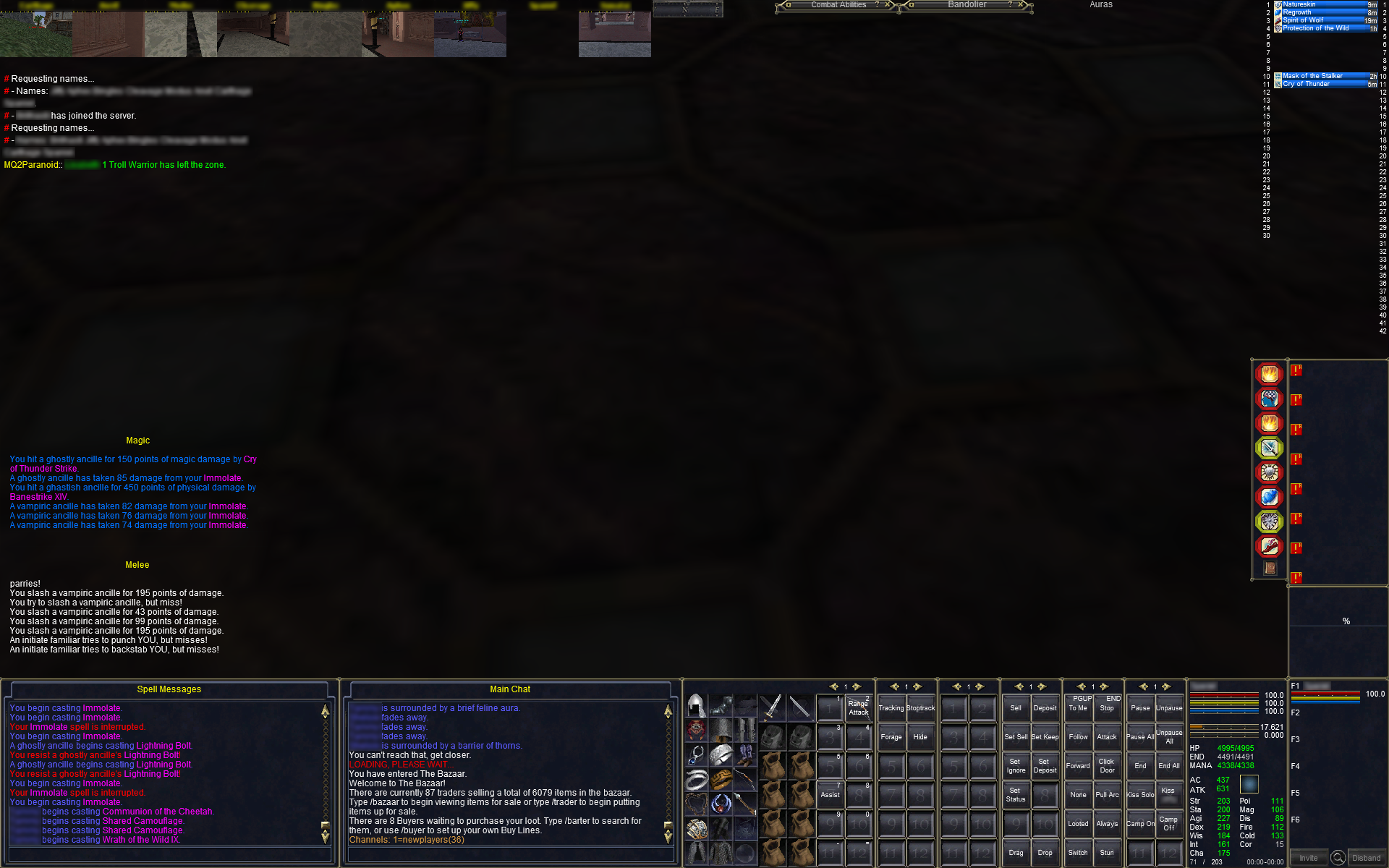
All I use isboxer for is the window layout. I let MQ2eqwire handle CPU and FG/BG fps and I don't use any of the actual boxing features of isboxer like broadcasting. All that gets disabled. I have the main window full screen with small windows aligned at the top left for my other characters. Each character has his own slot so I always know where to click to get the character I want, I also have small namebars above the window to remind myself who is who. When you click on one of the small windows, the main screen switches to that character and the one that was there previously moves to it's home in the small window group. The switch is instant. isboxer will also launch your entire group together, or whichever slot you want. It's a great piece of software when you take the time to get things arranged properly.
Last edited:

Sum1
Warriors are inferior (read: crybaby) tanks
- Joined
- Jul 30, 2006
- RedCents
- 6,332¢
All I use isboxer for is the window layout. I let MQ2eqwire handle CPU and FG/BG fps and I don't use any of the actual boxing features of isboxer like broadcasting. All that gets disabled. I have the main window full screen with small windows aligned at the top left for my other characters. Each character has his own slot so I always know where to click to get the character I want, I also have small namebars above the window to remind myself who is who. When you click on one of the small windows, the main screen switches to that character and the one that was there previously moves to it's home in the small window group. The switch is instant. isboxer will also launch your entire group together, or whichever slot you want. It's a great piece of software when you take the time to get things arranged properly.
#WorthIt
I only use it for the windows, as well. And I’d do it again and again. It’s awesome
It might be an older thread...I may add here some of my experience.
I have been using ISBoxer for years and it worked fine. I would set up hotkeys and control all 3 of my toons basically broadcasting hot keys from box 1 to box 2 and 3.
With recent content (and with that I mean some content that came out 2 years ago) there were more and more challenges and it seemed I am not able to finish quite a few events by simply broadcasting hotkey strikes.
I tried Kiss and the question came up, if I still need ISBoxer. I had to turn off key broadcast anyway since automated toons don't use the hotkeys. I have an older laptop with 8 gigs of memory so running ISBoxer actually slowed the game down quite a bit...
So, now all I do is use Kiss, I can switch between the windows easily and actually performance is better then with ISBoxer. Toons run fine, and I keep tweeking the scripts...
So, for me gameplay is better with Kiss only...
I have been using ISBoxer for years and it worked fine. I would set up hotkeys and control all 3 of my toons basically broadcasting hot keys from box 1 to box 2 and 3.
With recent content (and with that I mean some content that came out 2 years ago) there were more and more challenges and it seemed I am not able to finish quite a few events by simply broadcasting hotkey strikes.
I tried Kiss and the question came up, if I still need ISBoxer. I had to turn off key broadcast anyway since automated toons don't use the hotkeys. I have an older laptop with 8 gigs of memory so running ISBoxer actually slowed the game down quite a bit...
So, now all I do is use Kiss, I can switch between the windows easily and actually performance is better then with ISBoxer. Toons run fine, and I keep tweeking the scripts...
So, for me gameplay is better with Kiss only...
Users who are viewing this thread
Total: 1 (members: 0, guests: 1)
Share: