• You've discovered RedGuides, an EverQuest multi-boxing and scripting community 🧙‍♀️⚙️. We want you to play several EQ characters at once, come join us and say hello! 👋

Question - Way to switch what window MQ2chat output goes to

Joined
Apr 16, 2025
RedCents
81¢
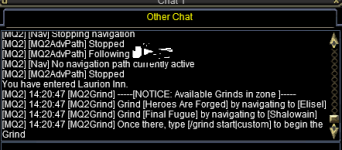
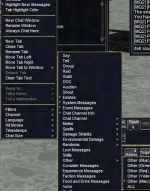
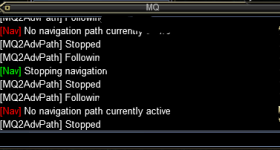
Is there anyway to route which window the MQ2Chatwnd output goes to? so i have the standard MQ2chatwnd open up top labeled (MQ) by default, and that's fine, but the in game audio triggers wont work unless I use the /plugin mq2chat. When I do that, everything happening in the main MQ labeled window is repeating itself in an additional window labeled (other chat), which is what i use for guild chat, etc. So, question is: Is there a way to assign it to another window without having to go through and setup an entirely new window/filters/etc. What I want to do is open a brand new chat window and just assign all that BS text from mq2chatwnd to go there, that way i can pick up audio triggers off the texts in game.

hopefully thats not too confusing, lol. here is what im talking about.
 

Attachments

  • Screenshot 2026-07-20 142037.png
    Screenshot 2026-07-20 142037.png
    11 KB · Views: 0
  • chatwnd.png
    chatwnd.png
    14.4 KB · Views: 0
explain how you are picking up audio triggers?

because if you are scanning log files for that, you can just turn on the mq log and get your mq2chatwnd logged into its own log file
 
explain how you are picking up audio triggers?

because if you are scanning log files for that, you can justturn on the mq log and get your mq2chatwnd logged into its own log file
Oh I am just using the standard in game EQ button and accessing the audio trigger tool. I just noticed that the audio triggers for plugins wouldn't work unless I used MQ2chat, which feeds it to an in game window. Issue with using MQ2log is that I would need to have an independent audio trigger like gina reading the log files in real time, right?
 
there is, he cant use ingame audio triggers on the mq2chatwnd though, so he was using mq2chat to have it go to his normal eq chat window, and wanted to move that into its own window but we cant
 
there is, he cant use ingame audio triggers on the mq2chatwnd though, so he was using mq2chat to have it go to his normal eq chat window, and wanted to move that into its own window but we cant
Yeah i was looking all over in settings and I don't see anywhere I can assign it to a specific window in the mq2chatwnd.ini. Looks like the only solution is going to be moving every other filter outta that window into a new window. problem is I dont have 2 characters, lol. It's going to be a huge copy paste project.
 
Question - Way to switch what window MQ2chat output goes to

Users who are viewing this thread

Back
Top
Cart