• You've discovered RedGuides, an EverQuest multi-boxing and scripting community 🧙‍♀️⚙️. We want you to play several EQ characters at once, come join us and say hello! 👋

  • A TLP without truebox has thawed (Very Vanilla ready)
    Frostreaver
Very Vanilla MQ2 (Beta server)

Vanilla - Very Vanilla MQ2 (Beta server) 2021-11-11

No permission to download
Redbot updated Very Vanilla MQ2 (Beta server) with a new update entry:

20201203

Dec 03 2020
- Updated for BETA
- Added WarforgedEmblem and RestlessMark Currencies - Sic
- Added .Sharing to the fellowship tlo it returns true of false if exp sharing is on for the member - Sic
Usage: /echo ${Me.Fellowship.Sharing[x]} where x is fellowship member 1-12
- Added .FindVariable to the Macro TLO it returns a string of the full variable name if it exist - requested by ctaylor22
Usage: /echo Macro.FindVariable[=Myvar]} for EXACT variable name
Return: Myvar
Usage...

Read the rest of this update entry...

 
I'm getting a CTD using this compile. Anyone else?
 
i am able to load in a toon from the rg launcher but once the toon loads into game, mq2 is automatically unloaded, reloading mq2 option changes nothing while in game. i am unable to get mq2 running on an active client.
 
New build coming in a moment, just had some last minute fixes & CoV updates from Sic to push
 
How do I install RG for Beta? I don't see it listed under "Very Vanilla MQ2 Status". The launcher is "unavailable" when toggled to Beta.
 
I've been trying to get beta to download for a few days.... it looks like the beta compile hasn't been updated since last december. I'm not sure if @eqmule is going to update for beta this year.... there hasn't been any announcements that I've seen.
 
I've been trying to get beta to download for a few days.... it looks like the beta compile hasn't been updated since last december. I'm not sure if @eqmule is going to update for beta this year.... there hasn't been any announcements that I've seen.

Discord showed an update a few days ago from him.
 
like every year, they (dbg) pretty much re-build beta every day. so we have to get lucky with timing where beta is rebuilt, mq2 beta is able to be patched, and then VV beta is able to be rebuilt.

beta for mq2 was updated this Wednesday, but was later in the afternoon, and then not updated yesterday, and looking not so far today

if this is helpful you can "watch" the resource and When beta is back in action you will be able to > Watch MQ2 Beta < and get notified when it is updated/available.
 
like every year, they pretty much re-build beta every day. so we have to get lucky with timing where beta is rebuilt, mq2 beta is able to be patched, and then VV beta is able to be rebuilt.

beta for mq2 was updated on Wednesday, but was later in the afternoon, and then not updated yesterday, and looking not so far today

if this is helpful you can "watch" the resource and When beta is back in action you will be able to > Watch MQ2 Beta < and get notified when it is updated/available.

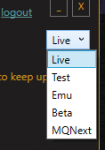
So, when I select "beta" from the launcher dropdown menu and try to patch it tells me the build is down for patchday and nothing is available. Do I need to be updating some other way?
 
So, when I select "beta" from the launcher dropdown menu and try to patch it tells me the build is down for patchday and nothing is available. Do I need to be updating some other way?
nah, that is the correct way, if it is updated and available it will be on the launcher - the "watch" thing just allows you to get notified when it is back up either by forums or e-mail.
 
Question on Beta directory. Do we install the Beta version in the same MacroQuest2\Release pathway used for Live?
 
Are there instructions on how to set this up for Beta? Clearly I am lost.

I created a new folder "MacroQuest2 Beta" and downloaded into it. Loaded up Beta and nothing. Can I only run one (Live or Beta) at a time? I guess I am not sure how this works for both. All the files look the same, and its not obvious for idiots like me.
 
Are there instructions on how to set this up for Beta? Clearly I am lost.

I created a new folder "MacroQuest2 Beta" and downloaded into it. Loaded up Beta and nothing. Can I only run one (Live or Beta) at a time? I guess I am not sure how this works for both. All the files look the same, and its not obvious for idiots like me.

Any alternate version
1634336093883.png

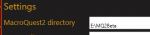
in the settings tab, you would want to tell it where you want to install it.
I would 1000% not put it in an existing install that you use.
1634336329992.png

my MQ2Beta would just be in this directory, so i don't contaminate any of my other installs.
1634336192887.png

for EQ itself:

> EQ Beta Patcher <

As a recurring theme, you will want to have a SEPERATE install for "Beta" versus your "test" or "live" or "emu" install of eq

Here is all the information you'll need to help you get started with beta:


HOW DO I ACCESS THE BETA SERVER?

  • Use the beta launcher to access the beta server.
  • If you don’t already have the beta launcher, you can directly download it here. (There may be a lot of data for you to download, so please be patient and plan accordingly!)
  • Be sure to run the beta server LaunchPad shortcut every time before you log in. Failing to do so may cause you to experience crashes or gameplay issues that could be fixed by patching.


I KEEP GETTING A 1017 ERROR. HOW DO I FIX THAT?

  • What time is it? If between 5AM and 7AM PT, please wait until 7AM and update your client. We run an automated update every morning that pushes out the latest to beta.
  • If it's not during our update time, make sure that you've updated your beta client and that in LaunchPad it's still pointed to the "Beta" version.


HOW DO I COPY MY CHARACTER ONTO THE BETA SERVER?

  • Run /beta in your chat window on the character that you would like copied.
  • We've scheduled scripts that will copy characters to the beta server to run alongside the morning patch.
  • Please note that it can take several days for us to copy your character, depending on patches.

HOW DO I USE THE /betabuff COMMAND?
  • We want people to be able to test the content with a variety of classes and levels. In order to give you that ability to test as much of the expansion as possible, we have created a /betabuff command.
  • To beta buff, use this command on a level 1 character: /betabuff
  • This command will only work if the character created on the beta serveris level 1.
  • You should target your character to be Level 110 when the beta starts.

HOW DO I GET TO BETA ZONES?
  • When you get onto the beta server, create your character and head to the Plane of Knowledge and speak to Old Man Thorren.
 
Thanks Sic.... Got it working. Is there any detriment to copying over all my files from Live? Over the years I have customized a lot of files, like F11 heads up display to incorporate info I use as a tank, but I forgot what I did and what files they were. A simple copy/paste would streamline re-researching years of modification.
 
Thanks Sic.... Got it working. Is there any detriment to copying over all my files from Live? Over the years I have customized a lot of files, like F11 heads up display to incorporate info I use as a tank, but I forgot what I did and what files they were. A simple copy/paste would streamline re-researching years of modification.
You probably want to copy your mq2 and then patch beta so you have all your configs and files
 
Sadly, after I copied over the files and repatched it is no longer working. Which files from Live are corrupting the Beta folder? I think deleting them and repatching is the solution, I just don't know which files to delete. Thank you in advance.
 
Sadly, after I copied over the files and repatched it is no longer working. Which files from Live are corrupting the Beta folder? I think deleting them and repatching is the solution, I just don't know which files to delete. Thank you in advance.
not sure if you mean mq2 or beta, but both would be similar in that:
if you copy over your live folder and then beta patch, it will replace any file that needs replacing.

(eq) like all other launchpad instalations you can verify file integrity via the launchpad if you think you have a bad file and want to do a "full file scan". or you can just delete and patch from scratch
 
I mean Beta.... and its not working and honestly it's just pissing me off at this point. I cant get this to work.

copied over my live folder, patched beta, and nothing works...

I've deleted the entire folder just to get it to work, repatched, and still nothing. It's raid time, and nothing is working.

I am getting a blurb that says "Either MQ2 or eqgame is out of date"... Assuming this is the issue, how do I resolve it? Both were just patched.
 
Last edited:
Hi guys,

Having a similar problem to LV above, to illustrate what my problem is, when I try the autologin feature, it tries to load me up using my live copy of EQ, instead of the beta copy of EQ. I suppose my question is, how do I get MQ2 to work for the beta version of EQ...does that make sense?
 
Vanilla - Very Vanilla MQ2 (Beta server)

Users who are viewing this thread

Back
Top
Cart