• You've discovered RedGuides, an EverQuest multi-boxing and scripting community 🧙‍♀️⚙️. We want you to play several EQ characters at once, come join us and say hello! 👋

  • A TLP without truebox has thawed (Very Vanilla ready)
    Frostreaver
Very Vanilla MQ (Test Server)

Vanilla - Very Vanilla MQ (Test Server) (19 Viewers) 3.1.52472.1

No permission to download
Dumb question but is rebuilding for 64 bit as massive as re-writing mq for next? Are you having to restart from the ground up?

If you can re-use the old stuff as a base and update it would you say 50% needs to be updated? 75?

I'm not questioning how hard you all are working on this at all, I'm just trying to wrap my head around what an undertaking it is.

Either way thank you all for your efforts in making this game fun for me in my weird play times and anti-social tendencies!
 
Dumb question but is rebuilding for 64 bit as massive as re-writing mq for next? Are you having to restart from the ground up?

If you can re-use the old stuff as a base and update it would you say 50% needs to be updated? 75?

I'm not questioning how hard you all are working on this at all, I'm just trying to wrap my head around what an undertaking it is.

Either way thank you all for your efforts in making this game fun for me in my weird play times and anti-social tendencies!
>>> 64bit discussion thread <<<
 
My main characters are on Test and this outage has impacted me, but I have no need for a refund or extension. I knew it was going to be down for an extended time and stayed subscribed to RG and will continue to do so. Appreciate the gesture but for me it's not necessary.
Same here.
 
I have to say you guys wrecked me for playing EQ! I can barely stand playing now without MQ running it. It increases the playability of EQ a hundredfold! As a returning player, I was used to boxing 3 toons and had been doing so for about a year and a half when I decided to see what all the fuss was about for MQ. I'm very happy I did. I work full-time, have several kids and am forced to "adult" more often than not. I have no time to play EQ like I did a few decades ago. It's nice to be able to load all your characters at once and use class builds that don't require you to study AA point functions till your eyes bleed. I wish EQ would follow your lead and build some of these functions into the game. Thanks for all that you do and all of the time invested in creating this wonderful program. /cheers
 
@Oakfrost They have a perfect opportunity to do this with the Mercenary revamp to be released in Sept 2022. My suspicion is that they simply eliminate all the unused merc ranks, leaving J1 & J5, making J5 automatic at level 85, and call it a merc revamp. Instead, working with RG on adaptions of the plugins would be very welcomed by players who are somewhere between fully adopting CWTN plugins and wishing to use the in-game mercenaries.
 
Charlie_Brown_sad-791.png


test being down = sad charlie brown
 
I didn't know I could!

edit: ok, it's not going to be quick as I need adjust my build pipeline. I'll stay up for an hour and see where we're at.
 
Last edited:
I didn't know I could!

edit: ok, it's not going to be quick as I need adjust my build pipeline. I'll stay up for an hour and see where we're at.
been waiting patiently for awhile now =) i personally dont mind waiting a bit more. thank you again for all the hard work you all do. its much appreciated. eventually my test crew will be back in action =)
 
wasnt sure where to post this but having issues with the mesh updater when usin the launcher with the next anyone else having these issues and if so how do i resolve it
 
wasnt sure where to post this but having issues with the mesh updater when usin the launcher with the next anyone else having these issues and if so how do i resolve it
not sure about the issue specifically - but no meshes have been updated in a while - were you needing new meshes?

you can always manually download them > here < if needed
 
not sure about the issue specifically - but no meshes have been updated in a while - were you needing new meshes?

you can always manually download them > here < if needed
do i make a mesh folder when they are done downloading ? usually with the legacy all i had to do was click it an it updated the mesh files but it keeps saying the install location doesnt appear to be present when i have the next mq up an running just no mesh files
 
do i make a mesh folder when they are done downloading ? usually with the legacy all i had to do was click it an it updated the mesh files but it keeps saying the install location doesnt appear to be present when i have the next mq up an running just no mesh files

I would consider just running the migrator:


It is OFFICIAL! MacroQuest is the version of MacroQuest that we offer here at RedGuides.

You will see this with "MacroQuest - Live" or "MacroQuest - Test" in the RG Launcher.

Please, check out this link: >>> Functions & Features Demo + Migration to the new MacroQuest<<<

There are a couple of small, yet important changes with MacroQuest:
1. mq2map click is Control+Shift+Click
2. new easyfind self travel is Control+Click (reminder in find window title bar)
3. new easyfind group travel is Control+Shift+Click
4. If you selected a destination in your zone guide and want to activate it you /travelto activate
5. /yes and /no are now aliases
6. your ini configuation files (like for kissassist) now reside in your "Config" folder and not your "Macro" folder
 
OHHH how I have missed you /hug to you all lol. Looking great, just logged but guys looks like they load up and die like usual lol
 
I updated "MacroQuest - Test" and using version "2022-02-18 07:36:20"
1645313128470.png


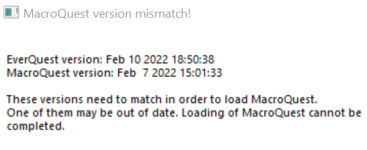
When i try to login to a character I get:
1645313093927.png

Do I do something wrong, or do I need to wait on a new version?
The confusion part it that it says I use latest version 2022-02-18, but on the error it says I use a version from Feb 7??
 
It works just fine.
Did a new installation on laptop and had the wrong path to the test installation.
Changed in the ini and then it worked.
 
just incase no one was really aware, Test has now just patched, So those trying Mq2 for test it wont work currentlly
 
Let me preface this with saying: I don't actually know. I'm just looking at the crash dump and that's what I see, so take anything I say with a grain of salt. Also, I don't have a system with nahimic on it to test so I can't validate that anything I'm saying is correct.

That said, I found this uninstall guide on reddit:


well crap! Im using MSI also grrrr
 
I also have MSI's, just disable Nahimic and use the RealTek(R)... I've never had to uninstall, or had any issue, YMMV.

--Taz
 
MacroQuest - Test not working for me some toons will assist, other's will not. If I change a toggle on the interface it resets mode to manual. My tank won't tank or pull just stands there. Switched to RGMerc and it was telling me that there was no nav mesh for the zone (ME in ToL) even though I updated them. Is this just my problem or is anyone else having issues?

Live server I have no problems with the CWTN plugins
 
Last edited:
Redbot updated Very Vanilla MQ (Test Server) with a new update entry:

unload/reload fixes

February 25, 2022:
- Fixed some potential issues with detours. Possibly fixes issue with unloading/reloading
causing problems with commands
- Moved GetSubscriptionLevel to core. If you have a copy of this function in your plugin,
you can remove it now.
- Added GetClass(), GetClassString(), GetRace(), GetRaceString(), GetClassThreeLetterCode()
to PlayerClient (SPAWNINFO) as convenience helpers for plugin code.
- Reverted an earlier change to MQ2Map during 64-bit conversion to...

Read the rest of this update entry...
 
Thanks @Redbot! I just got back from dinner but i can confirm that I was having map issues earlier that seem to be resolved now.

I am still having a mySEQ issue, the maps only show the character that is selected. No others and no NPC's, not sure if there is a known issue. Could be the offsets? I have updated via the launcher.

--Taz
 
My CWTN plugins still not working correctly on test server even after the patch :shrug: I cancelled my sub until its fixed.
 
My CWTN plugins still not working correctly on test server even after the patch :shrug: I cancelled my sub until its fixed.
howdy voodoomagic,

I'm sorry you've having issues.

I can confirm the plugins are all working - so --- are you missing meshes? did you not migrate your meshes over? because the plugin will tell you that you need meshes with mq2nav to be in non-manual modes. actually tells you in output.

I'm betting this is your problem - but with 0 infirmation about specifically what your issue is it is a wild stab in the dark.

it would be impossible to fix an issue that is unknown

based on your previous post about working on live but having mesh issues on test. sounds like you still don't have meshes installed in your test directory.

please let us know what your issue is, specifically, and we can direct you on how to fix them.

What i would personally do is open my life install - release -> resources and then copy that mq2nav folder - then navitate to my test install release -> resources and paste this entire folder there

or you can manually download them from > MQMesh < and then place them in your release -> resources -> MQ2Nav folder

it actually appears that the link to run the mesh updater from the launcher, doesn't update it for your test folder - so i'm betting this is your issue.

let me know if you get sorted.
 
anmyway to use the auto path to find objectives again? anytime i click one to auto path it says not able to make a path, do have all meshes updated etc :)
 
Vanilla - Very Vanilla MQ (Test Server)

Users who are viewing this thread

Back
Top
Cart