• You've discovered RedGuides, an EverQuest multi-boxing and scripting community 🧙‍♀️⚙️. We want you to play several EQ characters at once, come join us and say hello! 👋

  • A TLP without truebox has thawed (Very Vanilla ready)
    Frostreaver
Very Vanilla MQ (Test Server)

Vanilla - Very Vanilla MQ (Test Server) (6 Viewers) 3.1.52472.1

No permission to download
because MacroQuest is a free and open source software. You're paying for macros and plugins and community support.

Priority is always on the live build, because thats where the majority of people are playing. Test patches twice a month. Unless its a low effort requirement, keeping test up to date is a disproportionately higher amount of work for a lower value. That said, we do want to try and get a test build out, but its not going to be as fast as a live build.

Please understand, that only in recent years have people come to expect updates to MQ on the same day as EQ patches. Historically it used to take somewhere between 24-48 hours.
Hey man, apologies if I gave the impression that this was a question of how quickly it will be updated in the future, that was never a concern on my end. I simply wanted to know whether it will be supported in a commensurate manner as vanilla, but Ill just drop it and watch what happens after the next few patches.

Cheers!
 
I simply wanted to know whether it will be supported in a commensurate manner as vanilla,

I think most people are just looking for that commitment that the Test Environment will remain a regular official build and not just a poor cousin that gets the "hand me downs"

Maybe we need to look at the model for Test....Why should it be free? Why can we Grind or use CWTN plugins for free on test?

I like that we can "Trial" stuff for a period on Test - but there is a part of the community that plays daily on Test and if they want regular Test build's then maybe the Test build should be a paid build.
 
Sic is right Test will be a close copy of Live. At the moment, the only difference is eqlib. He has a good writeup on what makes MQ and RG different here.

Is this ultimately a question about the speed of patches for Test vs Live?
 
It’s a general question because we haven’t maintained Test builds the way we maintain Live builds. But we were also a bit behind on maintaining a tool chain to make that easy, remember we just started this recently.

brainiac is being generous, I remember MQ builds being down for a week or more.

But overall I think the question is fair, “is MQ for Test going to be maintained?”

And the answer brainiac gave was generally yes, but not with the frequency of Live.
 
It’s a general question because we haven’t maintained Test builds the way we maintain Live builds. But we were also a bit behind on maintaining a tool chain to make that easy, remember we just started this recently.

brainiac is being generous, I remember MQ builds being down for a week or more.

But overall I think the question is fair, “is MQ for Test going to be maintained?”

And the answer brainiac gave was generally yes, but not with the frequency of Live.
Well that's good enough for me to know thanks for the info. I have 12 subs I pay for on Live but I like to get down on Test too. And get away from the rat race of Live.... Thanks all
 
I think most people are just looking for that commitment that the Test Environment will remain a regular official build and not just a poor cousin that gets the "hand me downs"

Maybe we need to look at the model for Test....Why should it be free? Why can we Grind or use CWTN plugins for free on test?

I like that we can "Trial" stuff for a period on Test - but there is a part of the community that plays daily on Test and if they want regular Test build's then maybe the Test build should be a paid build.
I know I can't speak for everyone, but Test is my home now, and I'd be more than happy to pay for plugins and whatnot that I would normally pay for on live, to use on Test, if the downtime between EQ and RG patches were more consistent. This is especially true since it seems most of the plugins I use are not going to be supported except through MQNext (this is what the rumor mill says, anyhow. I haven't seen anything official making that announcement. Of course, I don't pay very close attention until I try to log in and can't. =P )
 
I know I can't speak for everyone, but Test is my home now, and I'd be more than happy to pay for plugins and whatnot that I would normally pay for on live, to use on Test, if the downtime between EQ and RG patches were more consistent. This is especially true since it seems most of the plugins I use are not going to be supported except through MQNext (this is what the rumor mill says, anyhow. I haven't seen anything official making that announcement. Of course, I don't pay very close attention until I try to log in and can't. =P )
If by rumor mill and plugins you mean cwtn plugins, yhere is very clear and specific stickied thread in the cwtn section about the expansion and new spells being built only for next. > HERE <

Definitely check in there instead of any weird super secret rumor mill nonsense.

There is no secret, or #gotcha.

Maintaining two forked builds has been more than double the work for cwtn and i, and the single version that RG will be moving to is macroquest "Next" or just "Macroquest".


if instead, you mean mq2mule for muleassist - eqmule has not many any effort to move anything over to "Next" as he plans to continue MQ2 development. @aquietone made MAUI a "Mule ASsist User Interface" replacement that works in "next"
 
Once Next is updated for Test, how does one go about updating files since it is not updated and launched from the RG launcher?

Would I just re-download the files to the same location and overwrite existing files in my NextTest folder? ALSO just assuming (we know what that does) this doesn't overwrite settings and what not cause those should be INI files that are separate from the actual operating framework correct?

Direraven I don't know this for a fact as I do not have any inside scoop or anything but it doesn't seem to be a monetary issue for the RG staff updating/mainting the Test version of Next more so that Next is still fairly new in production that working and operating on Live gives all the producers more than enough work to keep them busy between patches. Once all the kinks are hammered out and it goes to the only supported MQ version offered by RG (hopefully sooner rather than later) I figure the producers will keep the Test version up and running in same format as previously offered.

Test server gives everyone the ability to take their time and work through new patches and get stuff lined up for live so live is not down for 2-3 days after patches, like the test server is after patches. Think of test server like the Beta server for live lol, test doesn't have the population to properly test and catch all bugs but a lot of the major ones are caught and corrected before they are rolled to live.

Thats just my 2 cents and hopes for the future of Next and Test server lol.
 
Once Next is updated for Test, how does one go about updating files since it is not updated and launched from the RG launcher?

Would I just re-download the files to the same location and overwrite existing files in my NextTest folder? ALSO just assuming (we know what that does) this doesn't overwrite settings and what not cause those should be INI files that are separate from the actual operating framework correct?
Yep, this would be the right method. It will eventually be in the RG Updater and function as normal, but for now just unzip over the top. There should be nothing in it that overwrites any of your config.
 
Thank you, @brainiac . Question: It seems that I can't get EQBC server to load. Whenever I choose "Start EQBC Server" nothing happens. No error, but nothing loads. /plugin mq2eqbc in game just returns "plugin mq2eqbc is already loaded" but nothing will connect. Can anyone point me to a correction? I'm not finding anything to point me to a fix.

also: once I right click MQ and select "start EQBC server" the ability to right click hangs up, and the menu won't appear any longer. I have to go into system tray and force close the program. Once I restart the program I can select other menu items (load profile, etc), but once I select 'Start EQBC server" it hangs up again, but the server doesn't start.
 
The file eqbcs.exe should be in your folder, do you see it? What happens when you run that directly? Also, have you restarted your computer? There are multiple versions of eqbcs that ship with MQ2 and one of them may be running. There is only one that ships with MQ.
 
So, 75% of the time, when I ask a question, I get an answer that makes me go, "Duh, dummy." Running the eqbcs.exe file directly from the file worked, and I'm able to connect now. I did, at least, restart my computer to see if that fixed any problems. Thanks Knightly, you're the best.
 
Thank you, @brainiac . Question: It seems that I can't get EQBC server to load. Whenever I choose "Start EQBC Server" nothing happens. No error, but nothing loads. /plugin mq2eqbc in game just returns "plugin mq2eqbc is already loaded" but nothing will connect. Can anyone point me to a correction? I'm not finding anything to point me to a fix.

also: once I right click MQ and select "start EQBC server" the ability to right click hangs up, and the menu won't appear any longer. I have to go into system tray and force close the program. Once I restart the program I can select other menu items (load profile, etc), but once I select 'Start EQBC server" it hangs up again, but the server doesn't start.
Why not just use Dannet ?
 
Not 100% sure what I am doing wrong that I did not do first time around lol but getting versions not matching. Am I missing an extra update step?
1639697102161.png

EDIT: Was downloading from the gitlab link and not the Download Link.... Question above answered /facepalm
 
Last edited:
Hey fellas, trying to get MQ2EQWire.dll to load on this new version of test. I tried copy/paste from old test, and even direct download from the zip. Here is the error that I am receiving:

The procedure entry point
?GetClassMember@EQUIStructs@@YA_JPAXH@Z could not be located in the dynamic link library
I:\MQ2NextTEST\Plugins\mq2eqwire.DLL.

Any help would be appreciated.
 
Hey fellas, trying to get MQ2EQWire.dll to load on this new version of test. I tried copy/paste from old test, and even direct download from the zip. Here is the error that I am receiving:

The procedure entry point
?GetClassMember@EQUIStructs@@YA_JPAXH@Z could not be located in the dynamic link library
I:\MQ2NextTEST\Plugins\mq2eqwire.DLL.

Any help would be appreciated.
you can't copy mq2 files into macroquest "next". they are not compatable

you're putting some low-grade gasoline into a sophisticated high-performance jet engine, and it is saying "yoooo dude, don't do that".

so don't copy files around. let the RG launcher handle your files. :)

there is no mq2eqwire in next, it is not needed.

set up frame limiter > i talk about it here < and > here < some of the functions and features that framelimiter have are just NEXT level and gives significant performance incrase
 
When EQ is running I can not use the " ' " (apostrophe) button, it changes the screen that has the focus and rotates through as you push. Looked in the Key settings on the settings tab in game and didn't see one that has the apostrophe as the primary or secondary key selected. Totally could of missed it.
 
When EQ is running I can not use the " ' " (apostrophe) button, it changes the screen that has the focus and rotates through as you push. Looked in the Key settings on the settings tab in game and didn't see one that has the apostrophe as the primary or secondary key selected. Totally could of missed it.
check your macroquest.ini you probably have that ` set to "CycleNExtWindow"

change that to CycleNextWindow= with nothing after equal sign.
 
I think Ive found a bug. Sometimes while clicking on character windows or just clicking on hotkeys etc in the driver toons window it will click on others characters windows. I wont really know until I go to another character and I will see where a mouse click has clicked on a link in chat...or a spell effect description will be up...or in really shitty circumstances a character will be disbanded. its like how ISboxer had that pass thru click window that would click to other characters hotkeys etc back when I used Isboxer. I cant get it to reproduce constantly, but it definitely does it when I switch between windows using the mouse click. It will also do it while Im swapping between computers using Input Director. Anyone else experienced this?
 
I think Ive found a bug. Sometimes while clicking on character windows or just clicking on hotkeys etc in the driver toons window it will click on others characters windows. I wont really know until I go to another character and I will see where a mouse click has clicked on a link in chat...or a spell effect description will be up...or in really shitty circumstances a character will be disbanded. its like how ISboxer had that pass thru click window that would click to other characters hotkeys etc back when I used Isboxer. I cant get it to reproduce constantly, but it definitely does it when I switch between windows using the mouse click. It will also do it while Im swapping between computers using Input Director. Anyone else experienced this?
Does it ever happen if you don't have Input Director loaded at all (exited)?

Do you use MQ2GroupInfo and MimicMe?
 
Does it ever happen if you don't have Input Director loaded at all (exited)?

Do you use MQ2GroupInfo and MimicMe?
I dont use Groupinfo or Mimicme, but I do have mimicme on a hotkey I got from sics videos... as far ID exited Ill try it for a bit, see if maybe that is the culprit
 
I dont use Groupinfo or Mimicme, but I do have mimicme on a hotkey I got from sics videos... as far ID exited Ill try it for a bit, see if maybe that is the culprit
?

I don't have a mimicme hotkey. when i mimicme i use the one from groupinfo
 
?

I don't have a mimicme hotkey. when i mimicme i use the one from groupinfo
oh ok thats what I use then. I didnt know thats what it was called LOL. The ones that are under the group window....come to me...follow me...mimic me... I got those confused with the others you showed in your video. Sorry for the confusion!

yep, its doing it without Input Director. Just had my Pally hit his /rgstart hotkey in his window, while the rogue clicked on a Velious Honeyberry link that was in the main chat window.

I noticed it during a named fight. Pally wasnt assisting. Not sure if its was just coincidence or what.

AHA I caught it this time. if you click over to your other windows there is almost like a slight click lag. when the window switches for that split second, it will click whatever the mouse pointer is hovering over.

I wonder if It could have something to do with the background frame limiter.
 
Ok it is definitely something with the background frame limiter. Played around with it a bit, altered some settings no change. Reset it back to default on all characters and no more issue.

Its just strange that it is doing it only on the second computer and not both, all the settings were the same across all the teams on both computers.
 
Happy New Year!

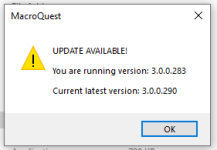
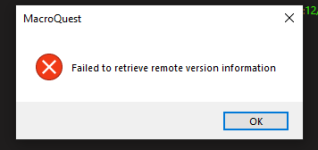
I'm getting the following popup when I open MQNext on the Test server. Everything seems to work ok though.

1641039920401.png
 
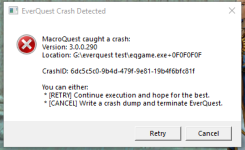
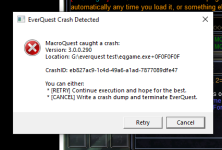
Had a hard freeze of computer had to power off, and once I rebooted and logged back in anytime I try to adjust a window or move a window to another screen it causes a crash. Have had this happen before but goes away after a reset but I have tried resetting computer multiple times and it is still causing a crash on all instances.

1641582821731.png
 
Had a hard freeze of computer had to power off, and once I rebooted and logged back in anytime I try to adjust a window or move a window to another screen it causes a crash. Have had this happen before but goes away after a reset but I have tried resetting computer multiple times and it is still causing a crash on all instances.
You have something called A-Volute (Realtek) which houses the Nahimic On Screen Display. We have seen conflicts with this before resulting in similar issues. Try turning that off and see if you still have issues.
 
You have something called A-Volute (Realtek) which houses the Nahimic On Screen Display. We have seen conflicts with this before resulting in similar issues. Try turning that off and see if you still have issues.
How do I go about finding one of those on my computer to turn it off?
 
Let me preface this with saying: I don't actually know. I'm just looking at the crash dump and that's what I see, so take anything I say with a grain of salt. Also, I don't have a system with nahimic on it to test so I can't validate that anything I'm saying is correct.

That said, I found this uninstall guide on reddit:
 
Tried those steps and did everything that I could find on my computer as it discussed, still crashes as soon as I try to adjust a window.
 
1641601885799.png

Does not crash in VV only with Next. Not sure if that means anything to you or helps out with anything.
 
Last edited:
Well, you definitely got rid of Nahimic, but I do see NVidia in here...do you have NVidia's on screen display turned on? I suspect it's something in that vein.
 
things to check:
- updated drivers
- compatibility layers
- directx 9.0c install

this is a problem that has been solved but outside of the area of mqnext. basically, some kind of outside influence does not like the mqnext overlay, because it works for like 99% of people.
 
It was working fine until I had a hard freeze and then upon reboot it does not want to function properly, trying to go through all my drivers now making sure they are updated. I have no idea what compatibility layers is soo not sure on that one lol. Where would I need to re-install directx 9 at? Don't think I have any nvidia's on screen display turned on
 
Application compatibility layers are the two registry keys here:
HKLM\Software\Microsoft\Windows NT\CurrentVersion\AppCompatFlags\Layers
HKCU\Software\Microsoft\Windows NT\CurrentVersion\AppCompatFlags\Layers

We check for MQ items in there (I think there's an option in the Tray util to check it) but drivers could be there as well. The directx 9.0c install brainiac is talking about is here: https://www.microsoft.com/en-us/download/details.aspx?id=8109
 
Opened up those registries they do have the MQ files in them.

Where would I need to install the directX to? like into my EQ file? Don't think that is the problem but would rather try everything cause I have no idea what is the problem, tried it again yesterday and it still crashes when trying to move screens or resize, it did just close down when I went to click the square to make it big screen didn't give an error or crash report just closed the window down completely.
 
Vanilla - Very Vanilla MQ (Test Server)

Users who are viewing this thread

Back
Top
Cart