This is a thread to discuss Very Vanilla MQ for emulators. We exclusively support the RoF2 Client.
Last edited:



Sorry for posting in the EMU forum too... i had search but it didn't catch the image. I tried this method and only allows MQ to boot not MQ2 (get the same error from launcher) so many of the plugins for the setup are not loadable. Anyway to start up MQ2? Thanks

 www.redguides.com
yes, the launcher is currently not correctly launching MQ, which is what i mentioned above.Thanks Sic. I've always just used the "Launch MQ" button on launcher for EMU and it launches the black MQ2 icon so the MQ that loads w/ the purple icon doesn't have my settings nor does it seem to be able to launch the CWTN plugins. Appreciate the historic link and patience... I should have known it'd be there. I'll roll back for now.
yeah, some of the new stuff like Lua is just nuts amazingAll clear now and working. Thanks again for pointing me (multiple times) in the right direction. Looking forward to the future of MQ too.
hmmm think I borked something, used launcher to update, which puts Next on, that works great (yes running it from the directory) but none of the cwtn plugins are there. /stumped
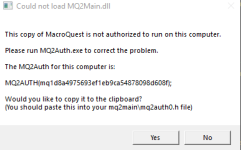
are you running emu?I am getting this to pop up after the last update.
I can not access the .dll and I can not seem to locate this MQ2Auth.exe to run it or the mq2main\mq2auth0.h file to paste it into.
The computer I am running MQ2 on has not changed and I only run it on this one computer.
any and all help would be appreciated.
Could not load MQ2Main.dll
Please run MQ2Auth.exe to correct the problem.
The MQ2Auth for this computer is:
MQ2AUTH(**********************************); (obviously the * are numbers and letters)
Would you like to copy it to the clipboard?
(You should paste this into your mq2main\mq2auth0.h file)
merged to the emu release thread, please see the above issue/resolution.I am.
redbot said:Workaround: in the RedGuides Launcher, click "Open MQ folder" and then click "MacroQuest.exe"
You can now log into emu as you would normally.
After updating MQ through the redguides launcher im getting this error. Is there an easy fix for this?
redbot said:Workaround: in the RedGuides Launcher, click "Open MQ folder" and then click "MacroQuest.exe"
You can now log into emu as you would normally.
 - over protective av's i guess - disabling that will allow me to load and get to character select
Tommy - check out sic's and microscopes resolution to this in the mq2autologin thread:I have also this problem it works but when i come to the character selection I am kicked.- anyone has an idea.
www.redguides.com
[Servers]
Project Lazarus=Project LazarusGood news! MQ is now on the launcher for our EMU build!
the good things this brings are too numerous to put in an update message!
There are a couple of small, yet important changes with MacroQuest vs the old MQ2 as explained > HERE <
Moving to...

Oddly I suffered the same. Instances kept crashing when between char select and game opening (after a few seconds)... disabled plugin manager and boom, right into the game.Update
After playing around with plugins. it seems the mq2pluginmanager is the culprit
Disabling all plugins except mq2pluginmanager crashes the client
Enabling all plugins except mq2pluginmanager and loads fine
is there some softwatre/update needed to run behind the scene?
Thank you for this. Appears plugin manager might be w culpritOddly I suffered the same. Instances kept crashing when between char select and game opening (after a few seconds)... disabled plugin manager and boom, right into the game.
October 9, 2022 (emu):
- Fixed issue causing custom UIs to create instability and other problems (#639).
October 6, 2022:
- Remove Spell.SPA - this wasn't actually a SPA and was some other meaningless value.
- Add Spell.CategoryID and Spell.SubcategoryID - the integer values of Category and Subcategory
Load the plugin /plugin navDoes everyone's MQ2Nav work on this? I can't get it to work. /nav says "This is not a valid command. Please use /help" MQ2Nav is definitely loaded though
October 10, 2022:
- emu: Improved ability to capture crash reports.
- emu: Fixed CharSelect data (#627).
Question: I am trying to run the MQ2WARRIORS and other MQ2 CWTN addons, but it just says could not be loaded: Unknown Error
I updated Launcher, and the EMU servers... but no love. Other things work ok.. just not that?
Good news! MQ is now on the launcher for our EMU build!
the good things this brings are too numerous to put in an update message!
There are a couple of small, yet important changes with MacroQuest vs the old MQ2 as explained > HERE <
Moving to MacroQuest mental notes:
1. mq2map click is Control+Shift+Click
2. new easyfind self travel is Control+Click (reminder in find window title bar)
3. new easyfind group travel is Control+Shift+Click
4. If you selected a destination in your zone guide and want to activate it you /travelto activate
5. /yes and /no are now aliases
6. your ini configuration files (like for kissassist) now reside in your "Config" folder and not your "Macro" folder
7. if you want the functionality of the MQ2 "MQ2TargetInfo" - They are now in 3 separate plugins: /plugin groupinfo /plugin targetinfo /plugin xtarinfo
Unfortunately, we dropped the ball on a couple of things.
- the launcher doesn't have a method to migrate from old emu to new emu
- the launcher doesn't install MQ for emu into a different directory than your existing MQ2 emu directory
- We also didn't announce
We're (RG) really sorry for any confusion or pain points on this.
In case you *really* want to use MQ2 instead of the new awesome MQ - you can check the > history < tab and manually download a legacy build. Keep in mind using the launcher will update to MQ.
- CWTN plugins are not currently on EMU >>> CWTN Plugins & MQ Emu <<<
Does your emu have zone finder? If not, then noGot my /nav issue fixed. I noticed /travelto doesn't work due to MQ2EasyFind not being in the emulator version. Is it not compatible with Emu servers? Or is that on the to-do list?
October 15, 2022:
- emu: Fix max pet buff count being incorrect
October 14, 2022:
- Add MaxFPS and MaxBGFPS to EverQuest TLO. Reports the settings found on the options window.
- Improved Macro TLO functionality to be able to retrieve some values while a macro isn't running.
- Fixed achievement categories not being found properly.