



This post is deprecated. Please use this thread:

 www.redguides.com
------------------
The RedGuides community uses GitLab as our host, but this guide will work for any git repository.
Requirements:
1) Team -> Manage Connections
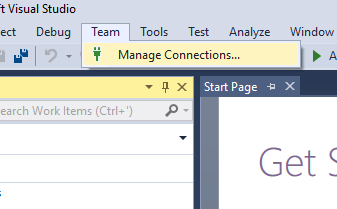
2) Under "Local Git Repositories" Click "Clone". If you're accessing the VeryVanilla repo, enter this url:
Specify a local folder to place the files, and click "Clone". If it's your first time cloning, you'll be asked for your GitLab login & password.
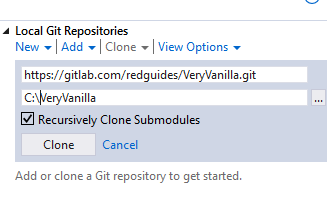
3) Make any changes you'd like to the code you've just cloned locally. You can do this through Visual Studio, notepad, or any other way, so long as you use the folder you specified in step 2. I edited the file "Readme.md", saved it, and closed it.

4) Now that you've made changes to the code, let's confirm Visual Studio noticed. Go back to "Team Explorer"

5) Double-click the repository, in my case, it's "VeryVanilla"
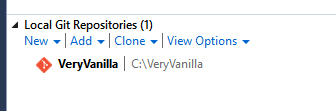
6) Click "Changes"
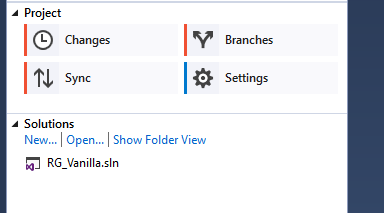
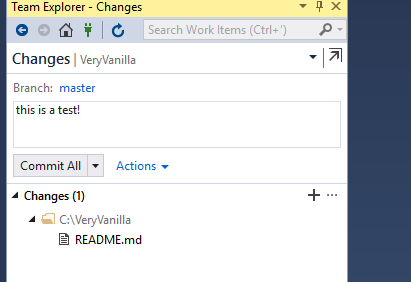
7) As you can see, it noticed I changed README.md. I entered a commit message, "this is a test!" which is a poorly thought out and non-standard commit message. My apologies, I hope you do better. Click "Commit All".
8) Now hit "Sync" and your change will be shared with the mods, who may merge it for all to see.

9) Success!

Guide - - Git: Open Vanilla "Forking X" Workflow
Get the Repo Create an account on GitLab.com and sign in. Navigate to https://github.com/RedGuides/openvanilla Click Fork If it prompts you for a namespace, choose your account It will fork and you’ll be looking at something that’s pretty much identical to what you were just looking at...
www.redguides.com
------------------
The RedGuides community uses GitLab as our host, but this guide will work for any git repository.
Requirements:
- Visual Studio (Community edition is free)
- A git repository (the VeryVanilla repo)
1) Team -> Manage Connections
2) Under "Local Git Repositories" Click "Clone". If you're accessing the VeryVanilla repo, enter this url:
Rich (BB code):
https://gitlab.com/redguides/VeryVanilla.git3) Make any changes you'd like to the code you've just cloned locally. You can do this through Visual Studio, notepad, or any other way, so long as you use the folder you specified in step 2. I edited the file "Readme.md", saved it, and closed it.
4) Now that you've made changes to the code, let's confirm Visual Studio noticed. Go back to "Team Explorer"
5) Double-click the repository, in my case, it's "VeryVanilla"
6) Click "Changes"
7) As you can see, it noticed I changed README.md. I entered a commit message, "this is a test!" which is a poorly thought out and non-standard commit message. My apologies, I hope you do better. Click "Commit All".
8) Now hit "Sync" and your change will be shared with the mods, who may merge it for all to see.
9) Success!
Last edited:
