

Hello everyone.
I am trying to write something that will 'reset' the extended target window entries - because on the EMU server I am on, sometimes targets get 'stuck' as corpses in there, which means I can never really clear it.
Manually I can right click on the button, select anything from the context menu, then do it again to set it back to 'Auto' which is what I usually want.
I can easily click on the window in the right spot with:
However, that pops up the right click context menu. I cannot find a UI element that corresponds with it so I can't notify it to select what I want.
Has anyone else had this problem and come up with a solution? Someone else had this similar question but seems unresolved at this time:

 www.redguides.com
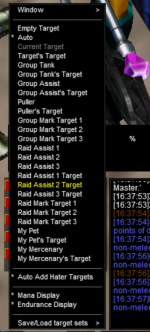
I am trying to write something that will 'reset' the extended target window entries - because on the EMU server I am on, sometimes targets get 'stuck' as corpses in there, which means I can never really clear it.
Manually I can right click on the button, select anything from the context menu, then do it again to set it back to 'Auto' which is what I usually want.
I can easily click on the window in the right spot with:
Code:
/notify ExtendedTargetWnd ETW_Role0 rightmouseupHowever, that pops up the right click context menu. I cannot find a UI element that corresponds with it so I can't notify it to select what I want.
Has anyone else had this problem and come up with a solution? Someone else had this similar question but seems unresolved at this time:
Question - - Context Menu
Spent quite a while trying to figure this out without any joy. Is there some way to access Everquests Context Menus via MQ? They only reply as NULL when you /echo ${EverQuest.LastMouseOver.Name} over them. and semi-related (im a curious person), the people that develop MQ, they have to program...
www.redguides.com