- Joined
- Mar 9, 2018
- RedCents
- 370¢
Ooo that sounds even better!!Hi.
Yes, this consolidates items across the toons you play on separate accounts that are logged in simultaneously.
It doesn't consolidate between toons on the same account.

Follow along with the video below to see how to install our site as a web app on your home screen.
Note: This feature may not be available in some browsers.



Ooo that sounds even better!!Hi.
Yes, this consolidates items across the toons you play on separate accounts that are logged in simultaneously.
It doesn't consolidate between toons on the same account.
Features
...Feat: Mainly UI improvements
- Removed option to give to self in give list
- Give list now shows all dannet peers in zone instead of added toons
- Added icon for skip buttons
- Add window now closes when you add all in zone
- Set "add from file" window size on appearing
- Improved color consistency of buttons
- Added item mode to confirmation boxes
- Added changelog.txt
Yep. Checks are built in. If you don't have the depot it won't try to deposit.will it now work with a FTP account that does not have access to TS Depot?

Thanks.Sorry to bother, but im having issues with the script. it fails to start with the following (after the 5th time trying, PID goes up by 1 each time i try):
Cannot delay while importing a module.
Stack traceback:
[C] in function 'require'
...\init.lua 5: in main chunk
Ending lua script 'tsc' with PID 5 and status 2.
Knightly added workarounds for that a few weeks ago already. If you're still facing some issue with it then you may not be using packageman correctly.
Oops. I meant to send the above as a private message. Deleting it.Knightly added workarounds for that a few weeks ago already. If you're still facing some issue with it then you may not be using packageman correctly.
Commits
(cb46312) ~rawmotion1Revert "Removed lfs.dll to use packageman instead"
This reverts commit commit # [8412285](https://github.com/rawmotion1/TSC/commit/84122850fbae31353bb1ea10eed52dc78ffc61c6).
I've reverted yesterday's update until I can figure out what's going on.Sorry to bother, but im having issues with the script. it fails to start with the following (after the 5th time trying, PID goes up by 1 each time i try):
Cannot delay while importing a module.
Stack traceback:
[C] in function 'require'
...\init.lua 5: in main chunk
Ending lua script 'tsc' with PID 5 and status 2.
(f6d1b26) ~rawmotion1Toons list is now alphabetized
This should help people with lots of toons
Sorry to hear. Send me a DM and I'll see if I can solve it for you.I have an issue where the bags get filled up on all the toons, and it locks up. Doesn't do any trading or consolidating.
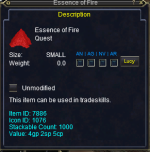
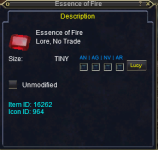
View attachment 50011View attachment 50012
I got hung up on this, I had to shove the latter into my "Dragon's Hoard" to get past it!
 why everquest!?
View attachment 50011View attachment 50012
I got hung up on this, I had to shove the latter into my "Dragon's Hoard" to get past it!

Unfortunately, there is no way to know which trade skill an item is for (other than looking online).I understood there has been chats about dump alchemy-stuff to char1 and tinkering-stuff to char2....
any more information about this possible feature available?
Back on the previous discussion page, I thought Rare Spawn and JB were saying that we already have those data bases built through TCN?Unfortunately, there is no way to know which trade skill an item is for (other than looking online).
Yes, JB's databases do contain lots of that info, but those are his IP.Back on the previous discussion page, I thought Rare Spawn and JBL were saying that we already have those data bases built through TCN?
Could be just force of habit, but personally, I'll keep them mostly seperated, I sub 6 accounts and have my Depots sorted by TS disciplines, with each account holding 2 disciplines. Each account has 690 slots and most are half full already. (yes, I am a TS hoarder from the very beginning!) Previously, I had my disciplines all sorted onto seperate neighborhood plots, and used the "shopping" function of the TSC mac to run grab what I needed from each plot. The main advantage of that system was I could throw a merc into my group and keep exp/farming, while one toon ran off and tradeskilled. Now I have to pull off that for a bit to gather materials.Yes, JB's databases do contain lots of that info, but those are his IP.
Organizing TS items by trade skill discipline might be something for the roadmap... However, I'm not sure having mules dedicated to specific TS disciplines is even necessary anymore.
With TCN's ability to query your toons for what you need, and with TSC keeping the spread to a minimum, organizing TS items by discipline on separate mules seems redundant.
ID's are your friend :p
I'll see how to work around this scenario and release an update asap. I can imagine there are more items like this.
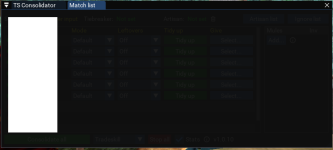
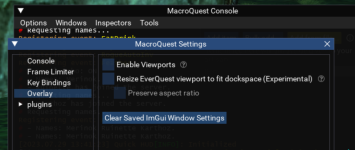
This worked! Thank you!Okay this is a shitty solution, but all I can offer at the moment until I figure out what's causing this.
Open your console (Ctrl + ~). Then go to Windows > Settings. Go to the overlay tab and click Clear Saved ImGui Window Settings.
This will reset ALL ImGui windows, unfortunately, so you'll have to place everything back where you want it. Sorry
View attachment 50087

[TsC] Looking for items to give away...
[TsC] Toon1  has 21  slots left
[TsC] Giving Distilled Grade AA Mamba Venom to Toon1
...a\Local\VeryVanilla\MacroQuest\Release\lua\TSC\utils.lua:344: attempt to compare number with nil
stack traceback:
    ...a\Local\VeryVanilla\MacroQuest\Release\lua\TSC\utils.lua: in function 'tradeNewest'
    ...a\Local\VeryVanilla\MacroQuest\Release\lua\TSC\trade.lua:59: in main chunk
Ending lua script 'TSC/trade' with PID 28 and status -1