
- Seller
- #1,761
I would prefer to do a reboot, and then load a single EQ instance and then go from there..Oh no sorry. just my 6 eq instances.


I would prefer to do a reboot, and then load a single EQ instance and then go from there..Oh no sorry. just my 6 eq instances.
and no other guis running...I would prefer to do a reboot, and then load a single EQ instance and then go from there..
and no other guis running...
Normally I use sparxx but I have tried with default as well and seen no difference. I have restarted my pc and loaded one instance of eq. Would you like me to run setup again or try to run the Lua?lastly are you using the default UI or custom?
DPG DB whatever they call themselves, can't get items from the TSD without being at the bank, hello!..
apparently i forgot to register that specific one on accident. pushing out a fix.
Just try and run it..Normally I use sparxx but I have tried with default as well and seen no difference. I have restarted my pc and loaded one instance of eq. Would you like me to run setup again or try to run the lua?
pretty sure you're not supposed to be able to force open the window anywhere you want, either...
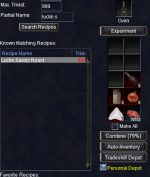
apparently i forgot to register that specific one on accident. pushing out a fix.
It means you can use it to tradeskill anywhere. You can open it from a tradeskill window. Can only deposit or directly withdraw at the bank.There was wording to the affect you could use it anywhere, but, I surmise means, you can look at it anywhere. However, if in finditem the depot is checked it will consume items directly from there wherever you are.. wrapping my head around that.
No window. It did, however, also try to run a hotkey I have on alt q after not sure why ?Just try and run it..

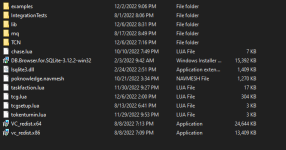
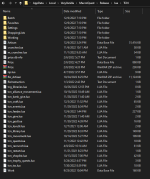
the plot thickensNo window. It did, however, also try to run a hotkey I have on alt q after not sure why ?
View attachment 43928
I find it curious that I am unable to load it on 2 separate pcs on two different networks. A friend mentioned I might need some lib files for this to work. I didn't even have a lib folder. Is it possible my install is incorrect? Attaching images of my lua and tcn folders.
View attachment 43930
View attachment 43931
I was hoping they would have evolved from Dragon Hoard and allowed withdrawals from anywhere in the world...It means you can use it to tradeskill anywhere. You can open it from a tradeskill window. Can only deposit or directly withdraw at the bank.
Opening quest window also opened the gui! So having alt q as keybind for task window is a requirement for this! Huzzah thank you!the plot thickens
if mq.TLO.Window('TaskWnd').Child('TASK_TaskList').Items() == 0 then
mq.cmd('/keypress ALT+Q')
mq.delay(500)
while not mq.TLO.Window('TaskWnd').Open() do mq.delay(100) end
mq.cmd('/keypress ALT+Q')
end
If the quest window does not open up it ain't goin no futher..
it is waiting for the quest window to open using alt-q
I sent the edited file, please try it..No window. It did, however, also try to run a hotkey I have on alt q after not sure why ?
View attachment 43928
I find it curious that I am unable to load it on 2 separate pcs on two different networks. A friend mentioned I might need some lib files for this to work. I didn't even have a lib folder. Is it possible my install is incorrect? Attaching images of my lua and tcn folders.
View attachment 43930
View attachment 43931
Your new library works even without alt q keybound. Thanks so much for taking the time to troubleshoot with me I can't wait to use it.I sent the edited file, please try it..
So you can keep your binds..
This was assuming alt-q opens the quest window for everyone out there...
This exercise just ensured more compatibility, happy to help....Your new library works even without alt q keybound. Thanks so much for taking the time to troubleshoot with me I can't wait to use it.
the build is out already. might i suggest joining discord for realtime conversations on development, i only check forums a few times a day.While all this was going on I was also doing this
Tradeskill Depot TCSNeXt Status:
We can determine if we have the expansion - Waiting
We can open the window if it is not open - Good
We can wait for the list to populate - Good
We can get counts - Good
We can grab items based on name and count from TSD - Good
TODO:
Local Depot:
Get calculated counts and if they are good determine if we are using UI or not, if using UI we don't need to grab nothing we can just consume directly from the depot, if not we need to get proper counts to grab.
Remote Depot...
I am a closet luddite, but resistance is futile, I suppose..the build is out already. might i suggest joining discord for realtime conversations on development, i only check forums a few times a day.
12/06/2022
3.27b - ChangeLog
Changed Behavior: Will no longer use alt-q to open and close quest log, so you can bind the key combo.
New Behavior: Will always check the TSD box in the UI, I don't know of a reason why you wouldn't want to...
All recipe updates post TOL are a separate downloadSo when are the new expansion updates going to be integrated?

 www.redguides.com
Is this under standard or artisan?Been using the sell feature, Question is does the threshold work? No matter what i set it to it sells after each successful combine.

Standard crafting, just starting TS.Is this under standard or artisan?
How many did you set the quantity to, and how many are in inventory?Standard crafting, just starting TS.
Was making rings. last 2 inventory slots are non tradeskill bags. gives me 40 slots. I may just not be doing something right.How many did you set the quantity to, and how many are in inventory?
It adheres to the craft goal while selling/destroying. Also if you have under 4 available non ts-slots it will sell.
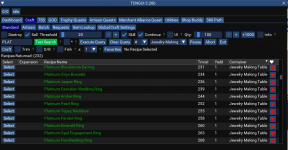
When you select the recipe there should be an inventory count in the GUI, can you tell me what it is?Was making rings. last 2 inventory slots are non tradeskill bags. gives me 40 slots. I may just not be doing something right.
View attachment 43966
Ok doing pottery now. Set to sell at 40. I set quantity to 100 to reduce vendor trips. Starts and when inv count reaches 2 (result of combine is 2) it stops and says threshold reached and sells. Then replenishes my vendor items back to 100. Then starts again.When you select the recipe there should be an inventory count in the GUI, can you tell me what it is?
when you click on dashboard how many slots does it say are available. Dunno what pottery sells but most does not.. I usually set it to destroy unless it has any value..Ok doing pottery now. Set to sell at 40. I set quantity to 100 to reduce vendor trips. Starts and when inv count reaches 2 (result of combine is 2) it stops and says threshold reached and sells. Then replenishes my vendor items back to 100. Then starts again.
Im sure this is something I'm doing wrong.
I will keep playing with it.Just a note, if you are trying to make a product that is a secondary artifact from the main, it will most likely not be a learned recipe in the UI.
An example is Spiritual Luclin Fish Steaks, because it is a product after the scales..
unfired hand formed bottle needs to be destroyed..I will keep playing with it.
Sell is working it just sells after every combine.
Was making Platinum amber rings and unfired hand-formed bottle.
Im only checking the sell option.
I just tried selling by itself, worked, I tried selling with continue, it worked, I tried selling with continue and UI, it worked, tried selling with UI, it worked.unfired hand formed bottle needs to be destroyed..
I can sell. It is the threshold slider. No matter what I set it to, I will sell on every single combine. Won't let me wait and sell until I have created like 20 of the items.I just tried selling by itself, worked, I tried selling with continue, it worked, I tried selling with continue and UI, it worked, tried selling with UI, it worked.
//scratch head
oh.. heh.. the threshold is the amount in platinum...I can sell. It is the threshold slider. No matter what I set it to, I will sell on every single combine. Won't let me wait and sell until I have created like 20 of the items.
There are a lot of 'tool tips' there are '?' marks by a lot of the items they give an idea of what it is all about...oh.. heh.. the threshold is the amount in platinum...
12/08/2022
3.28b - ChangeLog
Added: Request from Tradeskill Depot, this is part of the request cycle so nothing new to do other than hit request..
It will check remote toon inventory, bank, and then depot and deliver from any of those sources.

