• You've discovered RedGuides, an EverQuest multi-boxing and scripting community 🧙‍♀️⚙️. We want you to play several EQ characters at once, come join us and say hello! 👋

  • A TLP without truebox has thawed (Very Vanilla ready)
    Frostreaver
Resource icon

Release TOB Hazuri Mission Automation 01/06/2026

No permission to download
Joined
Dec 1, 2006
RedCents
1,529¢
Nightmare327 submitted a new resource:

TOB Hazuri Mission Automation - Automates most of the Hazuri Mission in Theater of Eternity

You can start the mission either in the 'Theater of Eternity' zone, or within the mission. The most common starting point I would suggest is next to Alchemist Balino in Theater of Eternity. It currently mainly uses CWTN automation, though as there is more interest, I will add in some of the others. It can also make sure all of your toons are full mana, health, and endurance before starting. It has been tested with a mercenary as part of the group, but that was late in the process...

Read more about this resource...
 
Please let me know what your experience is with this version of the script. I refactored a lot of code, and have done more testing with some beta testers, so I hope it is working well, but please let me know of any issues you experience using this.
 
I have used this,in prerelease form, multiple times a day for almost two months. It is an absolute gem and works for me 100% of the time. Fantastic.
 
I DL'd the new update and tried it out.
Working great!

Thanks again N327

FYI - My testing has been with two groups. 9 Toons & 3 Mercs. CWTN 100% here.
My SK easily grabs aggro from all the 4 initial mobs. My War has some trouble and I have to click on each of the ones I don't have locked aggro with to help ensure my merc can live and ensure another actual toon does not go too far down. Thanks to Nightmare fixing a few bugs, this is working flawlessly now for me.
 
Last edited:
One thing I came across with the targeting logic, is it tries to attack the replicants when they spawn even if they're not active. With a fully raid geared group this wasn't an issue, but I had 5 adds stack up while it waited for the replicant to go active.

I didn't bother testing it myself, but with a high DPS group I wonder if it may not be better to use an xtarhater spawncount rather than just spawncount?
 
One thing I came across with the targeting logic, is it tries to attack the replicants when they spawn even if they're not active. With a fully raid geared group this wasn't an issue, but I had 5 adds stack up while it waited for the replicant to go active.

I didn't bother testing it myself, but with a high DPS group I wonder if it may not be better to use an xtarhater spawncount rather than just spawncount?
Was this with the 'Best For Last' set to off? If that is set to true, it shouldn't target them until Hazuri is under 10%. I may add some xtarhater logic in, but I know when I tested it seemed a bit better when you attacked them as soon as they spawned.

Can you damage them if they are not yet on the xtarhater list? I know in LS you could damage them before they became 'active', but I cannot remember if that is also true in TOB missions.
 
My apologies if this has been answered somewhere else before, I just couldn't find the info.

I have not used Lua before and am interested in using it for the ToB High Priest mission. I have read through the tread on using Lua for it, but I have questions.

So I need to download and use the LEM to set up the script? Or can I copy the script that was in the discussion and put it in a folder in the Lua folder in the Very Vanilla folder?

Any help, suggestions would be greatly appreciated.

My box crew is Pally ran manually and then the rest of the team using CWTN plugins.

I have completed the High Priest mission with this team, but want to be able to get the full achievements.

Thanks in advance.
 
Was this with the 'Best For Last' set to off? If that is set to true, it shouldn't target them until Hazuri is under 10%. I may add some xtarhater logic in, but I know when I tested it seemed a bit better when you attacked them as soon as they spawned.

Can you damage them if they are not yet on the xtarhater list? I know in LS you could damage them before they became 'active', but I cannot remember if that is also true in TOB missions.
Set to false, and no you cannot damage them until they go on xtar in this mission.
 
My apologies if this has been answered somewhere else before, I just couldn't find the info.

I have not used LUA before and am interested in using it for the ToB High Priest mission. I have read through the tread on using LUA for it, but I have questions.

So I need to download and use the LEM to set up the script? Or can I copy the script that was in the discussion and put it in a folder in the LUA folder in the Very Vanilla folder?

Any help, suggestions would be greatly appreciated.

My box crew is Pally ran manually and then the rest of the team using CWTN plugins.

I have completed the High Priest mission with this team, but want to be able to get the full achievements.

Thanks in advance.
You need to install LEM. Easiest way to do this is by clicking "Watch" on the resource, and then re-running the launcher and clicking on the Lua tab, and it should be available for installation. To install specific LEM events or conditions from a forum post, they should have added a lengthy import string. In game, you type /Lua run lem and then click import on the LEM interface and past the string in and click import. Then you will need to enable the event or condition before running the mission.
 
just ran this, kept swapping targets instantly instead of focusing down 1 mob at a time.. raid geared Ber x2, Bsty,sham,bard,pally - so it was choppy and killing the add's / Replicants was ... Horrid cause took ages due to all the Assist swapping
 
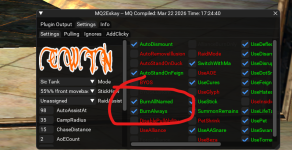
Does anyone have any idea why all my toons (using cwtn class plugins) always are set to "always burn" after running this and the TOB Control room mission Lua scripts.
Maybe if you don't know why this happens, perhaps you may know a hotkey I can create to turn this off so I dont have to tab over to all my boxes to turn it off after ?? Thanks in advance!
 
Does anyone have any idea why all my toons (using cwtn class plugins) always are set to "always burn" after running this and the TOB Control room mission lua scripts.
Maybe if you don't know why this happens, perhaps you may know a hotkey I can create to turn this off so I dont have to tab over to all my boxes to turn it off after ?? Thanks in advance!
This should turn all the burn off.

/cwtna burnallnamed off
 
Hello Hopeless, not sure if this is the same thing.

I did try "/cwtna burnalways off" and that seemed to do it. Thanks!
 

Attachments

  • 1775655503430.png
    1775655503430.png
    301.5 KB · Views: 0
I apologize for that. When I set it to burnalways on, I do that with a nosave, so it does not over-ride your default settings, but it does not set it back at the end of the run.

Right now because of the uncertainty, I have not updated all of these with my latest routines, where I basically reset the plugin at the end of the mission so it will then reload your defaults. Once we get a clearer picture after next week, I can go back and update these scripts to use that new process.
 
I apologize for that. When I set it to burnalways on, I do that with a nosave, so it does not over-ride your default settings, but it does not set it back at the end of the run.
i think i've shared before - but you can get around this bit easily by just /multiline ; /plugin blah unload; /timed 3 /plugin blah loadat the end of the script before exiting, since everything else was no saved, it would just reload the plugin with the saved settings
 
i think i've shared before - but you can get around this bit easily by just /multiline ; /plugin blah unload; /timed 3 /plugin blah loadat the end of the script before exiting, since everything else was no saved, it would just reload the plugin with the saved settings
Yes, that is what I do in my latest versions of the scripts, so I plan on implementing that in these scripts also once I see that they will still be used. Thanks for pointing that out, as it was that comment that prompted me to do my version where it does the unload and reset with a function, that seems to work well.
 
Release TOB Hazuri Mission Automation

Users who are viewing this thread

Back
Top
Cart