Hi, love this software. Allows me to help my guild raiding and just enjoy my primary toon.
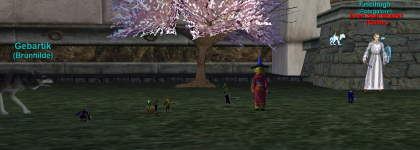
I'm having an issue that progressed from one computer to now both of my computers. All toons on the screen of any active characters screen are tiny. Even my gnome toon is a giant to the rest of the toons in her world. I've tried the Reinstall function on the RedGuides GUI. Not sure what the Mesh Updater is but seems a bit more intrusive so figured I would go here and ask before I do anything else. I would just leave it as is but it is causing some issue so would like to try and get it fixed.
My Shaman won't auto shrink on CWTN I guess because she already recognizes the toons as shrunk way past maximum? When I manually cast group shrink, they all grow to what would be the shrink size X1 cast.
Anyone have any suggestions?
I'm having an issue that progressed from one computer to now both of my computers. All toons on the screen of any active characters screen are tiny. Even my gnome toon is a giant to the rest of the toons in her world. I've tried the Reinstall function on the RedGuides GUI. Not sure what the Mesh Updater is but seems a bit more intrusive so figured I would go here and ask before I do anything else. I would just leave it as is but it is causing some issue so would like to try and get it fixed.
My Shaman won't auto shrink on CWTN I guess because she already recognizes the toons as shrunk way past maximum? When I manually cast group shrink, they all grow to what would be the shrink size X1 cast.
Anyone have any suggestions?