• You've discovered RedGuides, an EverQuest multi-boxing and scripting community 🧙‍♀️⚙️. We want you to play several EQ characters at once, come join us and say hello! 👋

  • A TLP without truebox has thawed (Very Vanilla ready)
    Frostreaver

Guide - The Red Guide to Git

Redbot

💻❤️
Moderator
Joined
Oct 15, 2004
RedCents
104,068¢
Pronouns
He/Him
The repository:
https://gitlab.com/redguides/kissassist

The development branch:
https://gitlab.com/redguides/kissassist/tree/development

The issue board (please add bugs and feature requests you find elsewhere)
https://gitlab.com/redguides/kissassist/-/boards/1445696

🙋Why should I use Git❓

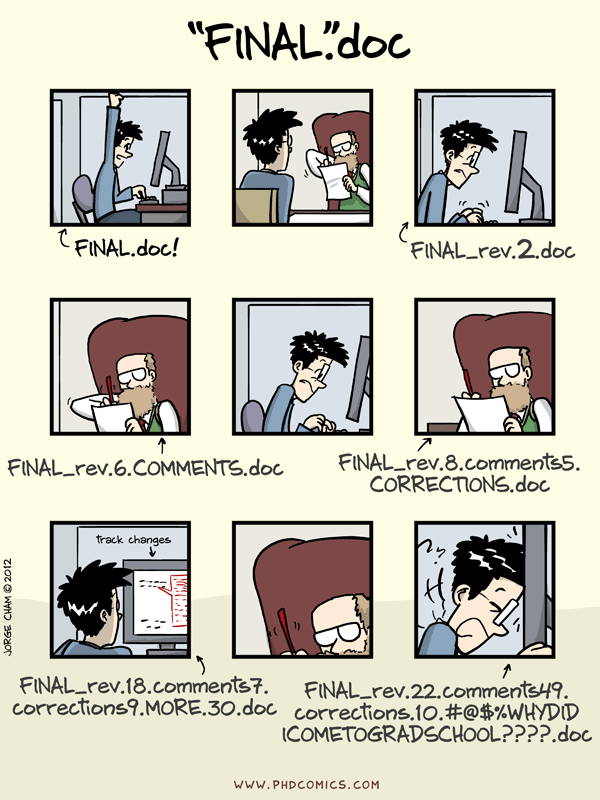
Because of situations like this,

phd101212s.png


At RedGuides we've only been using git for two years, but even with my relative newbie understanding, it's giving the entire community some serious benefits such as:

We can quickly see the modifications people have made:
1575930968541.png
via: https://gitlab.com/redguides/VeryVanilla/commit/7bdafb3b5cb6bd5d32c4fdd610371a9858ab020c

We can see the entire history of any file,
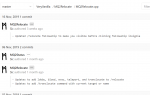
1575930994644.png
via: https://gitlab.com/redguides/VeryVanilla/commits/master/MQ2Relocate/MQ2Relocate.cpp

You get a branch: your own offline copy of the project, and you can share it for review and automatic merging.
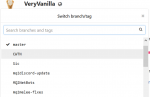
1575931046729.png

With branches, you and a friend can work on the same file and automatically merge when done:
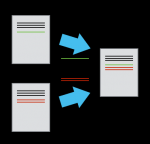
1575931074829.png

It's version control that's made for sharing, so let's use it!

🔨 Setting up your repo for KissAssist💋

  1. Download Git and begin to install: https://git-scm.com/downloads

  2. One of the last install prompts asks which editor you'd like to use. If you're not familiar with Vim (why is this default for Windows users?) then use VS Code or Notepad++,
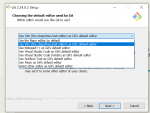
    1575931110002.png

  3. After install, navigate to a folder you'd like to keep your repositories.

  4. Type "powershell" in the folder bar and hit enter:
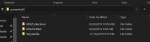
    1575931118630.png

  5. In the powershell window, type
    git clone https://gitlab.com/redguides/kissassist.git
    (if you need access, PM @Redbot or @ctaylor22)

  6. Now let's make a branch (your own personal copy) where you're free to mess things up. Type cd kissassist to navigate inside the newly made kissassist folder, and type:
    git pull (This makes sure you’re up to date, if you just cloned you don’t need to do this)
    git branch mydevbranch (it's a good idea to name your branch for whatever you're working on. If you're adding bard song checks, name the branch something like "bardsongchecks")
    git checkout mydevbranch (this puts you on your branch)
    git branch (use this to check what branch you're on. The * should be beside the branch you just created)

  7. To keep things organized on your PC, I recommend a different folder for each branch. Feel free to copy and rename the "kissassist" repository folder, it won't break anything.
💪 Using your branch for KissAssist😚
  1. Edit that macro! When you're done with an edit, commit your changes (locally) with the following lines,
    git status Check to make sure everything looks right, branch, file you changed, etc.
    git add . This adds all the changes you made, including any new files.
    git commit This is where you explain what changed. Remember to save! (If you're in a weird text editor that's confusing, it's probably VIM. Look up some commands :))
  2. When you're ready to put your commits on the server, type git push --set-upstream origin mydevbranch This uploads the changes to your branch on the server.

  3. If you think the code in your personal branch is ready for the development or master branch, submit a merge request for @ctaylor22 to approve.
    The easiest way to submit a merge request (some call it a "pull request", same thing) is do it on the website:
    https://gitlab.com/redguides/kissassist/merge_requests/new
    Select a source branch, a target branch, and hit merge.
Someday we'll have a beautiful workflow, but the basics are enough for now: pull, branch, commit, push, merge.

If you want a GUI (which I don't recommend for new users as it's going to confuse you with options) search for "Git Gui" on your PC, it's already installed from step 1. There are many GUI alternatives if it doesn't suit you. If you want to stick with powershell, I recommend posh git (follow the install steps carefully, as well as the first two steps of "usage") it gives you tab completion, as well a handy status bar built into the commandline.

This thread also serves as a dumpster for random git questions, so ask away!
 
Last edited:
Great write-up RedBot! I had some very early frustrations with git, but now (outside of the random issue now and again) I absolutely love the idea of it, the implementation of it, its flexibility to accommodate any level of complexity and collaborative workings.

I've been using GitKraken for many weeks now and I couldn't navigate all the different Gits without it!
 
@Sic - Git is a beast. I think a lot of us have our usual work flow to memory than start looking into the git book whenever we have to do something crazy because we screwed up. :-D

@Redbot - Woo! Great resource! I think being able to help improve KA but also easily manage our own mods is great.
 
So, once I get to the
INI:
git pull
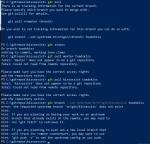
piece, it falls apart when I apply my brain to what to do next. Following the directions in the powershell, this is what I get:
1576824587193.png

So apparently I'm misunderstanding what it's saying I'm supposed to do here.
 
So, once I get to the
INI:
git pull
piece, it falls apart when I apply my brain to what to do next. Following the directions in the powershell, this is what I get:
View attachment 18904

So apparently I'm misunderstanding what it's saying I'm supposed to do here.

My fault, I left a step out. I just updated this guide with a copy/paste of @Knightly's tutorial on branches.

Your repo doesn't know what branch you want to upload your changes to.

git push --set-upstream origin toadskiss
This tells it to use the branch 'toadskiss'

It will remember, so in the future you can just use git push
 
Last edited:
So, git mod questions.

I've got my branch linked now, if I make changes to my local copy of KA, check that it works, and want to submit a push to include those changes, I just need to open powershell and nav to my branch, then git push?

Would I need to git pull to make sure my branch is current with dev, before any edits, or what is the process there exactly?
 
So, git mod questions.

I've got my branch linked now, if I make changes to my local copy of KA, check that it works, and want to submit a push to include those changes, I just need to open powershell and nav to my branch, then git push?
Yup!
Would I need to git pull to make sure my branch is current with dev, before any edits, or what is the process there exactly?
git pull would just pull from your own branch, you'd need to merge the dev branch with yours to make sure they're currently the same. You can do merging on the gitlab website, it's pretty simple. I think "rebase" works as well, but I don't know how to use it yet.

But really I wouldn't worry about it, If there's a conflict between the dev branch and yours, it's usually automatically merged, and if not they make it easy to merge changes.
 
Well, I admit partial defeat. I thought I understood the process of steps, but I'm not getting the results I wanted.

So the version I cloned was the master, there're no directions here on how to clone the development branch. One thing I tried was to use the pathname for the dev branch I cloned on the gitlab website as a test, but that was a failure, so I deleted that branch again. The syntax for the git clone step above will only clone master, which isn't what I'm trying to mod.

The process flow as I think I understand it:

Install Git locally
create a folder and clone a git repository to work with
make edits to the local mac file or whatever you're editing
push those edits back to git

Seems pretty straightforward, but the steps I'm using aren't grabbing the right repository, and I don't want to try and push changes until I understand where things are being pushed, how to make sure that I'm adding code changes to the right file, and how to make sure that changes made to the master/dev branch or whatever you originally cloned from are respected in your local copy. As I understand it, that's what the CI/CD stream is supposed to handle, but I still don't get how it works in a newbie user's perspective of commands to issue, and steps to take. Someone want to throw me some hints please?
 
First off, think of cloning a repo as cloning the whole repo (every branch). Rather than cloning.a specific branch (dev/master) when you clone you're cloning the whole thing.

From there, it's a matter of understanding what happens when you switch branches. The default branch is almost always going to be master. So if you're in your local copy you're going to see master. When you want to change branches from the command line you would type "git checkout <branch name>" like if you wanted to checkout the "development" branch you would type: "git checkout development". If you have a program you're using you would probably just search for how to "checkout" a branch in that program. When you do a checkout, git changes what you see on the filesystem.

Lastly, a clone of a repo is yours. Any modifications you make to it are local until you "commit" and "push" your changes. So don't be too worried about breaking something. Worst case scenario, delete your local copy and start again as many times as you need to.
 
Well, I admit partial defeat. I thought I understood the process of steps, but I'm not getting the results I wanted.

So the version I cloned was the master, there're no directions here on how to clone the development branch. One thing I tried was to use the pathname for the dev branch I cloned on the gitlab website as a test, but that was a failure, so I deleted that branch again. The syntax for the git clone step above will only clone master, which isn't what I'm trying to mod.

The process flow as I think I understand it:

Install Git locally
create a folder and clone a git repository to work with
make edits to the local mac file or whatever you're editing
push those edits back to git

Seems pretty straightforward, but the steps I'm using aren't grabbing the right repository, and I don't want to try and push changes until I understand where things are being pushed, how to make sure that I'm adding code changes to the right file, and how to make sure that changes made to the master/dev branch or whatever you originally cloned from are respected in your local copy. As I understand it, that's what the CI/CD stream is supposed to handle, but I still don't get how it works in a newbie user's perspective of commands to issue, and steps to take. Someone want to throw me some hints please?

There's only ONE repository, that repository has many branches. You always clone the repository, and with it will come all the branches. It always has at least ONE called "master". This is the one people use as the "true" branch (imagine it as "live"). Each branch is a "version" of that repository. They live in the same place (in the repository). What you need to do is tell git to start looking at the development branch - when you do that it hides the other branches and only shows you what is in the development branch. when you create a new branch it copies all of the files from the branch you start from (normally master).

First I would google for "git list all branches" so I can find out which ones exist ( `git branch -a`)

Then I would google "how do I switch branches in git"? ( `git checkout <insert_branch_name>` )
That would put me on that branch I want to be on.
 
Also, if videos are your thing, there's tens if not hundreds of git tutorials on youtube. Pretty much every coder on the planet uses it, and they all started somewhere so there's an answer to every question (especially web sites like "stack overflow").

I highly recommend learning the command line over using any user interface tool, since you will learn as you go along that way.

I use git for my ini's as well as my macs, once the penny drops you'll love it (especially when you make that change that broke everything and want to revert back or see what you did).
 
Thank you, that is very helpful. I was looking at it wrong, which is what was confusing me, or rather I was confusing myself. I am using the command line, as I'm old school DOS/Linux anyway, so that's no issue, I just needed to understand some of the basics apparently.
 
Dr. Whom's general process for engaging with Red Guide Repos (right or wrong and I'm sure command line commands could be optimized -- but it's been working OK so far -- feel free to disregard, pull from, or utilize in whatever official material you may want/have):

Assumptions on the below process:
- You're working from a non-forked repo (The below process should work on a forked repo but I've not tested)
- You've got a Master and a Development branch

0. Clone the project following one of the guides here on git or your particular preferred method. For me it's git clone <project URI copied from gitlab>
1. Ask the project maintainer if their project will use a Development branch or work straight from master. We'll assume Development branch with all below.
2. Make sure we've got all the branch records: git fetch --all
3. Checkout the Development branch: git checkout Development -- Git's downloaded and switched me to the Development branch
4. Just make sure I'm on the development branch: git branch -- Should have a * near development
5. Just make sure I've downloaded the latest code: git log -- I take a look at the latest commits to see what's been done
6. Now time to create my new feature branch: git branch <MyFeatureBranchName>
7. Now to checkout my feature branch: git checkout <MyFeatureBranchName>
8. I'll do some edits and stage my commit: git add <file I changed> && git commit -m "Commit message explaining my feature change and any design choices not in the comments."
9. I'll repeat step 8 until I've finished a single thematic feature related to that branch.
10. Now I'll make sure I have the latest code from the gitlab servers for the development branch: git checkout Development && git pull origin Development
11. Take a look at any changes: git log
12. Head back to my feature branch: git checkout <MyFeatureBranchName> && git branch
13. Merge the latest development branch on my feature branch: git merge Development
14. Handle any conflicts...
15. Push my new feature to gitlab: git push origin <MyFeatureBranchName>
16. Head over to gitlab and create a new Merge request with details on what my branch includes feature wise, why I created the feature I did, and any reference issues it solves.
 
Last edited:
New to Git. Is there a KA most recent updates message or page? Like the forum post used to list the newest changes for users when KA would update on RedGuides.
 
New to Git. Is there a KA most recent updates message or page? Like the forum post used to list the newest changes for users when KA would update on RedGuides.
Yeah, I think what you want to see are the latest commits. The master branch (release branch) latest changes are here:

Not too exciting, as it's just the release version you get in VV. When that's updated so is the forum version.

The real fun is on the development branch, which is here:
 
Last edited:
Sorry to resurrect this old post but I'm fumbling through git and gitlab...

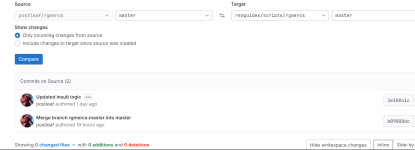
I have a fork of rgmercs that I recently made a change to and submitted the merge request which was merged. I tried to update the fork to match the rgmercs repo and it pulled in all the changes to make it up to date except it has some kind of residual in the commits (ie my fork is "2 commits ahead...". The residual commits appear to me to be some leftover differences in the commit tags but no actual changes (ie 0 changed files, See below for excerpts from the gitlab web interface).

The (ignorant) question is: how do i resolve this? Did i do something wrong in the merge request? Did I do some other newbie thing(s) wrong?
Note: I found some stuff in the guides on redguides that talked about setting up a repo mirror but that seems to be only available for paid gitlab sub which I dont have. Perhaps this is part of the issue?

1702660747083.png

1702660789751.png
 
Last edited by a moderator:
Thank you for the contribution to rgmercs! I'm not sure about being ahead, perhaps the merge was squashed (all commits merged into one big commit) when merging?

I'd say you should just delete the branch and start fresh, but you used your fork's master branch so you may need to delete the fork and start over.

In the future, make a new branch if you plan to merge your fork's changes, usually named after the change you're implementing. e.g. "fix_ae_mez" and then use that branch to merge. Keep the main/master branches clean, makes it easy.

Also, this is a better guide for forking & merging:
 
Thank you for the contribution to rgmercs! I'm not sure about being ahead, perhaps the merge was squashed (all commits merged into one big commit) when merging?

I'd say you should just delete the branch and start fresh, but you used your fork's master branch so you may need to delete the fork and start over.

In the future, make a new branch if you plan to merge your fork's changes, usually named after the change you're implementing. e.g. "fix_ae_mez" and then use that branch to merge. Keep the main/master branches clean, makes it easy.

Also, this is a better guide for forking & merging:

I had a feeling that deleting fork and starting over was the way to go. Trying to make sure I don't fall in the same hole again.

I think my problem may have been that I created a branch in the fork but then commit to my forked main branch and then merged from there. It seems that maybe I should merge from the branch to the upstream origin instead. I'll try to do that next attempt.
 
Guide - The Red Guide to Git

Users who are viewing this thread

Back
Top
Cart