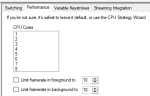
Edit 2/26/2022 to note that as of January the old CPUAffinity setting has been replaced by a new setting called ClientCore.
The update notes https://forums.daybreakgames.com/eq...te-notes-january-19-2022.280388/#post-4098095
=============================
*** Disclaimer! The following settings seem to work well on my Windows 10 Pro (21H1) -- Dell G315 laptop -- quad-core, hyperthreaded Core I5-8300H CPU -- 16GB RAM -- Adata NVMe SSD -- integrated Nvidia GeForce GTX 1050Ti. Your mileage may vary on different hardware!
And don't take my advice if you frequently play without Macroquest loaded and still need frame limiting!***
I use ISBoxer and will continue since I appreciate it's monitor management and virtualized EQClient.ini files. ISBoxer also had frame limiting and CPU management as a standard feature long before Sony or Macroquest.
But after implementing the newest RedGuide's Macroquest it makes sense to ensure you're using just one frame limiter and RedGuide's really seems to work the best! And you no longer need to use the EQWire plugin!
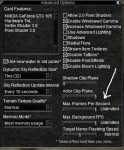
Even if you're not using ISBoxer there are still the embedded settings in the EQ client itself. My recommendation is that you disable all frame limiters except for RedGuide's! In game you'd go the Display > Advanced Options and slide the levers to the far right.
!
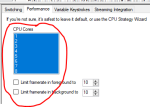
If you use ISBoxer you should also disable the CPU and Frame Management in the Performance Tab for each character in your team. Make sure you save your changes and Export All to Innerspace!
!
Now I did have some issues with ISBoxer's Key Repeater not working on my Background boxes, but after some trial and error I found the following "Next" settings work well on my laptop...
(Editing the ..\Config\MacroQuest.ini file
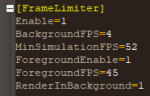
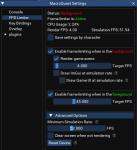
!
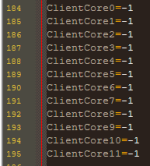
Finally, make sure you're letting Windows manage your CPU cores by ensuring your EQClient.ini files are set to:
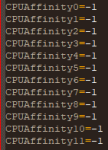
!
As I created this post my 6 character team was running KissAssist 12.002.006 and pulling and killing mobs and my hardware was:
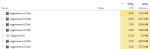
The update notes https://forums.daybreakgames.com/eq...te-notes-january-19-2022.280388/#post-4098095
=============================
*** Disclaimer! The following settings seem to work well on my Windows 10 Pro (21H1) -- Dell G315 laptop -- quad-core, hyperthreaded Core I5-8300H CPU -- 16GB RAM -- Adata NVMe SSD -- integrated Nvidia GeForce GTX 1050Ti. Your mileage may vary on different hardware!
And don't take my advice if you frequently play without Macroquest loaded and still need frame limiting!***
I use ISBoxer and will continue since I appreciate it's monitor management and virtualized EQClient.ini files. ISBoxer also had frame limiting and CPU management as a standard feature long before Sony or Macroquest.
But after implementing the newest RedGuide's Macroquest it makes sense to ensure you're using just one frame limiter and RedGuide's really seems to work the best! And you no longer need to use the EQWire plugin!
Even if you're not using ISBoxer there are still the embedded settings in the EQ client itself. My recommendation is that you disable all frame limiters except for RedGuide's! In game you'd go the Display > Advanced Options and slide the levers to the far right.
!
If you use ISBoxer you should also disable the CPU and Frame Management in the Performance Tab for each character in your team. Make sure you save your changes and Export All to Innerspace!
!
Now I did have some issues with ISBoxer's Key Repeater not working on my Background boxes, but after some trial and error I found the following "Next" settings work well on my laptop...
(Editing the ..\Config\MacroQuest.ini file
!
Finally, make sure you're letting Windows manage your CPU cores by ensuring your EQClient.ini files are set to:
!
As I created this post my 6 character team was running KissAssist 12.002.006 and pulling and killing mobs and my hardware was:
Last edited: