• You've discovered RedGuides, an EverQuest multi-boxing and scripting community 🧙‍♀️⚙️. We want you to play several EQ characters at once, come join us and say hello! 👋

  • A TLP without truebox has thawed (Very Vanilla ready)
    Frostreaver
The NEW Linux and MQ Guide!!

Guide - The NEW Linux and MQ Guide!! (1 Viewer) 2.0

No permission to download
Joined
Dec 22, 2019
RedCents
1,263¢
thedank submitted a new resource:

The NEW Linux and MQ Guide!! - Linux Baby!!

This is an update to my old guide located here

********************************************************************************
The quick and dirty rundown on installing EverQuest on Ubuntu 22.04
********************************************************************************

1. Install Ubuntu 22.04 and necessary graphics drivers (not covered here) [I have tested on Nvidia...

Read more about this resource...
 
I noticed there are a few minor typos in the current guide that prevent it from being copy/pasted as is. The lines are the following:

mv ../Redguides_VeryVanilla.zip .
unzip Redguides_VeryVanilla.zip
rm Redguides_VeryVanilla.zip

The issue is that the file downloaded from the site has capitalization on the G in Redguides, so it should be: RedGuides_VeryVanilla.zip instead of Redguides_VeryVanilla.zip.
 
Can anyone confirm if the Wine install interferes with the Steamclient and proton? I was hoping to copy my install from my Windows machine rather than install EQ from scratch. Just got this rig how I want it and only thing left now is get MQ running so I can box again.
 
Nice to see an update!

On a slightly different track, there was someone working on getting Docker container for EQ and MQ2 a year or two ago. Was there any progress on that front? https://www.redguides.com/community/threads/fun-with-docker-linux.82220/
A dock or other lxc would be AMAZING. Having one or two large session windows and 4 smaller ones would be an interesting take. I'm so used to alt-tabbing between my puller and tank and rarely get to see my other boxes in action unless I swivel the camera around. But for starters I'm going to use a dualboot with another linux drive with Steam and see if it plays nicely.
 
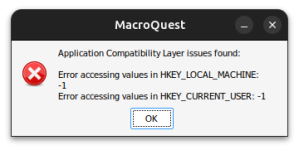
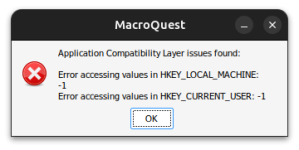
I am pretty new to Linux and I am trying to test this setup on an old mini PC that I used to use for Truebox servers. So far I have been able to successfully get EQ running on Ubuntu 24.04. I am trying to get MQ running as well, however I am getting this error when I try to launch MQ with Wine following the instructions in this guide. Any help would be appreciated.

1718830620908.png
 
Last edited:
Thanks for the updated guide link. With Windows 11 Recall, I'm making my long-delayed move to Linux permanent, though I'll keep W10 on my (EQ) workstation for this stupid, old game.
 
Thanks for the updated guide link. With Windows 11 Recall, I'm making my long-delayed move to Linux permanent, though I'll keep W10 on my (EQ) workstation for this stupid, old game.
This is exactly why I am looking into this right now too!
 
I am pretty new to Linux and I am trying to test this setup on an old mini PC that I used to use for Truebox servers. So far I have been able to successfully get EQ running on Ubuntu 24.04. I am trying to get MQ running as well, however I am getting this error when I try to launch MQ with Wine following the instructions in this guide. Any help would be appreciated.

View attachment 62574
  1. Using regedit add the following two registry keys
  2. HKEY_CURRENT_USER\Software\Microsoft\WindowsNT\CurrentVersion\AppCompatFlags\Layers
  3. HKEY_LOCAL_MACHINE\Software\Microsoft\WindowsNT\CurrentVersion\AppCompatFlags\Layers
 
Fix to get the Redguides Launcher to work
  1. Download RedGuides Launcher
  2. Install Redguides Launcher
  3. Run it twice after install
  4. Open Wine Configuration
  5. On the application tab add your custom .exe make sure it is highlighted after adding
  6. Click Libraries add d3d9 and set to disable this will only be for your custom .exe
  7. Install MQ through the Launcher
Forogt you also need to wintirck in Visual C++ runtime 64bit and .Net 4.8
 
Last edited:
Anyone having issues with opening multiple wine containers at once when using MQ. Works fine when running EQ without MQ but when i run MQ it just keeps bouncing non stop back and forth between screen. like its sending a non stop resize or something to the screen. Makes it completely unplayable and its only when i use MQ. any ideas on this?
 
  1. Using regedit add the following two registry keys
  2. HKEY_CURRENT_USER\Software\Microsoft\WindowsNT\CurrentVersion\AppCompatFlags\Layers
  3. HKEY_LOCAL_MACHINE\Software\Microsoft\WindowsNT\CurrentVersion\AppCompatFlags\Layers
Thanks so much for helping out here. I finally got a chance to get back to messing with this. I added the two registry keys that you listed but I'm still not getting very far. I do have the MQ icon in the system tray (not sure if that's even what it is called on Linux) where I just had a black box before.1719076557816.png

However, I am still getting the same error message as before:1719076630094.png

I'm not sure if it is helpful, but here is the terminal output from Wine when I run wine MacrQuest.exe &

Code:
002c:fixme:winediag:loader_init wine-staging 9.11 is a testing version containing experimental patches.
002c:fixme:winediag:loader_init Please mention your exact version when filing bug reports on winehq.org.
0124:fixme:file:NtLockFile I/O completion on lock not implemented yet
0130:fixme:process:SetProcessShutdownParameters (00000100, 00000001): partial stub.
0138:fixme:file:NtLockFile I/O completion on lock not implemented yet
0124:fixme:kernelbase:AppPolicyGetProcessTerminationMethod FFFFFFFFFFFFFFFA, 000000000011F1B0
0130:fixme:kernelbase:AppPolicyGetProcessTerminationMethod FFFFFFFFFFFFFFFA, 000000000011FE80
0154:fixme:file:NtLockFile I/O completion on lock not implemented yet
0160:fixme:process:SetProcessShutdownParameters (00000100, 00000001): partial stub.
0168:fixme:file:NtLockFile I/O completion on lock not implemented yet
0180:fixme:kernelbase:AppPolicyGetThreadInitializationType FFFFFFFFFFFFFFFA, 000000000161FF50
warn:  Skipping CPU adapter: llvmpipe (LLVM 17.0.6, 256 bits)
0154:fixme:system:NtUserQueryDisplayConfig flags 0x2, paths_count 0x11ead8, paths 0xb0fdf0, modes_count 0x11eadc, modes 0xb0d170, topology_id (nil) semi-stub
warn:  D3D11DeviceFeatures: External memory features not supported
0154:fixme:system:NtUserQueryDisplayConfig flags 0x2, paths_count 0x11ebc8, paths 0xb1bb20, modes_count 0x11ebcc, modes 0xb12f10, topology_id (nil) semi-stub
0154:fixme:system:NtUserQueryDisplayConfig flags 0x2, paths_count 0x11b7dc, paths 0xb1bb20, modes_count 0x11b840, modes 0xb74190, topology_id (nil) semi-stub
err:   readMonitorEdidFromKey: Failed to get EDID reg key size
err:   DXGI: Failed to parse display metadata + colorimetry info, using blank.

I removed all entries with a info: prefix for the sake of brevity, but if that output is needed to help troubleshoot, I can provide that too.

Any further assistance will be greatly appreciated.
 
Thanks so much for helping out here. I finally got a chance to get back to messing with this. I added the two registry keys that you listed but I'm still not getting very far. I do have the MQ icon in the system tray (not sure if that's even what it is called on Linux) where I just had a black box before.View attachment 62686

However, I am still getting the same error message as before:View attachment 62687

I'm not sure if it is helpful, but here is the terminal output from Wine when I run wine MacrQuest.exe &

Code:
002c:fixme:winediag:loader_init wine-staging 9.11 is a testing version containing experimental patches.
002c:fixme:winediag:loader_init Please mention your exact version when filing bug reports on winehq.org.
0124:fixme:file:NtLockFile I/O completion on lock not implemented yet
0130:fixme:process:SetProcessShutdownParameters (00000100, 00000001): partial stub.
0138:fixme:file:NtLockFile I/O completion on lock not implemented yet
0124:fixme:kernelbase:AppPolicyGetProcessTerminationMethod FFFFFFFFFFFFFFFA, 000000000011F1B0
0130:fixme:kernelbase:AppPolicyGetProcessTerminationMethod FFFFFFFFFFFFFFFA, 000000000011FE80
0154:fixme:file:NtLockFile I/O completion on lock not implemented yet
0160:fixme:process:SetProcessShutdownParameters (00000100, 00000001): partial stub.
0168:fixme:file:NtLockFile I/O completion on lock not implemented yet
0180:fixme:kernelbase:AppPolicyGetThreadInitializationType FFFFFFFFFFFFFFFA, 000000000161FF50
warn:  Skipping CPU adapter: llvmpipe (LLVM 17.0.6, 256 bits)
0154:fixme:system:NtUserQueryDisplayConfig flags 0x2, paths_count 0x11ead8, paths 0xb0fdf0, modes_count 0x11eadc, modes 0xb0d170, topology_id (nil) semi-stub
warn:  D3D11DeviceFeatures: External memory features not supported
0154:fixme:system:NtUserQueryDisplayConfig flags 0x2, paths_count 0x11ebc8, paths 0xb1bb20, modes_count 0x11ebcc, modes 0xb12f10, topology_id (nil) semi-stub
0154:fixme:system:NtUserQueryDisplayConfig flags 0x2, paths_count 0x11b7dc, paths 0xb1bb20, modes_count 0x11b840, modes 0xb74190, topology_id (nil) semi-stub
err:   readMonitorEdidFromKey: Failed to get EDID reg key size
err:   DXGI: Failed to parse display metadata + colorimetry info, using blank.

I removed all entries with a info: prefix for the sake of brevity, but if that output is needed to help troubleshoot, I can provide that too.

Any further assistance will be greatly appreciated.
Ok, so I was a dummy and forgot to run export WINEPREFIX=~/Games/eqlive before creating the registry keys. I guess those keys ended up in the default Wine prefix?

Setting the wine prefix before running regedit seems to have fixed the issue with the error window showing up. I also have the system tray icon visible now too. However, clicking on it does nothing so I am not able to set up my auto login profiles. Does anyone have any ideas on how to get this part working?

I am one step closer at least.
 
I ran into some issues that was causing EQ to crash and I also realized I was still testing this with a version of MQ from before the most recent patch. I decided to start over fresh. I deleted the eqlive directory and the MQ directory and reinstalled everything from scratch. I now have EQ working with MQ loaded and things are working fine. The only issue right now is the system tray. I have the blank icon again and I still cannot get it to open the UI to let me configure my auto login. It is worth noting though that the MQ UI does load on first launch to ask for a master password for auto login.

Another unexpected bonus:
I loaded MQ2DanNet and ran a quick test of /dex Otherguy /g Hello, World! to one of my characters currently running on my Windows PC and it worked fine. I'm not sure if the issues with DanNet on Linux occur only in specific cases or if the issues with the Windows sockets has actually been fixed in a more recent version of Wine, but my simple test worked at least.
 
If anyone else is having my issue......... the cure is just to go to full screen mode and alt tab to different characters. wasted 5 days... lol
 
I ran into some issues that was causing EQ to crash and I also realized I was still testing this with a version of MQ from before the most recent patch. I decided to start over fresh. I deleted the eqlive directory and the MQ directory and reinstalled everything from scratch. I now have EQ working with MQ loaded and things are working fine. The only issue right now is the system tray. I have the blank icon again and I still cannot get it to open the UI to let me configure my auto login. It is worth noting though that the MQ UI does load on first launch to ask for a master password for auto login.

Another unexpected bonus:
I loaded MQ2DanNet and ran a quick test of /dex Otherguy /g Hello, World! to one of my characters currently running on my Windows PC and it worked fine. I'm not sure if the issues with DanNet on Linux occur only in specific cases or if the issues with the Windows sockets has actually been fixed in a more recent version of Wine, but my simple test worked at least.
It is interesting that dannet worked as every time I have tried to use it locks EQ up completely MQ is still fine.
 
This post has some really good info on the issues with running DanNet on Linux. Since I am very new to all of this, my only guess is that the issue in Wine with sockets and polling that was causing DanNet to hang may have actually been fixed in Wine. I plan to do some more experimenting soon to see if I just got lucky or if DanNet “just works” now on this latest version of Wine-staging.

I could still really use some help trying to troubleshoot the lack of UI interaction from the system tray icon though. Not being able to use/configure auto login is kind of a non-starter for me. All of my EQ accounts have random passwords generated by a password manager and I don’t have any of them memorized so logging into the game by just running “eqgame.exe patchme” won’t work and I really don’t want to have to run 6+ instances of the launcher to get all my guys logged in with cached credentials like I used to before I learned about the beauty that is auto login.

I also heavily utilize the keybinds for window swapping that are configured through the auto login UI and I would be in a pretty bad spot without them as well.
 
Fix to get the Redguides Launcher to work
  1. Download RedGuides Launcher
  2. Install Redguides Launcher
  3. Run it twice after install
  4. Open Wine Configuration
  5. On the application tab add your custom .exe make sure it is highlighted after adding
  6. Click Libraries add d3d9 and set to disable this will only be for your custom .exe
  7. Install MQ through the Launcher
Forogt you also need to wintirck in Visual C++ runtime 64bit and .Net 4.8
How do you install the Visual C++ runtime 64bit via winetricks? I can only seem to find the 32bit versions.
 
How is this effort working out? I was going to give it a try this weekend as my primary OS of choice is Fedora (need to update 40 to 41 anyways!) and I only maintain a Windows partition for EQ/MQ. I'd love to blow up the Windows partition and go full Linux again if this works well.

Looks like there's a workable solution for EQ, MQ, and even RG launcher. I could probably get EQLogParser to work in wine as well. Any other gotchas I should be aware of? Kinda sucks that Dannet isn't going to be an option and I'll have to EQBC but that might not be so bad. Does the Lua and IMGui stuff work out pretty well too or am i going to have to rethink my setup in game with what tooling I use?
 
You’ll need to copy you Lua configs over Luarocks which is the package manager does not work in Wine/Crossover.

Also ever since the June patch EQ does not release keyboard mouse control if it’s running in the background which makes it impossible to run multiple toons atm. This was part of Daybreaks attempt to enhance windowed mode which they made worse
 
Thanks for the update, i guess I'll hold off on EQ on Linux for now. I hope it gets sorted out, I want to go back to Linux full time!
 
since desktops are so easy to use and fluid in linux, could that be an answer? put a character on separate desktops and just switch between them? that would be awesome and super convenient since I have my key set to windows + mousescroll to get between the desktops. i'd think one instance would have to release the mouse if you are moving to separate desktop yeah?
 
  • Opted to use Bottles so I could throw everything in one space and not have to worry about it.
    • Still have to make sure all the stuff everything needs is installed.
    • Not messing with prefixes since everything is in same bottle and its taken care of.
    • Had to turn off Gnome 47's 'not responding' notification as it pops up a gazillion times during the process until you are in game.
  • Got EQ installed and it seems to run well, not experiencing that windowed mode issue where one instance won't release cursor.
  • RG installed
    • Everything works... but sometimes it loses its mind and doesn't remember that I've installed things previously.
    • Mesh updater works
    • MQ launches but seems to forget EQ install path so I have to keep setting that.
Overall, great progress so far this morning. Its not a smooth friendly experience like windows is... I'll see what I can mess with to make it better. I am wondering if the new redfetch gizmo would be better for updating the things instead of the launcher on linux.

Next steps:
  • I still have my windows partition available so I can poke at this as I have time.
  • I want to get everything working and then work on making it smoother and more friendly... part of that is just knowing how its going to be different on linux vs what we're used to on windows.
  • See how it goes and report back.

Pretty promising so far... this appears to run pretty well. The MQ piece is clunky for now but i'll figure it out. Then we can all abandon windows and rejoice!
 
Good info here, greatly appreciated as well. I intend to move fully to linux within the next year, which I was going to be more relaxed about until they stealth forced that copilot nonsense into win10. Be great to make sure MQ works smoothly with EQ before I move over though. I have tried EQ stand alone on linux a bit, but hadn't thought to test MQ over there. For some reason I made the assumption in my head it would just work :P My head is usually in the clouds though, so no real surprise there.
 
Most of it works, its just not as smooth and user friendly as it is on the windows side. The trouble is trying to motivate myself to spend time on working out the kinks instead of just booting up my windows partition and playing EQ lol.

Have to be okay with not having Dannet though, that doesn't work on linux at this time. That means no boxhud either if you are a fan of that utility.
 
Ok Good News tested today through crossover and the focus background crontol issue appears to have been fixed so the two issues really are.
1. Danet will lock the EQ client completely no crash: Workaround use EQBCS drawback is most Lua and a few plugins require Dannet.
2. Luarocks will cause a crash message: workaround is to import your Lua folder from a PC after the Lua scripts are installed and run at least once on PC.
 
Linux users: Rather than the RedGuides Launcher, please try redfetch. It's cross-platform. Install python & pip and you're good to go.

pipx install redfetch
 
Last edited:
Anyone gotten it to work with the steam client? I would think its just a prefex setup, but im still new to linux. I've gotten it to launch but it never catches the eq process. Ill keep plugging away at it however!
 
have you looked at protondb site? It gives info about how to get it running on linux.


Yea I have EQ running in Steam just fine. Last night I worked awhile at it and got MQ2 to run via steam as well. It was a bit of a job, but now when I fire up EQ via steam it fires up MQ2 as well. So far so good!
 
Crossover 25 just came out. updated to wine 10 number of improvements to graphics using d3dmetal 2.1, DXMT for dx11 apps on MacOS, MoltenVK 1.2.10, Support for GOG Galaxy, and Epic Games store.
 
After my successes with EQ/MQ2 via steam and mint, and feeling full of myself, I took the plunge with CachyOS, Hyperland, Wayland, and wine 10. Currently have EQ and MQ2 running (albiet with several small issues) but I have to say, wine 10 really is a game changer!
 
I haven't tried Wine10 yet, I've heard good things. I wonder if this means that Bottles will be using Wine10 under the hood too.
 
If you see Vulkan errors:

Code:
sudo add-apt-repository ppa:kisak/kisak-mesa && sudo dpkg --add-architecture i386 && sudo apt update && sudo apt upgrade && sudo apt install libgl1-mesa-dri:i386 mesa-vulkan-drivers mesa-vulkan-drivers:i386

I had some mini pcs with integrated AMD gpus, and this was the fix I needed ^
 
Also hope people find this comment or we can update the guide.

This first block: (make sure you take winehq-stable, guide has staging)
Code:
sudo dpkg --add-architecture i386
sudo mkdir -pm755 /etc/apt/keyrings
sudo wget -O /etc/apt/keyrings/winehq-archive.key https://dl.winehq.org/wine-builds/winehq.key
sudo wget -NP /etc/apt/sources.list.d/ https://dl.winehq.org/wine-builds/ubuntu/dists/jammy/winehq-jammy.sources
sudo apt update
sudo apt install --install-recommends winehq-stable

-stable is wine 10.0 now
-staging is wine 10.5 up to you I guess?
 
Anybody find a way to get IMGUI to work in Ubuntu 22.04? Everything else is working perfectly, but IMGUI for some reason is the only feature that I can't seem to get. Pretty annoying with how many scripts have GUIs attached to them lol.
 
Guide - The NEW Linux and MQ Guide!!

Users who are viewing this thread

Back
Top
Cart