Ok so I just returned recently and with the free heroic bonus event added a 3rd maxed out group. I had been away since the DX upgrade and previously was able to run 24 no issues. I'm trying to run 18 for ROS raids and my CPU is maxed out on Ryzen 7 3800 X 8core. Now its far from the best CPU out there but I used to run far more boxes on main pc before. Is there anything I can do to settings wise to fix this? Or am I now looking at a true 2 pc setup moving forward?

-
 Hail, we're RedGuides. We want you to play six (yes, 6!) EverQuest characters at once. We have scripts and a friendly community to help, please join our playstyle and say hello! 👋
You are using an out of date browser. It may not display this or other websites correctly.
You should upgrade or use an alternative browser.
You should upgrade or use an alternative browser.
Question - System Adjustments (can't do 18 vs doing 36 pre DX upgrade)
- Thread starter Naeeldar
- Start date

DEADCiTiES
Well-known member
Have you already been using frame limiter and not using the new UI? Reducing graphics settings: turning off shadows, reducing sky update interval, turning off foliage, lowering texture quality, using classic models etc.
There are times where removing your eqclient from the eq directory and having the launcher build a new one can fix performance issues. I suggest remove instead of delete because you might want to pull settings out of the ini to import into the new one, like keybinds and such.
There are times where removing your eqclient from the eq directory and having the launcher build a new one can fix performance issues. I suggest remove instead of delete because you might want to pull settings out of the ini to import into the new one, like keybinds and such.
Last edited:
Have you already been using frame limiter and not using the new UI? Reducing graphics settings: turning off shadows, reducing sky update interval, turning off foliage, lowering texture quality, using classic models etc.
There are times where removing your eqclient from the eq directory and having the launcher build a new one can fix performance issues. I suggest remove instead of delete because you might want to pull settings out of the ini to import into the new one, like keybinds and such.
So new UI had been released but I believe it was only bank slots if I remember correctly last time I played. I know the DX patch also hit something but I'm just surprised I'm maxing out CPU usage (granted it's only 8 cores). Shading, clip plane, sky is off etc.. So I've reduced all the setting. Video and RAM are fine it's just CPU suddenly maxing out.
My INI file is massive at this point so it's an option painful losing some of the data though. But maybe I'll remove it and go down that path. I added 6 more with the intent of running ROS and I could do it if it wasn't maxing out CPU.

Far Clip plane at 25% helped my PC to reduce the stuttering and extremely low FPS.
Shadows and advanced lightning, flora and Bloom, post effekts off.
5600X and RX7900XT, 32GB RAM and 2TB gen 5 NvME, so I doubt the hardware is at fault here.
Still, textures is missing here and there and graphical explosions that almost causes brain damage on me.. If I suffered from epilepsy, I would sue Everquest company big time..
Shadows and advanced lightning, flora and Bloom, post effekts off.
5600X and RX7900XT, 32GB RAM and 2TB gen 5 NvME, so I doubt the hardware is at fault here.
Still, textures is missing here and there and graphical explosions that almost causes brain damage on me.. If I suffered from epilepsy, I would sue Everquest company big time..
There are several threads about how to " FIX " performance after the DX11 upgrade with mixed results. Some folks report better performance, many report worse, some are almost unplayable now.
Over the last 3-4 months I've easily spent 20-30 hrs following various guides and tweaking settings.
The basics are easy and haven't changed
- Use frame limiter to avoid updating the screen on any clients that are not visible.
- Use frame limiter advanced option -> Minimum simulation rate 30 FPS
- use /hidemodels all and/or stick figures so you are avoid drawing as many models as possible.
The newer stuff has to do with the DX11 implementation details and how it loads textures which can impact video performance. I'm including it here because it might be helpful.
These are the eqclient.ini settings that helped me the most.
UseNewUIEngine=0
MipMapping=FALSE
ShowDynamicLights=FALSE
TextureQuality=1
VertexShaders=TRUE
20PixelShaders=1
MultiPassLighting=0
PostEffects=1
UseLitBatches=TRUE
AllLuclinPcModelsOff=1
You can also set most of that in game. Alt O -> Display
- Far Clip Plane = 25-50%
- Particles
Advanced Tab
- Enable shaders and post effects. Disable all other check boxes.
- Shadow plane = 0
- Actor Clip = 25-50%
Over the last 3-4 months I've easily spent 20-30 hrs following various guides and tweaking settings.
The basics are easy and haven't changed
- Use frame limiter to avoid updating the screen on any clients that are not visible.
- Use frame limiter advanced option -> Minimum simulation rate 30 FPS
- use /hidemodels all and/or stick figures so you are avoid drawing as many models as possible.
The newer stuff has to do with the DX11 implementation details and how it loads textures which can impact video performance. I'm including it here because it might be helpful.
These are the eqclient.ini settings that helped me the most.
UseNewUIEngine=0
MipMapping=FALSE
ShowDynamicLights=FALSE
TextureQuality=1
VertexShaders=TRUE
20PixelShaders=1
MultiPassLighting=0
PostEffects=1
UseLitBatches=TRUE
AllLuclinPcModelsOff=1
You can also set most of that in game. Alt O -> Display
- Far Clip Plane = 25-50%
- Particles
Advanced Tab
- Enable shaders and post effects. Disable all other check boxes.
- Shadow plane = 0
- Actor Clip = 25-50%

eqsubi15
Ultimate seasoned veteran member
This is excellent info. How large of a box force are you running and FPS results with these Frame Limiter settings? Also, what is your hardware specs?There are several threads about how to " FIX " performance after the DX11 upgrade with mixed results. Some folks report better performance, many report worse, some are almost unplayable now.
Over the last 3-4 months I've easily spent 20-30 hrs following various guides and tweaking settings.
The basics are easy and haven't changed
- Use frame limiter to avoid updating the screen on any clients that are not visible.
- Use frame limiter advanced option -> Minimum simulation rate 30 FPS
- use /hidemodels all and/or stick figures so you are avoid drawing as many models as possible.
The newer stuff has to do with the DX11 implementation details and how it loads textures which can impact video performance. I'm including it here because it might be helpful.
These are the eqclient.ini settings that helped me the most.
UseNewUIEngine=0
MipMapping=FALSE
ShowDynamicLights=FALSE
TextureQuality=1
VertexShaders=TRUE
20PixelShaders=1
MultiPassLighting=0
PostEffects=1
UseLitBatches=TRUE
AllLuclinPcModelsOff=1
You can also set most of that in game. Alt O -> Display
- Far Clip Plane = 25-50%
- Particles
Advanced Tab
- Enable shaders and post effects. Disable all other check boxes.
- Shadow plane = 0
- Actor Clip = 25-50%
This is excellent info. How large of a box force are you running and FPS results with these Frame Limiter settings? Also, what is your hardware specs?
I have two computers that are fairly different:
My "main" PC is getting a bit long in the tooth. It is a i7-6700k 4 core/8 thread @ 4Ghz. 32 GB ram, Geforce 1070 and 1TB NVME drive. Main issue here is CPU bottleneck. I generally only run a single group but in a pinch I can push that up to two groups. FPS varies widely depending on the zone, number of mobs, etc. With single group in GH prior I can hit fairly stable 60 FPS but that will dip as I move around. The March patch hurt my GPU performance and I haven't dug into the memory config to see if I can fix it.
My "big" PC is a AMD 3950x 16 core/32 thread. I think it runs around ~ 3.2 Ghz but that can change a lot based on load. It has 64 GB of ram and a GeForce 2070 GPU. This weekend I think I had 4x groups on it and it still had plenty of head room. This machine constantly outperform my "main" machine in terms of smooth game play. I don't have enough active accounts to find the limits of the machine.
Just fired up a single group. Depending on where I'm looking and what it has to render my FPS on the "big" machine is ranging from 57 FPS to 120 FPS. CPU isage ranges from ~ 15-30% of a core while in the background, up to ~80% when active.
However, that is with background rendering at 10 FPS ( recording raid ) and with models on. When I was pushing the limit of the box by using stick figures, hiding models, dropping clip planes, etc. I could get another ~ 15-30% clients.
DEADCiTiES
Well-known member
Allowing your machine to go up to 120 fps is probably hurting performance with little benefit. You could limit it to 60 and notice a more stable 60 while reducing CPU usage. Even though the new UI only rendered a few elements at the time when you were using it, the new ui engine has issues with efficiency. Make sure to turn the new ui off and give it a test, I bet you'll notice a reduction of load.
If you're not recording you can even limit your background to .001, that's another area where you'll see a decrease in resources being used if you made that change.
If you're not recording you can even limit your background to .001, that's another area where you'll see a decrease in resources being used if you made that change.
Last edited:
eqsubi15
Ultimate seasoned veteran member
Nice! I've got a decent PC build, but I need to take another look at my frame limiter settings because 24 seems to be where my smooth play is at. Anymore at it gets a bit sketchy.I have two computers that are fairly different:
My "main" PC is getting a bit long in the tooth. It is a i7-6700k 4 core/8 thread @ 4Ghz. 32 GB ram, Geforce 1070 and 1TB NVME drive. Main issue here is CPU bottleneck. I generally only run a single group but in a pinch I can push that up to two groups. FPS varies widely depending on the zone, number of mobs, etc. With single group in GH prior I can hit fairly stable 60 FPS but that will dip as I move around. The March patch hurt my GPU performance and I haven't dug into the memory config to see if I can fix it.
My "big" PC is a AMD 3950x 16 core/32 thread. I think it runs around ~ 3.2 Ghz but that can change a lot based on load. It has 64 GB of ram and a GeForce 2070 GPU. This weekend I think I had 4x groups on it and it still had plenty of head room. This machine constantly outperform my "main" machine in terms of smooth game play. I don't have enough active accounts to find the limits of the machine.
Just fired up a single group. Depending on where I'm looking and what it has to render my FPS on the "big" machine is ranging from 57 FPS to 120 FPS. CPU isage ranges from ~ 15-30% of a core while in the background, up to ~80% when active.
However, that is with background rendering at 10 FPS ( recording raid ) and with models on. When I was pushing the limit of the box by using stick figures, hiding models, dropping clip planes, etc. I could get another ~ 15-30% clients.
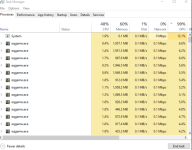
AMD 7950x, 64gb ddr5, rtx3080, 2tb nvme
Last edited:
Allowing your machine to go up to 120 fps is probably hurting performance with little benefit. You could limit it to 60 and notice a more stable 60 while reducing CPU usage. Even though the new UI only rendered a few elements at the time when you were using it, it still has issues with efficiency. Make sure to turn the new ui off and give it a test, I bet you'll notice a reduction of load.
If you're not recording you can even limit your background to .001, that's another area where you'll see an increase in hardware resources if you made that change.
100% agree.
I forgot about the new UI. I've had that turned off for so long I don't even think about it!
During "normal" operation I use the FPS limiter on the foreground to max of 60 fps. Only unchecked it to give numbers for this thread.
For me the bottle neck is going to be my GeForce 2070. The AMD 3950 is just a beast when it comes to core counts.
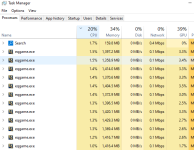

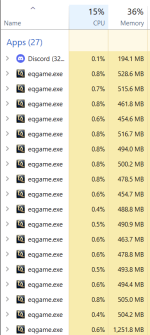
You are getting better than what I'm getting, I'm jealous. I used to get a starting of 1.2 gig per client, which went down to around 800ish within 10 min over less fir active characters and 200meg for inactive, 15 to 20 guys on at a time at full graphics. Now I start at 1 7 Gig and go upwards to about 2 5gig. This is with stick figure, and no Luclin models. Even a baz guy stays up and does not go down, before the baz guy would go down to about 100 megs since he just sat and did not even turn or anything. I can barely run a full group well now. Some kind of stupidity on Eq part I'm sure.

Also to note.... DX11 has bumped the memory usage on GPU, so some of that lag may be due to low mem capacity GPU
I know a lot of people have 8GB of GPU memory which is common on cards.
I specifically went AMD over NVIDIA this rebuild (last was 10yrs ago!) to get more GPU memory for my $
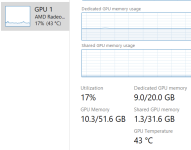
Hmm seems like its the new UI. Shut it off. Rebooted and suddenly down to 70% CPU usage on 18 chars. Memory is 39% and GPU memory is only about 10gig out of 40gig. So not an issue there.
Guessing new UI was the culprit.
Truly appreciate everyone's help. Passed out as much redcents as I could but hit limit fast given how helpful everyone was.
Guessing new UI was the culprit.
Truly appreciate everyone's help. Passed out as much redcents as I could but hit limit fast given how helpful everyone was.
Last edited:
For me, what I listed above both 'before' and 'after' is with New UI off. I'm gonna check my settings against what @LamahHerder just posted. thanks Lama. If its the same, I bet its close, I wonder if I should reinstall dx11.Hmm seems like its the new UI. Shut it off. Rebooted and suddenly down to 70% CPU usage on 18 chars. Memory is 39% and GPU memory is only about 10gig out of 40gig. So not an issue there.
Guessing new UI was the culprit.
Truly appreciate everyone's help. Passed out as much redcents as I could but hit limit fast given how helpful everyone was.
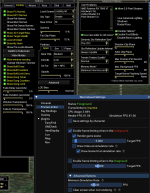
Should really be using framelimiter for BG like my screenshot, you shouldnt be sitting at 70% CPUHmm seems like its the new UI. Shut it off. Rebooted and suddenly down to 70% CPU usage on 18 chars. Memory is 39% and GPU memory is only about 10gig out of 40gig. So not an issue there.
Should really be using framelimiter for BG like my screenshot, you shouldnt be sitting at 70% CPU
I am using it. Doesn't seem to have the same impact that you are seeing. I even have other settings like sky off, me only for armor, clip plane of 30%. Still seeing high CPU usage.... But at least I can operate 18 again. but I'd be happy to get it lower.
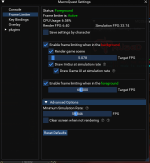

Thank you. I must have misread one of the above that dropped me down to 60% CPU usage on average. Crazy how much DX/new UI has hit. My system isn't a monster (but still new with 8 core, 64gig ram and a decent GPU) but I use to run as much as 42 on this pc before all the updates.Uncheck draw imgui/ui
rendering the game ui is what uses the most cpu in eq. You’ve still got it rendering at 60fps which is massive cpu hog
Wait, are you saying to make sure shades and post effects are enabled? I thought having those turned of would be better.There are several threads about how to " FIX " performance after the DX11 upgrade with mixed results. Some folks report better performance, many report worse, some are almost unplayable now.
Over the last 3-4 months I've easily spent 20-30 hrs following various guides and tweaking settings.
The basics are easy and haven't changed
- Use frame limiter to avoid updating the screen on any clients that are not visible.
- Use frame limiter advanced option -> Minimum simulation rate 30 FPS
- use /hidemodels all and/or stick figures so you are avoid drawing as many models as possible.
The newer stuff has to do with the DX11 implementation details and how it loads textures which can impact video performance. I'm including it here because it might be helpful.
These are the eqclient.ini settings that helped me the most.
UseNewUIEngine=0
MipMapping=FALSE
ShowDynamicLights=FALSE
TextureQuality=1
VertexShaders=TRUE
20PixelShaders=1
MultiPassLighting=0
PostEffects=1
UseLitBatches=TRUE
AllLuclinPcModelsOff=1
You can also set most of that in game. Alt O -> Display
- Far Clip Plane = 25-50%
- Particles
Advanced Tab
- Enable shaders and post effects. Disable all other check boxes.
- Shadow plane = 0
- Actor Clip = 25-50%

If you look on DBG's forums, one of the devs posted about turning those on (might have been beta? or just reg forums, around nov/dec). Something they did with the DX11 shenanigan's made that "optimal". (think was Catebrie around the time DX11 was pushed to live).Wait, are you saying to make sure shades and post effects are enabled? I thought having those turned of would be better.
No, the old ui system uses tons of cpu too , but we can manage it with Framelimiter. New ui can’t be controlled by framelimiterThank you. I must have misread one of the above that dropped me down to 60% CPU usage on average. Crazy how much DX/new UI has hit. My system isn't a monster (but still new with 8 core, 64gig ram and a decent GPU) but I use to run as much as 42 on this pc before all the updates.
I don’t think these make any difference whether they are on or off. I just leave them as defaultWait, are you saying to make sure shades and post effects are enabled? I thought having those turned of would be better.
I’m not at my computer to check my personal settings but I thought minimum fps in background needed to be like 30 so it didn’t effect performance of group. Also wouldn’t checking clear screen when not rendering help him even further?
The new frame limiter breaks apart the concept of the game loop logic (simulation) and game rendering ( drawing ui/models/etc )
You can now set the minimum simulation rate to 30 fps while setting the render frame rate to zero. This drastically lowers the CPU usage for background clients.
Wait, are you saying to make sure shades and post effects are enabled? I thought having those turned of would be better.
You want to have shaders and post effects turned on in order to see some of the raid mechanics.
No, clear screen just helps it stop from looking like it’s having a seizure sometimes. It is your preference, there is no performance impactI’m not at my computer to check my personal settings but I thought minimum fps in background needed to be like 30 so it didn’t effect performance of group. Also wouldn’t checking clear screen when not rendering help him even further?
Users who are viewing this thread
Total: 1 (members: 0, guests: 1)
Share: