• You've discovered RedGuides, an EverQuest multi-boxing and scripting community 🧙‍♀️⚙️. We want you to play several EQ characters at once, come join us and say hello! 👋

  • A TLP without truebox has thawed (Very Vanilla ready)
    Frostreaver

Problem - Solved: Crash Dec 15th update

Status
Not open for further replies.
Joined
Nov 23, 2019
RedCents
1,410¢
Hi,

Did the update today. After that, I have had numerous DLL crash popups referencing MQ2berzerker, MQ2shaman and MQ2cleric (not SK so far). Don't know exactly, but it seems to happen after a death (or at least while the crap is meeting the fan).

I rebooted the first time, but the second time didn't wipe and selected 'retry' - toons kept functioning.

I have the dumps, but forgot to record the email address. Should I post them here, or can someone provide me with an email? I have dumps for all 3 plugin DLL's.
 
Hi,

Did the update today. After that, I have had numerous DLL crash popups referencing MQ2berzerker, MQ2shaman and MQ2cleric (not SK so far). Don't know exactly, but it seems to happen after a death (or at least while the crap is meeting the fan).

I rebooted the first time, but the second time didn't wipe and selected 'retry' - toons kept functioning.

I have the dumps, but forgot to record the email address. Should I post them here, or can someone provide me with an email? I have dumps for all 3 plugin DLL's.
plz pm me and chat the dmps - don't worry about e-mailing them to eqmule
 
thanks - we'll get it looked and and updated.

in the mean time you *should* be fine if you take off levitation
 
Thanks for the fast reply. I'll try the levitation fix - blocked Shauri's Leviation (48823) on all toons and we'll see how it goes.
 
plz pm me and chat the dmps - don't worry about e-mailing them to eqmule
I am having the same issues. Never had them before but now it is giving me Popup Error message 3 or 4 times a day and it asks to Retry or Cancel ...but retry never works just gives me another pop-up error message. The only that has worked is camping out the toons, closing MQ2 and do a complete relaunch and bring the toons back in. I will post a screen shot on this post the next time it happens. Thanks for all you do, it is really appreciated.
 
I am having the same issues. Never had them before but now it is giving me Popup Error message 3 or 4 times a day and it asks to Retry or Cancel ...but retry never works just gives me another pop-up error message. The only that has worked is camping out the toons, closing MQ2 and do a complete relaunch and bring the toons back in. I will post a screen shot on this post the next time it happens. Thanks for all you do, it is really appreciated.
if you get that pop-up that means a .dmp file is generated in your mq2 logs folder.

plz pm us the .dmp file

i suspect they are not actual cwtn plugin dmps, but I'm happy to take a look at them.
 
I am having the same issues. Never had them before but now it is giving me Popup Error message 3 or 4 times a day and it asks to Retry or Cancel ...but retry never works just gives me another pop-up error message. The only that has worked is camping out the toons, closing MQ2 and do a complete relaunch and bring the toons back in. I will post a screen shot on this post the next time it happens. Thanks for all you do, it is really appreciated.
you appear to be a live server user, but i don't see you having cwtn plugins?

are you talking about cwtn plugins causing you crashes - because that is what this thread was about and it was related to a levitation error that we fixed 2+ weeks ago

whatever the case is - shoot me a couple of your .dmp files and i'll take a look.
 
you appear to be a live server user, but i don't see you having cwtn plugins?

are you talking about cwtn plugins causing you crashes - because that is what this thread was about and it was related to a levitation error that we fixed 2+ weeks ago

whatever the case is - shoot me a couple of your .dmp files and i'll take a look.
My apologies! Placed my concerns in the wrong area. Disregard my complaint!! However. I will be buying every MQ2Class there is available as soon as I have done my due diligence in what I have to do first in order to use it. Thanks again, as always.
 
My apologies! Placed my concerns in the wrong area. Disregard my complaint!! However. I will be buying every MQ2Class there is available as soon as I have done my due diligence in what I have to do first in order to use it. Thanks again, as always.
well still feel free to PM me a couple of your dmps and i'd be happy to take a look at them.

There are a few crashes out there still with autoloot, there are some known issues with un-updated eq UI pieces that can cause issues upon zoning, and whatnot - eqgame/kernelbase crashes can be all sorts of stuff - *but* sometimes it'll tell us what it is and then we can try and find ways to help you around that problem
 
I he had a few crashs in the last week on my SK. I will find those dump files and PM them to you. And I think once on my Shm. Both using the CWTN plugins. Kicked them both to desktop. Other toons kept going.
 
I he had a few crashs in the last week on my SK. I will find those dump files and PM them to you. And I think once on my Shm. Both using the CWTN plugins. Kicked them both to desktop. Other toons kept going.
well, just because that happens to be one of the running plugins, definitely doesn't mean it was the cause. the dmps will usually say if it is a plugin causing a direct crash and would be called something like mq2berzerker_blah.dmp

but again to be clear - this thread was started because of a crash that we caused in the cwtn plugins, that we identified and fixed over two weeks ago. and this is what we're talking about.


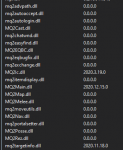
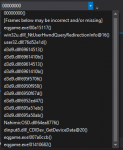
some of medicman's crashes
you can see which plugins are loaded; the cwtn class plugins aren't even loaded
and the stack frame doesn't really have much good information in it.
looks like a directx /cideo crash.

I would ensure you have the june 2010 directx 9.0c as the one that comes with windows 10 is meh

definitely check the 9.0c thing, and then check your actual video drivers to ensure those are also updated.
1609291057688.png1609291075270.png
 
Last edited:
Problem - Solved: Crash Dec 15th update
Status
Not open for further replies.

Users who are viewing this thread

Back
Top
Cart