



Have had a TON of PMs/DMs/Emails/Messenger-Birds/SmokeSignal requests asking for this so here it is
Created a video explaining how I move around my group with CWTN plugins (And CWTN Plugins and kissassist also)
Please don't listen to the "Chase Button" in the video. Use the Chase Button code down below
> > > Sic's Hotkey Resource on RedGuides < < <
Since Chat just added all of the CWTN plugins to use shortnames for their commands you can also replace any /${Berzerker.Command with /${Me.Class.ShortName} and not have to have mq2berzerker
***
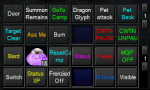
This is my boxing "Control Center" - pretty much manage my crew from here.
Some of the empties or the random things are just "replaceable" boxes that i will stick something when i'm working on things
These are just regular EQ social Hotkeys
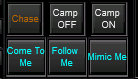
For my MQ2TargetInfo window I utilize the 3 "spare" button spaces for my chase, camp off, and cmap on button since its next to my follow me, come to me and mimic me buttons.
Created a video explaining how I move around my group with CWTN plugins (And CWTN Plugins and kissassist also)
Please don't listen to the "Chase Button" in the video. Use the Chase Button code down below
> > > Sic's Hotkey Resource on RedGuides < < <
Since Chat just added all of the CWTN plugins to use shortnames for their commands you can also replace any /${Berzerker.Command with /${Me.Class.ShortName} and not have to have mq2berzerker
***
This is my boxing "Control Center" - pretty much manage my crew from here.
Some of the empties or the random things are just "replaceable" boxes that i will stick something when i'm working on things
These are just regular EQ social Hotkeys
For my MQ2TargetInfo window I utilize the 3 "spare" button spaces for my chase, camp off, and cmap on button since its next to my follow me, come to me and mimic me buttons.
Hotkeys I use with my CWTN/Kiss team:
Many more hotkeys and suggestions on my hotkey resource.
> > > Sic's Hotkey Resource on RedGuides < < <
Create the CWTN Aliases
You can make this alias to use eqbc to easily send your group to do the same command "/cwtn mode 0" would use eqbc to have everyone go mode 0, "/cwtna mode 0" would have everyone including yourself go mode 0 (CWTNA, A for all). This is "cleaner" and easier to read than using the "/noparse /bcg //docommand /${Me.Class.ShortName} blah" for every hotkey.
EQBC:
/alias /cwtn /noparse /bcg //docommand /${Me.Class.ShortName}/alias /cwtna /noparse /bcga //docommand /${Me.Class.ShortName}(i have r here for "raid" and ra for "raid all" despite being "anyone on eqbc not including me" and "anyone on eqbc"
/alias /cwtnr /noparse /bca //docommand /${Me.Class.ShortName}/alias /cwtnra /noparse /bcaa //docommand /${Me.Class.ShortName}Dannet variant:
/alias /cwtn /noparse /dgge /docommand /${Me.Class.ShortName}/alias /cwtna /noparse /dgga /docommand /${Me.Class.ShortName} if creating them for the first time:
(otherwise toons wouldn't have access to the alias until they relogged)
EQBC:
/noparse /bcaa //alias /cwtn /noparse /bcg //docommand /${Me.Class.ShortName}/noparse /bcaa //alias /cwtna /noparse /bcga //docommand /${Me.Class.ShortName}(i have r here for "raid" and ra for "raid all" despite being "anyone on eqbc not including me" and "anyone on eqbc"
/noparse /bcaa //alias /cwtnr /noparse /bca //docommand /${Me.Class.ShortName}/noparse /bcaa //alias /cwtnra /noparse /bcaa //docommand /${Me.Class.ShortName}Dannet variant:
/dgga /alias /cwtn /dgge /docommand /$\{Me.Class.ShortName}/dgga /alias /cwtna /dgga /docommand /$\{Me.Class.ShortName} These aliases allow me to just "/cwtna burnallnamed off" and have the entire group including me to turn burnallnamed off or "/cwtn mode 2" for everyone not me to go in mode 2
If you want kissassist to be able to toggle on/off burns you can utilize the ${BurnAllNamed} Variable kiss has
/varset BurnAllNamed 0 to turn off burns in kissassist/varset BurnAllNamed 1 to turn on burns in kissassistif you are using burns in your dps routine (like my bard ini) you will want to append && ${BurnAllNamed} in each condition that is a burn condition
example:
dps1=${Target.Named} && ${BurnAllNamed}Campoff Key:
This covers both cwtn toons and kissassist toons
Code:
/bcga //returntocamp 0
/noparse /bcga //docommand /${Me.Class.ShortName} mode 0
/bcga //chaseoff
/noparse /bcga //if (${Me.Class.ShortName.Equal[CLR]}) /dismount
CampOn Key:
(this one you will want to edit for your "driver toon" as you can see either war mode 7 or shd mode 7 is normally what i have, as well as a resetcamp for the driver as well. this will ensure when i hit my CampOn button that my driver resets their camp (since resetting your mode while in your mode doesn't, unless you cycle to 0 and then back).
This covers both cwtn toons and kissassist toons
CampOn Key for Warrior Using CWTN Alias:
Code:
/bcga //camphere on
/war mode 7
/cwtn mode 1
/war resetcamp
CampOn Key for SK Using CWTN Alias:
Code:
/bcga //camphere on
/shd mode 7
/cwtn mode 1
/shd resetcamp
Burn Now Key Using CWTN Alias:
Code:
/bcga //burn
/cwtna burnnow
Stop BurnNow Key: (for cwtn toons) - just stops an issue'd burnnow
Code:
/noparse /bcaa //docommand /${Me.Class.ShortName} stopburnnow
Code:
/cwtna stopburnnowReset Camp Key:
Code:
/shd resetcampReset Camp Key:
Code:
/war resetcampSic's_Return_To_Camp_In_Sic_Tank_Mode
Specifically for Hytiek.
Code:
/shd gotocamp
or
/war gotocamp
Chase Key ( I also stick a /shd mode 7 in my chase hotkey - but personal preference)
Code:
/cwtn mode 2
/bcg //chaseon
SwitchWithMA - I leave this turned on so i don't actually keep a key to toggle it on/off
Code:
/cwtn switchwithma on
Last edited:
