• You've discovered RedGuides, an EverQuest multi-boxing and scripting community 🧙‍♀️⚙️. We want you to play several EQ characters at once, come join us and say hello! 👋

  • A TLP without truebox has thawed (Very Vanilla ready)
    Frostreaver

Request - Run Movement on Pause toggle

Joined
Jun 19, 2024
RedCents
83¢
Use case: when I want to send all my toons shopping for spells.

If not already possible (and undiscovered) could we get a toggle command for the 'Run Movement on Pause' switch?
I like having the 'chase on pause' about 90% of the time, as is helps navigating around PoK and such.
However, there are times when I would like to quickly and temporarily stop the chase.
Ladders, Vendors, Bankers, etc. (now that I'm old enough for Guk) 🤭

If this is possible, thank you for doing it.
If not, thank you for listening.

- M
 
You tell your group to chase or stop chasing you by using the commands. link them to social buttons.
/dgga /rgl chaseon
/dgga /rgl chaseoff
 
Any option can be changed on command line with /rgl set optionname value(true, number, false, etc)

Try /rgl set show for some examples
Use dannet to broadcast as desired.

I have multiple stickhow, chases, etc on a buttonmaster bar.

So what Dead said, or change just that option, whichever you prefer.
 
There is a toggle for this under advanced configs. Every option has a toggle because the entire UI is built automagically based on the options available. If you don't see an option it means it is under advanced and you arent in the advanced mode.
 
Thank you all for your ideas.
@Algar - I see the set option for Chase on|off, I just can't find one for the "Run Movement on Pause" option which Derple mentions above in the config.
@DEADCiTiES - This may be the only option, however this can be a little funky if you don't name the char being chased so I use /dge /rgl chaseon ${Me.Name} to set the leader.
This methods behavior is still a little different that the request replicating the toggle "button" which is available under the advanced utilities configuration.

@Derple - thank you for pointing that out. I had in fact seen the button which is how I handle it currently. I was just asking if there war any command to replicate that specific button.

- M
 
Thank you all for your ideas.
@Algar - I see the set option for Chase on|off, I just can't find one for the "Run Movement on Pause" option which Derple mentions above in the config.
@DEADCiTiES - This may be the only option, however this can be a little funky if you don't name the char being chased so I use /dge /rgl chaseon ${Me.Name} to set the leader.
This methods behavior is still a little different that the request replicating the toggle "button" which is available under the advanced utilities configuration.

@Derple - thank you for pointing that out. I had in fact seen the button which is how I handle it currently. I was just asking if there war any command to replicate that specific button.

- M
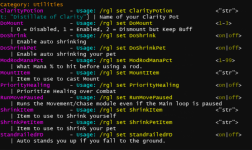
The options is RunMovePaused.

From the /rgl set show command:
1724546213390.png
 
A little more work if you don't regularly keep one open anyway, but if you use VSC, NP++ or similar (any text/code editor that can search inside files/folders), you can always search the directory for the term you see, as tracking down the option display text will lead you to the option name!

I have also missed things in the set show spam before :)
 
Thank you all for your ideas.
@Algar - I see the set option for Chase on|off, I just can't find one for the "Run Movement on Pause" option which Derple mentions above in the config.
@DEADCiTiES - This may be the only option, however this can be a little funky if you don't name the char being chased so I use /dge /rgl chaseon ${Me.Name} to set the leader.
This methods behavior is still a little different that the request replicating the toggle "button" which is available under the advanced utilities configuration.

@Derple - thank you for pointing that out. I had in fact seen the button which is how I handle it currently. I was just asking if there war any command to replicate that specific button.

- M
Similarily to the ui being built programmatically around the data, so is the command handler. Every option that exists has both an UI element and a command line command automagically :)
 
Request - Run Movement on Pause toggle

Users who are viewing this thread

Back
Top
Cart